Introduction
Thank you for choosing Gsangoo USB C Wired Headphones. These earphones are designed to provide a high-fidelity audio experience with convenient wired control and broad compatibility with USB Type-C devices. This manual provides essential information for setup, operation, and maintenance to ensure optimal performance and longevity of your product.

Image: Gsangoo USB C Wired Headphones, showcasing the earbuds and USB-C connector.
Caractéristiques du produit
- USB C Connectivity: Designed for devices without a 3.5mm audio jack, offering direct digital audio transmission.
- Conception confortable et ergonomique : Shaped to fit the ear's natural curve for extended wear comfort.
- Écouteurs magnétiques : Integrated magnets help prevent cable tangling when not in use.
- Son de haute qualité : Features a 14.2mm sound driver for immersive audio reproduction.
- In-line Control & HD Microphone: Allows for volume adjustment, music playback control, and clear hands-free calls.
- Construction durable : Made with a lightweight ABS shell and TPE wire for enhanced durability and service life.
- Advanced DAC Chip: Ensures wide compatibility and stable, high-quality sound transmission.
Installation
To begin using your Gsangoo USB C Wired Headphones, simply plug the USB Type-C connector into the compatible port on your device. No additional drivers or software are typically required. The headphones are designed for immediate plug-and-play functionality.

Image: Illustration of connecting the USB Type-C headphones to a device, highlighting the port and built-in DAC chip.
Mode d'emploi
The in-line control unit allows for easy management of audio and calls:
- Monter le son: Appuyez une fois sur le bouton « + ».
- Baisser le volume: Appuyez une fois sur le bouton « - ».
- Lire/mettre en pause la musique : Appuyez une fois sur le bouton central.
- Chanson suivante : Tap the center button twice.
- Chanson précédente : Tap the center button three times.
- Répondre à l'appel : Tap the center button once during an incoming call.
- Fin d'appel : Tap the center button once during an active call.
- Rejeter l'appel : Tap the center button three times during an incoming call.
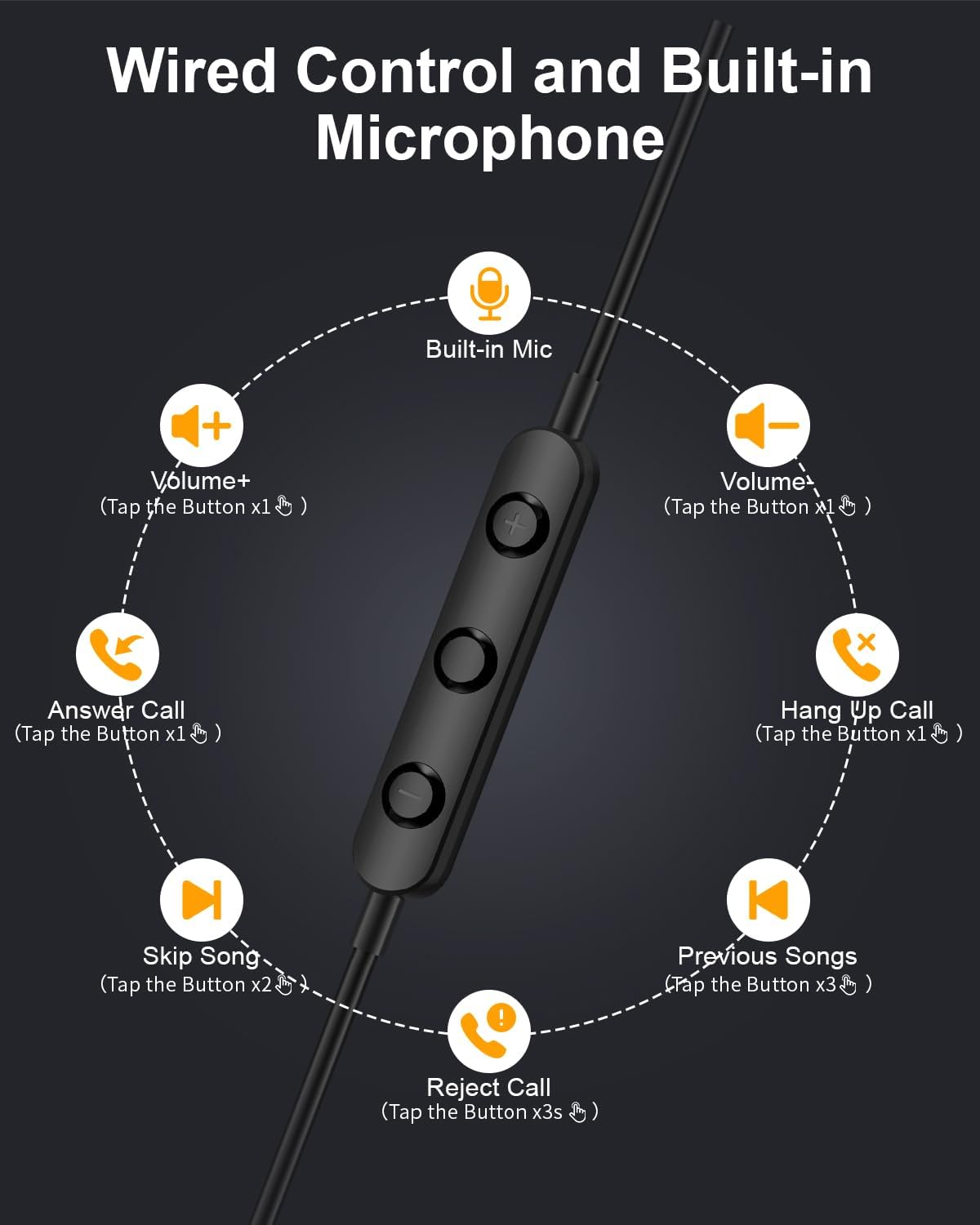
Image: Diagram illustrating the functions of the in-line control buttons for volume, music, and call management.
Compatibilité
These USB C wired earphones are compatible with a wide range of devices that feature a USB Type-C audio output and do not have a 3.5mm headphone jack. Please note: These headphones are not compatible with devices that have both a USB-C jack and a 3.5mm jack, as the device may prioritize the 3.5mm port.
Appareils compatibles :
- Pour Apple : iPhone 17/17 Air/17 Pro/16/16 Pro/16 Pro Max/15/15 Plus/15 Pro/15 Pro Max, iPad 10th Gen/iPad Air 4th/5th/11/13 inch/iPad Pro 11/12.9/iPad Mini 6th.
- Pour Samsung: Galaxy S25 Ultra/S25/S24 Ultra/S24/S23 FE/S23/S23 Ultra/S22/S22 Ultra/S21 FE/S21/S21 Ultra/S20 FE/S20 Ultra/Z Flip6/Z Fold5/A55/A54/A16 5G/A56 5G/A34 5G/A53 5G/A33 5G.
- Pour Google : Pixel 9 Pro/8 Pro/8/7/7 Pro/7a/6a/6/6 Pro.
- Pour OnePlus : 12R/12/11R/11/10T/10 Pro/9/Nord/8T.
- And other Phone USB C devices without a 3.5mm jack.

Image: Visual guide to USB C headphone compatibility, showing various devices and emphasizing the requirement for a USB-C only audio port.
Entretien
Un entretien approprié prolongera la durée de vie de vos écouteurs :
- Nettoyage: Essuyez délicatement les écouteurs et le câble avec un chiffon doux et sec. Évitez d'utiliser des produits chimiques agressifs ou des matériaux abrasifs.
- Stockage: When not in use, store the headphones in the provided storage bag to prevent tangling and damage. The magnetic design helps keep the earbuds together.
- Éviter l’humidité : Ces écouteurs ne sont pas résistants à l'eau. Tenez-les à l'écart des liquides et de l'humidité élevée.
- À manipuler avec précaution : Avoid pulling the cable forcefully or bending the connector at sharp angles.

Image: Close-up of the magnetic earbuds, demonstrating how they connect to prevent tangling.
Dépannage
Si vous rencontrez des problèmes avec vos écouteurs, veuillez consulter les solutions courantes suivantes :
- Pas de son :
- Assurez-vous que le connecteur USB-C est complètement inséré dans votre appareil.
- Vérifiez les paramètres de volume de votre appareil.
- Verify that your device supports audio output via its USB-C port and does not have a 3.5mm jack that might be prioritized.
- Test the headphones with another compatible device to rule out a device-specific issue.
- Le microphone ne fonctionne pas :
- Assurez-vous que les écouteurs sont correctement connectés.
- Vérifiez les paramètres d'entrée du microphone de votre appareil.
- Vérifiez que le microphone n'est pas obstrué.
- Sound Quality Issues (e.g., static, distortion):
- Assurez-vous que le connecteur est propre et exempt de débris.
- Try playing different audio sources to determine if the issue is with the content.
- Les commandes ne répondent pas :
- Vérifiez que les écouteurs sont correctement connectés.
- Some older devices or specific apps may have limited support for in-line controls.
If these steps do not resolve the issue, please contact Gsangoo customer support for further assistance.
Caractéristiques
| Nom du modèle | 945-Black-USBC |
| Prise pour casque | USB C |
| Technologie de connectivité | Câblé |
| Matériel | Acrylonitrile Butadiene Styrene (ABS) Shell, Thermoplastic Elastomer (TPE) Wire |
| Type de contrôle | Commande par bouton (bouton-poussoir) |
| Fonctionnalité du câble | Sans enchevêtrement |
| Poids de l'article | 0.634 onces (0.02 kilogrammes) |
| Niveau de résistance à l'eau | Non résistant à l'eau |
| Type de pilote audio | Pilote dynamique |
| Forme de l'écouteur | Bud (In Ear) |
| Fonctions de contrôle du bruit | Réduction passive du bruit, isolation acoustique |
| Prend en charge la technologie Bluetooth | Non |
| Dossier spécial | Léger |
| Dimensions du produit | 1 x 1 x 0.3 pouces |
Garantie et assistance
Gsangoo is committed to providing high-quality products and customer satisfaction. We offer after-sales service to address any questions or concerns you may have regarding your USB C Wired Headphones.
For product support, troubleshooting assistance, or warranty inquiries, please contact Gsangoo customer service through the platform where you purchased the product or visit the official Gsangoo store page.
We aim to respond to all inquiries within 24 hours to provide satisfactory assistance.


