1. Introduction
Welcome to the user manual for your Nothing Phone (3a). This guide provides detailed instructions on setting up, operating, maintaining, and troubleshooting your device to ensure optimal performance and user experience.

Figure 1.1: The Nothing Phone (3a) showcasing its unique transparent back design and Glyph Interface.
2. Installation
2.1. Déballage et inspection initiale
Upon receiving your Nothing Phone (3a), carefully open the packaging and inspect the contents. Ensure all items listed in the "What's in the Box" section are present and undamaged.
- Nothing Phone (3a) device
- Câble USB-C
- Éjecteur de plateau SIM
- Protection d'écran pré-appliquée
2.2. Insertion de la carte SIM
- Repérez le tiroir de la carte SIM sur le côté du téléphone.
- Insérez l'outil d'éjection du tiroir SIM dans le petit trou situé à côté du tiroir et appuyez fermement jusqu'à ce que le tiroir sorte.
- Placez votre ou vos cartes Nano-SIM dans le plateau, les contacts dorés vers le bas.
- Réinsérez soigneusement le tiroir SIM dans le téléphone jusqu'à ce qu'il s'enclenche.
2.3. Assistant de mise sous tension et de configuration initiale
Press and hold the power button on the right side of the phone until the Nothing logo appears. Follow the on-screen instructions to complete the initial setup, including language selection, Wi-Fi connection, Google account sign-in, and data transfer.
3. Utilisation de votre téléphone vide (3a)
3.1. Nothing OS 3.1 Overview
The Nothing Phone (3a) runs on Nothing OS 3.1, an intuitive and customizable Android-based operating system. It features functional adaptations for an optimized user experience.

Figure 3.1: Visual representation of Nothing OS 3.1's customizable interface.
3.2. Système de caméra
The Nothing Phone (3a) is equipped with an advanced camera system designed to capture high-quality photos and videos.
- Caméra principale : 50-MP OIS (Optical Image Stabilization) main camera for detailed and stable shots.
- Appareil photo téléobjectif : 50-MP telephoto lens with up to 30x Ultra Zoom for capturing distant subjects.
- Caméra ultra grand angle : 8-MP ultra-wide-angle lens for expansive landscape and group shots.
- Caméra frontale : 32-MP front camera for sharp selfies and video calls.

Figure 3.2: Detailed breakdown of the Phone (3a)'s Elite Camera System components.

Figure 3.3: Illustration of the telephoto zoom lens technology and its capability to capture distant scenes.
3.3. Essential Key and Essential Space
The Essential Key is a new physical button on the side of your device. A short press captures screen content, while a long press allows you to record voice notes, ideas, and inspirations. The Essential Space organizes your captures and provides personalized suggestions.

Figure 3.4: The Essential Key and its integration with the Essential Space for content organization.
3.4. Interface Glyph
The Glyph Interface on the back of the phone provides unique LED light and sound notifications for calls, messages, and other alerts, offering a distinct visual and auditory experience.

Figure 3.5: The Glyph Interface on the rear of the Nothing Phone (3a), demonstrating its illuminated patterns.
4. Entretien
4.1. Gestion de la batterie
The Nothing Phone (3a) features a 5,000 mAh battery with 50W fast charging. To maximize battery lifespan:
- Évitez les températures extrêmes.
- Utilisez le câble USB-C fourni pour le chargement.
- Évitez de décharger complètement la batterie fréquemment.

Figure 4.1: Visual representation of the 5,000 mAh battery capacity.
4.2. Nettoyage de votre appareil
Use a soft, lint-free cloth to clean the screen and back of your phone. For stubborn smudges, slightly dampNettoyez le chiffon avec de l'eau. Évitez d'utiliser des produits chimiques agressifs ou des matériaux abrasifs.
4.3. Mises à jour logicielles
Vérifiez et installez régulièrement les mises à jour logicielles pour que votre appareil bénéficie des dernières fonctionnalités, correctifs de sécurité et améliorations de performances. Accédez à Paramètres > Système > Mise à jour logicielle pour vérifier les mises à jour.
5. Dépannage
5.1. Problèmes courants et solutions
| Problème | Cause possible | Solution |
|---|---|---|
| Le téléphone ne s'allume pas | Batterie faible, plantage logiciel | Charge the phone for at least 30 minutes. Perform a forced restart by holding the power button for 10-15 seconds. |
| Les applications plantent ou se bloquent. | App bug, insufficient RAM, outdated software | Clear app cache/data. Close background apps. Update the app or phone software. |
| Faible autonomie de la batterie | High screen brightness, background apps, network issues | Adjust screen brightness. Close unused apps. Disable unnecessary features like GPS/Bluetooth. |
5.2. Réinitialisation d'usine
If issues persist, a factory reset may be necessary. This will erase all data on your phone, so ensure you have backed up important information. Navigate to Paramètres > Système > Options de réinitialisation > Effacer toutes les données (réinitialisation d'usine).
6. Spécifications
Key technical specifications for the Nothing Phone (3a) (Model: A059).
| Fonctionnalité | Détail |
|---|---|
| Nom du modèle | Rien Téléphone (3a) |
| Numéro de modèle | A059 |
| Système opérateur | Android 15, Nothing OS 3.1 |
| Afficher | 6.77-inch Flexible FHD+ AMOLED, 120 Hz, 1.07 billion colors |
| Processeur | Snapdragon 7s Gen 3 (2.5 GHz, 8-core) |
| BÉLIER | 12 Go (jusqu'à 20 Go de RAM en mode Boost) |
| Stockage | 256 Go |
| Caméra principale | 50-MP OIS |
| Téléobjectif | 50-MP (30x Ultra Zoom) |
| Caméra ultra grand-angle | 8 MP |
| Caméra frontale | 32 MP |
| Batterie | 5,000 mAh (50W Fast Charging) |
| Dimensions | 7.75 x 0.83 x 16.35 cm |
| Poids | 201 grammes |
| Résistance à l'eau/à la poussière | IP64 |
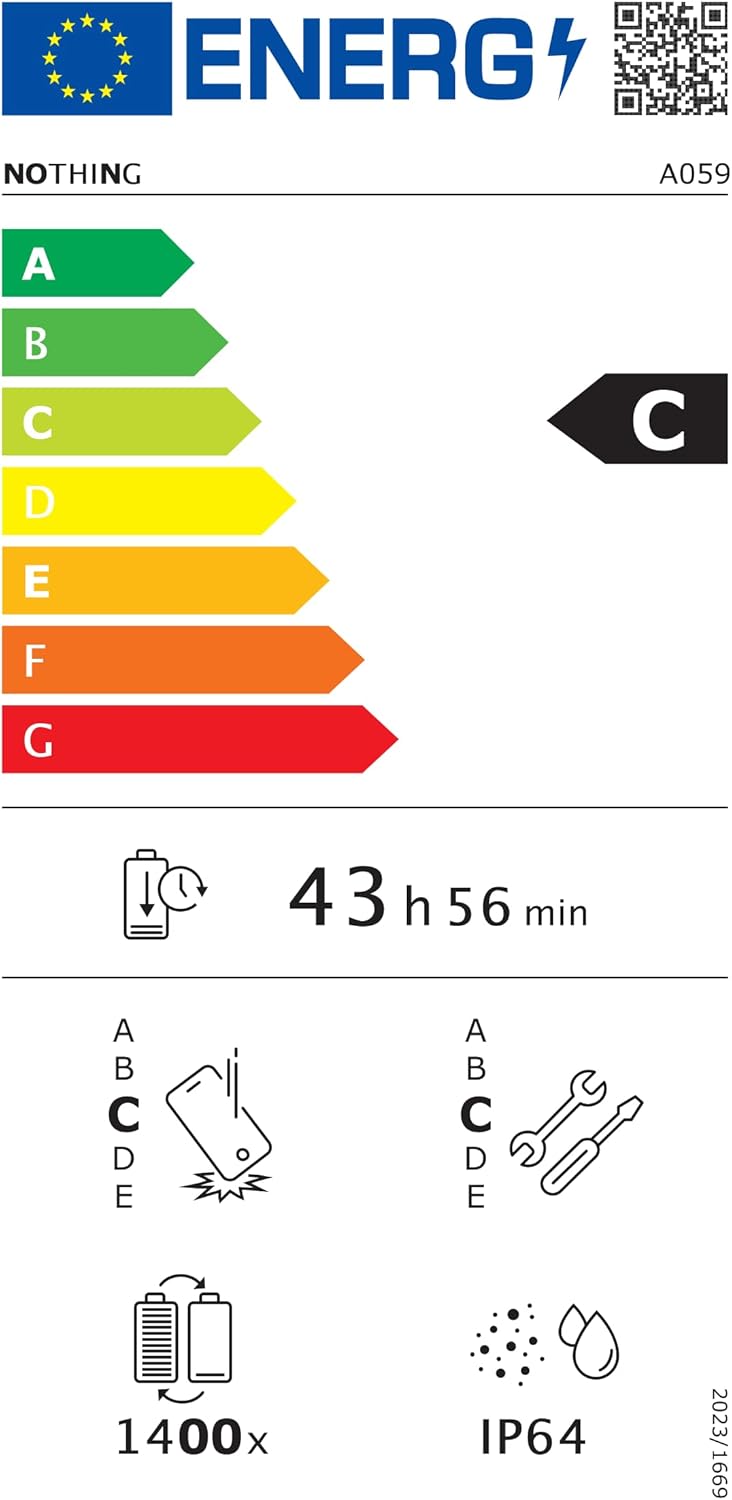
Figure 6.1: EU Energy Label for Nothing Phone (3a), indicating energy efficiency and IP64 rating. More details available at eprel.ec.europa.eu/qr/2179652.
7. Garantie et assistance
Your Nothing Phone (3a) comes with a manufacturer's warranty. Please refer to the warranty card included in your product packaging for specific terms and conditions.
For further assistance, technical support, or warranty claims, please visit the official Nothing support webVous pouvez trouver plus d'informations sur le site ou contacter leur service client. Rien dans la boutique Amazon.


