Introduction
Thank you for choosing the Porodo Lifestyle 4K Digital Camera. This camera is designed to capture your world in stunning detail, offering 4K video recording and high-resolution 50MP images. With features like 16x digital zoom, a flip flash, and a 180° rotating screen, it is ideal for vlogging, photography, and various content creation needs. This manual provides essential information on setting up, operating, and maintaining your camera to ensure optimal performance and longevity.
Consignes de sécurité
- N’exposez pas l’appareil photo à des températures extrêmes, à la lumière directe du soleil ou à une forte humidité.
- Évitez de faire tomber l'appareil photo ou de le soumettre à des chocs violents.
- Keep the camera away from water and liquids unless specifically designed for underwater use (this model is not).
- Ne tentez pas de démonter ou de modifier l'appareil photo. Cela annulera la garantie.
- Utilisez uniquement le type de batterie et la méthode de charge spécifiés.
- Tenir hors de portée des enfants.
Contenu du colis
Veuillez cocher la case correspondant aux éléments suivants :
- Porodo Lifestyle 4K Digital Camera
- Batterie rechargeable (650 mAh)
- Câble de charge de type C
- Manuel de l'utilisateur (ce document)
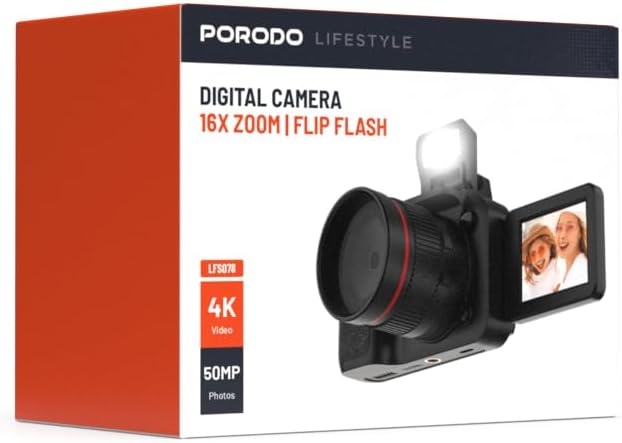
Image : Avant view of the Porodo Lifestyle 4K Digital Camera retail box, showing the camera and key features.

Image : Dos view of the Porodo Lifestyle 4K Digital Camera retail box, displaying product specifications and features.
Produit terminéview
Familiarize yourself with the various parts of your Porodo Lifestyle 4K Digital Camera.

Image: The Porodo Lifestyle 4K Digital Camera shown with its 180° rotating screen flipped open and the integrated flash extended upwards.
- Lentille: Main optical component for capturing images and videos.
- Flip Flash: Fournit un éclairage supplémentaire dans des conditions de faible luminosité.
- 180° Rotating Screen (2.2'' Display): Permet une flexibilité viewing angles, ideal for vlogging and selfies.
- Bouton d'alimentation : Allume/éteint la caméra.
- Bouton de l'obturateur : Prend des photos ou démarre/arrête l'enregistrement vidéo.
- Commandes de zoom : Permet de régler le zoom numérique 16x.
- Boutons de navigation: Pour la navigation dans les menus et le réglage des paramètres.
- Port de type C: Pour le chargement et le transfert de données.
- Fente pour carte mémoire : Pour insérer une carte SD (non incluse).
Installation
1. Installation et chargement de la batterie
- Repérez le couvercle du compartiment à piles sur la partie inférieure de l'appareil photo.
- Faites glisser le loquet pour ouvrir le couvercle.
- Insérez la batterie de 650 mAh fournie, en veillant à ce que les contacts soient correctement alignés.
- Close the battery compartment cover until it clicks securely.
- Connect the camera to a power source using the Type-C charging cable. The charging indicator will illuminate.
- Une charge complète prend environ 2.5 heures. Le voyant changera de couleur ou s'éteindra une fois la charge terminée.
2. Installation de la carte mémoire
Une carte mémoire (carte SD, non incluse) est nécessaire pour stocker les photos et les vidéos.
- Repérez l'emplacement de la carte mémoire, généralement sur le côté ou en dessous de l'appareil photo.
- Insérez la carte SD en orientant les contacts métalliques dans le bon sens (reportez-vous au schéma près de l'emplacement, le cas échéant) jusqu'à ce qu'elle s'enclenche.
- Pour retirer la carte, appuyez doucement dessus jusqu'à ce qu'elle ressorte.
3. Mise sous tension initiale
- Maintenez le bouton Marche/Arrêt enfoncé pendant quelques secondes jusqu'à ce que l'écran s'allume.
- Upon first use, you may be prompted to set the date and time. Use the navigation buttons to adjust and confirm.
Mode d'emploi
Basic Photo Mode (50MP)
- Allumez l'appareil photo. Il se mettra généralement en mode photo par défaut.
- Frame your shot using the 2.2'' display.
- Appuyez à mi-course sur le déclencheur pour effectuer la mise au point (le cas échéant).
- Press the Shutter button fully to capture a 50MP image.

Image: A person holding the Porodo Lifestyle 4K Digital Camera, demonstrating a typical usage scenario for capturing photos.

Image : Une autre view of a person holding the Porodo Lifestyle 4K Digital Camera, illustrating the camera's ergonomic design during use.
Basic Video Mode (4K)
- Switch the camera to video mode (usually via a dedicated button or menu option).
- Press the Shutter button once to start 4K video recording. A recording indicator (e.g., red dot, timer) will appear on the screen.
- Appuyez à nouveau sur le déclencheur pour arrêter l'enregistrement.

Image: The Porodo Lifestyle 4K Digital Camera highlighting its 4K video resolution capability.
Using the 16X Digital Zoom
- While in photo or video mode, use the zoom controls (often marked with 'W' for Wide and 'T' for Telephoto) to adjust the 16x digital zoom.
- Press 'T' to zoom in and 'W' to zoom out.
Using the Flip Flash
- To activate the flash, manually flip it up from its resting position.
- The camera will automatically use the flash when needed in low-light conditions, depending on your flash settings (e.g., Auto, Fill-in, Red-eye reduction).
- To turn off the flash, gently push it back down until it locks into place.
Using the 180° Rotating Screen
- The 2.2'' display can be rotated 180 degrees.
- Flip the screen out from the side of the camera and rotate it to face forward for selfies or vlogging, or to various angles for creative shots.
- Ensure the screen is securely positioned before shooting.

Image: The Porodo Lifestyle 4K Digital Camera illustrating its 2.2-inch display and 180-degree flip screen functionality.
Lecture et suppression Files
- Enter Playback mode (usually via a dedicated button or menu option).
- Utilisez les boutons de navigation pour faire défiler vos photos et vidéos.
- Pour supprimer un file, select it and press the Delete button (often marked with a trash can icon). Confirm deletion when prompted.
Connexion à un ordinateur
- Éteignez l'appareil photo.
- Connectez la caméra à votre ordinateur à l'aide du câble Type-C fourni.
- Allumez la caméra. Elle devrait apparaître comme un lecteur de disque amovible sur votre ordinateur.
- You can now transfer photos and videos to your computer.
Entretien
Nettoyage de l'appareil photo
- Utilisez un chiffon doux non pelucheux pour nettoyer le boîtier de l'appareil photo.
- Pour la lentille et l'écran, utilisez un chiffon et une solution de nettoyage spécifiques. N'utilisez pas de produits abrasifs.
- Avoid spraying cleaning solutions directly onto the camera. Apply to the cloth first.
Entretien de la batterie
- Rechargez complètement la batterie avant la première utilisation.
- Évitez de décharger complètement la batterie fréquemment afin de prolonger sa durée de vie.
- Si vous devez ranger l'appareil photo pendant une période prolongée, chargez la batterie à environ 50 % et retirez-la de l'appareil.
Stockage
- Rangez l'appareil photo dans un endroit frais et sec, à l'abri de la lumière directe du soleil et des températures extrêmes.
- Use a camera bag or case to protect it from dust and scratches.
Dépannage
| Problème | Cause possible | Solution |
|---|---|---|
| La caméra ne s'allume pas. | La batterie est déchargée ou mal installée. | Chargez la batterie. Assurez-vous que la batterie est insérée en respectant la polarité. |
| Impossible de prendre des photos/vidéos. | La carte mémoire est pleine, non insérée ou corrompue. | Insérez une carte mémoire. Supprimez les données inutiles. files. Formatez la carte (cela effacera toutes les données). |
| Les images/vidéos sont floues. | Objectif sale. Lumière insuffisante. Bougeage de l'appareil photo. | Clean the lens. Use the flash or shoot in brighter conditions. Hold the camera steady. |
| Flash ne fonctionne pas. | Flash is not flipped up. Flash setting is off. | Ensure the flash is manually flipped up. Check flash settings in the menu. |
| La caméra se fige. | Bug logiciel. | Retirez puis réinsérez la batterie pour réinitialiser l'appareil photo. |
Caractéristiques
Detailed technical specifications for the Porodo Lifestyle 4K Digital Camera:

Image: Visual representation of the camera's core capabilities: 4K video, 50MP photos, and 16x digital zoom.

Image: A detailed table outlining the technical specifications of the Porodo Lifestyle 4K Digital Camera.
- Nom du modèle : Porodo Lifestyle 4K Digital Camera – 50MP, 16x Zoom, Flip Flash, 180° Rotating Screen
- Numéro de modèle de l'article : 6849108448116
- Marque: Porodo
- Maximum WebRésolution de l'image de la caméra : 50 MP
- Résolution vidéo : 4K (3840x2160)
- Zoom numérique : 16X
- Zoom optique : 1.0
- Afficher: 2.2'' (180° Rotating Screen)
- Capacité de la batterie : 650mAh (1 P76 battery included)
- Temps de travail: Jusqu'à 3 XNUMX heures
- Temps de recharge : Environ 2.5 heures
- Port de charge : Type C
- Technologie de capteur photo : CMOS
- Soutenu File Formats : JPG (images), AVI (vidéos)
- Stabilisation d'image : Numérique
- Rapport hauteur/largeur : 16:9, 4:3
- Description du comptage : Place
- Dimensions du produit : 6 x 13 x 9 cm; 310 g
- Pays d'origine : Chine
Garantie et assistance
Porodo products are designed with quality and reliability in mind. For warranty information and technical support, please refer to the official Porodo webconsultez votre site web ou contactez votre distributeur local.
Support en ligne: Visitez le Porodo Store on Amazon pour obtenir des informations et des mises à jour sur les produits.
Options de garantie prolongée : Additional warranty plans may be available through authorized retailers. Please check with your point of purchase for details.