Introduction
Ce manuel fournit des instructions détaillées pour une utilisation sûre et efficace de votre Ourlife 5K30FPS WiFi Action Camera. Please read this manual thoroughly before operating the device to ensure optimal performance and longevity.
Le Ourlife M40TR is a versatile action camera designed to capture high-quality video and photos in various environments, including underwater, thanks to its robust waterproof casing. It features 5K 30fps video recording, a dual-screen display, a 170-degree wide-angle lens, and Wi-Fi connectivity.
Qu'y a-t-il dans la boîte
Lors du déballage, veuillez vérifier que tous les composants sont présents :
- OurlCaméra d'action ife M40TR
- Boîtier étanche
- Accessoires de montage
- Câble de chargement USB
- Manuel de l'utilisateur (ce document)
- Remote Control (if included with specific package)

Image : Le Ourlife M40TR Action Camera shown with its waterproof housing and a small remote control. This image illustrates the primary components included with the camera.
Produit terminéview
Familiarize yourself with the camera's main components and interfaces.
- Écran avant : 1.3-inch display for quick status checks.
- Écran arrière : 2.0-inch IPS touch screen for menu navigation and playback.
- Lentille: 170-degree wide-angle lens.
- Bouton d'alimentation/mode : Permet d'allumer/d'éteindre et de basculer entre les modes.
- Bouton obturateur/OK : Permet de démarrer/arrêter l'enregistrement ou de prendre des photos, et de confirmer les sélections.
- Port microphone : Pour connecter un microphone externe.
- Port USB : Pour le chargement et le transfert de données.
- Emplacement pour carte MicroSD : Pour l'insertion de la carte mémoire.
- Compartiment à piles : Pour l'insertion de la pile.

Image : Un gros plan view de l'Ourlife Action Camera highlighting its 2-inch responsive touch screen. This screen is used for controlling camera functions and reviewc'est foutage.
Installation
1. Chargement de la batterie
Before first use, fully charge the camera battery. Connect the camera to a USB power source (e.g., computer, wall adapter) using the provided USB cable. The charging indicator light will illuminate during charging and turn off when complete.
2. Insertion d'une carte microSD
A MicroSD card (not included) is required for recording. Use a Class 10 or higher MicroSD card, up to 128GB. Insert the card into the MicroSD card slot with the contacts facing the correct direction until it clicks into place.
Note: For optimal performance, format the MicroSD card within the camera before first use and periodically thereafter.
3. Fixation du boîtier étanche
The camera comes with a waterproof case for underwater use and protection against impacts. Ensure the camera is securely placed inside the case and the latch is firmly closed before submerging or exposing to harsh conditions.
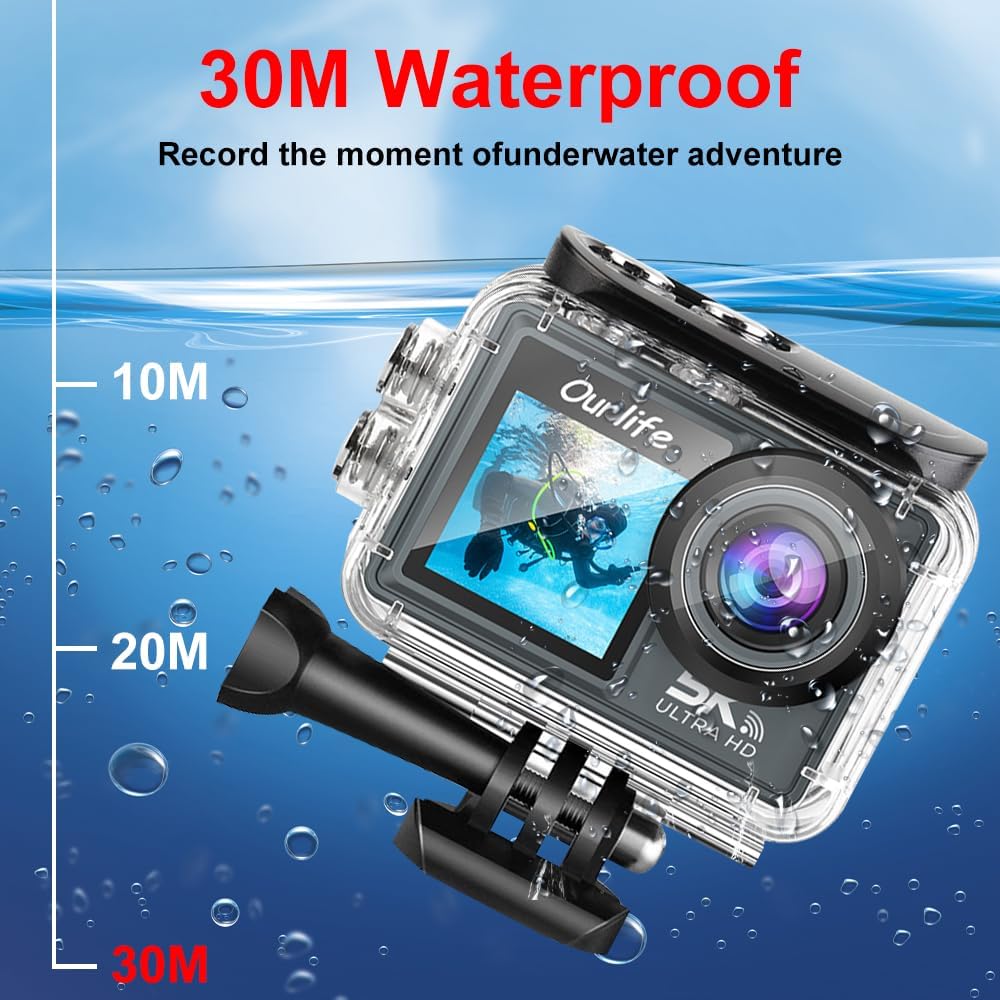
Image : Le Ourlife Action Camera enclosed in its waterproof case, depicted underwater with depth markers indicating its 30-meter waterproof capability. This highlights the camera's suitability for aquatic activities.
4. Mise sous/hors tension
To power on, press and hold the Power/Mode button for a few seconds. To power off, press and hold the Power/Mode button again until the screen turns off.
Utilisation de l'appareil photo
1. Commandes de base et navigation
Use the Power/Mode button to cycle through different shooting modes (Video, Photo, Playback, Settings). Use the touch screen for menu navigation and selecting options. The Shutter/OK button initiates recording or takes a photo in the respective modes.
2. Enregistrement vidéo
In Video mode, press the Shutter/OK button to start recording. Press it again to stop. The camera supports resolutions up to 5K at 30 frames per second (fps), as well as 4K, 2.7K, 1080P, and 720P options. Adjust resolution in the settings menu.
3. Capture de photos
In Photo mode, press the Shutter/OK button to take a single photo. The camera offers various photo modes including single shot, automatic shooting, burst mode, and timed photography.
4. Connectivité Wi-Fi et application
Enable Wi-Fi in the camera's settings. Download the official Ourlife app on your smartphone or tablet. Connect your device to the camera's Wi-Fi network. The app allows for remote control, live preview, playback, and sharing of your footage.
5. Prise en charge des microphones externes
For enhanced audio quality, connect a compatible external microphone to the camera's microphone port. Ensure the microphone is securely connected before recording.
6. Enhanced Image Stabilization (EIS)
The camera features Electronic Image Stabilization (EIS) to reduce blur and shake in your videos, especially during action-packed activities. This feature can be toggled On or Off in the camera settings.

Image: A side-by-side comparison demonstrating the effect of Enhanced Image Stabilization (EIS). The left image shows a clear, stable shot with EIS enabled, while the right image shows a blurred shot with EIS disabled, illustrating the benefit of the feature.
7. Objectif grand angle
The 170-degree wide-angle lens captures a broad field of view, ideal for landscapes, group shots, and immersive action footage. Be aware that wide-angle lenses may exhibit some distortion at the edges of the frame.

Image : Une illustration montrantasing the 170-degree ultra wide-angle capability of the Ourlife Action Camera, demonstrating how it captures a significantly broader scene compared to narrower angles, ideal for expansive views.
Entretien
- Nettoyage: Use a soft, lint-free cloth to clean the camera lens and screens. For the waterproof case, rinse with fresh water after saltwater use and allow to air dry.
- Stockage: Rangez l'appareil photo dans un endroit frais et sec, à l'abri de la lumière directe du soleil et des températures extrêmes. Retirez la batterie si vous prévoyez de le ranger pendant une période prolongée.
- Entretien de la batterie: Évitez de décharger complètement la batterie fréquemment. Rechargez-la régulièrement, même si elle n'est pas utilisée, afin de prolonger sa durée de vie.
Dépannage
| Problème | Solution possible |
|---|---|
| La caméra ne s'allume pas. | Vérifiez que la batterie est chargée. Réinsérez la batterie. |
| Impossible d'enregistrer des vidéos/de prendre des photos. | Check if a MicroSD card is inserted and formatted. Ensure sufficient storage space. |
| Qualité vidéo/photo médiocre. | Nettoyez l'objectif. Vérifiez les paramètres de résolution. Assurez-vous d'un éclairage suffisant. |
| Problèmes de connexion Wi-Fi. | Ensure Wi-Fi is enabled on the camera and your device. Restart both devices. Check app permissions. |
| La caméra se bloque ou ne répond plus. | Retirez puis réinsérez la batterie pour effectuer une réinitialisation matérielle. |
Caractéristiques
| Fonctionnalité | Détail |
|---|---|
| Numéro de modèle | M40TR |
| Résolution vidéo | Jusqu'à 5K 30 images/seconde (également 4K, 2.7K, 1080p, 720p) |
| Profondeur imperméable | Jusqu'à 30 mètres (avec boîtier étanche) |
| Taille de l'écran principal | Écran IPS de 2.0 pouces |
| Taille de l'écran secondaire | 1.3 pouces |
| Angle de l'objectif | Grand angle de 170 degrés |
| Connectivité | Wi-Fi, USB |
| Stockage | MicroSD Card (Class 10 or higher, up to 128GB) |
| Prise en charge des microphones externes | Oui |
| Stabilisation d'image | Stabilisation électronique de l'image (EIS) |
| Couleur | Noir |
Garantie et assistance
Pour obtenir des informations sur la garantie et une assistance technique, veuillez consulter le site officiel d'Ourlla vie webConsultez leur site web ou contactez directement leur service client. Conservez votre reçu d'achat comme preuve d'achat pour toute réclamation au titre de la garantie.
Official Ourlife Store: Visitez le OurlBoutique Life sur Amazon


