1. Introduction
The ISOtunes PRO 3.0 Bluetooth Hearing Protection Earbuds are designed to provide certified hearing protection while allowing for audio streaming and communication in noisy environments. This manual provides essential information for the proper setup, operation, and maintenance of your device.
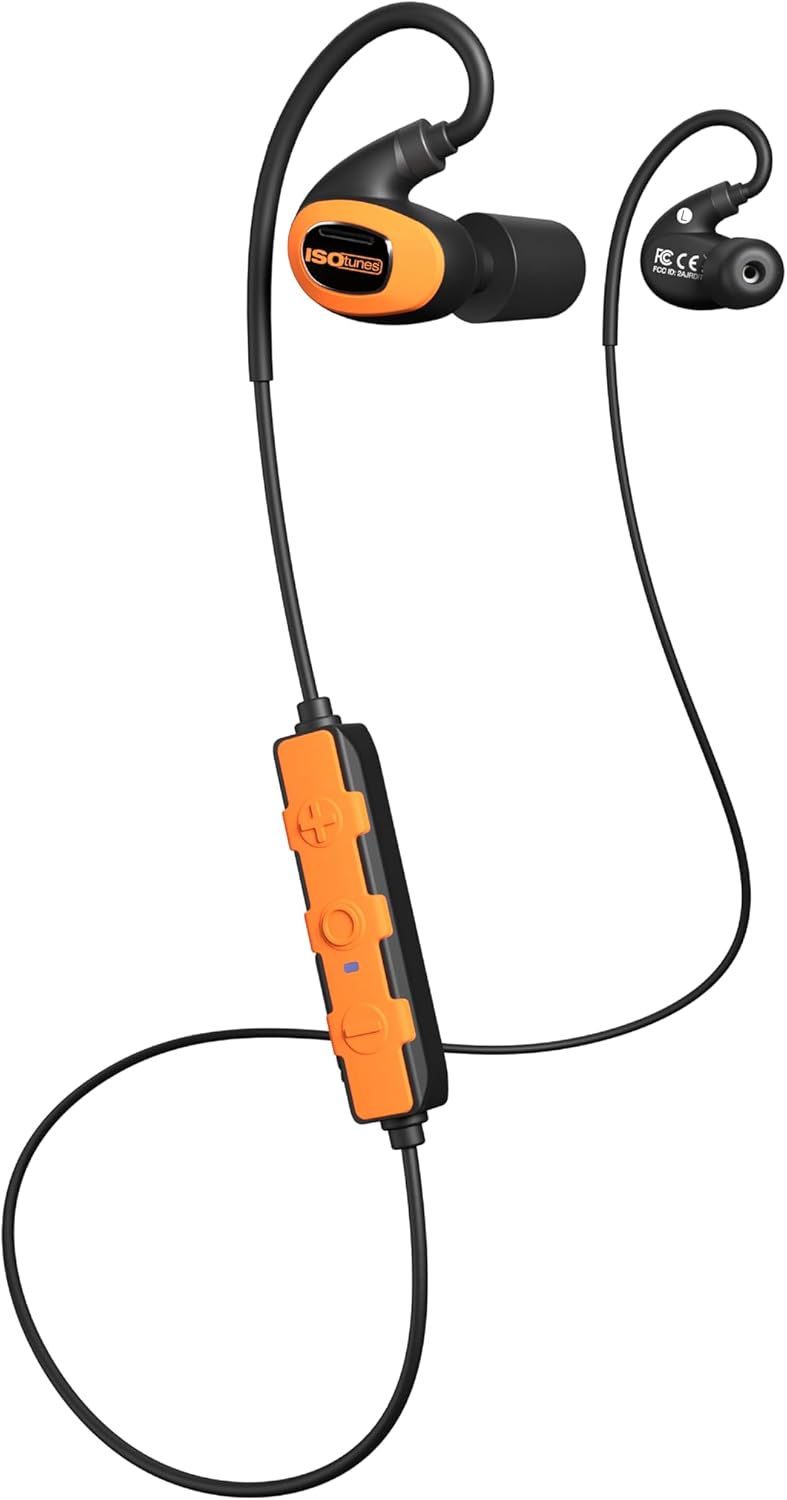
Image 1.1: ISOtunes PRO 3.0 Bluetooth Hearing Protection Earbuds, Safety Orange variant, showcasing the earbuds, inline control panel, and connecting cable.
2. Contenu du colis
Vérifiez que tous les éléments énumérés ci-dessous sont inclus dans votre colis :
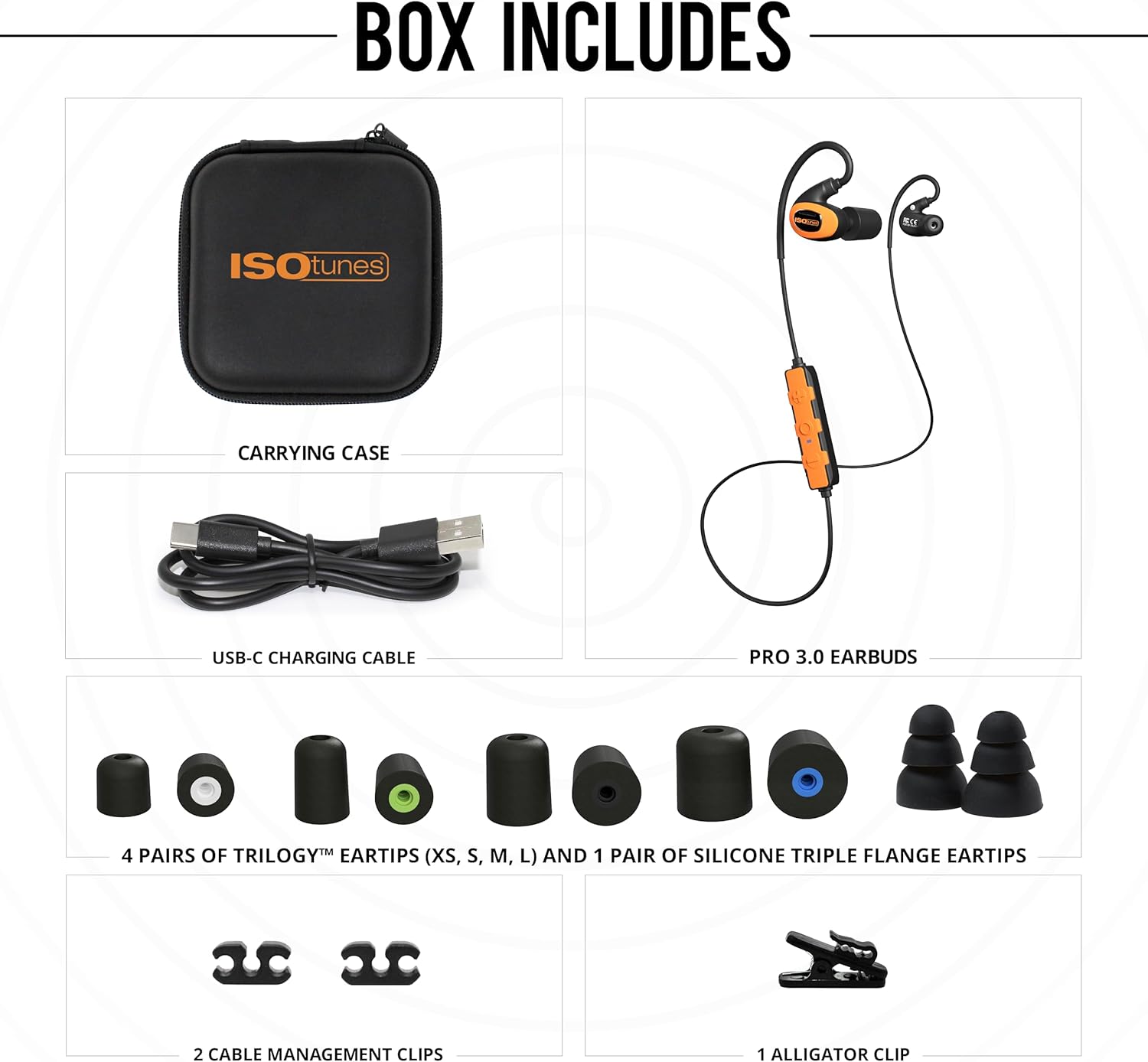
Image 2.1: Visual representation of the ISOtunes PRO 3.0 package contents, including the earbuds, carrying case, USB-C charging cable, various eartips, and cable management clips.
- ISOtunes PRO 3.0 Earbuds
- Câble de chargement USB-C
- Mallette de transport
- 4 Pairs of Trilogy™ Foam Eartips (XS, S, M, L)
- 1 Pair of Silicone Triple Flange Eartips
- 2 clips de gestion des câbles
- 1 Pince crocodile
3. Informations importantes sur la sécurité
The ISOtunes PRO 3.0 earbuds are designed for hearing protection. Adhere to all safety guidelines to ensure proper function and personal safety.
- Conformité OSHA : These earbuds are OSHA approved and feature an ANSI-certified Noise Reduction Rating (NRR) of 27 dB. The SafeMax volume limit is set to 85dB to protect against hearing damage.
- Bon ajustement : Achieving the stated NRR requires a proper seal. Refer to the eartip selection and insertion guide for optimal fit.
- Sensibilisation à l'environnement: While providing hearing protection, always remain aware of your surroundings, especially in hazardous environments.

Image 3.1: A diagram illustrating the correct method for rolling and inserting foam eartips into the ear canal, alongside a chart detailing various noise levels and their potential for hearing damage.
4. caractéristiques du produit
The ISOtunes PRO 3.0 offers a range of features designed for demanding work environments:

Image 4.1: A graphic summarizing the key features: OSHA compliance, Bluetooth 5.4 with LE Audio and Auracast, 27 dB NRR, IP67 dust/sweat/waterproof rating, up to 20-hour battery life, and military-spec drop test durability.
- Protection auditive certifiée : ANSI-certified 27 dB NRR and SafeMax 85dB volume limit.
- Construction durable : IP67 dust and waterproof rating, tested to military drop & shock standards (MIL-STD 810H), aramid-reinforced cables.
- Durée de vie prolongée de la batterie : Up to 20 hours of use on a single charge, with USB-C fast charging.
- Audio de haute qualité : Custom-tuned full-range dynamic drivers for clear sound.
- Connectivité avancée: Bluetooth 5.4 with Low Energy (LE) Audio and Auracast support, dual pairing, and 2-way radio compatibility.

Image 4.2: Demonstrates the versatility of the ISOtunes PRO 3.0 earbuds in different work environments such as outdoor power equipment operation, manufacturing, woodworking, and construction.
5. Guide de configuration
5.1 Recharge de vos écouteurs
Before first use, fully charge your ISOtunes PRO 3.0 earbuds.
- Locate the USB-C charging port on the inline control panel.
- Connect the provided USB-C cable to the port and the other end to a compatible USB power source.
- The LED indicator on the control panel will show charging status. A full charge takes approximately 1.5-2 hours. A 10-minute quick charge provides approximately 2 hours of listening time.
5.2 Eartip Selection and Insertion
Proper eartip selection and insertion are crucial for optimal hearing protection and sound quality.
- Choisissez la bonne taille : Experiment with the included Trilogy™ foam eartips (XS, S, M, L) and silicone triple flange eartips to find the size that provides a snug, comfortable fit and a good seal in your ear canal.
- Foam Eartip Insertion: Roll the foam eartip into a tight, creaseless cylinder. Insert the compressed eartip into your ear canal and hold it in place for 5-10 seconds while it expands to create a seal.
- Silicone Eartip Insertion: Gently push the silicone eartip into your ear canal until it forms a comfortable seal.
5.3 Couplage Bluetooth
To connect your ISOtunes PRO 3.0 to a Bluetooth-enabled device:
- Assurez-vous que les écouteurs sont éteints.
- Press and hold the multi-function button on the control panel until the LED indicator flashes blue and red, indicating pairing mode.
- Sur votre appareil, activez Bluetooth et recherchez les appareils disponibles.
- Select "ISOtunes PRO 3.0" from the list.
- Once connected, the LED indicator will flash blue periodically.
6. Operating Your ISOtunes PRO 3.0

Image 6.1 : Un aperçu détaillé view of the ISOtunes PRO 3.0 earbuds and the inline control panel, showing the buttons for power, volume, and multi-function.
6.1 Mise sous/hors tension
- Mise sous tension : Maintenez le bouton multifonction enfoncé pendant 3 secondes. La LED clignotera en bleu.
- Éteindre: Maintenez le bouton multifonction enfoncé pendant 5 secondes. La LED clignotera en rouge puis s'éteindra.
6.2 Gestion des appels
- Répondre/Terminer l'appel : Appuyez une fois sur le bouton multifonction.
- Rejeter l'appel : Appuyez sur le bouton multifonction et maintenez-le enfoncé pendant 2 secondes.
- Assistant vocal: Appuyez deux fois sur le bouton multifonction pour activer l'assistant vocal de votre appareil.
6.3 Lecture de musique
- Lecture/Pause : Appuyez une fois sur le bouton multifonction.
- Piste suivante : Press the volume up (+) button for 2 seconds.
- Piste précédente: Press the volume down (-) button for 2 seconds.
6.4 Contrôle du volume
- Augmenter le volume : Appuyez sur le bouton d'augmentation du volume (+).
- Diminuer le volume : Appuyez sur le bouton de réduction du volume (-).
6.5 Dual Pairing and 2-Way Radio Compatibility
The PRO 3.0 supports dual pairing, allowing connection to two Bluetooth devices simultaneously. It also offers compatibility with 2-way radios for enhanced communication in professional settings. Refer to your 2-way radio's manual for specific pairing instructions.
7. Entretien et maintenance
- Nettoyage: Nettoyez régulièrement les embouts auriculaires avec de l'eau distillée.amp cloth. For foam eartips, replace them when they become dirty or lose their elasticity. The earbuds themselves can be wiped with a soft, dry cloth. Do not use harsh chemicals.
- Stockage: Store the earbuds in the provided carrying case when not in use to protect them from dust, moisture, and physical damage.
- Exposition à l'eau : While IP67 rated, avoid prolonged submersion. Ensure the USB-C port cover is securely closed before exposure to water or dust.
8. Dépannage
| Problème | Cause possible | Solution |
|---|---|---|
| Les écouteurs ne s'allument pas | Batterie faible | Charge the earbuds using the USB-C cable. |
| Impossible de jumeler l'appareil | Écouteurs non appariés ; Bluetooth désactivé ; hors de portée | Ensure earbuds are in pairing mode (flashing blue/red). Turn on device Bluetooth. Move device closer to earbuds. |
| Mauvaise qualité sonore ou faible volume | Improper eartip fit; Low battery; Source audio quality | Adjust eartips for a secure seal. Charge earbuds. Check audio source quality. |
| Connexion intermittente | Interférences ; Hors de portée ; Batterie faible | Move away from other wireless devices. Reduce distance to paired device. Charge earbuds. |
9. Spécifications techniques
| Fonctionnalité | Spécification |
|---|---|
| Nom du modèle | PRO 3.0 |
| Numéro de modèle de l'article | IT-21B |
| Indice de réduction du bruit (NRR) | 27 dB |
| SafeMax Volume Limit | 85 dB |
| Version Bluetooth | 5.4 (with LE Audio & Auracast support) |
| Autonomie de la batterie | Jusqu'à 20 heures |
| Temps de charge | Approx. 1.5-2 hours (10 min quick charge for 2 hours use) |
| Port de chargement | USB-C |
| Niveau de résistance à l'eau | IP67 (Dust, Sweat, and Waterproof) |
| Norme de durabilité | MIL-STD 810H (Military Drop & Shock) |
| Gamme de fréquences | 20 Hz - 20,000 XNUMX Hz |
| Impédance | 32 ohms |
| Poids de l'article | 8.1 onces |
| Dimensions du produit | 4.75 x 4.5 x 2.25 pouces |
| Code UPC | 850045924232 |
10. Garantie et support client
ISOtunes products are backed by a manufacturer's warranty. For specific warranty details, registration, or to contact customer support, please visit the official ISOtunes website or refer to the warranty card included in your product packaging. You may also reach out to the seller directly for assistance.


