1. Introduction
Welcome to the CUBOT GT1 Smartwatch user manual. This guide provides essential information for setting up, operating, maintaining, and troubleshooting your new smartwatch. The CUBOT GT1 is designed for outdoor enthusiasts, featuring a durable zinc alloy casing, high-precision dual-frequency GPS, a 1.43-inch HD AMOLED display, and comprehensive health monitoring capabilities.
2. Installation
2.1 Contenu du paquet
- CUBOT GT1 Smartwatch
- Câble de chargement
- Manuel de l'utilisateur (ce document)
2.2 Charge initiale
Before first use, fully charge your CUBOT GT1 Smartwatch. Connect the provided charging cable to the charging port on the back of the watch and to a standard USB power adapter (not included). The watch will display a charging indicator. A full charge can take approximately 2-3 hours.
Note: The watch features a 480 mAh high-voltage polymer battery. A single charge can last up to 90 days in standby mode, 20-30 days with normal daily use, and up to 22 hours with continuous GPS activation.
2.3 Appairage avec votre smartphone
- Download the official CUBOT smartwatch application from your smartphone's app store (compatible with Android 9.0+ and iOS 9.0+).
- Assurez-vous que Bluetooth est activé sur votre smartphone.
- Open the CUBOT app and follow the on-screen instructions to create an account or log in.
- Sélectionnez « Ajouter un appareil » ou « Associer un nouvel appareil » dans l'application.
- The app will search for your CUBOT GT1. Select it from the list of available devices.
- Confirmez la demande de jumelage sur votre smartphone et sur votre montre connectée.
Une fois jumelée, la montre synchronisera les données et les notifications avec votre smartphone.
3. Mode d'emploi
3.1 Contrôles de base
The CUBOT GT1 features a 1.43-inch HD AMOLED touchscreen and two physical buttons:
- Écran tactile : Swipe to navigate menus, tap to select, swipe down for quick settings, swipe up for notifications.
- Bouton d'alimentation: Press to wake the screen, return to the main watch face, or access the main menu.
- Bouton PERSONNALISÉ : Configurable for quick access to a specific function (e.g., sport mode). Long press for stopwatch.
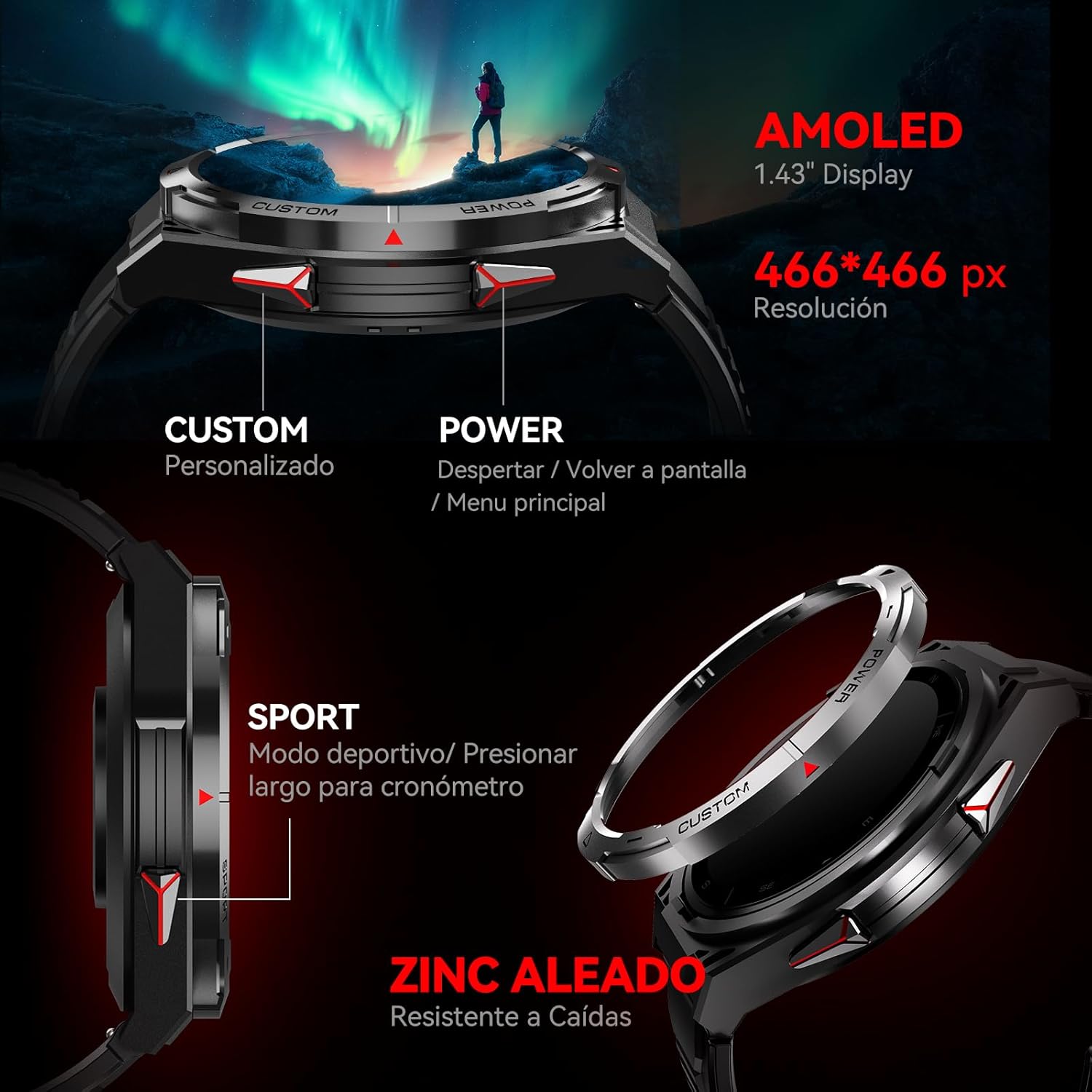
Image : Côté view of the CUBOT GT1 Smartwatch, highlighting the 'CUSTOM' and 'POWER' buttons and indicating the 1.43-inch AMOLED display with 466x466 pixel resolution.
3.2 Fonctionnalités GPS
The smartwatch integrates a dual-frequency L1+L5 GPS system for high-precision positioning. This system supports features such as:
- Suivi en temps réel : Calibrates exercise routes and distances.
- Return-to-Start: Guides you back to your starting point via the same path or a straight line.
- Résilience environnementale : Provides reliable positioning in various environments.

Image: The CUBOT GT1 Smartwatch displaying a GPS tracking map on its screen, with satellites in the background, illustrating its dual-frequency GPS precision for navigation.
3.3 modes sportifs
The GT1 offers over 150 built-in sport modes. It utilizes the professional Savy sports algorithm and can automatically recognize 6 common sport modes. Each mode provides detailed exercise data to help users train scientifically.
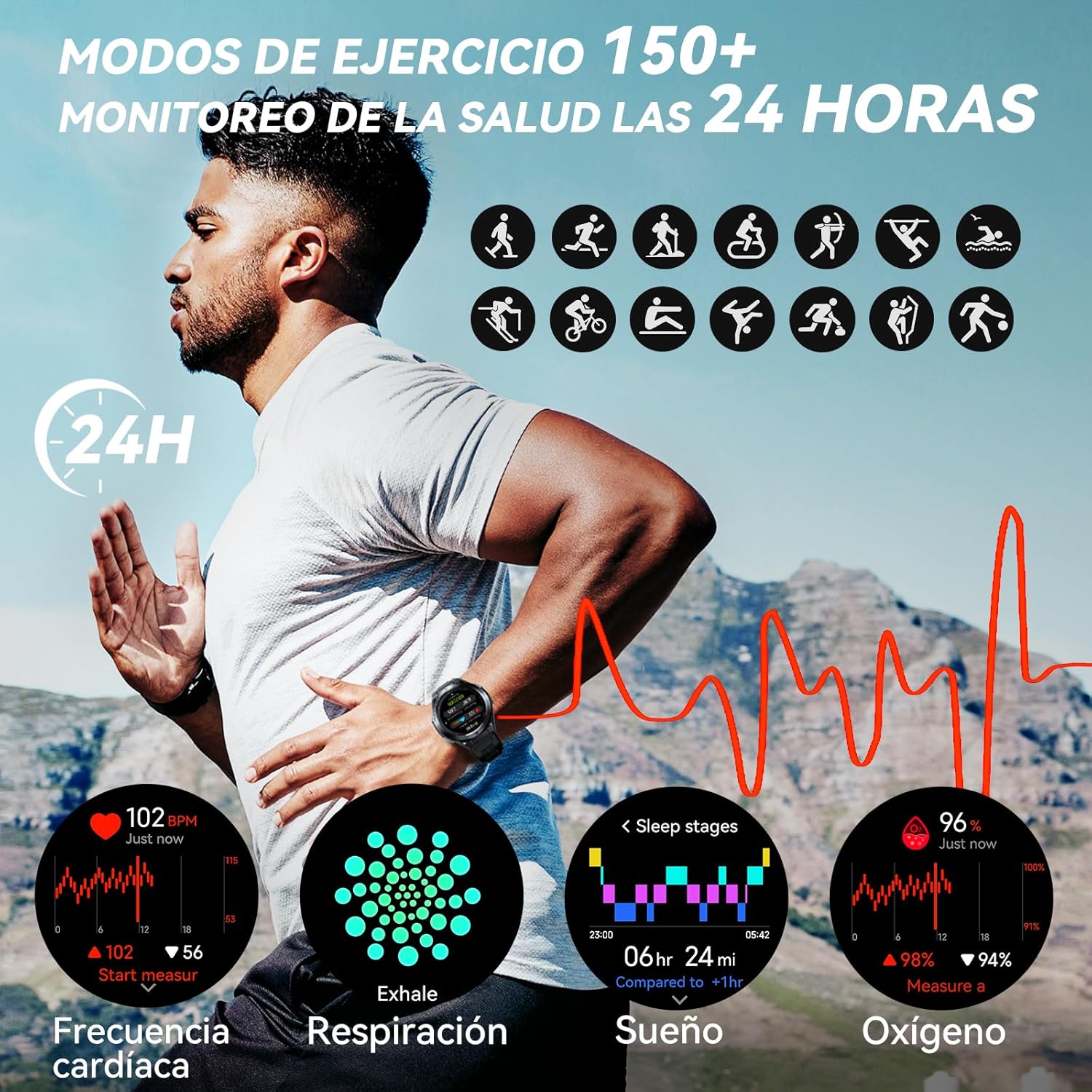
Image: A visual representation of various sport modes icons and health monitoring graphs for heart rate, respiration, sleep, and blood oxygen, indicating 24-hour tracking.
3.4 Surveillance de la santé
The smartwatch provides comprehensive 24-hour health monitoring through scientific algorithms, including:
- Surveillance de la fréquence cardiaque
- Blood Oxygen Saturation (SpO2) tracking
- Sleep Data analysis
- Real-time Pressure detection
3.5 Notifications et appels
Connect your smartwatch to your smartphone via the app to receive real-time notifications for incoming calls, text messages, and social media alerts (e.g., Facebook, Instagram, Twitter). You can answer or reject calls directly from the watch.

Image: The CUBOT GT1 Smartwatch displaying various communication features, including WhatsApp notifications, AI assistant interaction, Bluetooth call handling, and an SOS call screen.
3.6 fonctionnalités supplémentaires
The CUBOT GT1 offers several other convenient functions:
- Contrôle de la musique : Contrôlez la lecture de musique sur votre smartphone.
- Télécommande de la caméra: Déclenchez à distance l'appareil photo de votre smartphone.
- Prévisions météorologiques: View conditions météorologiques actuelles.
- Alerte sédentaire : Vous rappelle de bouger après des périodes d'inactivité.
- Bouton SOS : For emergency situations (refer to app settings for configuration).
- Capteurs environnementaux : Includes atmospheric pressure, altitude, and compass.

Image: A collage of various smartwatch functions, including an 'All In One Smartwatch' screen showing app icons, music control, sedentary alert, camera control, and weather display.
4. Entretien
4.1 Résistance à l'eau
The CUBOT GT1 is water-resistant up to 5 ATM (50 meters), making it suitable for swimming. However, it is crucial to follow these guidelines:
- After exposure to water, especially deep water or corrosive liquids like seawater, activate the drainage function on the watch. This function vibrates the watch to expel water from the speaker and microphone holes.
- Always drain and dry the device thoroughly after use in water.
- Store the watch in a dry place to prolong its lifespan.
- Évitez d'exposer la montre à l'eau chaude, à la vapeur ou aux jets d'eau à haute pression.

Image: The CUBOT GT1 Smartwatch submerged in water, illustrating its 5 ATM water resistance. Additional icons show IP69K dustproof rating and resistance to drops, along with atmospheric pressure, altitude, and compass features.
4.2 Nettoyage
Regularly clean your smartwatch and strap to prevent skin irritation and maintain functionality:
- Essuyez la montre et le bracelet avec un chiffon doux et sec.amp, chiffon non pelucheux.
- N’utilisez pas de produits chimiques agressifs, de nettoyants abrasifs ni de solvants.
- Avant de procéder à la charge, assurez-vous que les contacts de charge sont propres et secs.
4.3 Entretien de la batterie
- Évitez les températures extrêmes, qui peuvent réduire la durée de vie de la batterie.
- Ne laissez pas la montre complètement déchargée pendant des périodes prolongées.
- Si vous ne comptez pas utiliser la montre pendant une période prolongée, chargez-la à environ 50 % avant de la ranger.

Image: The back of the CUBOT GT1 Smartwatch showing the heart rate sensor and charging contacts, with text detailing battery life: 90 days standby, 25 days daily, 22 hours continuous GPS, and 10 days frequent use, powered by a 480mAh battery.
5. Dépannage
- La montre ne s'allume pas : Assurez-vous que la montre est complètement chargée. Branchez-la au câble de chargement et à une source d'alimentation.
- Impossible de connecter le smartphone :
- Assurez-vous que le Bluetooth est activé sur votre téléphone et votre montre.
- Make sure the CUBOT app is installed and running.
- Redémarrez la montre et votre smartphone.
- Vérifiez si la montre est déjà jumelée avec un autre appareil.
- Données sanitaires inexactes : Assurez-vous que la montre est bien ajustée à votre poignet, ni trop serrée ni trop lâche. Nettoyez le capteur situé au dos de la montre.
- Problèmes de signal GPS : Assurez-vous de vous trouver dans un espace ouvert et dégagé. view of the sky. GPS performance can be affected by buildings, dense foliage, or adverse weather.
- Écran non réactif : Essayez de redémarrer la montre en appuyant longuement sur le bouton d'alimentation. Si elle ne répond toujours pas, laissez la batterie se décharger complètement, puis rechargez-la.
- Water damage after swimming: Although the watch is water-resistant, improper drainage or exposure to corrosive liquids can cause issues. Always activate the drainage function and dry thoroughly after water exposure. If issues persist, contact support.
6. Spécifications
| Fonctionnalité | Spécification |
|---|---|
| Marque | CUBOT |
| Modèle | GT1 |
| Taille de l'écran | 1.43 pouces |
| Type d'affichage | Écran AMOLED |
| BÉLIER | 256 Mo |
| Capacité de la batterie | 480 millièmeamp Heures |
| Durée de vie moyenne de la batterie | 7 days (normal use), up to 90 days (standby), 22 hours (continuous GPS) |
| Connectivité | Bluetooth |
| GPS | Integrated GPS (Dual-frequency L1+L5) |
| Résistance à l'eau | 5 distributeurs automatiques de billets (50 mètres) |
| Caractéristiques spéciales | SOS Button, GPS, Phone Calls, Notifications, Music Player, Touchscreen |
| Appareils compatibles | Smartphone (Android 9.0+, iOS 9.0+) |
| Accessoires de montage | Câble de chargement |
7. Garantie et assistance
7.1 Informations sur la garantie
For detailed warranty information, please refer to the warranty card included with your product packaging or the purchase documentation provided by your retailer. Keep your proof of purchase for any warranty claims.
7.2 Assistance clientèle
If you encounter any issues or have questions not covered in this manual, please visit the official CUBOT website or contact their customer support through the contact information provided on their website ou votre plateforme d'achat.


