1. Introduction
This manual provides detailed instructions for the installation, operation, and maintenance of your VANBAR 2-in-1 Android Car Wireless Adapter. This device converts your car's wired Apple CarPlay or Android Auto system into a wireless connection, enhancing convenience and user experience.
2. Consignes de sécurité
- N'essayez pas de démonter ou de modifier l'appareil.
- Gardez l'appareil à l'écart de l'eau, de l'humidité et des températures extrêmes.
- Ensure the device is securely placed to avoid obstruction while driving.
- Utilisez l'appareil de manière responsable et évitez les distractions au volant.
3. Contenu du colis
Veuillez vérifier que le colis contient les éléments suivants :
- VANBAR 2-in-1 Wireless Adapter (Model: Carplay01)
- USB-A to USB-C Adapter Cable
- Manuel de l'utilisateur (ce document)
4. Produit terminéview
The VANBAR 2-in-1 Wireless Adapter is a compact device designed to enable wireless Apple CarPlay and Android Auto in compatible vehicles. It features a durable alloy casing for efficient heat dissipation and includes both USB-A and USB-C connectivity options.

Image 4.1: VANBAR 2-in-1 Wireless Adapter showing USB-A and USB-C connectivity. The adapter is a small black square with a USB cable attached, and an additional USB-C adapter is shown.

Image 4.2: Diagram illustrating the internal structure of the adapter, highlighting the glass and metal alloy components for excellent heat dissipation.
5. Instructions de configuration
Suivez ces étapes pour la configuration initiale :
- Connectez l'adaptateur :
Plug the VANBAR wireless adapter into your car's USB port that supports wired Apple CarPlay or Android Auto. Use the provided USB-C adapter if your car has a USB-C port.
- Coupler via Bluetooth:
Sur votre smartphone, activez le Bluetooth et le Wi-Fi. Rechercher the adapter's Bluetooth name (e.g., "VANBAR-XXXX") and pair with it. Confirm any pairing requests on your phone and car display.
- Connexion automatique :
Once paired, the adapter will automatically connect to your phone via Wi-Fi to initiate Apple CarPlay or Android Auto. The car's display should switch to the CarPlay or Android Auto interface.

Image 5.1: Visual guide for connecting the adapter to the car's USB port, pairing via Bluetooth, and the automatic connection process.
6. Mode d'emploi
After successful setup, the adapter will automatically connect to your smartphone when you start your car. You can then use Apple CarPlay or Android Auto wirelessly.
- Navigation: Use your preferred navigation apps directly on your car's display.
- Musique et médias : Stream music, podcasts, and audiobooks.
- Appels et messages : Make and receive calls, and send/receive messages using voice commands or the car's interface.
- Contrôle vocal : Utilize Siri (for Apple CarPlay) or Google Assistant (for Android Auto) for hands-free operation.

Image 6.1 : Example of a car display showing multiple CarPlay functions simultaneously, including navigation, music playback, and an incoming call.

Image 6.2: Illustration of different control methods for the car's infotainment system, including touchscreen, steering wheel buttons, and a central rotary knob.
7. Compatibilité
This wireless adapter is designed for vehicles equipped with factory-wired Apple CarPlay or Android Auto. It supports:
- Véhicules: Compatible with most car models from 2015 onwards that have wired CarPlay/Android Auto.
- Téléphones intelligents :
- Apple CarPlay: Requires iPhone with iOS 10 or later.
- Android Auto: Requires Android phone with Android 11 or later.
For detailed compatibility lists, please refer to the official resources:
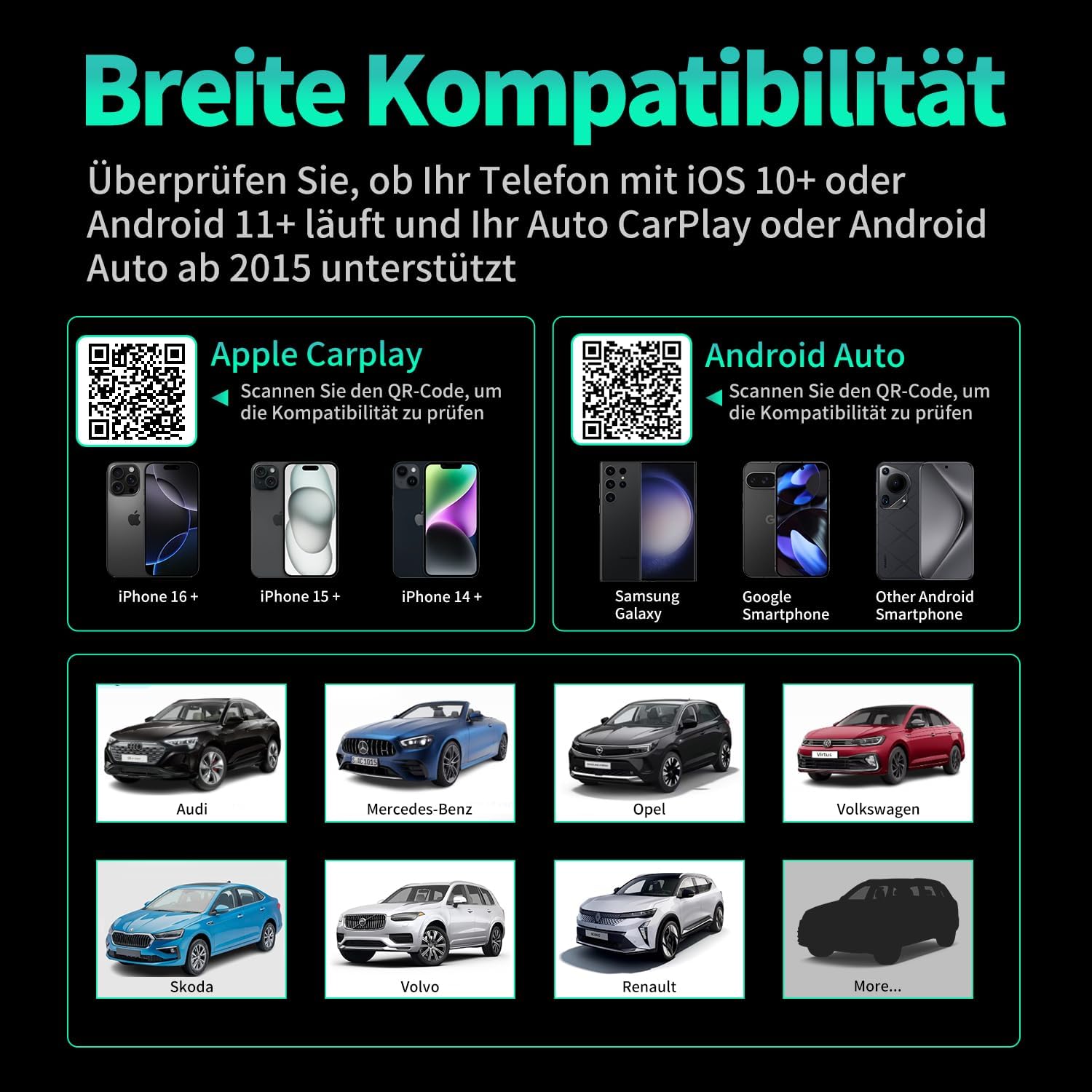
Image 7.1 : Compatibilité surview displaying supported iPhone models (14+, 15+, 16+), Samsung Galaxy, Google, and other Android smartphones, along with car brands like Audi, Mercedes-Benz, Opel, Volkswagen, Skoda, Volvo, and Renault.
8. Entretien
- Nettoyage: Essuyez l'appareil avec un chiffon doux et sec. N'utilisez pas de nettoyants liquides ni de produits abrasifs.
- Stockage: Rangez l'appareil dans un endroit frais et sec lorsqu'il n'est pas utilisé pendant une période prolongée.
- Mises à jour du micrologiciel : Vérifiez le fabricant webConsultez régulièrement le site pour vérifier les mises à jour du micrologiciel disponibles afin de garantir des performances et une compatibilité optimales.
9. Dépannage
| Problème | Cause possible | Solution |
|---|---|---|
| L'adaptateur ne se connecte pas à la voiture. | Incorrect USB port, car not compatible, loose connection. | Ensure the adapter is plugged into the correct USB port that supports wired CarPlay/Android Auto. Verify car compatibility. Re-plug the adapter firmly. |
| Phone not connecting to adapter. | Bluetooth/Wi-Fi off, incorrect pairing, phone OS not supported. | Ensure Bluetooth and Wi-Fi are enabled on your phone. Forget previous Bluetooth connections and re-pair. Check phone OS version for compatibility (iOS 10+, Android 11+). |
| Connexion intermittente ou décalage. | Interference, weak signal, outdated firmware. | Ensure no other devices are causing Wi-Fi interference. Try restarting both the car's infotainment system and your phone. Check for firmware updates. |
| CarPlay/Android Auto ne se lance pas. | CarPlay/Android Auto not enabled in car settings, app issues. | Check your car's infotainment settings to ensure CarPlay/Android Auto is enabled. Restart your phone and the car's system. |
10. Spécifications
| Numéro de modèle | Carplay01 |
| Marque | BARRE DE VANNE |
| Technologie de connectivité | Bluetooth 5.0, Wi-Fi (2.4 GHz + 5 GHz), USB |
| Appareils compatibles | Smartphones (iOS 10+, Android 11+) |
| Type de connecteur | USB Type A, USB Type C (with adapter) |
| Dimensions du produit | 1 x 5.5 x 4.5 cm |
| Poids de l'article | 12 g |
| Couleur | Noir |
| Caractéristiques spéciales | Wireless Android Auto, Wireless Apple CarPlay, GPS Navigation, Spotify, iHeart Radio support |
11. Garantie et assistance
For warranty information and technical support, please refer to the official VANBAR webou contactez directement leur service client. Conservez votre reçu d'achat pour toute réclamation sous garantie.


