1. Introduction
This manual provides essential instructions for the safe and efficient operation, setup, and maintenance of your Displays2go Pedestal Display with Digital Sign (Model DF037NLB). Please read this manual thoroughly before using the product and retain it for future reference.
The DF037NLB is a versatile pedestal display featuring a 37-inch stretch LCD advertising screen, designed for indoor use. It includes a rear locking storage compartment for added functionality.
2. Consignes de sécurité
- Ce produit est destiné à utilisation en intérieur uniquementNe pas exposer à l'humidité, à la pluie ou à des températures extrêmes.
- Veillez à placer l'appareil sur une surface stable et plane afin d'éviter tout basculement.
- Ne bloquez pas les ouvertures de ventilation.
- Utilisez uniquement l’adaptateur secteur fourni.
- Coupez l'alimentation électrique avant de procéder au nettoyage ou à toute opération de maintenance.
- Ce produit peut contenir des substances chimiques reconnues par l'État de Californie comme pouvant causer le cancer et des anomalies congénitales ou d'autres problèmes de reproduction (avertissement Proposition 65).
3. Contenu du colis
Vérifiez que tous les composants sont présents dans l'emballage :
- Pedestal Display Unit (DF037NLB)
- Câble d'alimentation
- Télécommande
- Set of Keys (for storage compartment)
- Manuel de l'utilisateur (ce document)
4. Installation
4.1 Déballage et placement
- Carefully remove the pedestal display from its packaging.
- Place the unit on a flat, stable surface in your desired indoor location. Ensure adequate space around the unit for ventilation.
4.2 Connexion d'alimentation
- Locate the power input port on the rear of the unit.
- Connect the provided power cable to the unit and then to a standard electrical outlet.
- The unit is now ready for initial power-on.
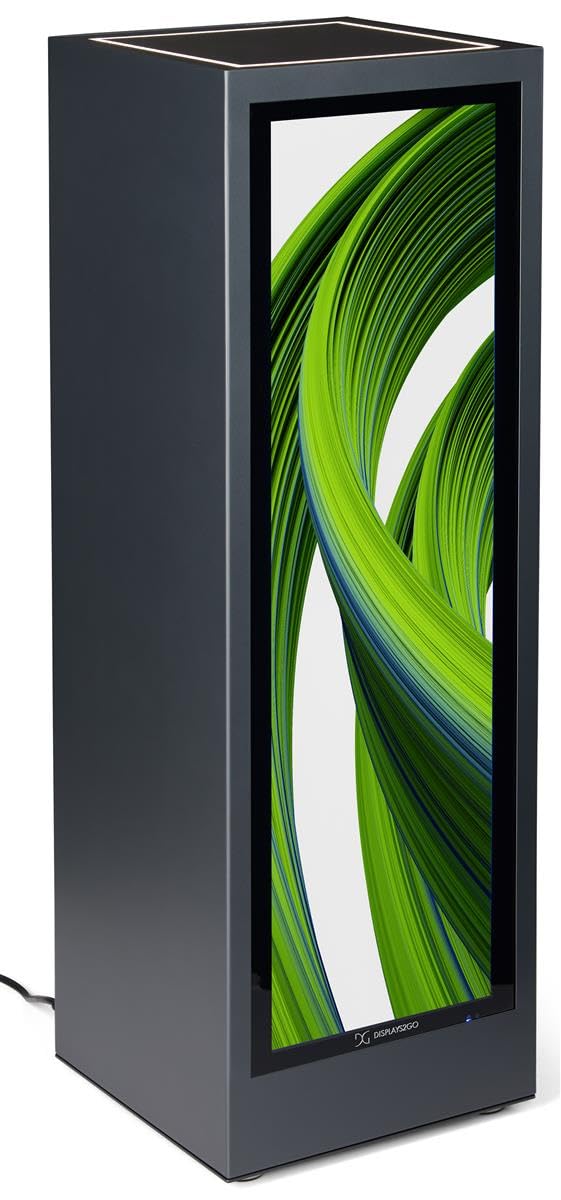
Illustration 4.1 : Avant view of the Displays2go Pedestal Display with Digital Sign.
5. Mode d'emploi
5.1 Digital Signage Operation
The pedestal display features a 37-inch stretch LCD screen for displaying various media content.
- Content Formatting: For optimal display, format your marketing materials to a resolution of 720 2520 pixels de large x XNUMX XNUMX pixels de haut.
- USB Content Transfer: Use the USB ports located on the rear of the unit to transfer images, videos, and other content to the display's internal storage.
- Connectivité : The unit supports WiFi and Bluetooth connectivity. This allows for network access, content updates, and connection to external Bluetooth speakers or peripherals like a mouse and keyboard.
- Accès à Google Play : Access the Google Play app store to download and install business applications directly onto the display.
- Audio: The display includes two built-in speakers for audio playback.

Image 5.1: The digital display showcasing product advertisements for watches.

Image 5.2: The digital display showcasing product advertisements for headphones.

Image 5.3: The 37-inch diagonal measurement of the stretch LCD screen.
5.2 Rear Locking Storage Compartment
The unit features a rear-accessible storage compartment for securing personal items or product backstock.
- To open the compartment, insert one of the provided keys into the lock and turn.
- To lock, close the door, insert the key, and turn to secure. Remove the key to prevent unauthorized access.
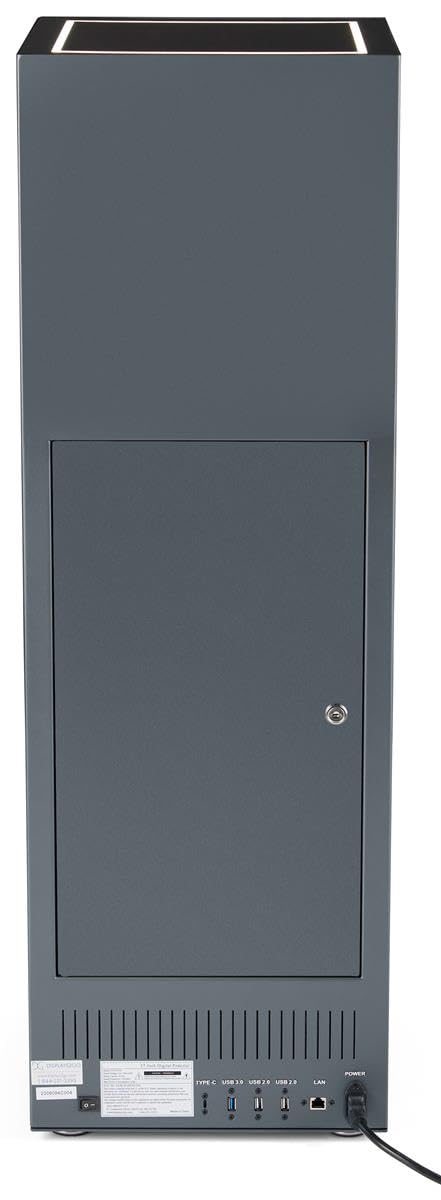
Image 5.4 : Arrière view of the pedestal display showing the closed locking storage compartment and connectivity ports.

Image 5.5 : Arrière view of the pedestal display with the locking storage compartment open, revealing interior space.
Éclairage à 5.3 LED
The mirrored top surface of the pedestal features LED illumination to highlight products placed on top. This feature is integrated with the main power supply and activates when the unit is powered on.
6. Entretien
6.1 Nettoyage
- Débranchez toujours le câble d'alimentation avant de procéder au nettoyage.
- Use a soft, dry, lint-free cloth to clean the exterior surfaces of the pedestal.
- For the screen, use a screen-specific cleaning solution and a microfiber cloth. Do not spray liquid directly onto the screen.
- Avoid abrasive cleaners or solvents, as they may damage the finish.
6.2 Mises à jour logicielles
Periodically check for software updates through the unit's operating system settings to ensure optimal performance and access to the latest features. Refer to the on-screen instructions for update procedures.
7. Dépannage
If you encounter issues with your pedestal display, refer to the following common problems and solutions:
| Problème | Cause possible | Solution |
|---|---|---|
| L'écran ne s'allume pas | Pas de connexion électrique | Ensure power cable is securely connected to the unit and a working outlet. |
| Aucune image à l'écran | Incorrect input source or no content loaded | Check display settings for input source. Ensure content is properly loaded via USB or network. |
| Aucun son des haut-parleurs | Volume trop faible ou coupé | Adjust volume using the remote control or on-screen settings. Check if external Bluetooth speakers are connected and overriding internal speakers. |
| Impossible de se connecter au Wi-Fi/Bluetooth | Network issues or incorrect settings | Verify Wi-Fi network is active and password is correct. Ensure Bluetooth device is in pairing mode and within range. |
8. Spécifications
| Fonctionnalité | Détail |
|---|---|
| Numéro de modèle | DF037NLB |
| Dimensions du produit (L x P x H) | 14 x 14 x 43 pouces |
| Taille de l'écran | 37 pouces (diagonale) |
| Recommended Content Resolution | 720px (width) x 2520px (height) |
| Connectivité | WiFi, Bluetooth, USB ports (Type-C, USB 3.0, USB 2.0), LAN |
| Audio | Haut-parleurs intégrés |
| Stockage | Rear locking compartment |
| Système opérateur | Access to Google Play App Store |
| Environnement d'utilisation | Utilisation en intérieur uniquement |
9. Garantie et assistance
For warranty information, technical support, or service inquiries, please contact Displays2go customer service. Refer to your purchase documentation or the Displays2go official website pour les coordonnées.


