1. Introduction
This user manual provides comprehensive instructions for the setup, operation, maintenance, and troubleshooting of your Thomson 27-inch QHD Gaming Monitor (Model: M27QG5Y14). This monitor is designed to deliver a superior visual experience with its QHD resolution, 180Hz refresh rate, and IPS panel technology, making it ideal for gaming and multimedia applications.

Illustration 1.1 : Avant view of the Thomson 27-inch QHD Gaming Monitor, showcasinson design élégant et sa zone d'affichage.
2. Consignes de sécurité
Please read all safety instructions carefully before using the monitor. Keep this manual for future reference.
- Source d'alimentation : Utilisez uniquement l'adaptateur secteur fourni avec le moniteur. Assurez-vous que la prise de courant est correctement mise à la terre.
- Ventilation: Ne pas obstruer les ouvertures de ventilation. Laisser un espace suffisant autour du moniteur pour permettre une bonne circulation de l'air et éviter toute surchauffe.
- Liquide et humidité : Tenez l'écran à l'écart de l'eau, de la pluie et de l'humidité excessive. Ne posez aucun objet contenant du liquide sur l'écran.
- Nettoyage: Disconnect the power cable before cleaning. Use a soft, dry cloth. Do not use liquid cleaners or aerosol cleaners.
- Placement: Placez l'écran sur une surface stable et plane. Évitez de l'exposer directement au soleil ou à proximité de sources de chaleur.
- Manutention: Manipulez l'écran avec précaution. Évitez de le faire tomber ou de le soumettre à des chocs violents.
- Entretien: N’essayez pas de réparer vous-même le moniteur. Confiez toute réparation à un technicien qualifié.
3. Contenu du colis
Vérifiez que tous les articles sont présents dans le colis. Si un article est manquant ou endommagé, contactez votre revendeur.
- Thomson 27-inch QHD Gaming Monitor
- Support pour écran (base et col)
- Adaptateur secteur et câble d'alimentation
- Câble HDMI
- DisplayPort (DP) Cable (may vary by region)
- Câble USB-B vers USB-A (pour la fonctionnalité de hub USB)
- Manuel de l'utilisateur (ce document)
- Vis pour l'assemblage du support
4. Installation
4.1. Assemblage du support pour écran
- Retirez délicatement le moniteur de son emballage et placez-le face contre une surface douce et propre afin d'éviter les rayures.
- Fixez le pied du support au panneau du moniteur à l'aide des vis fournies.
- Attach the stand base to the stand neck and secure it with the designated screw.
- Once assembled, carefully lift the monitor and place it on a stable desk or table.

Image 4.1: Monitor dimensions and stand assembly overview. The monitor measures approximately 61 cm wide, 54 cm high (with stand), and 24 cm deep (with stand).
4.2. Connexion du moniteur
Connect the necessary cables to the monitor's input ports. Refer to the image below for port locations.
- Connexion électrique : Connect the power adapter to the "DC IN" port on the monitor, then plug the power cable into a power outlet.
- Entrée vidéo:
- Connect an HDMI cable from your computer's graphics card to an "HDMI 2.1" port on the monitor.
- Alternatively, connect a DisplayPort (DP) cable from your computer's graphics card to a "DP 1.2" port on the monitor.
- Concentrateur USB : To enable the monitor's USB 3.0 ports, connect a USB-B cable from the "USB 3.0 B" port on the monitor to a USB-A port on your computer.
- Sortie audio : Connect headphones or external speakers to the "Earphone Plug" (3.5mm audio jack) for audio output.

Image 4.2: Rear panel of the monitor displaying the various input and output ports for connectivity.
4.3. Réglages ergonomiques
Le support pour écran permet divers réglages afin d'optimiser votre confort visuel. viewconfort :
- Inclinaison: Adjust the screen's vertical angle (up or down).
- Pivot: Faites pivoter l'écran horizontalement (à gauche ou à droite).
- Pivoter: Faites pivoter l'écran de 90 degrés pour passer en mode portrait. viewing.
- Réglage de la hauteur : Réglez la hauteur du moniteur à votre niveau de vision préféré.
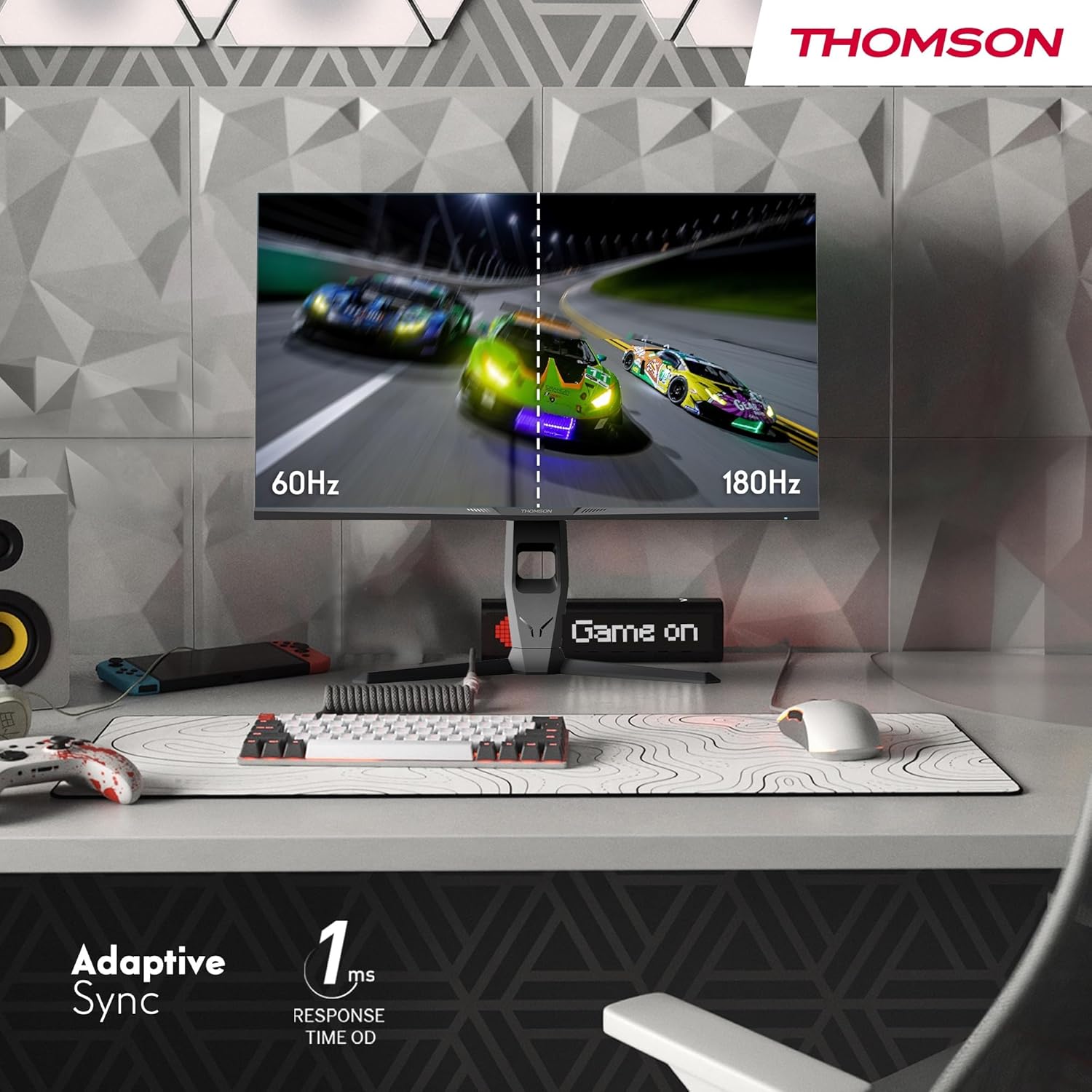
Image 4.3: Demonstrations of the monitor's ergonomic capabilities, including tilt, swivel, and pivot for optimal viewangles d'inclinaison.
4.4. Montage VESA
The monitor is compatible with VESA 100x100mm mounting standards. To mount the monitor on a wall or an alternative stand, remove the original stand and attach the VESA-compatible mount (sold separately) using appropriate screws.
5. Mode d'emploi
5.1. Marche/Arrêt
Pour allumer ou éteindre le moniteur, appuyez sur le bouton d'alimentation, généralement situé à l'arrière ou en dessous. Le voyant d'alimentation s'allume lorsque le moniteur est allumé.
5.2. Menu d'affichage à l'écran (OSD)
Le menu OSD vous permet de régler différents paramètres du moniteur. Utilisez le joystick ou les boutons (leur emplacement peut varier) du moniteur pour naviguer dans le menu.
- Paramètres d'image : Réglez la luminosité, le contraste, la netteté, la température de couleur et le gamma.
- Paramètres de couleur : Fine-tune RGB levels, saturation, and hue.
- Sélection d'entrée : Basculez manuellement entre les entrées HDMI et DisplayPort.
- Audio: Réglez le volume des haut-parleurs intégrés ou de la sortie casque.
- Paramètres OSD : Modifier la langue, la transparence et le délai d'expiration de l'affichage à l'écran.
- Paramètres de jeu : Access features like Adaptive Sync, response time (OD), and crosshair overlays.
5.3. Fonctionnalités de jeu
- Taux de rafraîchissement de 180 Hz: Provides smoother motion and reduced input lag, especially beneficial for fast-paced games. Ensure your graphics card and cable support this refresh rate.
- Temps de réponse de 1 ms (OD) : Minimizes motion blur and ghosting for clear, crisp images during rapid movements.
- Synchronisation adaptative : Synchronizes the monitor's refresh rate with your graphics card's frame rate, eliminating screen tearing and stuttering. Enable this feature in the OSD menu and your graphics card control panel.

Image 5.1: Visual comparison illustrating the difference between 60Hz and 180Hz refresh rates, highlighting the smoother motion provided by the higher refresh rate, alongside the Adaptive Sync feature.
5.4. Caractéristiques de soins oculaires
- Technologie anti-scintillement : Réduit le scintillement de l'écran, qui peut provoquer une fatigue oculaire lors d'une utilisation prolongée.
- Mode faible lumière bleue : Filters out harmful blue light emissions to protect your eyes and reduce fatigue. This mode can be activated through the OSD menu.
- Écran antireflet : The matte screen surface minimizes reflections from ambient light, providing clear visuals without distraction.

Image 5.2: Depiction of the monitor's eye comfort features, including an anti-glare screen and technologies like Anti-Flicker and Low Blue Light for reduced eye strain.
5.5. Éclairage ambiant RVB
The monitor features integrated RGB ambient lighting on the rear. This lighting can be customized via the OSD menu to enhance your gaming environment or match your setup's aesthetics.
6. Entretien
6.1. Nettoyage du moniteur
- Écran: Essuyez délicatement l'écran avec un chiffon doux non pelucheux. Pour les taches tenaces, frottez légèrement.ampen the cloth with water or a specialized screen cleaner (ensure it's safe for LCD/IPS panels) and wipe gently. Never spray liquid directly onto the screen.
- Casing: Utilisez un chiffon doux et sec pour essuyer le moniteur.asing. Évitez d'utiliser des nettoyants ou des solvants abrasifs.
- Débranchez toujours le câble d'alimentation avant de procéder au nettoyage.
6.2. Stockage
Si vous devez stocker le moniteur pendant une période prolongée, débranchez tous les câbles, rangez-le dans son emballage d'origine (si disponible) et stockez-le dans un endroit frais et sec, à l'abri de la lumière directe du soleil et des températures extrêmes.
7. Dépannage
Cette section aborde les problèmes courants que vous pourriez rencontrer. Si le problème persiste, contactez le service client.
| Problème | Cause possible | Solution |
|---|---|---|
| Pas de courant | Câble d'alimentation non connecté ; prise de courant défectueuse ; moniteur éteint. | Vérifiez que le câble d'alimentation est bien branché. Testez la prise de courant. Appuyez sur le bouton d'alimentation du moniteur. |
| Aucun signal / Écran noir | Câble vidéo non connecté ; entrée incorrecte sélectionnée ; l’ordinateur n’émet aucun signal. | Check HDMI/DP cable connections. Select the correct input source via OSD. Ensure computer is on and outputting video. |
| Distorted image / Flickering | Incorrect resolution/refresh rate; Faulty cable; Graphics driver issue. | Set display resolution to 2560x1440 and refresh rate to 180Hz. Try a different video cable. Update graphics drivers. |
| Aucun son ne sort des haut-parleurs/écouteurs. | Volume too low; Audio cable not connected; Incorrect audio output selected on PC. | Increase monitor volume via OSD. Ensure headphones/speakers are connected. Select monitor as audio output device in PC settings. |
8. Spécifications
Detailed technical specifications for the Thomson M27QG5Y14 monitor.
| Fonctionnalité | Spécification |
|---|---|
| Marque | Thomson |
| Modèle | M27QG5Y14 |
| Taille de l'écran | 27 pouces |
| Type de panneau | IPS |
| Résolution | 2560 x 1440 (QHD) |
| Taux de rafraîchissement | 180 Hz |
| Temps de réponse | 1 Millisecond (OD) / 5 Milliseconds (GtG) |
| Luminosité | Nits 350 |
| Rapport de contraste | 1200:1 |
| ViewAngle d'attaque | 178 degrés (horizontal/vertical) |
| Gamme de couleurs | 120 % sRGB |
| Prise en charge HDR | HDR10 (10-bit) |
| Synchronisation adaptative | Oui |
| Connectivité | 2x HDMI 2.1, 1x DisplayPort 1.2, 1x USB 3.0 Type-B (upstream), 3x USB 3.0 Type-A (downstream), 1x Earphone Plug (3.5mm) |
| Haut-parleurs intégrés | Oui (2x2W) |
| Compatibilité de montage VESA | 100x100mm |
| Dimensions du produit (avec support) | 61 x 54 x 24 cm (L x H x P) |
| Poids (avec support) | 7.3 kg |
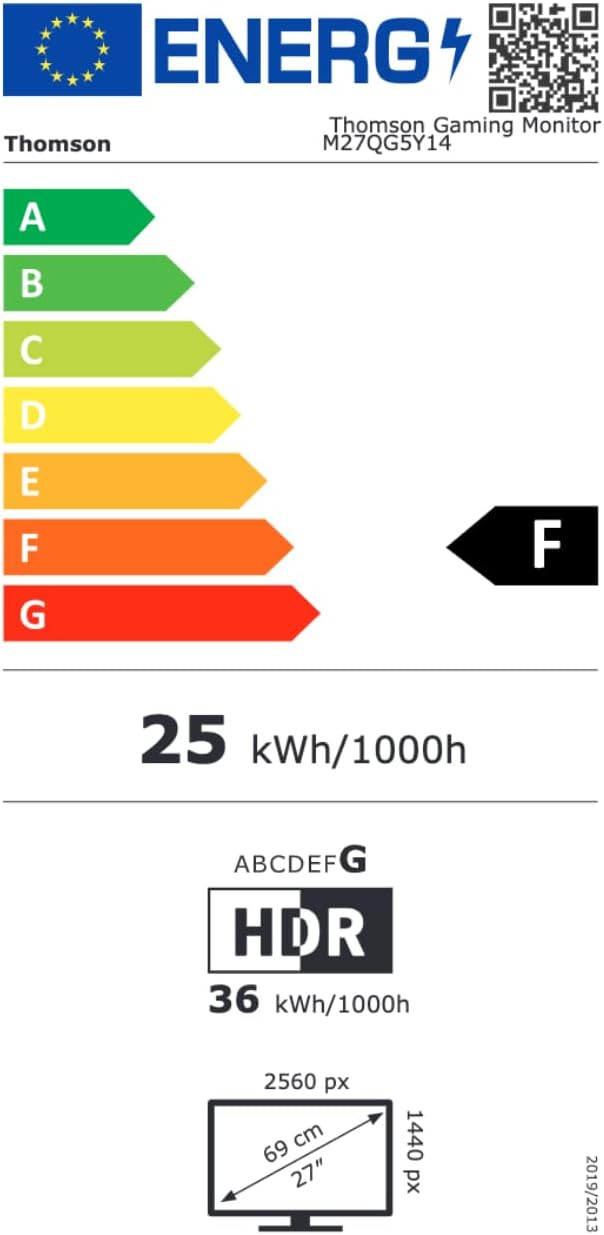
Image 8.1: EU Energy Label for the Thomson M27QG5Y14 monitor. For more details, visit the Base de données EPREL.
9. Garantie et assistance
Thomson products are designed for reliability and performance. This monitor typically comes with a Garantie de 3 ans La garantie couvre les défauts de fabrication à compter de la date d'achat. Veuillez conserver votre preuve d'achat pour toute réclamation au titre de la garantie.
For technical assistance, troubleshooting beyond this manual, or warranty inquiries, please contact Thomson customer support or your local retailer. Refer to the official Thomson webPour obtenir des coordonnées spécifiques, veuillez consulter le site ou l'emballage de votre produit.
You can also visit the official Thomson store on Amazon for more information: Thomson Store.


