1. Introduction
This manual provides detailed instructions for the installation, operation, and maintenance of the LiftMaster 41AB050-2 / 41AB050-2M Replacement Logic Control Board. This board is designed for specific LiftMaster and Chamberlain AC Belt Drive Garage Door Openers. Please read this manual thoroughly before proceeding with installation to ensure safe and correct operation.
2. Informations importantes sur la sécurité
WARNING: To prevent serious injury or death from electrocution, always disconnect electrical power to the garage door opener BEFORE installing or servicing the logic control board. Garage door springs are under extreme tension and can cause serious injury or death. DO NOT attempt to adjust, repair, or remove any components related to the garage door springs or cables.
- Assurez-vous que le dispositif d'ouverture de la porte de garage est débranché de la prise de courant.
- Wear appropriate safety gear, including safety glasses.
- En cas de doute sur une étape quelconque, consultez un technicien qualifié en portes de garage.
- Gardez les enfants et les animaux domestiques éloignés de la zone de travail.
3. Compatibilité
The LiftMaster 41AB050-2 / 41AB050-2M Logic Control Board is a 315MHz Security+ Receiver Logic Board with an End Panel Replacement Kit. It is compatible with various LiftMaster and Chamberlain AC Belt Drive Garage Door Openers manufactured between 2005 and 2015. This unit features a bouton d'apprentissage violet. It is also compatible with Sears Craftsman models 41AB150-2 and 41AB150-2M.
Important: Verify your existing garage door opener's logic board has a purple learn button and matches the model numbers (41AB050-2, 41AB050-2M, 041AB050-2M, 41AB150-2, 41AB150-2M) before installation to ensure proper compatibility.
4. Contenu du colis
Votre colis doit contenir les éléments suivants :
- 1 x LiftMaster 41AB050-2 / 41AB050-2M Logic Control Board
- 1 x End Panel
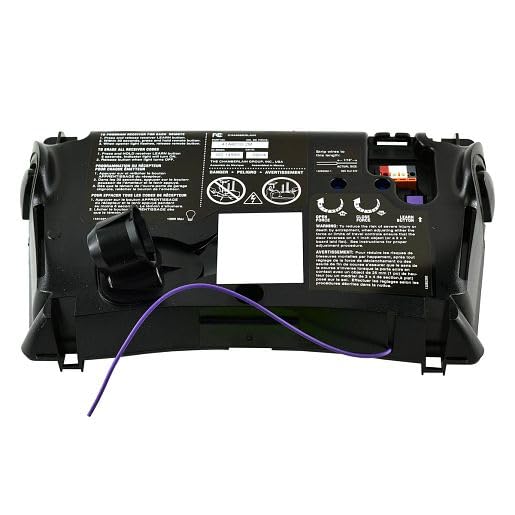
Image 1: The LiftMaster 41AB050-2 / 41AB050-2M Logic Control Board with its end panel. This image shows the overall appearance of the replacement part.
5. Configuration et installation
Follow these steps carefully to replace your garage door opener's logic control board:
- Débrancher l'alimentation : Crucial Safety Step! Unplug the garage door opener from the electrical outlet. If there is a wall switch, ensure it is in the "OFF" position.
- Accéder au tableau de bord : Remove the cover of your garage door opener unit to expose the existing logic control board. This usually involves unscrewing a few fasteners.
- Câblage photographique : Before disconnecting any wires, take clear photos of all wire connections to the existing board. This will serve as a reference for reconnecting wires to the new board.
- Déconnecter les fils : Carefully disconnect all wires from the old logic board. Note the position and color of each wire.
- Retirer l'ancienne carte : Unscrew or unclip the old logic board from its mounting points.
- Installer la nouvelle carte : Position the new LiftMaster 41AB050-2 / 41AB050-2M logic control board in place and secure it with the screws or clips.
- Rebrancher les fils : Using your photographs as a guide, carefully reconnect all wires to the corresponding terminals on the new logic board. Ensure all connections are secure.
- Replace End Panel (if applicable): If your kit includes a new end panel, replace the old one now.
- Remplacer le couvercle : Securely reattach the garage door opener cover.
- Restaurer l'alimentation : Rebranchez le dispositif d'ouverture de porte de garage à la prise électrique.
6. Fonctionnement et programmation
After installing the new logic board, you will need to program your remote controls and keypads to the opener. The 41AB050-2 / 41AB050-2M board features a bouton d'apprentissage violet.
- Localisez le bouton Apprendre : On the new logic board, locate the purple learn button.
- Activer le mode d'apprentissage : Press and immediately release the purple learn button. The LED indicator light next to the button will illuminate steadily for 30 seconds.
- Program Remote: While the LED is illuminated, press and hold the button on your remote control that you wish to operate the garage door.
- Confirmer la programmation : Release the remote control button when the opener lights flash or two clicks are heard. This indicates successful programming.
- Opération de test : Press the programmed button on your remote control to test the garage door opener's function.
- Program Additional Remotes/Keypads: Repeat steps 2-5 for any additional remote controls or wireless keypads you wish to program.
For detailed instructions on programming specific remote models or troubleshooting programming issues, refer to your remote control's individual instruction manual or the LiftMaster support website.
7. Entretien
The LiftMaster 41AB050-2 / 41AB050-2M Logic Control Board is designed for long-term reliability and requires minimal maintenance. However, consider the following:
- Garder propre: Ensure the area around the control board inside the opener housing remains free of dust, debris, and insects.
- Conditions environnementales : Avoid exposing the garage door opener to excessive moisture or extreme temperatures, which can affect electronic components.
- Contrôle professionnel : It is recommended to have your garage door opener system professionally inspected annually to ensure all components, including the logic board, are functioning correctly.
8. Dépannage
If you encounter issues after installing the new logic board, review Voici les problèmes courants et leurs solutions :
| Problème | Cause possible | Solution |
|---|---|---|
| Opener ne répond pas après l'installation. | Power not restored, incorrect wiring, or remote not programmed. |
|
| La télécommande ne fonctionne pas. | Remote not programmed, dead remote battery, or interference. |
|
| Les voyants de l'ouvre-porte clignotent mais la porte ne bouge pas. | Les capteurs de sécurité sont mal alignés ou obstrués. |
|
If troubleshooting steps do not resolve the issue, contact LiftMaster customer support or a qualified technician.
9. Spécifications
- Numéros de modèle : 41AB050-2, 41AB050-2M, 041AB050-2M
- Compatibilité: LiftMaster and Chamberlain AC Belt Drive Garage Door Openers (2005-2015 models) with purple learn button. Also compatible with Sears Craftsman 41AB150-2 / 41AB150-2M.
- Fréquence: Sécurité 315 MHz+
- Composants inclus : Control Board, End Panel
- Dimensions: Environ 10 x 4 x 1 pouces (25.4 x 10.16 x 2.54 cm)
- Poids: Environ 2 livre (0.91 kg)
- Fabricant: LiftMaster
10. Informations sur la garantie
For specific warranty details regarding the LiftMaster 41AB050-2 / 41AB050-2M Logic Control Board, please refer to the official LiftMaster webConsultez leur site web ou contactez directement leur service client. Les conditions de garantie couvrent généralement les défauts de fabrication pendant une période déterminée à compter de la date d'achat.
11. Assistance clientèle
If you require further assistance, have questions about installation, or need to report a defective product, please contact LiftMaster customer support through their official website or the contact information provided with your original purchase documentation.
LiftMaster Officiel Website: www.liftmaster.com


