Introduction
Thank you for choosing the Socool D22 Camping Fan with Light. This portable and versatile fan is designed to provide cooling and illumination for various indoor and outdoor activities, including camping, home use, and emergency situations. Please read this manual thoroughly before operating the device to ensure safe and optimal performance.
Consignes de sécurité importantes
- Lisez toutes les instructions avant d'utiliser le ventilateur.
- N’insérez pas vos doigts ni aucun objet dans la grille du ventilateur.
- Tenez le ventilateur éloigné de l'eau ou d'autres liquides afin d'éviter tout risque d'électrocution.
- Ne faites pas fonctionner le ventilateur avec un cordon ou une prise endommagés.
- Ensure the fan is placed on a stable, flat surface when in use.
- Tenir hors de portée des enfants.
- N’essayez pas de démonter ou de réparer le ventilateur vous-même. Contactez un technicien qualifié.
- Utilisez uniquement le câble USB-C fourni pour la charge.
- Évitez d'exposer la batterie à des températures extrêmes ou à la lumière directe du soleil.
Contenu du colis
- Socool D22 CampVentilateur
- Télécommande
- Câble USB-C
- Manuel d'utilisation
Produit terminéview
The Socool D22 Camping Fan features a robust design with multiple functionalities for enhanced user experience.

Devant view of the Socool D22 CampFan ing, montrantasing the fan blades and control panel.
Caractéristiques principales :
- Batterie rechargeable 20000 mAh : Provides up to 112 hours of continuous operation at low speed.
- Réglage du vent à 8 vitesses : Offers a range from gentle breeze to strong airflow (up to 1970 RPM).
- Oscillation automatique : Features 45° and 90° automatic oscillation for wider air distribution.
- 270° Manual Pivot: Allows for precise vertical airflow adjustment.
- 16 LED Lights with 3 Brightness Levels: Fournit un éclairage réglable pour répondre à différents besoins.
- Banque d'alimentation d'urgence : Equipped with a 5V-2A USB output to charge mobile devices.
- Télécommande: Conveniently adjust settings from a distance, with a dedicated storage slot.
- Affichage numérique: Shows current wind speed and remaining battery percentage.
- Fonction minuterie : Set the fan to operate for 1, 2, 4, or 8 hours.
- Mode nuit : Turns off the digital display for undisturbed sleep.
- Hidden Hanging Hook: Supports 360° rotation and 180° flip for versatile placement.
- Conception portable : Features a soft silicone handle for easy transport and a durable ABS build.
Installation
1. Charge initiale
Before first use, fully charge the fan. Connect the provided USB-C cable to the fan's Type-C input port (5V-3A) and plug the other end into a compatible power source (wall adapter, car charger, laptop, or power bank). The digital display will show the charging progress. A full charge typically takes 9-10 hours.

The fan can be charged using the Type-C input. It can also operate while charging.
2. Préparation de la télécommande
The remote control is stored in a dedicated slot on the side of the fan's base. Slide it out for use. Ensure the battery in the remote is functional.

The remote control conveniently stores in a slot on the fan's base to prevent loss.
Opération
The fan can be operated using the control panel on the base or the remote control.
1. Marche/Arrêt
- Appuyez sur le Bouton d'alimentation (or fan icon on remote) to turn the fan on. It will start at a low speed.
- Appuyez sur le Bouton d'alimentation encore une fois pour éteindre le ventilateur.
2. Réglage de la vitesse du ventilateur
The fan has 8 adjustable speed levels. Use the '+' or '-' buttons on the control panel or remote to increase or decrease the wind speed. The current speed will be displayed on the digital screen.

The fan offers 8 wind speed settings, from gentle to powerful, indicated by CFM values.
3. Oscillation and Pivot
- Oscillation automatique : Appuyez sur le Bouton d'oscillation (circular arrow icon) to cycle through 45°, 90° oscillation, or turn oscillation off.
- Manual Pivot: The fan head can be manually adjusted up to 270° vertically to direct airflow.

The fan features 45°/90° auto oscillation and a 270° manual pivot for wide-ranging airflow.
4. Fonction lumière
The fan is equipped with 16 LED lights. Press the Bouton lumineux (sun icon) to cycle through 3 dimmable brightness settings (Low, Medium, High) or turn the light off.
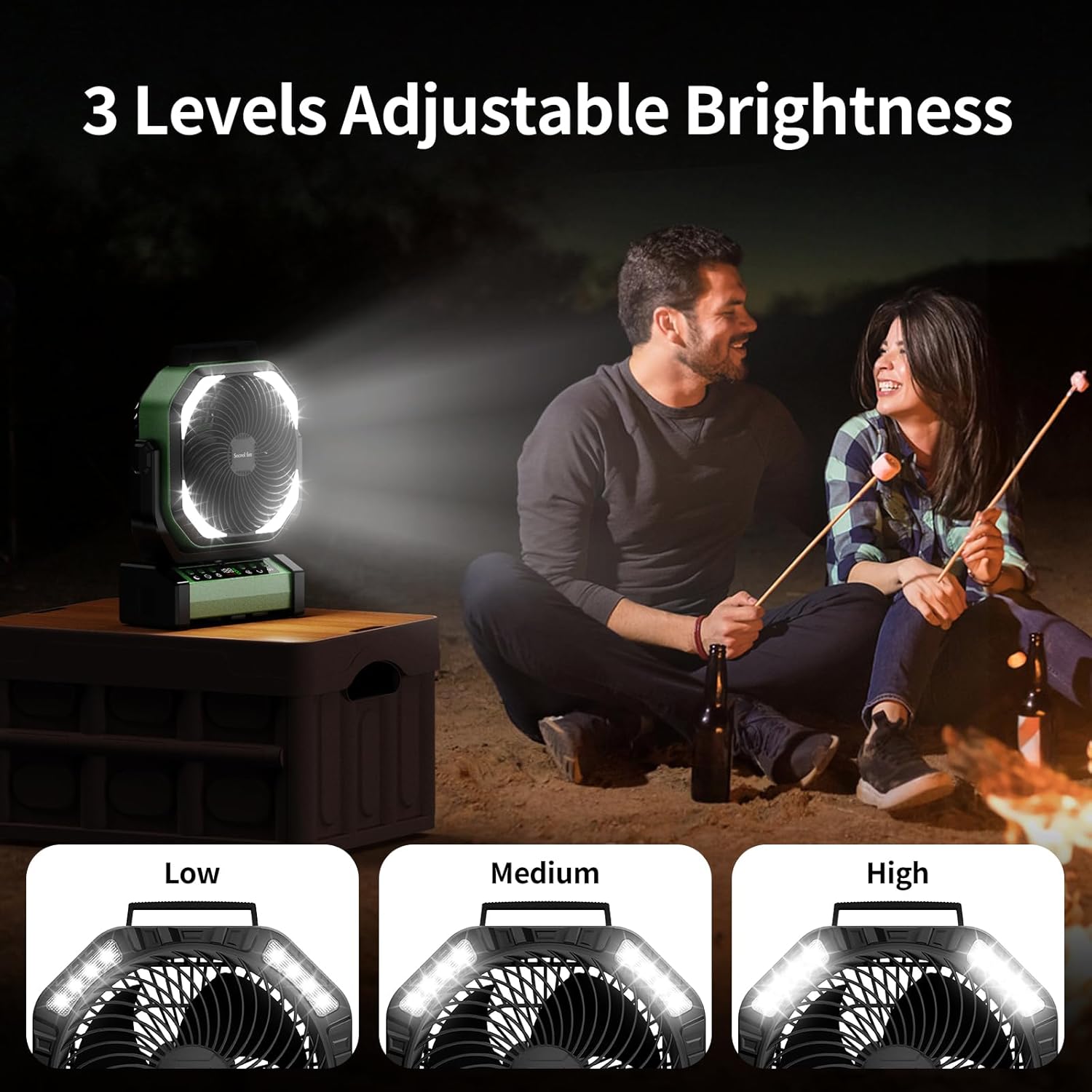
The integrated LED lights offer three brightness levels for various lighting needs.
5. Fonction de minuterie
Appuyez sur le Bouton de minuterie (clock icon) to set the fan to automatically turn off after 1, 2, 4, or 8 hours. The selected time will be displayed.
6. Night Mode (Display Off)
For undisturbed sleep, press the Bouton Mode nuit (moon icon) to turn off the digital display while the fan continues to operate.
7. Fonction de batterie de secours
The fan can act as an emergency power bank. Connect your mobile device to the USB-A output port (5V-2A) on the fan's base using your device's charging cable. The fan will charge your device.

The fan's 20000mAh battery can also serve as an emergency power bank to charge other devices.
Options de placement
The Socool D22 Camping Fan offers versatile placement options:
- Sur pied: Place on any flat surface.
- Crochet de suspension : Utilize the hidden hook at the bottom to hang the fan from tents, umbrellas, or other structures. The hook supports 360° rotation and 180° flip.
- Poignée portable : Use the soft silicone handle at the top for easy carrying.

The fan can be used free-standing, hung by its hook, or carried with its handle.
Entretien
- Nettoyage: Débranchez le ventilateur avant de le nettoyer. Utilisez un chiffon doux et sec.amp cloth to wipe the exterior surfaces. Do not use abrasive cleaners or immerse the fan in water.
- Stockage: Store the fan in a cool, dry place when not in use. Ensure the battery is partially charged (around 50%) before long-term storage to prolong battery life.
Dépannage
| Problème | Cause possible | Solution |
|---|---|---|
| Le ventilateur ne s'allume pas. | Batterie faible ou pas d'alimentation. | Charge the fan using the USB-C cable. Ensure the power button is pressed. |
| La vitesse du ventilateur est faible. | Low battery or low speed setting. | Charge the fan. Increase the fan speed using the '+' button. |
| La lumière ne fonctionne pas. | Light function is off or low battery. | Press the Light button to turn on/adjust brightness. Charge the fan. |
| La télécommande ne fonctionne pas. | Batterie de la télécommande déchargée ou hors de portée. | Replace remote battery. Ensure remote is within 20 feet of the fan. |
| L'oscillation ne fonctionne pas. | La fonction d'oscillation est désactivée. | Press the Oscillation button to activate 45° or 90° mode. |
Caractéristiques
| Fonctionnalité | Détail |
|---|---|
| Marque | Fan de Socool |
| Nom du modèle | D22Campventilateur de tente |
| Couleur | Vert |
| Conception de ventilateur électrique | Ventilateur de table |
| Source d'énergie | Alimenté par batterie |
| Dimensions du produit | 4"P x 10"L x 12"H |
| Caractéristiques spéciales | Lightweight & Emergency Power Supply, Oscillating, Portable & Adjustable Tilt, Remote Controlled |
| Utilisations recommandées | Circulation de l'air, refroidissement, ventilation |
| Niveau de bruit | 30 décibels |
| Quoitage | 15 watts |
| Capacité de débit d'air | 191 pieds cubes par minute |
| Vitesse | 1970 tr/min |
| Voltage | 5 volts |
| Type de commutateur | Télécommande et contrôle des boutons |
| Composants inclus | D22Camping Fan, Manual, Remote, USB-C Cable |
| Utilisation intérieure/extérieure | Intérieur, extérieur |
| Réutilisabilité | Rechargeable |
| Nombre de niveaux de puissance | 9 (en référence aux vitesses du ventilateur) |
| Fabricant | Shenzhen Luansheng Electronic Technology Co., Ltd. |
| Poids de l'article | 4.16 livres |
| Piles | 1 pile au lithium polymère requise (incluse) |
| Type de montage | Free Standing, Hook Hanging, Tabletop |
Vidéos de produits
Fonction terminéeview of Socool D22 CampVentilateur
This video provides a detailed introduction to the various functions of the Socool D22 Camping Fan, including speed adjustment, oscillation, light settings, and remote control operation.
Garantie et assistance
For warranty information or technical support, please refer to the warranty card included with your product or contact Socool fan customer service. Keep your purchase receipt for warranty claims.


