1. Introduction
The Carpuride W103 Pro is a 10.3-inch portable car stereo designed to enhance your driving experience with wireless Apple CarPlay and Android Auto. This device integrates essential smartphone features like GPS navigation, messaging, phone calls, and music playback directly onto its high-definition touchscreen. This manual provides detailed instructions for setup, operation, and maintenance of your W103 Pro.
2. Contenu de la boîte
Veuillez vérifier que tous les articles sont présents dans le colis :
- 1x Carpuride W103 Pro Car Stereo
- 1x CD Holder
- 1x Sticker Holder
- 1x Suction Cup Holder
- 1x Manuel d'utilisation
- 1x Aux Cable
- 1 chargeur USB-C
3. caractéristiques du produit
- Écran intelligent IPS de 10.3 pouces : Wireless CarPlay & Android Auto compatibility for GPS navigation, messaging, calls, and music.
- Double transmission Bluetooth : Bluetooth 5.0 for wireless hands-free calling and speaker phone listening.
- Lien miroir Android/iOS : Supports screen mirroring for most Android and iOS phones (Note: Netflix not supported).
- Plusieurs options de montage : Includes CD slot mount, sticker holder, and suction cup holder for versatile installation.
- Siri & Voice Control: Built-in mic and hands-free function for voice commands via Google Assistant or Siri.
- Navigation cartographique en temps réel : Magnified map details for Google Maps and Waze on the 10.3-inch HD IPS display.
- Conception de l'éclairage à capteur : Automatic display brightness adjustment for optimal visibility and eye protection.
- Égaliseur intégré : Preset and user-customized 16-band HD EQ for audio customization.
- Five Audio Output Options: Connect via car Bluetooth, phone Bluetooth, built-in speaker, AUX cable, or FM transmission.
- Compatibilité universelle: 12-24V power input, compatible with most cars, RVs, SUVs, pickups, and trucks.
- Options de personnalisation : Personalize boot logos and screens.
4. Configuration et installation
4.1 Connexion d'alimentation
Connect the W103 Pro using the provided Type-C charger to your vehicle's cigarette lighter. Ensure the power source provides at least 5V 2.5A or 5V 3A to prevent unexpected shutdowns due to insufficient power.
4.2 Montage de l'appareil
The W103 Pro offers three primary mounting options:
- Montage sur fente CD : Insert the metal CD player mount into your vehicle's CD slot. This mount features a 25mm ball head connector for durability and 360° rotation for optimal viewangles d'inclinaison.
- Suction Cup Holder: Attach the suction cup holder to a clean, smooth surface on your dashboard or windshield. Adjust the arm and screen angle as needed.
- Sticker Holder: Use the self-adhesive bracket for a more permanent installation on a flat dashboard surface.

Figure 4.2.1: Illustration of the three bracket installation types for the Carpuride W103 Pro.
5. Mode d'emploi
5.1 Fonctionnement de base
The W103 Pro features a full-touch HD capacitive monitor with a 1280x480 resolution, providing responsive and clear viewing. Navigate through menus and applications by tapping and swiping on the screen.

Figure 5.1.1: The 10.3-inch IPS HD touch screen of the Carpuride W103 Pro.
5.2 Luminosité de l'écran
The device includes a Sensor Light designed to protect your eyes. It automatically adjusts display brightness:
- When driving through a tunnel, the display will automatically brighten.
- Upon exiting a tunnel, the display will automatically dim to prevent eye strain.
You can also manually adjust brightness by clicking the sun icon in the upper right corner of the main screen.
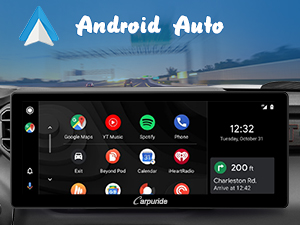
Figure 5.2.1: Automatic brightness adjustment via the Sensor Light feature.
6. Connectivité
6.1 Apple CarPlay sans fil
To use wireless Apple CarPlay, ensure your iPhone is running iOS 6 or above, has the CarPlay system enabled, and Siri is turned on.
- On the W103 Pro, open the 'iPlay' application.
- Sur votre iPhone, activez le Wi-Fi et le Bluetooth.
- Rechercher the Carpuride device (e.g., "Carpuride-xxxx") in your iPhone's Bluetooth settings and pair.
- Confirmez la connexion sur les deux appareils.

Figure 6.1.1: Wireless Apple CarPlay connection guide.
6.2 Android Auto sans fil
To use wireless Android Auto, your phone must support 5GHz Wi-Fi, run Android 11 or above, and have the Android Auto app updated to the latest version.
- On the W103 Pro, open the 'A-Auto' application.
- Sur votre téléphone Android, activez le Wi-Fi et le Bluetooth.
- Rechercher the Carpuride device in your phone's Bluetooth settings and pair.
- Confirmez la connexion sur les deux appareils.

Figure 6.2.1: Wireless Android Auto connection guide.
6.3 Lien miroir
The W103 Pro supports Phone Mirror-Link for both Android and iOS devices. This allows you to display your phone's screen content, including map navigation and videos, directly on the W103 Pro. Note that most phones do not support Netflix mirroring.

Figure 6.3.1: Mirror Link functionality displaying phone content.
6.4 Connectivité Bluetooth
The W103 Pro features dual Bluetooth chips (BT 5.0) for enhanced audio and call quality. It supports wireless hands-free calling and music streaming when paired with a smartphone.

Figure 6.4.1: Dual Bluetooth transmission for improved connectivity.
7. Options de sortie audio
The W103 Pro offers five ways to output audio:
- Connect to Car's Bluetooth: For Bluetooth music playback (calls not supported through this method).
- Connect Phone via Bluetooth: For calls and Bluetooth music. (Requires software upgrade through Carpuride support for optimal performance).
- Built-in Speaker and Mic: Use the W103 Pro's integrated speaker and microphone for music and calls.
- Câble AUX : Connect to your car's speakers via the provided AUX cable for audio playback and calls.
- Transmission FM : Transmit audio to your car's speakers via FM radio frequency.

Figure 7.1.1 : Plusview of audio output methods.
7.1 Égaliseur (EQ)
The W103 Pro includes a built-in preset EQ and a user-customized 16-band HD EQ. When playing music via SD card, U disk, or Bluetooth, you can access the EQ settings to adjust sound effects (e.g., rock, classical, jazz) and enable/disable bass boost ('Loud' function).

Figure 7.1.2: Equalizer settings for audio customization.
8. Spécifications
| Fonctionnalité | Description |
|---|---|
| Dimensions du produit | 1.2 x 10.89 x 4.63 pouces |
| Poids de l'article | 2.66 livres |
| Numéro de modèle | W103 Pro |
| Système opérateur | Android, iOS (via CarPlay/Android Auto) |
| Communication sans fil | Bluetooth, Wi-Fi |
| Caractéristiques spéciales | Digital Display Screen, Dual Bluetooth, Equalizer, Apple CarPlay, Android Auto |
| Entrée de l'interface humaine | Microphone, écran tactile |
| Couleur | Noir |
| Appareils compatibles | Smartphone |
| Type de connecteur | 3.5mm Jack, USB, Type-C |
| Mode de sortie audio | Stéréo |
| Encodage vidéo | H.264, H.265/HEVC |
9. Dépannage
- L'appareil s'éteint de manière inattendue : Ensure the power supply is at least 5V 2.5A or 5V 3A. Insufficient power can cause the CarPlay screen to shut off.
- Interférences de transmission FM : Tune to an interference-free FM radio station and slightly decrease the device's volume to resolve issues with FM wireless interference.
- Calls Not Routing to Car Speakers: After connecting to car Bluetooth, calls will be made through the W103 Pro's built-in speaker, not your car's speakers. This is by design.
- Mirroring After CarPlay/Android Auto: To switch to mirroring mode after using CarPlay/Android Auto, you may need to set up mirroring in your phone's settings and ignore CarPlay/Android Auto connections.
- Screen Brightness Too Sensitive: If the light sensor is overly sensitive, causing rapid changes in screen brightness, turn off the automatic light sensor and adjust manually.
- No Netflix Support for Mirror Link: Most phones do not support Netflix streaming via Mirror Link due to content protection policies.
10. Entretien
- Nettoyage: Utilisez un chiffon doux et sec pour nettoyer l'écran et l'extérieur de l'appareil. Évitez les nettoyants abrasifs et les solvants.
- Stockage: If not in use for an extended period, remove the product from its bracket and store it properly to avoid damage.
- Mises à jour logicielles : Periodically check the Carpuride support website répertoriant les mises à jour logicielles disponibles pour garantir des performances optimales et l'accès aux nouvelles fonctionnalités.
11. Garantie et assistance
Pour obtenir des informations sur la garantie et une assistance technique, veuillez consulter le site officiel de Carpuride. webou contactez directement leur service client. Conservez votre reçu d'achat pour toute réclamation sous garantie.


