Introduction
Thank you for choosing the KLIM K7 Cassette Tape Player and MP3 Converter. This device allows you to enjoy your classic cassette tapes and convert them into digital MP3 files for modern playback. It features a built-in microphone for recording, an integrated speaker, and a rechargeable battery for portability. This manual provides detailed instructions for setup, operation, and maintenance of your KLIM K7.
Produit terminéview
Caractéristiques principales
- Convertisseur de cassettes en MP3 : Effortlessly convert cassette tapes to digital MP3 files directly onto an SD card.
- Conception portable : Lightweight and compact for on-the-go listening.
- Microphone intégré : Record audio directly to the SD card.
- Haut-parleur intégré : Share your audio without external devices.
- Batterie rechargeable : Integrated 1000mAh battery provides extended playback.
- SD Card Player: Écouter MP3 fileest stocké sur la carte SD.
- Prise pour écouteurs 3.5 mm : For private listening with included earphones.
Composants et commandes de l'appareil
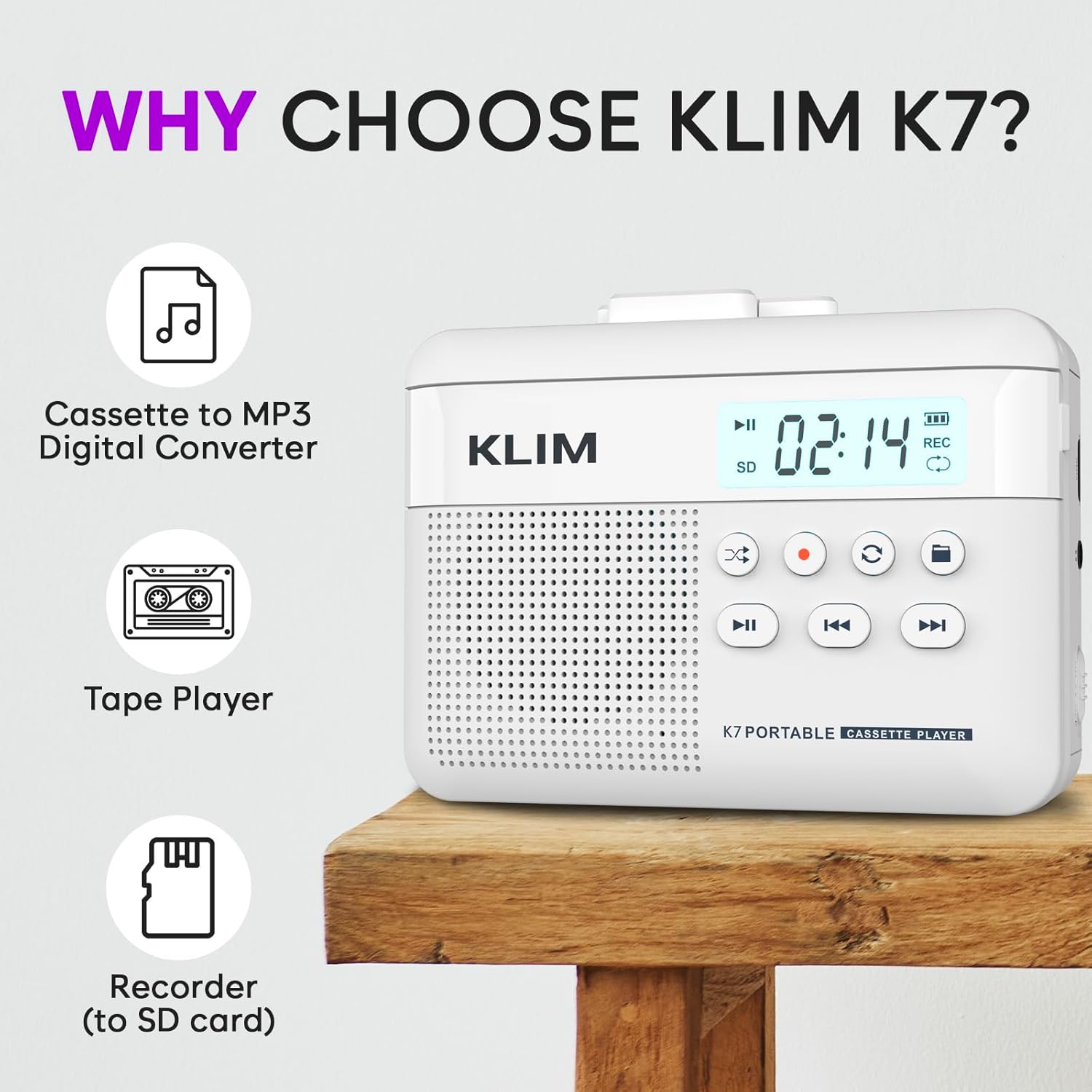
Figure 1 : Devant view of the KLIM K7 Cassette Player, showing the speaker grille, LCD display, and control buttons (Play/Pause, Rewind, Fast Forward, Stop, Record, Mode, Folder, Loop).
- Écran LCD : Shows track number, recording status, and battery level.
- Conférencier: Haut-parleur intégré pour la lecture audio.
- Bouton Lecture/Pause (►▮) : Démarre ou interrompt la lecture.
- Rewind Button (◀◀): Rewinds the cassette tape or navigates backward through MP3 tracks.
- Fast Forward Button (►►): Fast forwards the cassette tape or navigates forward through MP3 tracks.
- Bouton Arrêt (■) : Arrête la lecture ou l'enregistrement.
- Record Button (●): Démarre ou arrête l'enregistrement.
- Bouton Mode (↻) : Switches between cassette playback and SD card MP3 playback.
- Folder Button (🖿): Navigates through folders on the SD card.
- Loop Button (⟳): Répète le morceau en cours ou tous les morceaux.

Figure 2 : Côté view of the KLIM K7 Cassette Player, highlighting the SD card slot, 3.5mm headphone jack, and On/Off switch.
- Emplacement pour carte SD : Insert your Micro SD card here for recording and MP3 playback.
- Prise casque 3.5 mm: Connect the included earphones or other standard headphones.
- Interrupteur marche/arrêt : Allume ou éteint l'appareil.
- Contrôle du volume : Ajuste le niveau de sortie audio.

Figure 3 : Haut view of the KLIM K7 Cassette Player with the cassette compartment open, showing the tape mechanism.
- Compartiment à cassette : Insert your cassette tapes here.
- Cassette Door Release: Opens the cassette compartment.
Installation
1. Chargement de la batterie
Before first use, fully charge the KLIM K7. The device comes with a 1000mAh rechargeable battery.
- Locate the Type-C USB charging port on the side of the device.
- Connect the included Type-C USB cable to the charging port and the other end to a USB power adapter (not included) or a computer's USB port.
- The charging indicator on the LCD display will show charging status. A full charge typically takes approximately 2 hours.

Figure 4 : The KLIM K7 connected to a Type-C USB cable for charging.
2. Insertion d'une carte SD
An SD card (16GB included) is required for converting tapes to MP3 and for recording with the built-in microphone.
- Locate the SD card slot on the side of the device (refer to Figure 2).
- Insérez délicatement la carte Micro SD dans son logement, contacts dorés vers le bas, jusqu'à ce qu'elle s'enclenche.
- To remove, push the SD card inward until it clicks, then release, and it will eject.

Figure 5 : Inserting the Micro SD card into the KLIM K7.
3. Insertion d'une cassette audio
- Press the Cassette Door Release button to open the cassette compartment.
- Insert your cassette tape with the open side facing upwards and the tape reels aligned with the player's mechanism.
- Fermez fermement la porte du compartiment à cassette jusqu'à entendre un clic.
Mode d'emploi
1. Lecture de cassettes
- Ensure the device is powered on using the On/Off switch.
- Insert a cassette tape as described in the Setup section.
- Appuyez sur le Lecture/Pause (►▮) bouton pour démarrer la lecture.
- Réglez le volume à l'aide du contrôle du volume.
- Utilisez le Rewind (◀◀) et Fast Forward (►►) boutons pour naviguer dans la bande.
- Appuyez sur le Arrêter (■) bouton pour arrêter la lecture.
2. Conversion de cassettes audio en MP3
The KLIM K7 allows direct conversion of cassette audio to MP3 files on the inserted SD card, without needing a computer or additional software.
- Ensure an SD card is inserted and the device is powered on.
- Insérez la cassette audio que vous souhaitez convertir.
- Appuyez sur le Lecture/Pause (►▮) bouton pour démarrer la lecture de la cassette.
- Appui long le Record (●) button. The 'REC' indicator on the LCD display will illuminate, indicating that recording has started.
- Pour arrêter l'enregistrement, appuyez sur le Record (●) button again. The 'REC' indicator will turn off. The recorded audio will be saved as an MP3 file sur la carte SD.
- You can then remove the SD card and use the included SD card reader to transfer the MP3 files à un ordinateur ou à un autre appareil.

Figure 6 : Visual guide for converting cassette audio to MP3 files.
3. Using the Built-in Microphone for Recording
The KLIM K7 can also record audio directly from its built-in microphone to the SD card.
- Ensure an SD card is inserted and the device is powered on.
- Appuyez sur le Mode (↻) button until the device is in SD card mode (no cassette playing).
- Appui long le Record (●) button. The 'REC' indicator will light up, and the device will start recording audio from its microphone.
- Pour arrêter l'enregistrement, appuyez sur le Record (●) button again. The 'REC' indicator will turn off, and the recording will be saved as an MP3 file.

Figure 7 : Using the KLIM K7's built-in microphone for recording.
4. Playing MP3 Files à partir de la carte SD
- Assurez-vous d'avoir une carte SD avec MP3 files is inserted and the device is powered on.
- Appuyez sur le Mode (↻) button to switch to SD card playback mode. The LCD display will show track information.
- Appuyez sur le Lecture/Pause (►▮) bouton pour démarrer la lecture.
- Utilisez le Rewind (◀◀) et Fast Forward (►►) boutons pour sauter des pistes.
- Le Folder (🖿) button allows navigation through different folders on the SD card.
- Le Loop (⟳) button can be used to repeat the current track or all tracks.
- Réglez le volume à l'aide du contrôle du volume.
- Appuyez sur le Arrêter (■) bouton pour arrêter la lecture.

Figure 8 : Enjoying audio with the KLIM K7 and included earphones.
Entretien
Proper maintenance ensures the longevity and optimal performance of your KLIM K7.
- Nettoyage: Utilisez un chiffon doux et sec pour nettoyer l'extérieur de l'appareil. N'utilisez pas de nettoyants liquides ni de solvants.
- Compartiment à cassette : Nettoyez périodiquement les têtes de lecture/écriture et les galets presseurs avec un coton-tige légèrement essuyé.ampened with isopropyl alcohol to prevent audio quality degradation. Ensure the device is off and dry before use.
- Stockage: Conservez l'appareil dans un endroit frais et sec, à l'abri de la lumière directe du soleil et des températures extrêmes.
- Entretien de la batterie: Pour un stockage de longue durée, chargez la batterie à environ 50 % tous les quelques mois afin de préserver sa durée de vie.
Dépannage
If you encounter any issues with your KLIM K7, please refer to the following common solutions:
| Problème | Cause possible | Solution |
|---|---|---|
| L'appareil ne s'allume pas. | La batterie est épuisée. | Charge the device using the provided Type-C USB cable. |
| Aucun son lors de la lecture de la cassette. | Le volume est trop faible ou les écouteurs ne sont pas correctement connectés. | Increase the volume. Ensure headphones are fully plugged into the 3.5mm jack. |
| Recording to MP3 fails or produces no file. | La carte SD est pleine, mal insérée ou corrompue. | Check SD card insertion. Ensure sufficient space on the SD card. Try reformatting the SD card (this will erase all data). |
| Poor audio quality from cassette. | Dirty tape heads or worn-out cassette tape. | Clean the tape heads and pinch rollers. Try a different cassette tape to determine if the issue is with the tape itself. |
| L'appareil se bloque ou ne répond plus. | Problème logiciel temporaire. | Turn the device off and then on again. If the issue persists, allow the battery to fully discharge and then recharge. |
Caractéristiques
- Dimensions du produit : 4.76 x 3.61 x 1.56 pouces
- Poids de l'article : 9.9 onces
- Batterie: 1 batterie lithium-ion (incluse), 1000 mAh
- Temps de charge : Environ 2 heures
- Stockage: Compatible avec les cartes Micro SD (16 Go incluses)
- Sortie audio : Haut-parleur intégré, prise casque 3.5 mm
- Format d'enregistrement : MP3

Figure 9 : Dimensions of the KLIM K7 Cassette Player.
Garantie et assistance
KLIM is committed to producing quality electronics. The KLIM K7 Cassette Tape Player comes with a Garantie d'un an. If you encounter any problems with your device, please contact KLIM customer support for assistance.
Des plans de protection supplémentaires peuvent être disponibles à l'achat :
- Plan de protection de 2 ans : 3.99 $ (paiement unique)
- Plan de protection de 3 ans : 5.99 $ (paiement unique)
- NEW Complete Protect: $16.99 (monthly)
Pour obtenir de l'aide supplémentaire, visitez le site Boutique KLIM sur Amazon.


