1. Introduction
Thank you for choosing the himaly IF1010AR Digital Bluetooth Body Weight Scale. This scale is designed to provide accurate measurements of your body weight and various body composition metrics, including BMI, body fat, muscle mass, and more, through its integrated mobile application. Please read this manual carefully before use to ensure proper operation and to maximize the benefits of your new scale.
Informations importantes sur la sécurité
- Consultez votre médecin avant d'entreprendre tout régime alimentaire ou programme d'exercice physique.
- Do not use if you are pregnant, have a pacemaker, or other internal medical devices.
- Pour des mesures précises, placez la balance sur une surface dure et plane. Évitez les tapis et les sols irréguliers.
- La surface en écailles peut être glissante lorsqu'elle est mouillée. Assurez-vous qu'elle soit sèche avant de marcher dessus.
- Ne sautez pas sur la balance.
- Tenir hors de portée des enfants.
- Cette balance est destinée à un usage domestique uniquement et non à un diagnostic ou un traitement médical.
2. Contenu du colis
Vérifiez que tous les éléments sont présents dans votre colis :
- himaly IF1010AR Digital Bluetooth Body Weight Scale
- Câble de chargement USB
- Manuel de l'utilisateur (ce document)
3. Produit terminéview
The himaly IF1010AR scale features a sleek design with a tempered glass surface and four high-precision sensors for accurate measurements. It includes a digital display and Bluetooth connectivity for app integration.

Figure 3.1 : Face avant view of the himaly IF1010AR Digital Bluetooth Body Weight Scale, showing the display and electrode pads, alongside a smartphone displaying the companion app interface.

Figure 3.2 : Dessous view of the himaly IF1010AR scale, highlighting the four non-slip mats, the 'UNIT' button for changing measurement units, and the USB charging port.
Composants:
- Plateforme en verre trempé : La surface de pesée principale.
- Électrodes : Four metallic pads for body composition analysis.
- Écran LCD numérique : Shows weight and other basic readings.
- Bouton UNITÉ : Located on the underside, used to switch between weight units (kg/lb/st).
- Port de charge USB: Pour recharger la batterie interne.
- Non-Slip Mats: Four rubber feet on the bottom for stability.
4. Installation
4.1 Chargement de la balance
The himaly IF1010AR scale is equipped with a built-in rechargeable battery. Before first use, ensure the scale is fully charged.
- Locate the USB charging port on the underside of the scale (refer to Figure 3.2).
- Connect the provided USB charging cable to the scale and to a standard USB power adapter (not included) or a computer's USB port.
- L'écran affichera l'état de charge. Chargez jusqu'à ce que l'indicateur de batterie soit plein.

Figure 4.1 : Gros plan view illustrating the USB charging port on the side of the scale and the included USB cable for power.
4.2 Téléchargement et appairage de l'application
To access full body composition analysis and track your progress, download the companion app and pair it with your scale.
- Téléchargez l'application : Rechercher Téléchargez « Moving Life » sur l'Apple App Store (pour les appareils iOS) ou sur le Google Play Store (pour les appareils Android) et installez-le.
- Activer Bluetooth : Assurez-vous que Bluetooth est activé sur votre smartphone.
- Ouvrez l'application : Launch the "Moving Life" app and follow the on-screen instructions to create your user profile.
- Associez l'échelle : Step onto the scale barefoot to activate it. The app should automatically detect and connect to the scale via Bluetooth. If not, follow the app's instructions for manual pairing.

Figure 4.2: Image showing the scale's Bluetooth connectivity and icons for downloading the "Moving Life" app from Google Play and the App Store.
4.3 Étalonnage initial
For the most accurate first measurement, it is recommended to calibrate the scale:
- Placez la balance sur une surface dure et plane.
- Lightly step on the scale until the display lights up, then step off immediately.
- The display will show "0.0" or "CAL" indicating successful calibration.
5. Mode d'emploi
5.1 Prendre une mesure
Follow these steps for an accurate body composition measurement:
- Assurez-vous que vos pieds sont propres et secs.
- Open the "Moving Life" app on your smartphone and ensure Bluetooth is active.
- Step onto the scale barefoot, placing your feet on the electrode pads. Stand still until the measurement is complete.
- Your weight will be displayed on the scale's LCD. Detailed body composition data will be sent to the app.
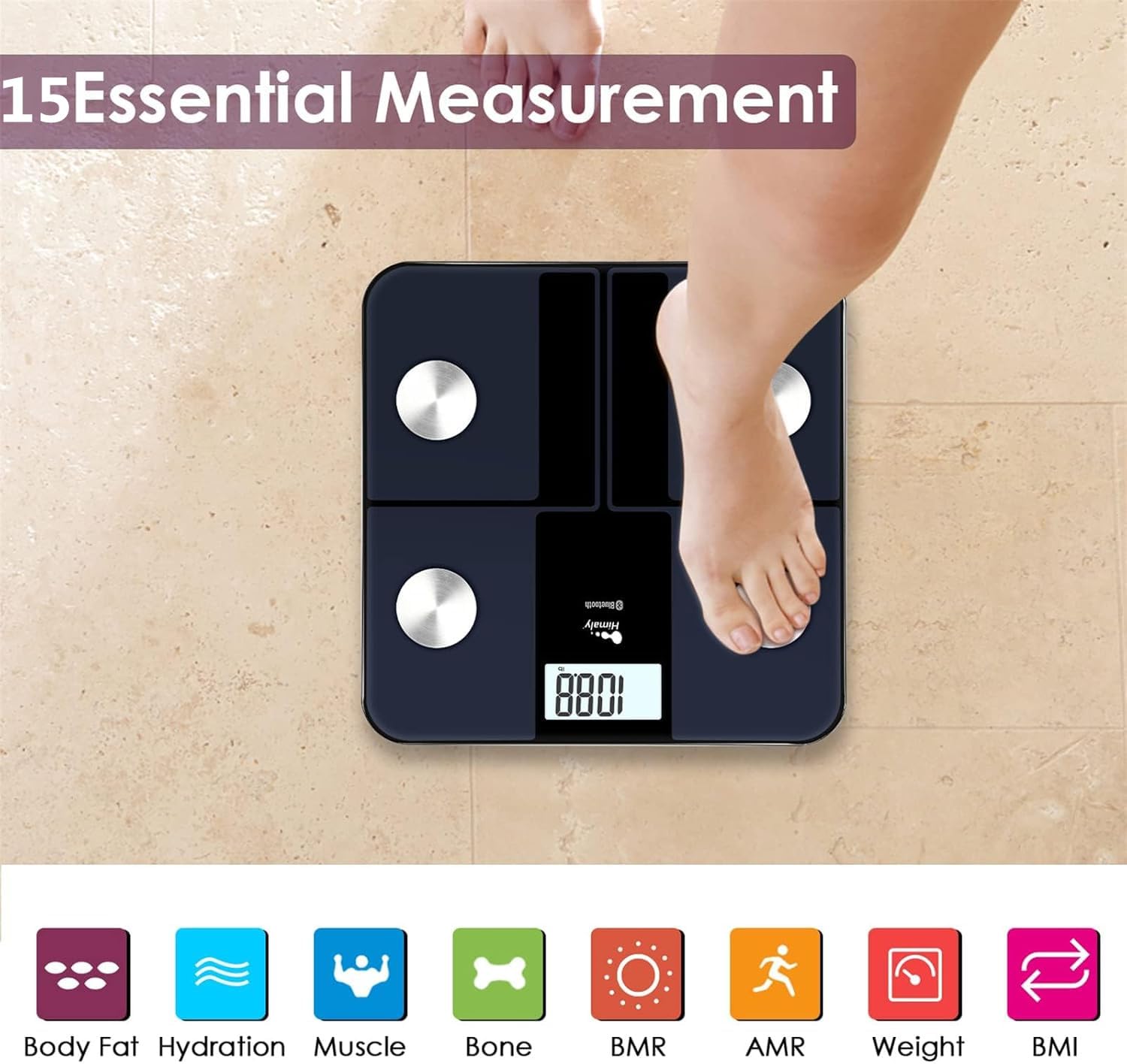
Figure 5.1: A person standing barefoot on the himaly scale, demonstrating the correct posture for obtaining 15 essential body composition measurements.
5.2 Comprendre l'affichage
The scale's LCD displays your weight. The app provides a more comprehensive breakdown of your body composition.

Figure 5.2: The scale's LCD display illustrating how different weight ranges (Thin, Slim, Normal, Heavy, Overweight) are visually represented, providing a quick reference for body type.
5.3 Version Pro multi-utilisateursfiles
The "Moving Life" app supports multiple user profiles, allowing each family member to track their individual health data.
- Dans l'application, accédez à la section de gestion des utilisateurs.
- Add new users by entering their details (age, height, gender).
- Assurez-vous que le profil utilisateur appropriéfile is selected in the app before taking a measurement to ensure data is assigned correctly.
6. Comprendre vos mesures
The "Moving Life" app provides detailed insights into various body composition metrics. Here's a brief explanation of some key indicators:
- Poids corporel : Votre masse corporelle totale.
- IMC (Indice de masse corporelle) : Une mesure de la masse grasse corporelle basée sur la taille et le poids.
- Pourcentage de graisse corporelletage: La proportion de graisse par rapport au poids corporel total.
- Masse musculaire : Le poids total des muscles de votre corps.
- Hydration (Water Percentage) : La quantité d'eau dans votre corps.
- Masse osseuse: Le poids total des os de votre corps.
- BMR (taux métabolique basal) : The number of calories your body burns at rest.
- AMR (Taux métabolique actif) : The total calories your body burns in a day, including activity.

Figure 6.1: An illustrative graph from the app demonstrating how weight and body fat trends can be tracked over time, providing visual progress monitoring.
7. Entretien
7.1 Nettoyage
- Essuyez la surface de la balance avec de la publicitéamp chiffon et détergent doux.
- N’utilisez pas de nettoyants abrasifs et n’immergez pas le tartre dans l’eau.
- S'assurer que la balance est parfaitement sèche avant de la ranger ou de l'utiliser à nouveau.
7.2 Stockage
- Conservez la balance dans un endroit frais et sec.
- Évitez l'exposition directe au soleil ou aux températures extrêmes.
8. Dépannage
| Problème | Cause possible | Solution |
|---|---|---|
| "Lo" affiché | Batterie faible. | Recharge the scale using the provided USB cable. |
| "Err" affiché | Surcharge ou erreur de mesure. | Step off the scale. Ensure weight is within the 400 lbs (181 kg) limit. Recalibrate if necessary. |
| Lectures inexactes | Scale on uneven surface, not calibrated, or feet not properly placed. | Place scale on a hard, flat surface. Perform initial calibration. Ensure bare feet are centered on electrode pads. |
| Pas de connexion Bluetooth | Bluetooth off, app not open, or scale not activated. | Ensure Bluetooth is enabled on your phone. Open the "Moving Life" app. Step on the scale to activate it. Try restarting both the app and your phone. |
| Body composition data not showing in app | Not standing barefoot, or feet not making proper contact with electrodes. | Ensure you are standing barefoot with clean, dry feet making full contact with all four electrode pads. |
9. Spécifications
| Fonctionnalité | Détail |
|---|---|
| Numéro de modèle | IF1010AR |
| Marque | himaly |
| Capacité de poids | 400 livres (181 kg) |
| Unités de mesure | kg / lb / m |
| Type d'affichage | LCD numérique |
| Connectivité | Bluetooth 4.0 |
| Source d'énergie | Built-in Rechargeable Battery (USB charged) |
| Matériel | Verre trempé, plastique |
| Dimensions | Environ. 33.7 x 32.8 x 4.3 cm |
| Poids de l'article | Environ 1.77 kg |
| Compatibilité des applications | iOS and Android (Moving Life App) |
10. Garantie et assistance
10.1 Informations sur la garantie
The himaly IF1010AR Digital Bluetooth Body Weight Scale comes with a standard manufacturer's warranty. Please refer to the warranty card included in your package or contact himaly customer support for specific warranty terms and conditions. This warranty typically covers defects in materials and workmanship under normal use.
10.2 Assistance clientèle
If you encounter any issues or have questions regarding your himaly scale, please contact our customer support team. For the most up-to-date contact information, please visit the official himaly webConsultez le site ou reportez-vous à l'emballage de votre produit.
Note: Specific contact details are not provided in this manual. Please check the product packaging or manufacturer's website pour obtenir les coordonnées de l'assistance.


