Introduction
Merci pour votre achatasing the SOOMFON Aux Bluetooth 5.4 Transmitter Receiver. This device offers a versatile 2-in-1 solution, functioning as both a Bluetooth transmitter and receiver. It enables wireless audio streaming for a wide range of devices, from non-Bluetooth TVs and audio players to wired headphones and speakers. Please read this manual carefully to ensure proper use and optimal performance.
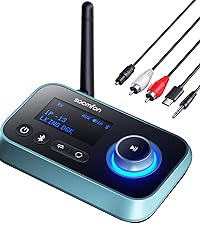
Produit terminéview
Contenu du colis

The package includes the SOOMFON Bluetooth 5.4 Transmitter Receiver, a USB-C charging cable, a 3.5mm AUX audio cable, a 3.5mm audio adapter, and the user manual.
- SOOMFON Bluetooth 5.4 Transmitter Receiver x1
- Câble de charge USB-C x1
- 3.5mm AUX Audio Cable x1
- 3.5mm Audio Adapter x1
- Manuel d'utilisation x1
Caractéristiques principales

This image summarizes the device's features, including its 10-meter wireless range, integrated microphone for calls, automatic reconnection capability, and portable, compact design.
- Bluetooth 5.4 + EDR : Equipped with the latest Bluetooth technology for faster, more stable transmission and reduced power consumption. Supports signal transmission up to 10 meters.
- Fonctionnalité 2 en 1 : Easily switch between Transmitter (TX) and Receiver (RX) modes with a slide switch.
- Appels mains libres : Built-in microphone with CVC 8.0 noise cancellation for clear calls in RX mode.
- Longue durée de vie de la batterie : Integrated large-capacity battery provides up to 8 hours of playback and talk time.
- Reconnexion automatique : Supports automatic reconnection in RX mode for convenience.
- Conception compacte : Petit et léger pour être facilement transportable.
Disposition de l'appareil

This diagram identifies the AUX 3.5mm port, microphone, multi-function button (MFB), volume/track control buttons, Type-C charging port, and the TX/RX mode switch.
- Port AUX 3.5 mm
- Microphone
- Bouton multifonction (MFB)
- Bouton d'augmentation du volume/piste suivante
- Bouton de réduction du volume/piste précédente
- Port de charge de type C
- Commutateur de mode TX/RX
Installation
Charger l'appareil
Before first use, fully charge the device. Connect the included USB-C charging cable to the Type-C charging port on the device and the other end to a USB power source (e.g., wall adapter, computer USB port). The indicator light will show charging status.
Marche/Arrêt
- Mise sous tension : Long-press the Multi-function Button (MFB) for approximately 3 seconds until the indicator light illuminates.
- Éteindre: Long-press the Multi-function Button (MFB) for approximately 3 seconds until the indicator light turns off.
Mode d'emploi
Mode Switching (TX/RX)

This diagram illustrates the versatility of the 2-in-1 device, showing how it can transmit audio from computers/TVs to Bluetooth headphones/speakers (TX mode) or receive audio from smartphones/laptops to car stereos/speakers (RX mode).
The device features a slide switch on its side to easily toggle between Transmitter (TX) and Receiver (RX) modes. Ensure the device is in the correct mode for your intended use.
Emetteur (TX) Mode
In TX mode, the device transmits audio from a non-Bluetooth source to a Bluetooth-enabled receiving device (e.g., Bluetooth headphones, Bluetooth speaker).

In Transmitter (TX) mode, the device connects to a TV, allowing audio to be streamed wirelessly to Bluetooth headphones.
- Faites glisser le commutateur de mode sur TX.
- Connect the SOOMFON device to your audio source (e.g., TV, PC, MP3 player) using the 3.5mm AUX audio cable.
- Place your Bluetooth receiving device (e.g., headphones, speaker) into pairing mode.
- The SOOMFON device will automatically search for and connect to nearby Bluetooth devices. The indicator light will flash during pairing and become solid upon successful connection.
A visual guide demonstrating the pairing process for TX mode: power on the receiving device, long-press the MFB button on the SOOMFON device, slide to TX mode, and observe the indicator lights for successful connection.
Mode récepteur (RX)
In RX mode, the device receives Bluetooth audio from a source (e.g., smartphone, tablet, laptop) and outputs it to a non-Bluetooth audio device (e.g., wired headphones, car stereo, home stereo system).

In Receiver (RX) mode, the device connects to a wired speaker, enabling it to receive audio wirelessly from a Bluetooth-enabled smartphone.
- Faites glisser le commutateur de mode sur RX.
- Connect the SOOMFON device to your audio output device (e.g., wired speaker, car stereo) using the 3.5mm AUX audio cable.
- On your Bluetooth audio source (e.g., smartphone), enable Bluetooth and search for available devices. Select "SOOMFON" from the list to pair.
- Once paired, the indicator light will become solid, and audio will stream wirelessly to your connected device.

The device can be used in Receiver (RX) mode to add Bluetooth audio streaming capabilities to car stereos via the AUX input.
Hands-free Calling (RX Mode Only)
When in RX mode and connected to a smartphone, the built-in microphone allows for hands-free calling. The device features CVC 8.0 noise cancellation for clear communication.

This image illustrates the hands-free calling feature with CVC 8.0 noise cancellation, ensuring clear communication even in noisy environments like a car.
- Répondre/Terminer l'appel : Appuyez une fois sur le bouton multifonction (MFB).
- Rejeter l'appel : Long-press the Multi-function Button (MFB) for 2 seconds.
- Recomposer le dernier numéro : Double-press the Multi-function Button (MFB).
Music Controls (RX Mode Only)
- Lecture/Pause : Appuyez une fois sur le bouton multifonction (MFB).
- Piste suivante : Press the Volume Up / Next Track button once.
- Piste précédente: Press the Volume Down / Previous Track button once.
- Monter le son: Long-press the Volume Up / Next Track button.
- Baisser le volume: Long-press the Volume Down / Previous Track button.
Entretien
- Gardez l'appareil au sec. Évitez tout contact avec l'humidité ou les liquides.
- N'essayez pas de démonter ou de modifier l'appareil.
- Nettoyez l'appareil avec un chiffon doux et sec. N'utilisez pas de produits chimiques agressifs ni de nettoyants abrasifs.
- Rangez l'appareil dans un endroit frais et sec lorsqu'il n'est pas utilisé.
Dépannage
Remarques importantes avant utilisation
- TX Mode Interference: In Transmitter (TX) mode, the device is susceptible to interference. Please turn off the Bluetooth function of other nearby devices to ensure a stable connection.
- Audio Delay (SBC Decoding): This product uses SBC decoding, which results in an audio delay of approximately 220ms. This delay makes the device unsuitable for applications requiring precise real-time audio, such as musical instrument performance.
- TX Mode Limitations: Voice calls and volume adjustment features are supported only in Receiver (RX) mode. Neither function is available when the device is operating in Transmitter (TX) mode.
Problèmes courants
| Problème | Solution |
|---|---|
| L'appareil ne s'allume pas. | Ensure the device is fully charged. Long-press the MFB button for 3 seconds. |
| Impossible de connecter un appareil Bluetooth. | Ensure the SOOMFON device is in the correct TX or RX mode. Place the other Bluetooth device in pairing mode. Keep devices within 10 meters. Turn off other Bluetooth devices nearby (especially in TX mode). |
| Aucun son ou qualité audio médiocre. | Check all cable connections. Ensure volume is turned up on both the SOOMFON device and the connected audio device. Verify the SOOMFON device is in the correct mode (TX/RX). Ensure no interference from other Bluetooth devices. |
| Hands-free calling not working in TX mode. | Hands-free calling is only supported in RX mode. Switch the device to RX mode for call functionality. |
| Audio delay during use. | This device uses SBC decoding, which has an inherent delay of approximately 220ms. This is normal operation and cannot be eliminated. It is not suitable for real-time applications like musical instrument performance. |
Caractéristiques
| Fonctionnalité | Détail |
|---|---|
| Version Bluetooth | 5.4 + EDR |
| Modes de fonctionnement | Émetteur (TX), Récepteur (RX) |
| Connectivité | AUX 3.5mm, Bluetooth |
| Portée sans fil | Jusqu'à 10 mètres (33 pieds) |
| Autonomie de la batterie | Jusqu'à 8 heures (temps de lecture/conversation) |
| Port de chargement | USB Type-C |
| Décodage audio | SBC (with ~220ms delay) |
| Appels mains libres | Supported in RX mode (with CVC 8.0 noise cancellation) |
| Dimensions du produit | Environ 16.3 x 6.9 x 2.1 cm |
| Poids du produit | 70 grammes |
Garantie et assistance
SOOMFON fournit un Garantie de 24 mois for this product from the date of purchase. We are committed to ensuring the quality and performance of our products. If you encounter any issues or have questions regarding your SOOMFON Aux Bluetooth 5.4 Transmitter Receiver, please do not hesitate to contact our customer support. We will assist you promptly.
For warranty claims or technical support, please refer to the contact information provided with your purchase or visit the official SOOMFON website.


