Introduction
The Stinger HORIZON10 is a state-of-the-art 10.1-inch universal car stereo designed to enhance your in-vehicle entertainment and connectivity. Featuring a 1280x800 HD weather-resistant touchscreen, wireless Apple CarPlay and Android Auto, advanced audio controls, and multiple camera inputs, the HORIZON10 provides a comprehensive and intuitive user experience. This manual provides detailed instructions for setting up, operating, maintaining, and troubleshooting your new car stereo.

Image: The Stinger HORIZON10 Infotainment System, showcasinson design élégant et son interface utilisateur.
Qu'y a-t-il dans la boîte
Upon unboxing your Stinger HORIZON10, please verify that all the following components are included:
- 10.1" Multimedia Touchscreen Display
- Module radio
- Support d'affichage
- Nose Bracket - Radio Bracket
- Couvercle arrière du connecteur LVDS
- Vis
- Prise étanche
- Faisceau AV 16 broches
- Faisceau de pré-sortie à 12 broches
- Faisceau de données à 14 broches
- 26 Pin Power Harness LVDS Display Cable
- Microphone externe
- Antenne GPS
- GPS Mounting Plate
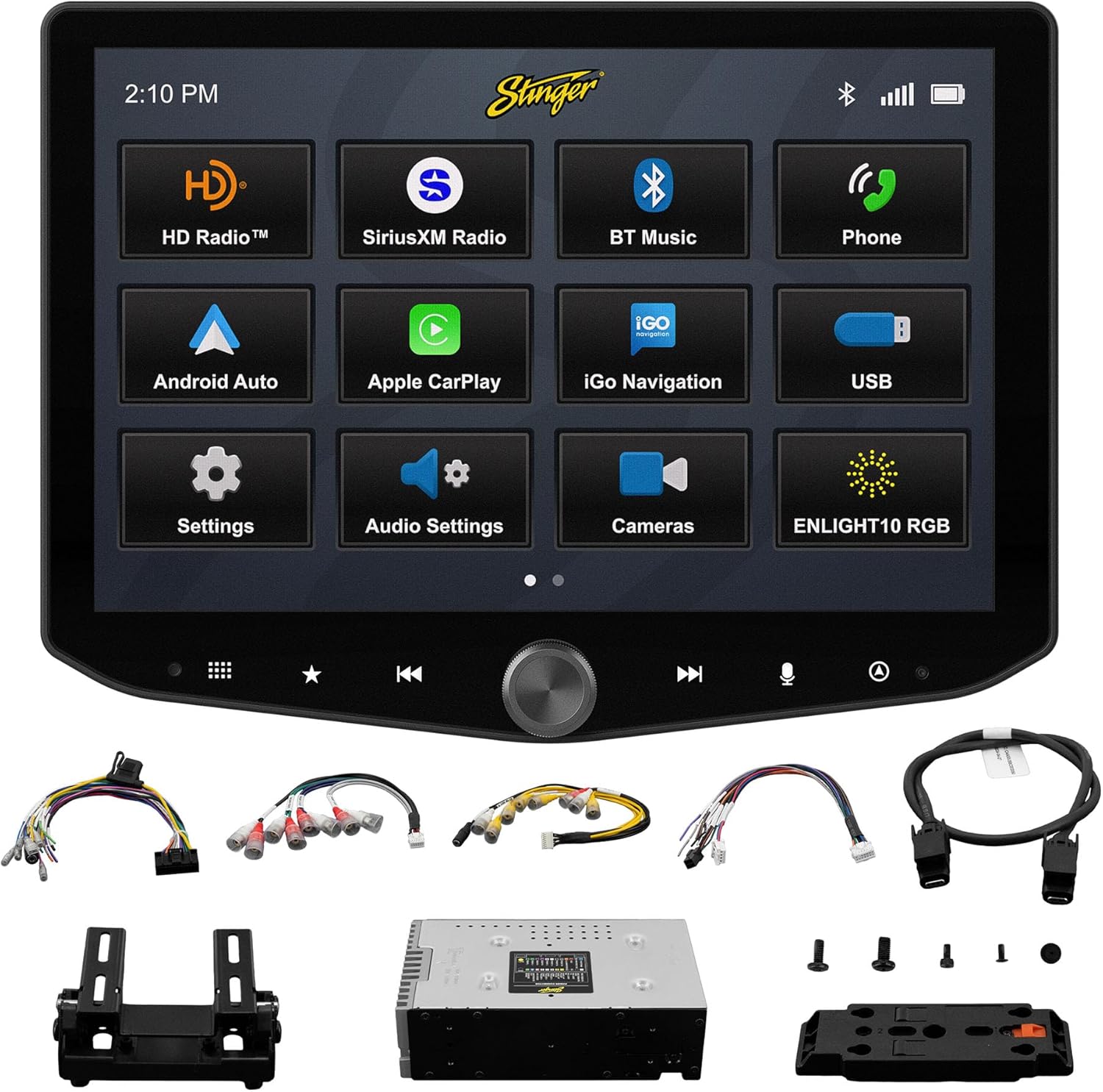
Image: All components included with the Stinger HORIZON10 car stereo system.
Configuration et installation
Professional installation is highly recommended for the Stinger HORIZON10 to ensure proper functionality and integration with your vehicle's electrical system. This unit is designed for universal compatibility, but specific vehicle dash kits, wiring harness interfaces, or antenna adapters may be required and are sold separately.
Étapes de configuration initiale :
- Montage: Securely mount the display and radio module using the provided brackets and screws. Ensure proper ventilation around the unit.
- Câblage : Connect the 16-pin AV harness, 12-pin pre-out harness, 14-pin data harness, and 26-pin power harness LVDS display cable to the corresponding ports on the radio module and your vehicle's wiring system. Refer to your vehicle's specific wiring diagram if necessary.
- Connexions externes : Connect the external microphone for hands-free calling and the GPS antenna for navigation functionality.
- Mise sous tension : Once all connections are secure, power on your vehicle to initiate the stereo. The unit should boot up and display the Stinger logo.
- Configuration initiale : Suivez les instructions à l'écran pour la configuration initiale, telles que la sélection de la langue et du fuseau horaire.
Mode d'emploi
Interface à écran tactile
The HORIZON10 features a large 10.1" 1280x800 HD floating touchscreen with anti-glare and anti-fingerprint film protection. Navigate through menus and applications by tapping, swiping, and pinching on the screen. The capacitive touch panel buttons and machined aluminum anodized knob provide additional tactile control.

Image : détaillée view of the Stinger HORIZON10 touchscreen, highlighting its capacitive touch buttons and anodized knob.
Apple CarPlay et Android Auto sans fil
Connect your iPhone or Android phone wirelessly to access navigation, calls, messages, music, and more directly on the HORIZON10 display. Wired connections are also supported via the USB-C input, which also provides fast 3A phone charging.

Image: The Stinger HORIZON10 displaying the Apple CarPlay interface wirelessly connected to an iPhone.

Image: The Stinger HORIZON10 displaying the Android Auto interface wirelessly connected to an Android phone.
Connectivité Bluetooth 5.1 et Wi-Fi
The unit supports dual phone connections for fast hands-free calling and music streaming via Bluetooth 5.1 A2DP. Wi-Fi connectivity enables additional features and updates.
Fonctionnalités audio avancées
Customize your sound experience with the 15-band adjustable EQ, 6 user EQ presets, and built-in crossover with HPF & LPF. The system offers 4.5 Vrms & 8ch RCA outputs with subwoofer control, and a Toslink (optical) audio output (48 kHz variable) for high-fidelity sound.

Image: Screenshot of the Stinger HORIZON10's advanced audio settings, showing the 15-band equalizer.
Entrées de caméra
Integrate up to four cameras (front/rear dashcam, blind spot cameras, backup camera) for enhanced safety and visibility. The system supports both AHD 720p and CVBS 480p camera inputs.

Image: The Stinger HORIZON10 displaying multiple camera views, illustrating its 4 camera input capability.
Tuner radio
Enjoy a wide variety of audio content with the built-in HD AM/FM radio tuner. The unit is also SiriusXM-Ready (SiriusXM Tuner Sold Separately).

Image: The Stinger HORIZON10 displaying the HD Radio interface, showing available stations.
USB & HDMI Inputs
The unit includes two USB-A inputs, one USB-C input (with 3A charging), and one HDMI input for media playback or mirroring.
Personnalisation
Personalize your experience by changing the background image and rearranging Home screen icons for easier access to your most used features.
onX Offroad App
The HORIZON10 includes a free 3-month trial of the onX GPS navigation off-roading map app. Register on the Stinger website to activate your trial.
Vidéo du produitview
Vidéo : Un officiel au-dessusview of the Stinger HORIZON10's key features and capabilities.
Entretien
To ensure the longevity and optimal performance of your Stinger HORIZON10, follow these maintenance guidelines:
- Nettoyage de l'écran : Utilisez un chiffon doux non pelucheux pour essuyer délicatement l'écran tactile. Pour les traces tenaces, frottez légèrement.ampNettoyez le chiffon avec de l'eau ou un nettoyant adapté aux écrans. Évitez les matériaux abrasifs et les produits chimiques agressifs.
- Résistance aux intempéries : While the display is IP65 weather-resistant, the radio chassis is not. Avoid direct exposure of the main unit to water or excessive moisture.
- Soins généraux: Veillez à ce que l'appareil soit exempt de poussière et de débris. Assurez-vous que toutes les connexions restent bien fixées.

Image: The Stinger HORIZON10 display with water droplets, demonstrating its IP65 weather-resistant feature.
Dépannage
If you encounter issues with your Stinger HORIZON10, refer to the following common problems and solutions:
| Problème | Cause possible | Solution |
|---|---|---|
| Pas de courant | Mauvaise connexion électrique, fusible grillé, problème de batterie du véhicule. | Vérifiez toutes les connexions électriques. Inspectez les fusibles du véhicule. Assurez-vous que la batterie du véhicule est chargée. |
| Pas de sortie audio | Incorrect audio settings, loose speaker wires, ampproblème de lifier. | Verify audio settings (volume, mute, source). Check speaker wire connections. Consult an audio specialist if using an external amplifier. |
| CarPlay/Android Auto ne se connecte pas | Bluetooth/Wi-Fi désactivé sur le téléphone, appariement incorrect, problème logiciel du téléphone. | Ensure Bluetooth and Wi-Fi are enabled on your phone. Re-pair the device. Restart both the phone and the HORIZON10 unit. Update phone OS. |
| L'écran tactile ne répond pas | Temporary software glitch, excessive dirt/moisture on screen. | Perform a soft reset (refer to device settings for reset option). Clean the screen thoroughly. If persistent, contact support. |
| Mauvaise réception radio | Antenne non connectée, antenne endommagée, zone de signal faible. | Check antenna connection. Consider a signal booster if in a weak reception area. |
If the problem persists after attempting these solutions, please contact Stinger customer support.
Caractéristiques
| Fonctionnalité | Détail |
|---|---|
| Numéro de modèle | 10.1" - IX210 |
| Dimensions du produit | 12.75 x 7.5 x 9.75 pouces |
| Poids de l'article | 6.98 livres |
| Taille de l'écran | 10.1 pouces |
| Résolution d'affichage | 1280x800 HD |
| Résistance aux intempéries | IP65 (Display only) |
| Technologie de connectivité | Bluetooth 5.1 A2DP, Wi-Fi |
| Type de contrôleur | Smartphone, Touchscreen |
| Entrées USB | 2x USB-A, 1x USB-C (3A charging) |
| Ports HDMI | 1 |
| Entrées de caméra | 4 (AHD 720p / CVBS 480p compatible) |
| Mode de sortie audio | Stéréo |
| Configuration des canaux de son surround | 7.1 |
| Nombre de canaux | 8 |
| EQ | 15-band adjustable EQ, 6 user presets |
| Sorties RCA | 4.5 Vrms & 8ch with subwoofer control |
| Sortie audio optique | Toslink (48 kHz variable) |
Informations sur la garantie
For detailed warranty information regarding your Stinger HORIZON10, please refer to the warranty card included with your product or visit the official STINGER webLes conditions de garantie peuvent varier et sont soumises à la politique du fabricant.
Assistance clientèle
Should you require further assistance, technical support, or have questions not covered in this manual, please contact STINGER customer service through their official website ou les coordonnées fournies dans la documentation de votre produit.
STINGER Officiel Website: www.stinger.com


