Introduction
This manual provides detailed instructions for the setup, operation, and maintenance of your One Fire Star Projector. This device combines a galaxy projector, night light, white noise generator, and Bluetooth speaker to create a versatile ambiance for any room.
Qu'y a-t-il dans la boîte
- One Fire Star Projector Unit
- Câble d'alimentation
- Télécommande
- Manuel d'utilisation (ce document)
Caractéristiques du produit
- Fonctionnalité 4 en 1 : Combines a night light, galaxy projector, white noise generator, and Bluetooth speaker.
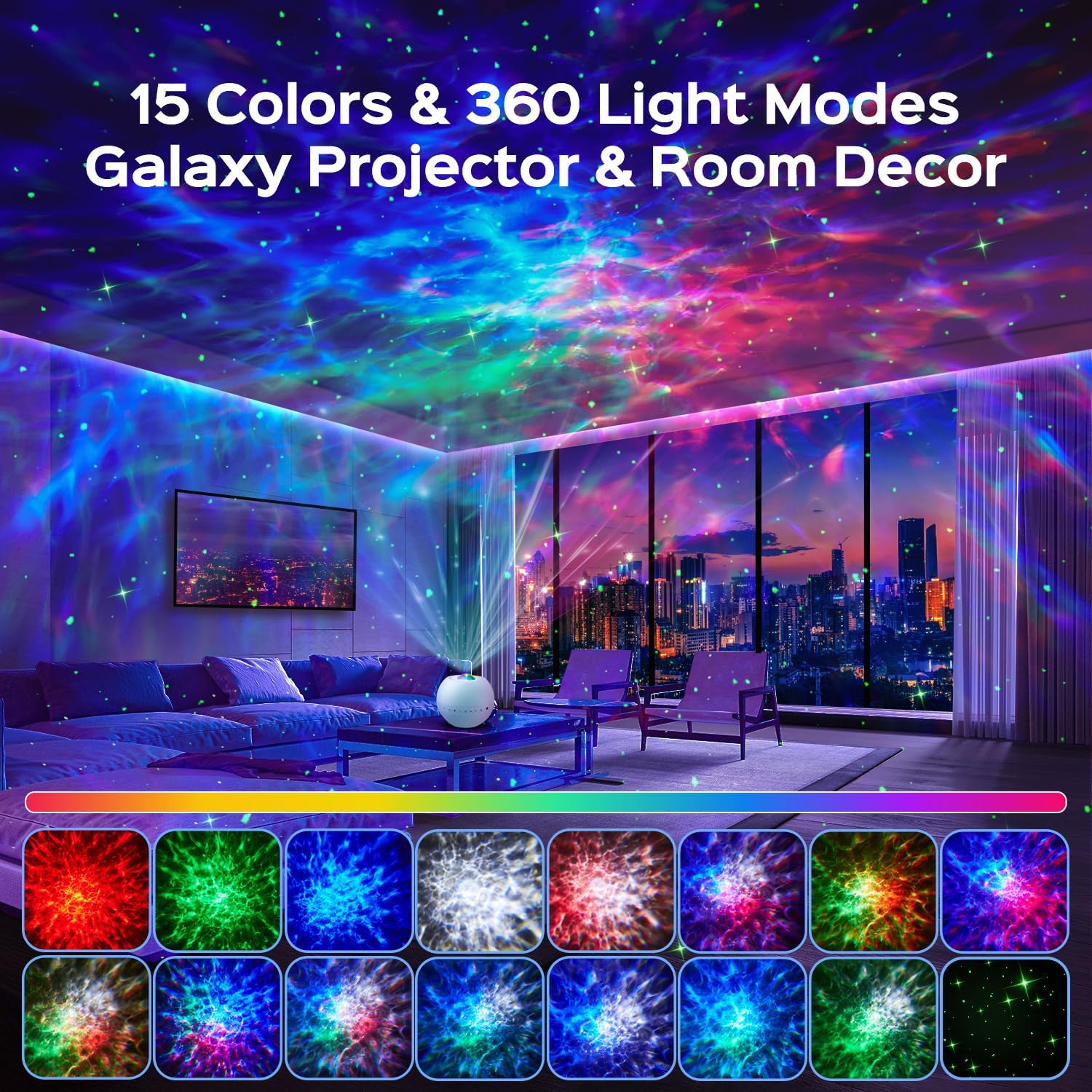
- Effets lumineux dynamiques : 15 color options, green stars, and 360-degree light effects covering over 250 square meters.
- 3 Projection Modes: Nebula, Nebulae & Stars, and Star modes for varied visual experiences.
- Bruit blanc intégré : 15 soothing sounds including lullabies, nature sounds (rain, waves, birds), and white noise.
- Haut-parleur Bluetooth 5.3 : Connect your device to play music or stories with HiFi sound quality.
- Télécommande: Full control over colors, music, volume, modes, brightness (7 levels), speed (4 levels), and timers (0.5/1/2/8 hours).
Installation
- Déballer: Retirez soigneusement tous les composants de l'emballage.
- Placement: Place the projector on a stable, flat surface in the desired room. Ensure there are no obstructions to the projection lens.
- Connexion électrique : Raccordez le câble d'alimentation fourni au port d'entrée d'alimentation du projecteur, puis branchez-le dans une prise électrique standard.
- Mise sous tension initiale : Press the power button on the device or the remote control to turn on the projector.
Mode d'emploi
Commandes de l'appareil
The projector unit features several buttons for direct control:

- Bouton d'alimentation : Allume ou éteint le projecteur.
- Interrupteur d'éclairage : Cycles through different light effects.
- Green Star Button: Activates or deactivates the green star projection.
- Piste précédente / Baisser le volume : Appuyez brièvement pour revenir au morceau précédent, appuyez longuement pour diminuer le volume.
- Piste suivante / Augmenter le volume : Appuyez brièvement pour passer au morceau suivant, appuyez longuement pour augmenter le volume.
- White Noise / Bluetooth Button: Toggles between white noise modes and Bluetooth pairing mode.
- 2H Timer Function: Active une minuterie d'arrêt automatique d'une heure.
Télécommande
La télécommande incluse offre des fonctionnalités complètes :

- Marche/Arrêt : Allume ou éteint l'appareil.
- Green Star On/Off: Toggles green star projection.
- Boutons de couleur (rouge, vert, bleu, blanc) : Sélectionnez des couleurs individuelles ou des combinaisons.
- Change Light Effect: Cycles through different light patterns.
- Lecture/Pause : Contrôle la lecture de la musique.
- Volume +/- : Régler le volume audio.
- Piste précédente/suivante : Navigates audio tracks.
- Dynamic Speed: Adjusts the speed of light movement (4 levels).
- Light Modes (F1, F2): Activates preset light modes.
- Annuler la minuterie : Deactivates any active timer.
- Régler la luminosité : Changes the projection brightness (7 levels).
- Timers (2H, 4H, 6H): Sets automatic shut-off timers for 2, 4, or 6 hours.
Light Projection Modes
The projector offers three primary dynamic projection modes:
- Nebula Mode: Creates an intense, imaginative nebula atmosphere.
- Nebulae & Stars Mode: Projects realistic skies with shimmering stars and artistic nebula clouds.
- Star Mode: Displays a crystal-clear, fantastic starry sky on the ceiling with surprising depth effects.
Note: Green stars cannot be projected independently in Star Mode.

White Noise and Bluetooth Speaker
The projector includes 15 built-in white noise sounds and a Bluetooth 5.3 speaker for external audio playback.

- White Noise Selection: Press the White Noise / Bluetooth button on the device or use the remote to cycle through the 15 integrated sounds. These include lullabies, nature sounds (rain, waves, bird song), and various white noise types.
- Jumelage Bluetooth:
- Assurez-vous que le projecteur est allumé.
- Press and hold the White Noise / Bluetooth button on the device or remote until you hear an audible prompt indicating Bluetooth pairing mode.
- On your mobile device, enable Bluetooth and search for "B0DCYV6CD2" or "One Fire Projector" in the list of available devices.
- Select the projector to pair. A confirmation sound will indicate successful pairing.
- You can now play music or audio from your device through the projector's speaker.

Fonction de minuterie
The projector features an automatic shut-off timer to conserve energy and assist with sleep.
- Using Device Button: Press the 2H Timer button on the unit to set a 2-hour timer.
- Utilisation de la télécommande : Use the 2H, 4H, or 6H buttons on the remote to set the desired timer duration. Press the "Cancel Timer" button to deactivate any active timer.

Entretien
- Nettoyage: Utilisez un chiffon doux et sec pour nettoyer l'extérieur du projecteur. N'utilisez pas de produits nettoyants abrasifs ni de solvants.
- Entretien des lentilles : Gently wipe the projection lens with a microfiber cloth to remove dust or smudges. Avoid touching the lens directly with fingers.
- Stockage: Lorsqu'il n'est pas utilisé pendant une période prolongée, rangez le projecteur dans un endroit frais et sec, à l'abri de la lumière directe du soleil et des températures extrêmes.
- Pouvoir: Débranchez toujours le câble d'alimentation avant de procéder au nettoyage ou à toute opération de maintenance.
Dépannage
| Problème | Cause possible | Solution |
|---|---|---|
| Le projecteur ne s'allume pas. | No power connection; faulty power cable; unit malfunction. | Ensure power cable is securely connected to both the projector and a working outlet. Try a different outlet. Contact support if problem persists. |
| Les lumières sont faibles ou peu visibles. | Brightness setting is low; lens is dirty; room is too bright. | Increase brightness using the remote. Clean the projection lens. Ensure the room is dark for optimal projection. |
| Connexion Bluetooth impossible. | Projector not in pairing mode; device Bluetooth off; too far from projector. | Ensure projector is in Bluetooth pairing mode (indicated by an audible prompt). Turn on Bluetooth on your device. Move your device closer to the projector (within 10 meters). |
| La télécommande ne fonctionne pas. | Les piles sont déchargées ou mal insérées ; la télécommande est trop éloignée ou obstruée. | Replace remote control batteries. Ensure batteries are inserted with correct polarity. Point remote directly at the projector. Reduce distance or remove obstructions. |
| No sound from white noise or Bluetooth. | Volume is too low; incorrect mode selected. | Increase volume using the device buttons or remote. Ensure the correct mode (White Noise or Bluetooth) is selected. |
Caractéristiques
| Marque | Un feu |
| Modèle | B0DCYV6CD2 |
| Fabricant | TK CO.,Ltd. |
| Dimensions du produit | 10.5 x 10.5 x 10 cm |
| Poids de l'article | 260 grammes |
| Style | Minimalist |
| Couleur | Blanc |
| Matériel | Plastique, Acrylonitrile Butadiène Styrène (ABS) |
| Types de finition | Mat |
| Nombre de lumières | 1 |
| Voltage | 5 volts |
| Utilisations spécifiques | Aide au sommeil, Décoration |
| Fonctionnalités supplémentaires | Timer, Dimmer |
| Direction de la lumière | DIRIGÉ |
| Source d'énergie | Électrique avec fil |
| Changer de style | Push Button (Integrated) |
| Piles incluses | Non |
| Piles requises | Non |
| Type d'ampoule | DIRIGÉ |
| Quoitage | 10 watts |
| Premier disponible | 10 septembre 2024 |
Garantie et assistance
One Fire provides a Garantie de qualité de 24 mois for this product. If you encounter any issues with your galaxy projector, please do not hesitate to contact our customer support team.
Our commitment is to provide world-class quality and customer service. For support, please refer to the contact information provided with your purchase or visit the official One Fire store on Amazon.


Vidéos de produits
Video: A general demonstration of the One Fire Star Projector's features and light effects (1 minute 14 seconds).
Vidéo : Un aperçu concisview of the projector's capabilities and visual output (31 seconds).
Video: An extended demonstration showcasing various light modes, white noise, and Bluetooth functions (3 minutes 14 seconds).


