1. Introduction
Thank you for choosing the Socool D22 20000mAh Camping Fan with Light. This portable and versatile device is designed to provide cooling and illumination in various settings, including camping, outdoor activities, and during power outages. Please read this manual carefully before use to ensure proper operation and to maximize the product's lifespan.
2. Consignes de sécurité
- N’insérez pas vos doigts ni aucun objet dans la grille du ventilateur lorsque celui-ci est en marche.
- Tenez le ventilateur éloigné de l'eau ou d'autres liquides afin d'éviter tout risque d'électrocution.
- Ne démontez pas, ne réparez pas et ne modifiez pas le ventilateur vous-même. Contactez le service client si une intervention est nécessaire.
- Tenir hors de portée des enfants.
- Use only the recommended charging cable and adapter to prevent damage to the battery.
- Évitez d'exposer le ventilateur à des températures extrêmes ou à la lumière directe du soleil pendant des périodes prolongées.
3. Contenu du colis
- Socool D22 CampVentilateur avec lumière
- Télécommande
- Câble de chargement USB-C
- Manuel d'utilisation
4. Produit terminéview
Familiarize yourself with the components of your Socool D22 CampFan ing :

Figure 1 : Devant view of the Socool D22 Camping Fan with Light, showing the fan blades, LED light ring, and control panel.
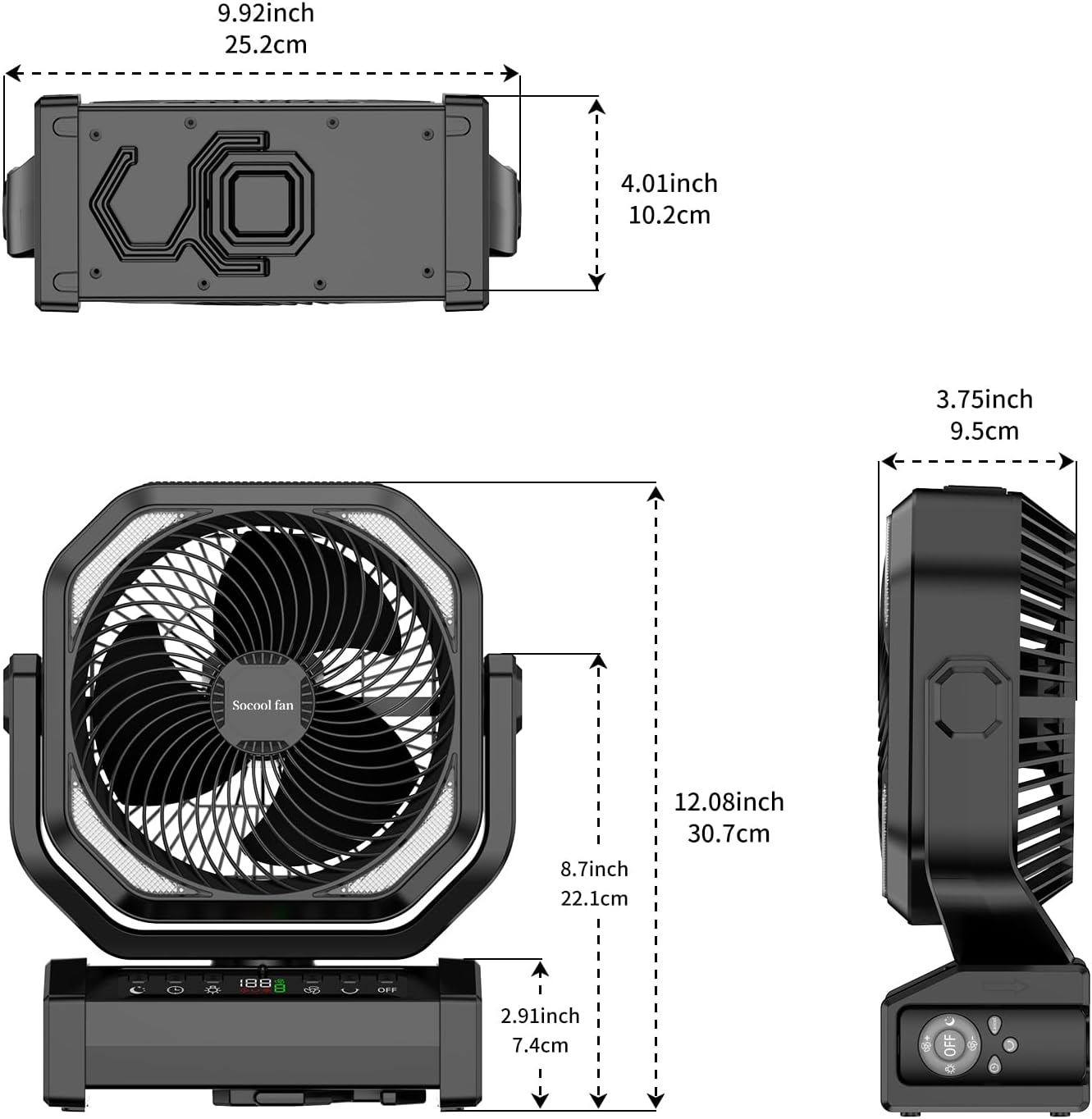
Figure 2 : Dimensions of the Socool D22 Camping Fan, illustrating its compact and portable design.
Panneau de configuration et ports :
- Bouton d'alimentation : Allume/éteint le ventilateur.
- Bouton de vitesse du ventilateur : Adjusts between 9 wind speeds.
- Bouton d'oscillation : Activates 45°/90° auto oscillation.
- Bouton lumineux : Cycles through 3 brightness levels for the LED light.
- Bouton de minuterie : Sets the timer for 1H, 2H, 4H, or 8H.
- Bouton Mode Veille : Activates sleep mode, turning off the display and reducing fan noise.
- Affichage numérique: Affiche le pourcentage de batterietage, fan speed, and timer settings.
- Port d'entrée/sortie USB-C : For charging the fan (5V/3A) and charging external devices (5V/2A).
- Port de sortie USB-A : Pour charger des appareils externes (5V/2A).
- Emplacement pour télécommande : Convenient storage for the remote control.
- Crochet intégré : For hanging the fan in tents or other elevated positions.
- Pivot à 270° : Allows manual adjustment of the fan head angle.
5. Installation
5.1 Charge initiale
Before first use, fully charge the fan. Connect the provided USB-C cable to the fan's USB-C port and the other end to a compatible 5V/3A USB power adapter. The digital display will show the charging progress. A full charge can take approximately 9-10 hours.

Figure 3 : The fan being charged via its Type-C port, highlighting its long-lasting battery and charging capabilities.
5.2 Options de placement
- Sur pied: Placez le ventilateur sur une surface plane et stable.
- Pendaison: Utilize the integrated hook to hang the fan from a tent ceiling, branch, or other suitable support.
- Poignée portable : Use the built-in handle for easy transport.
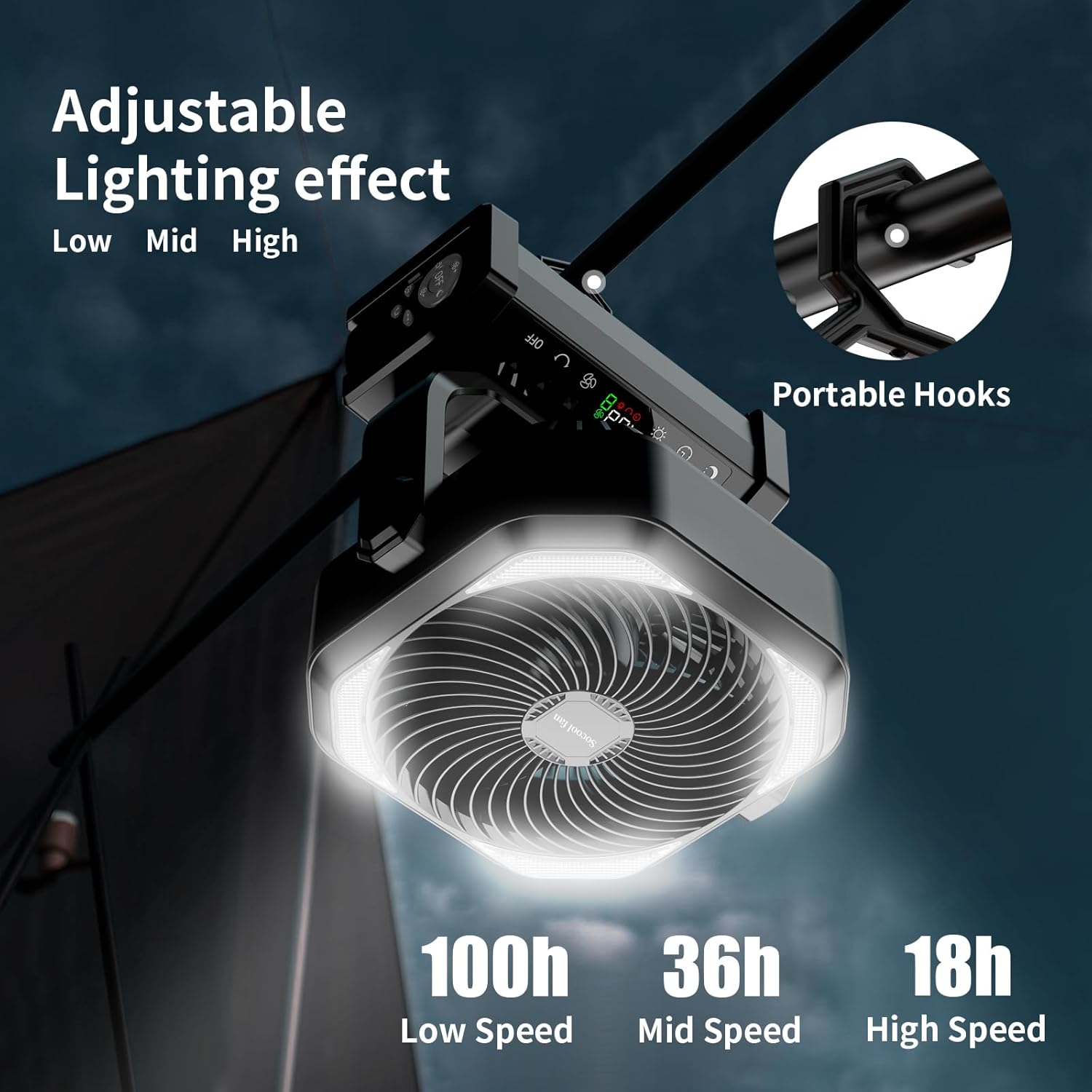
Figure 4 : The fan demonstrating its portable hook for hanging, ideal for tent use.

Figure 5 : The fan providing cooling and light inside a camptente.
6. Mode d'emploi
6.1 Mise sous/hors tension
Appuyez sur le Bouton d'alimentation sur le panneau de commande ou la télécommande pour allumer ou éteindre le ventilateur.
6.2 Réglage de la vitesse du ventilateur
Appuyez sur le Bouton de vitesse du ventilateur repeatedly to cycle through 9 different wind speeds. The digital display will show the current speed level. Speed 9 simulates natural wind.

Figure 6 : The fan operating at various speeds, indicating battery life at low, mid, and high settings.
6.3 Fonction d'oscillation
Appuyez sur le Bouton d'oscillation to activate automatic oscillation. Press once for 45° oscillation, and press again for 90° oscillation. Press a third time to turn off oscillation. The fan head can also be manually pivoted up to 270° for precise airflow direction.
6.4 Contrôle de la lumière LED
Appuyez sur le Bouton lumineux to turn on the LED light. Press repeatedly to cycle through 3 brightness settings (Low, Mid, High). Press a fourth time to turn off the light.
6.5 Réglage de la minuterie
Appuyez sur le Bouton de minuterie to set an automatic shut-off timer. Options include 1 hour, 2 hours, 4 hours, and 8 hours. The selected time will be displayed on the screen.
6.6 Mode veille
Activer Mode veille to reduce fan noise to below 30dB and turn off the digital display, ensuring an undisturbed rest. Press the Sleep Mode button to toggle this feature.
Télécommande 6.7
The included remote control allows convenient operation from a distance. Ensure the remote is pointed towards the fan's control panel. Store the remote in the designated slot on the fan base when not in use to prevent loss.

Figure 7 : The fan being operated with its remote control, showing the remote control storage slot.
6.8 Chargement des appareils externes
The fan features USB-C and USB-A output ports (5V/2A) to charge your mobile phone or other USB-powered devices. Connect your device to the appropriate port using its charging cable.
Vidéo 1: Demonstrates the various functions of the Socool D22 Camping Fan, including fan speeds, light settings, and charging capabilities.
7. Entretien
7.1 Nettoyage
- Assurez-vous que le ventilateur est éteint et débranché avant de le nettoyer.
- Essuyez l'extérieur du ventilateur avec un chiffon doux et sec.amp chiffon. N'utilisez pas de nettoyants abrasifs ou de solvants.
- Use a soft brush or vacuum cleaner to remove dust from the fan grille and blades.
7.2 Stockage
When not in use for an extended period, store the fan in a cool, dry place. Ensure the battery is partially charged (around 50%) before storage to prolong battery life. Recharge every 3-6 months if stored for long periods.
8. Dépannage
| Problème | Cause possible | Solution |
|---|---|---|
| Le ventilateur ne s'allume pas. | Batterie faible. | Rechargez le ventilateur à l'aide du câble USB-C fourni. |
| Le ventilateur ne souffle pas fort. | Réglage de la vitesse du ventilateur à faible vitesse. | Increase the fan speed using the Fan Speed Button. |
| LED light is dim or not working. | Batterie faible ou réglage de luminosité incorrect. | Charge the fan or adjust the light brightness using the Light Button. |
| La télécommande ne fonctionne pas. | Remote battery depleted or not pointed correctly. | Ensure the remote is pointed at the fan. Replace remote battery if necessary. |
| Impossible de charger des appareils externes. | Fan battery is too low or device cable is faulty. | Ensure the fan has sufficient charge. Try a different charging cable for your device. |
9. Spécifications
| Fonctionnalité | Détail |
|---|---|
| Nom du modèle | D22 |
| Capacité de la batterie | Polymère de lithium 20000mAh |
| Max Run Time (Fan) | Up to 112 hours (lowest speed) |
| Vitesses des ventilateurs | 9 niveaux |
| Vitesse du flux d'air | Up to 14.7 ft./s |
| Oscillation | Oscillation automatique 45°/90° |
| Angle de pivotement | Rotation manuelle à 270° |
| Lumière LED | 16 ultra-bright LED bulbs, 3 brightness settings (Max 400LM) |
| Paramètres de la minuterie | 1H, 2H, 4H, 8H |
| Niveau de bruit | <30dB (lowest speed) |
| Entrée/Sortie (USB-C) | 5 V/3 A |
| Sortie (USB-A) | 5 V/2 A |
| Dimensions du produit | 4"P x 12"L x 10"H |
| Poids de l'article | 1.9 livres |
| Méthode de contrôle | Buttons, Remote Control |
| Code UPC | 751314746466 |
10. Garantie et assistance
The Socool D22 Camping Fan with Light comes with a standard manufacturer's warranty. For detailed warranty information, product support, or technical assistance, please refer to the warranty card included in your package or visit the official Socool fan website. You may also contact our customer service team directly via the contact information provided on our website.


