Introduction
This manual provides instructions for the safe and effective use of your Ashfly Portable Handheld Kids Microscope. Please read this manual thoroughly before operating the device and retain it for future reference.
The Ashfly Portable Handheld Kids Microscope is designed to introduce young scientists to the microscopic world. Featuring a 2-inch LCD screen and 200x magnification, it allows for real-time observation of small objects.
Contenu du colis
Vérifiez que tous les éléments énumérés ci-dessous sont présents dans votre colis :
- Ashfly Portable Handheld Kids Microscope
- Câble de chargement USB
- Lanière/bracelet
- Manuel de l'utilisateur (ce document)

Image: Contents of the Ashfly Portable Handheld Kids Microscope package, including the microscope, USB cable, and wrist strap.
Installation
1. Chargement de l'appareil
- Locate the USB charging port on the microscope.
- Connect the provided USB charging cable to the microscope and a compatible USB power source (e.g., computer, wall adapter).
- Le voyant de charge s'allumera. Prévoyez environ 2 à 3 heures pour une charge complète.
- Une fois complètement chargée, débranchez le câble de charge.
2. Attaching the Lanyard/Wrist Strap
Thread the lanyard or wrist strap through the designated loop on the microscope to prevent accidental drops during use.
Mode d'emploi
1. Marche/Arrêt
- To power on, press and hold the power button (usually marked with a power symbol) for a few seconds until the screen illuminates.
- Pour éteindre l'appareil, maintenez le bouton d'alimentation enfoncé jusqu'à ce que l'écran s'éteigne.
2. Observing Objects
- Place the object you wish to observe on a flat surface.
- Position the microscope's lens directly over the object.
- Adjust the focus wheel (if present) or move the microscope closer/further from the object until a clear image appears on the 2-inch LCD screen.
- Use the zoom adjustment button (4x zoom) to further magnify the image up to 200x.

Image: A child holding the Ashfly microscope, observing a small object on a surface, demonstrating its handheld operation.
3. Capture de photos et de vidéos
The microscope supports photo and video functions. It comes with built-in memory for storing observations.
- To take a photo: Press the designated photo capture button (refer to device markings).
- To record a video: Press the designated video record button to start recording, and press it again to stop.

Image: The Ashfly microscope's screen displaying a magnified image of an insect, illustrating its digital imaging capability.
4. Dual-Lens Design
This microscope features a dual-lens design. One side is the digital microscope for recording observations, and the other side is a physical magnifier for quick viewing d'objets.
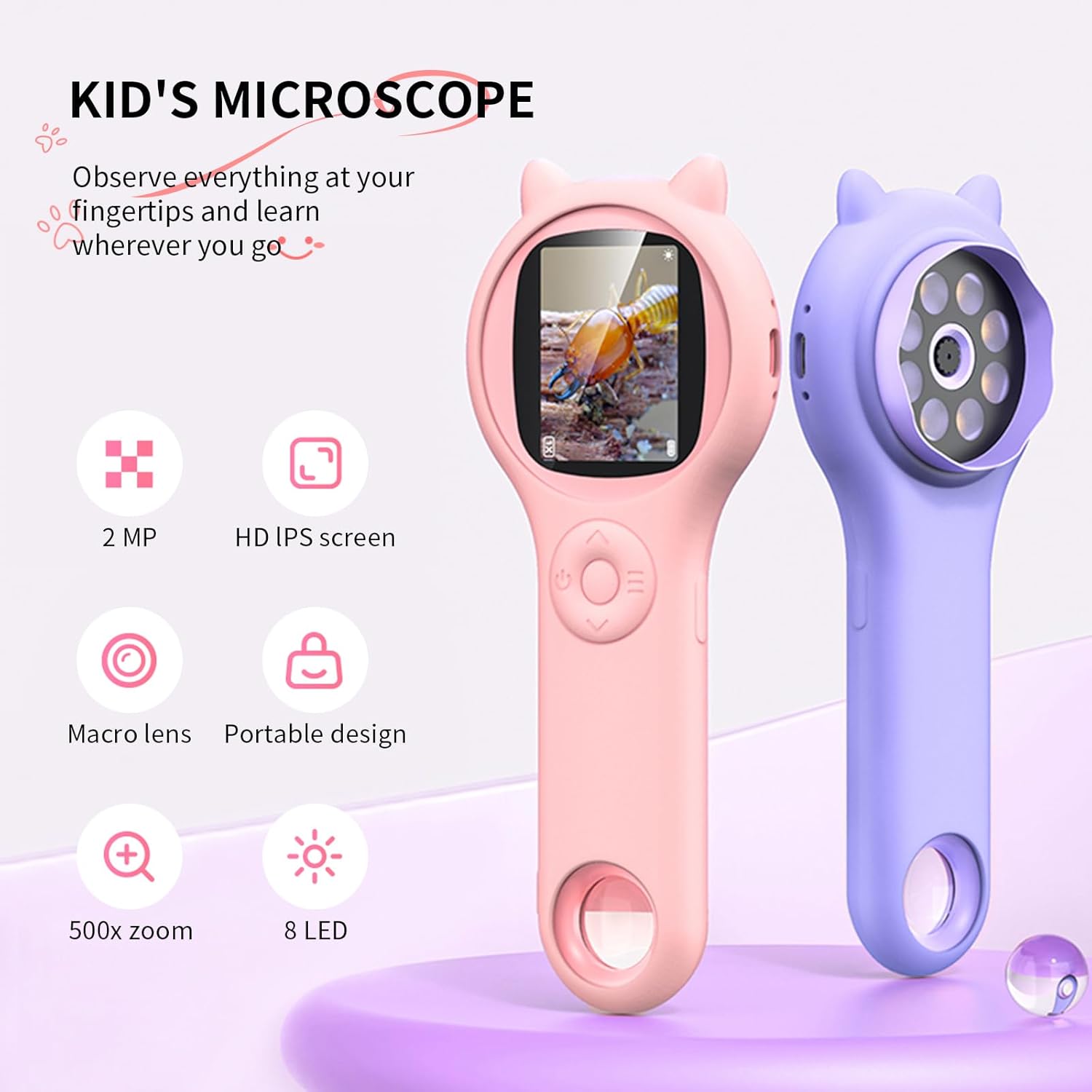
Image: Two Ashfly Kids Microscopes, one pink and one purple, illustrating the compact design and the different lenses/screens on each side.
Entretien
- Nettoyage: Use a soft, dry cloth to clean the exterior of the microscope. For the lens and screen, use a specialized lens cleaning cloth. Do not use abrasive cleaners or solvents.
- Stockage: Rangez le microscope dans un endroit frais et sec, à l'abri de la lumière directe du soleil et des températures extrêmes.
- Entretien de la batterie: Pour prolonger la durée de vie de la batterie, évitez de la décharger complètement trop souvent. Chargez l'appareil régulièrement, même en cas de non-utilisation prolongée.
Dépannage
| Problème | Cause possible | Solution |
|---|---|---|
| L'appareil ne s'allume pas. | La batterie est déchargée. | Chargez l'appareil à l'aide du câble USB fourni. |
| L'image à l'écran est floue. | Incorrect focus or distance from object. | Adjust the microscope's distance from the object or use the focus wheel (if applicable) until the image is clear. |
| Impossible de prendre des photos/vidéos. | La mémoire interne est pleine. | Transfer existing photos/videos to a computer to free up space. |
Caractéristiques
| Fonctionnalité | Détail |
|---|---|
| Modèle | ASIN B0DBVB3RGT |
| Marque | Mouche des cendres |
| Grossissement | Up to 200x (with 4x zoom adjustment) |
| Écran | 2-inch LCD, 1080P HD digital imaging |
| Source de lumière | DIRIGÉ |
| Matériel | Plastique |
| Couleur | Violet |
| Source d'énergie | Alimenté par batterie |
| Objectif | Achromatique |
Informations sur la garantie
Ashfly products are designed for quality and durability. For specific warranty details, please refer to the warranty card included with your product or visit the official Ashfly webConsultez le site. Conservez votre reçu d'achat comme preuve d'achat pour toute réclamation au titre de la garantie.
Assistance clientèle
If you encounter any issues or have questions regarding your Ashfly Portable Handheld Kids Microscope, please contact our customer support team:
- Support en ligne: Visitez le Ashfly Store on Amazon Pour consulter la FAQ et les options de contact.
- E-mail: Veuillez vous référer à l'emballage du produit ou à la notice officielle. website pour obtenir une assistance directe par courriel.