1. Introduction
This manual provides essential information for the installation, operation, maintenance, and troubleshooting of your PNY RTX 4000 Ada Generation 20GB DDR6 Quadro Graphics Card. This professional graphics card is designed for demanding applications such as 3D rendering, CAD/CAM, scientific simulations, and AI workflows, leveraging the NVIDIA Ada Lovelace architecture.
Key features include 6,144 CUDA cores, 48 RT Cores, 192 Tensor Cores, and 20GB of GDDR6 ECC memory, all within a single-slot, 130W design. It supports up to four 4K monitors or two 8K monitors via DisplayPort 1.4a.

Figure 1: PNY RTX 4000 Ada Generation Graphics Card overview, showing the single-slot design and an illustrative power connector icon.
2. Consignes de sécurité
Please read and follow all safety instructions carefully to prevent damage to the product or personal injury.
- Débranchez toujours l'alimentation de votre ordinateur avant d'installer ou de retirer un composant.
- Wear an anti-static wrist strap or frequently touch a grounded metal object to discharge static electricity before handling the graphics card.
- Assurez une ventilation adéquate à l'intérieur du boîtier de votre ordinateur afin d'éviter toute surchauffe.
- N’exposez pas la carte graphique à l’humidité ou à des températures extrêmes.
- Handle the card by its edges; avoid touching the gold-plated connectors or components on the PCB.
3. Contenu du colis
Vérifiez que tous les éléments sont présents dans l'emballage de votre produit :
- PNY RTX 4000 Ada Generation Graphics Card (VCNRTX4000ADA-PB)
- Documentation (this manual, quick start guide, etc.)
Note: Additional accessories such as display adapters or power cables may be sold separately or included depending on your region/retailer.
4. Installation
4.1. Installation physique
- Préparez votre système : Éteignez votre ordinateur et débranchez le câble d'alimentation de la prise murale. Ouvrez le boîtier de votre ordinateur.
- Localisez un emplacement PCIe : Identify an available PCI Express x16 slot on your motherboard. The RTX 4000 Ada Generation is a single-slot card.
- Retirer les caches des fentes : Retirez le ou les caches métalliques de l'emplacement PCIe situé à l'arrière de votre boîtier d'ordinateur, correspondant à l'emplacement PCIe choisi.
- Insérez la carte graphique : Alignez soigneusement la carte graphique avec le port PCIe et appuyez fermement jusqu'à ce qu'elle soit bien en place. Assurez-vous que le clip de fixation du port PCIe est bien verrouillé.
- Connecter l'alimentation : The RTX 4000 Ada Generation requires an 8-pin PCIe power connector from your power supply. Connect this cable to the power connector on the top edge of the graphics card. Ensure a secure connection.
- Sécurisez la carte : Use a screw to fasten the graphics card's mounting bracket to the computer case.
- Close Case and Connect Displays: Close your computer case. Connect your display monitor(s) to the DisplayPort outputs on the graphics card.
4.2. Installation du pilote
- Mise sous tension : Reconnect the power cable to your computer and power it on. Your system may boot with a basic display driver.
- Télécharger les pilotes : Navigate to the official PNY or NVIDIA website to download the latest drivers for the RTX 4000 Ada Generation. It is recommended to download drivers directly from the manufacturer's website pour des performances et une stabilité optimales.
- PNY Support: www.pny.com/support
- NVIDIA Drivers: www.nvidia.com/drivers
- Installer les pilotes : Exécutez le programme d'installation du pilote téléchargé et suivez les instructions à l'écran. Un redémarrage du système peut être nécessaire après l'installation.
- Vérifier l'installation : After restarting, open the NVIDIA Control Panel or NVIDIA Settings to confirm that the graphics card is recognized and operating correctly.

Figure 2: Display output section of the PNY RTX 4000 Ada Generation, showing four DisplayPort 1.4a connectors.
5. Utilisation de la carte graphique
5.1. Fonctionnement de base
Once installed and drivers are updated, your PNY RTX 4000 Ada Generation graphics card will automatically handle graphics processing for your system. Applications that benefit from GPU acceleration will utilize the card's capabilities.
- Panneau de configuration NVIDIA : Use the NVIDIA Control Panel (Windows) or NVIDIA Settings (Linux) to adjust display settings, manage 3D application profiles, and monitor GPU status.
- Compatibilité logicielle: Ensure your professional applications (e.g., CAD, rendering software) are updated to versions that support NVIDIA Ada Lovelace architecture for optimal performance.
5.2. Configuration multi-écrans
The RTX 4000 Ada Generation supports up to four DisplayPort 1.4a outputs, allowing for flexible multi-monitor configurations.
- Connect your monitors to the available DisplayPort outputs on the graphics card.
- Access your operating system's display settings (e.g., Windows Display Settings) or the NVIDIA Control Panel to configure display arrangement, resolution, and refresh rates.
- The card supports resolutions up to 4K on four monitors simultaneously, or two 8K monitors.
6. Entretien
6.1. Nettoyage
Un nettoyage régulier permet de maintenir des performances optimales et prolonge la durée de vie de votre carte graphique.
- Éteindre: Éteignez toujours votre ordinateur et débranchez-le de la source d'alimentation avant de le nettoyer.
- Élimination de la poussière : Use compressed air to gently blow dust from the heatsink fins and fan blades. Hold the fan blades in place while blowing to prevent over-spinning and potential damage to the fan bearings.
- Nettoyage extérieur : Wipe the exterior of the card with a soft, dry, lint-free cloth. Do not use liquid cleaners directly on the card.
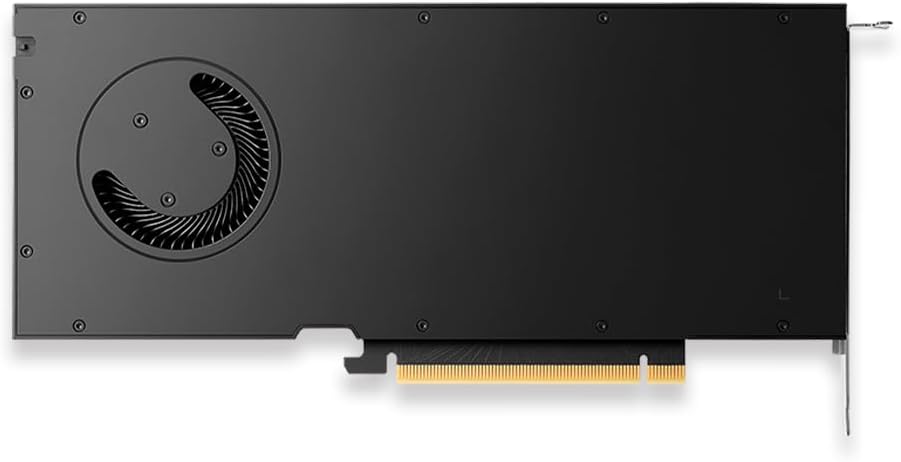
Figure 3 : Arrière view of the PNY RTX 4000 Ada Generation, highlighting the cooling fan for maintenance reference.
6.2. Stockage
If storing the graphics card, place it in an anti-static bag and store it in a cool, dry environment away from direct sunlight and extreme temperatures.
7. Dépannage
Cette section aborde les problèmes courants que vous pourriez rencontrer.
- Aucune sortie d'affichage :
- Ensure the monitor is powered on and connected to the graphics card, not the motherboard's integrated graphics.
- Verify the graphics card is fully seated in the PCIe slot and the power cable is securely connected.
- Essayez un autre câble d'affichage ou un autre moniteur.
- Check your BIOS/UEFI settings to ensure the primary display output is set to PCIe graphics.
- Problèmes d'installation des pilotes :
- Uninstall any previous graphics drivers using a utility like Display Driver Uninstaller (DDU) in Safe Mode, then attempt a fresh installation of the latest drivers.
- Ensure you downloaded the correct drivers for your operating system and graphics card model.
- Instabilité ou plantages du système :
- Assurez-vous que votre bloc d'alimentation (PSU) respecte la puissance minimale requise.tagles exigences relatives à votre système, y compris la carte graphique.
- Monitor GPU temperatures using software utilities. Excessive heat can cause instability. Ensure proper case airflow.
- Verify that your operating system and motherboard BIOS are up to date.
8. Spécifications
| Fonctionnalité | Détail |
|---|---|
| Marque | PNY |
| Numéro de modèle | VCNRTX4000ADA-PB |
| Coprocesseur graphique | NVIDIA Quadro RTX 4000 Ada Generation |
| Architecture | NVIDIA Ada Lovelace |
| Noyaux CUDA | 6,144 |
| Noyaux RT | 48 (3rd Generation) |
| Noyaux Tensor | 192 (4th Generation) |
| Taille de la mémoire RAM graphique | 20 GB GDDR6 ECC |
| Interface mémoire | 160 bits |
| Bande passante mémoire | 360 Go/s |
| Vitesse d'horloge du GPU | 2220 MHz (Boost) |
| Vitesse de la mémoire | 2250 MHz |
| Performances du FP32 | Up to 26.7 TFLOPS |
| Ray Tracing Performance | 61.8 TFLOPS |
| AI Performance (FP8) | 327.6 TFLOPS |
| Interface de sortie vidéo | 4 ports DisplayPort 1.4a |
| Résolution d'écran maximale | 3840x2160 (4K) per display, up to 4 displays; 8K on 2 displays |
| Consommation d'énergie | 130 W |
| Facteur de forme | Emplacement unique |
| Dimensions du produit (L x l x H) | 14.65 x 8.55 x 0.1 pouces |
| Poids de l'article | 1.85 livres |
9. Informations sur la garantie
PNY products are covered by a manufacturer's warranty. The specific terms and duration of the warranty may vary by region and product type. Please refer to the official PNY website or your product's packaging for detailed warranty information.
For warranty claims or to register your product, visit: www.pny.com/support/warranty
10. Assistance technique
If you encounter issues that cannot be resolved using the troubleshooting steps in this manual, or require further assistance, please contact PNY Technical Support.
- PNY Support Website: www.pny.com/support
- Le soutien website provides FAQs, driver downloads, and contact information for technical assistance.


