1. Introduction
This manual provides essential instructions for the safe and efficient use of your Meizu Note 21 Pro smartphone. Please read this manual thoroughly before operating the device and retain it for future reference.
2. Contenu de la boîte
- Meizu Note 21 Pro Smartphone
- Adaptateur secteur
- (Other accessories such as USB cable, SIM ejector tool, and documentation may vary by region.)
3. Disposition de l'appareil
Familiarize yourself with the physical components of your Meizu Note 21 Pro.
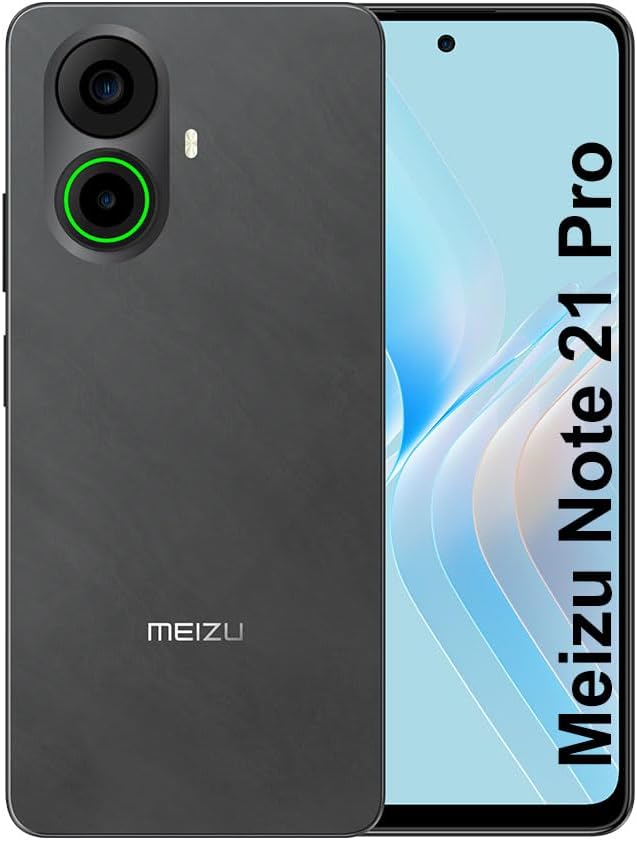
Image 3.1: Avant et arrière view of the Meizu Note 21 Pro. The front displays the screen with a punch-hole camera. The rear shows the dual camera module with a green accent ring on one lens, a flash, and the "MEIZU" logo at the bottom.
- Écran avant : 6.78-inch FHD+ screen with a 120Hz refresh rate.
- Caméra frontale : Situé en haut au centre de l'écran.
- Caméras arrière : Dual camera system, including a 64MP main camera.
- Capteur d'empreintes digitales latéral : Integrated for secure access.
- Port USB : Pour le chargement et le transfert de données.
- Prise audio 3.5 mm : Pour les écouteurs.
- Tiroir pour carte SIM/MicroSD : Supports Dual Nano SIM and MicroSD cards.
4. Installation
4.1. Insertion des cartes SIM et microSD
- Repérez le tiroir de la carte SIM sur le côté de votre appareil.
- Insérez l'outil d'éjection de la carte SIM dans le petit trou situé à côté du tiroir et poussez doucement jusqu'à ce que le tiroir sorte.
- Insérez votre ou vos cartes Nano SIM et/ou votre carte MicroSD dans les emplacements prévus à cet effet sur le plateau. Assurez-vous que les contacts dorés sont orientés vers le bas.
- Réinsérez soigneusement le plateau dans l'appareil jusqu'à ce qu'il s'enclenche.
4.2. Mise sous tension et configuration initiales
- Press and hold the Power button until the Meizu logo appears.
- Suivez les instructions à l'écran pour sélectionner votre langue, vous connecter à un réseau Wi-Fi et configurer votre compte Google.
- During setup, you will be guided to configure security features such as a PIN, pattern, or password.
4.3. Configuration de la reconnaissance d'empreintes digitales
- Accéder à Paramètres > Sécurité et confidentialité > Déverrouillage par empreinte digitale.
- Follow the on-screen instructions to register your fingerprint by repeatedly touching the side-mounted sensor.
- Ensure your finger covers the entire sensor area during registration for optimal performance.
5. Utilisation de votre appareil
5.1. Affichage et navigation
- The 6.78-inch FHD+ display operates at a 120Hz refresh rate for smooth visuals.
- Navigate the Android 14 operating system using touch gestures: tap, swipe, pinch-to-zoom.
- Access quick settings by swiping down from the top of the screen.
5.2. Fonctions de l'appareil photo
- Ouvrez l'application Appareil photo depuis l'écran d'accueil ou le tiroir d'applications.
- The rear camera system features a 64MP main sensor for high-resolution photos and a 2MP depth-of-field camera for portrait effects.
- The 13MP front-facing camera is suitable for selfies and video calls.
- Tap on the screen to focus, and use the on-screen shutter button to capture images. Explore various modes like Portrait, Night, and Pro within the camera app.
5.3. Performances et stockage
- The MediaTek G99 Octa Core processor ensures efficient performance for applications and multitasking.
- The device comes with 256GB of internal storage and 8GB of RAM.
- Storage can be expanded using a MicroSD card (sold separately).
5.4. Batterie et charge
- The Meizu Note 21 Pro is equipped with a 5000mAh battery.
- Use the provided Power Adapter for 30W fast charging.
- To charge, connect the USB cable to the phone's USB port and the power adapter, then plug the adapter into a wall outlet.
5.5. Connectivité
- 4G LTE : Supports various LTE FDD and TDD bands for cellular data. Note: This international version works on T-Mobile in the USA and globally with other carriers.
- Wi-Fi 5 : Connectez-vous aux réseaux sans fil pour accéder à Internet.
- Bluetooth : À associer avec des accessoires sans fil comme des casques et des haut-parleurs.
- NFC: Pour les paiements sans contact et un appairage rapide avec les appareils compatibles.
- GPS: Pour les services de localisation et la navigation.
6. Entretien
- Nettoyage: Utilisez un chiffon doux non pelucheux pour nettoyer l'écran et le boîtier de l'appareil. Évitez les produits chimiques agressifs et les matériaux abrasifs.
- Entretien de la batterie: Avoid extreme temperatures. Do not fully discharge the battery frequently. For optimal battery longevity, keep the charge between 20% and 80%.
- Mises à jour logicielles : Vérifiez et installez régulièrement les mises à jour système pour garantir des performances et une sécurité optimales. Accédez à Paramètres > Système > Mise à jour du système.
7. Dépannage
| Problème | Solution possible |
|---|---|
| L'appareil ne s'allume pas | Ensure the battery is charged. Connect the device to the power adapter and try again. If unresponsive, press and hold the Power button for 10-15 seconds to force a restart. |
| Mauvais signal réseau | Check if the SIM card is correctly inserted. Move to an area with better network coverage. Restart the device. Verify with your carrier that your plan is active. |
| Les applications sont lentes ou plantent. | Fermez les applications en arrière-plan. Videz le cache de l'application (Paramètres > Applications > sélectionner l'application > Stockage et cache > Vider le cacheRedémarrez l'appareil. Assurez-vous de disposer d'un espace de stockage suffisant. |
| Le capteur d'empreintes digitales ne fonctionne pas. | Ensure your finger and the sensor are clean and dry. Re-register your fingerprint in settings. |
8. Spécifications
- Modèle: Meizu Note 21 Pro
- Système opérateur: Android 14
- Processeur: MediaTek G99 Octa Core (2.2GHz)
- Afficher: 6.78 inches FHD+ (1080 x 2160 resolution), 120Hz Refresh Rate
- BÉLIER: 8 Go
- Stockage interne : 256 Go
- Caméra arrière : Capteur principal 64 MP + capteur de profondeur 2 MP
- Caméra frontale : 13 MP
- Batterie: 5000 mAh, charge rapide 30 W
- Connectivité : 4G LTE (FDD:1,2,3,4,5,7,8,12,17,18,19,20,26,28,66; TDD:38,40,41), 3G WCDMA, 2G Quad Band, Wi-Fi 5, Bluetooth, NFC, GPS
- Prise audio: 3.5 mm
- Dimensions: 6.64 x 2.96 x 0.33 pouces
- Poids: 1.1 livres
9. Garantie et assistance
For warranty information and technical support, please refer to the warranty card included with your product or visit the official Meizu webConsultez le site. Conservez votre preuve d'achat pour toute réclamation au titre de la garantie.
For further assistance, you may contact Meizu customer service through their official channels.