Introduction
Thank you for choosing the HUANUO Electric Standing Desk Frame. This manual provides detailed instructions for the assembly, operation, and maintenance of your new height-adjustable desk frame. Please read this manual thoroughly before installation and use to ensure proper function and safety.
Configuration et assemblage
Before beginning assembly, ensure all parts are present and undamaged. It is recommended to assemble the desk frame on a soft, clean surface to prevent scratches.
- Déballer les composants : Carefully remove all parts from the packaging. Refer to the parts list in your package for verification.
- Assembler les jambes et les pieds : Attach the desk feet to the bottom of the lifting columns using the provided screws. Ensure they are securely fastened.
- Barres transversales de connexion : Attach the crossbars between the two lifting columns. Adjust the length of the crossbars to match your desired desktop size.
- Installer le moteur et le boîtier de commande : Secure the motor and control box to the designated locations on the frame. Connect all necessary cables according to the wiring diagram provided in your package.
- Attacher le panneau de contrôle : Mount the control panel to the underside of your desktop in an easily accessible location.
- Monter le bureau : Carefully place your desktop onto the assembled frame. Secure the desktop to the frame using appropriate screws (desktop not included).
- Gestion des câbles: Organize all cables using the included cable ties or management solutions to prevent tangling and damage.

Image : Terminéview of the HUANUO Electric Standing Desk Frame components, including legs, feet, crossbars, and motor assembly, ready for setup.

Image: Close-up illustrating the improved solid construction of the desk frame, highlighting 30% longer plates and 30% thicker columns for enhanced stability and a maximum load capacity of 100kg.
Opération
The HUANUO Electric Standing Desk Frame features an intuitive control panel for easy height adjustment and memory presets.

Image: The desk's control panel, showing the digital height display, up/down adjustment buttons, and four programmable memory preset buttons (1, 2, 3, 4).
Réglage de la hauteur :
- Appuyez sur le Haut (^) bouton pour lever le bureau.
- Appuyez sur le Vers le bas (v) bouton pour abaisser le bureau.
- Release the button at your desired height. The current height will be displayed on the digital screen.
Configuration des préréglages de mémoire :
- Réglez le bureau à la hauteur souhaitée à l'aide des boutons Haut/Bas.
- Press one of the memory preset buttons (1, 2, 3 ou 4) jusqu'à ce que vous entendiez un bip ou que vous voyiez l'écran clignoter, indiquant que la hauteur a été enregistrée.
- To recall a saved height, simply press the corresponding memory preset button. The desk will automatically move to the stored position.

Image: Illustration of the desk's height adjustment range, showing a user transitioning from a sitting position (72cm) to a standing position (118cm), promoting a better way to work.

Image: Close-up of the desk's high-quality brushless motor, highlighting its durability with 100,000 lift tests and a low noise level of ≤55 dB during operation.
Entretien
Regular maintenance ensures the longevity and smooth operation of your HUANUO Electric Standing Desk Frame.
- Nettoyage: Essuyez le cadre du bureau avec un chiffon doux et sec.amp Chiffon. Évitez les nettoyants abrasifs ou les solvants qui pourraient endommager la finition.
- Gestion des câbles: Periodically check and reorganize cables to prevent pinching or damage.
- Vérification des fixations : Tous les deux ou trois mois, vérifiez que toutes les vis et tous les boulons sont bien serrés. Resserrer si nécessaire.
- Limite de poids: Do not exceed the maximum weight capacity of 100 kg (220 lbs) to prevent damage to the motor and frame.
Dépannage
If you encounter any issues with your desk frame, refer to the following common problems and solutions:
| Problème | Cause possible | Solution |
|---|---|---|
| Le bureau ne bouge pas. | Câble d'alimentation débranché, surcharge ou erreur moteur. | Check power connection. Reduce weight on desk. Perform a reset (refer to specific reset instructions in your package). |
| Uneven movement or shaking. | Loose fasteners, uneven floor, or unbalanced load. | Ensure all screws are tightened. Adjust foot pads for stability. Distribute weight evenly on the desktop. |
| Code d'erreur affiché. | Erreur système spécifique. | Consult the detailed error code list in your package or contact customer support. Often, a power cycle (unplug for 30 seconds, then plug back in) can resolve minor errors. |
Caractéristiques
Below are the technical specifications for the HUANUO Electric Standing Desk Frame (Model: BSQTECH-DEHNESD0728).
| Fonctionnalité | Détail |
|---|---|
| Marque | HUANUO |
| Numéro de modèle | BSQTECH-DEHNESD0728 |
| Couleur | Blanc |
| Dimensions du produit | 6.69"D x 42.52"W x 15.94"H (Frame only) |
| Plage de hauteur réglable | 70 cm à 118 cm (27.5" à 46.5") |
| Capacité de poids maximale | 100 kilogrammes (220 livres) |
| Poids de l'article | 21 kilogrammes (46.2 livres) |
| Assemblage requis | Oui |
| Composants inclus | Crochet pour casque |
| Type de moteur | Brushless (low noise, high durability) |
| Niveau de bruit | ≤55 dB |
| Code UPC | 810158829909 |

Image: View of the desk frame's reinforced double beams, indicating enhanced structural integrity and stability.
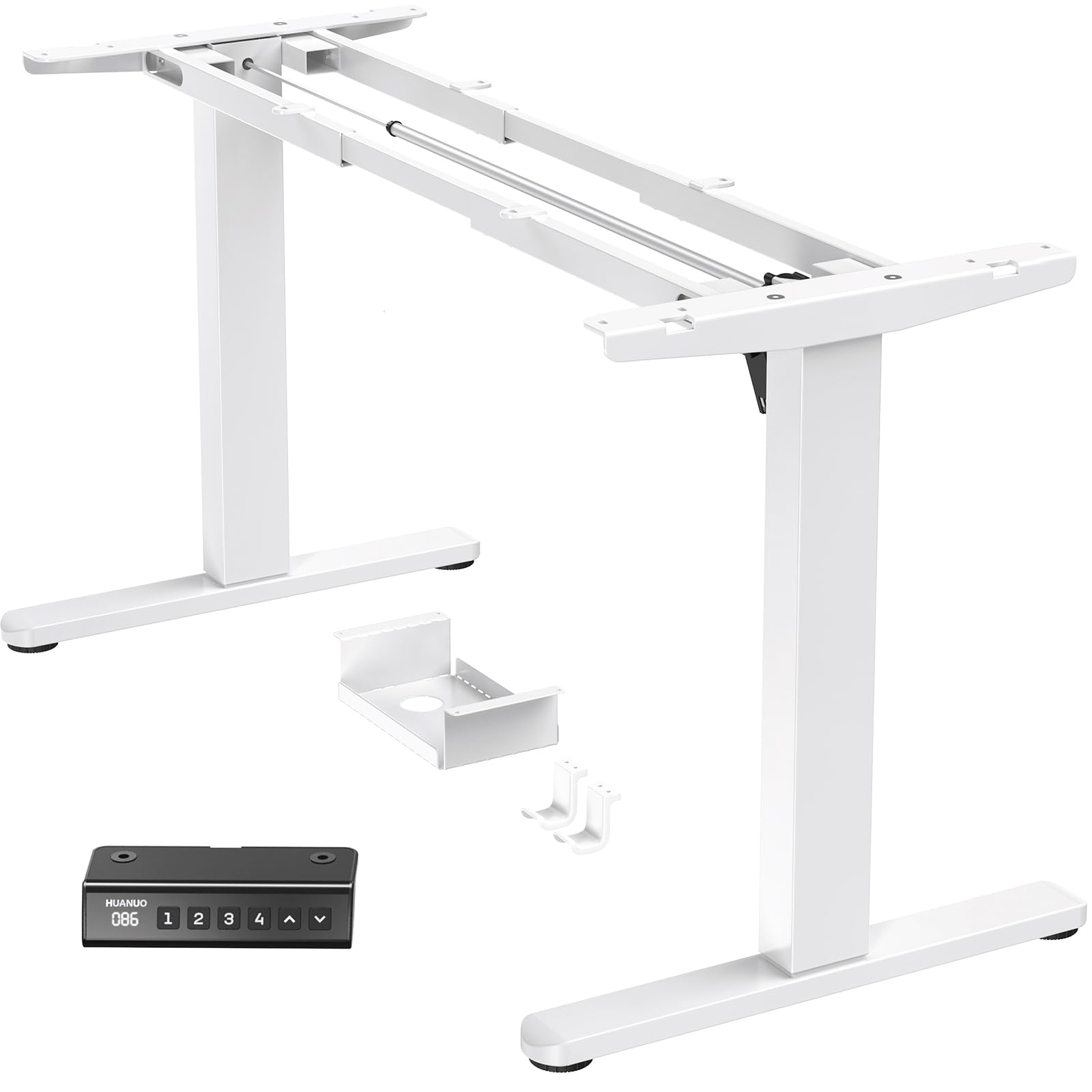
Image: Diagram showing the adjustable width of the desk frame (100-180cm) and height range (72-118cm), along with compatible desktop sizes (e.g., 110cm, 120cm, 140cm, 220cm wide, and 60cm, 70cm, 80cm, 90cm deep).
Garantie et assistance
HUANUO provides a limited warranty for this product. For specific warranty terms and conditions, please refer to the warranty card included in your product packaging or visit the official HUANUO website.
If you require technical assistance, have questions about assembly, or need to report a missing/damaged part, please contact HUANUO customer support:
- Support en ligne: Visit the HUANUO official webSite de FAQ et de ressources d'assistance.
- E-mail: Veuillez consulter la documentation de votre produit pour obtenir l'adresse électronique du service client.
- Téléphone: Veuillez consulter la documentation de votre produit pour connaître le numéro de téléphone du service client.
Please have your model number (BSQTECH-DEHNESD0728) and purchase date ready when contacting support.


