1. Introduction
Thank you for choosing the WIOONI WLAN Indoor Motion Detector. This device is designed to enhance your home security and smart automation experience by detecting motion and sending real-time notifications to your smartphone. It integrates seamlessly with Smart Life and Tuya Smart applications, allowing for intelligent linkages with other smart devices.
This manual provides detailed instructions on how to set up, operate, and maintain your motion detector. Please read it thoroughly before use to ensure proper functionality and safety.

Image 1.1: WIOONI WLAN Indoor Motion Detector and its corresponding mobile application interface.
2. Consignes de sécurité
- Cet appareil est destiné à utilisation en intérieur uniquementNe pas exposer à l'eau, à l'humidité ou à des températures extrêmes.
- Keep the device away from direct sunlight, heat sources, and strong electromagnetic fields.
- Utilisez uniquement le type de pile spécifié (AAA) et assurez-vous de respecter la polarité lors de l'installation.
- N'essayez pas de démonter ou de réparer l'appareil vous-même. Contactez le service client pour obtenir de l’aide.
- Tenir hors de portée des enfants et des animaux domestiques.
3. Contenu du colis
Le forfait comprend les éléments suivants :
- 2 x WIOONI WLAN Indoor Motion Sensor
- 4 piles AAA (2 par capteur)
- Mounting Accessories (e.g., double-sided adhesive tapes, hanging ropes)
- Manuel d'utilisation
4. Produit terminéview
The WIOONI motion detector features a compact design with an infrared PIR sensor for detecting human movement. It includes a small LED indicator for status and a button for pairing. The device is powered by AAA batteries for wireless operation.
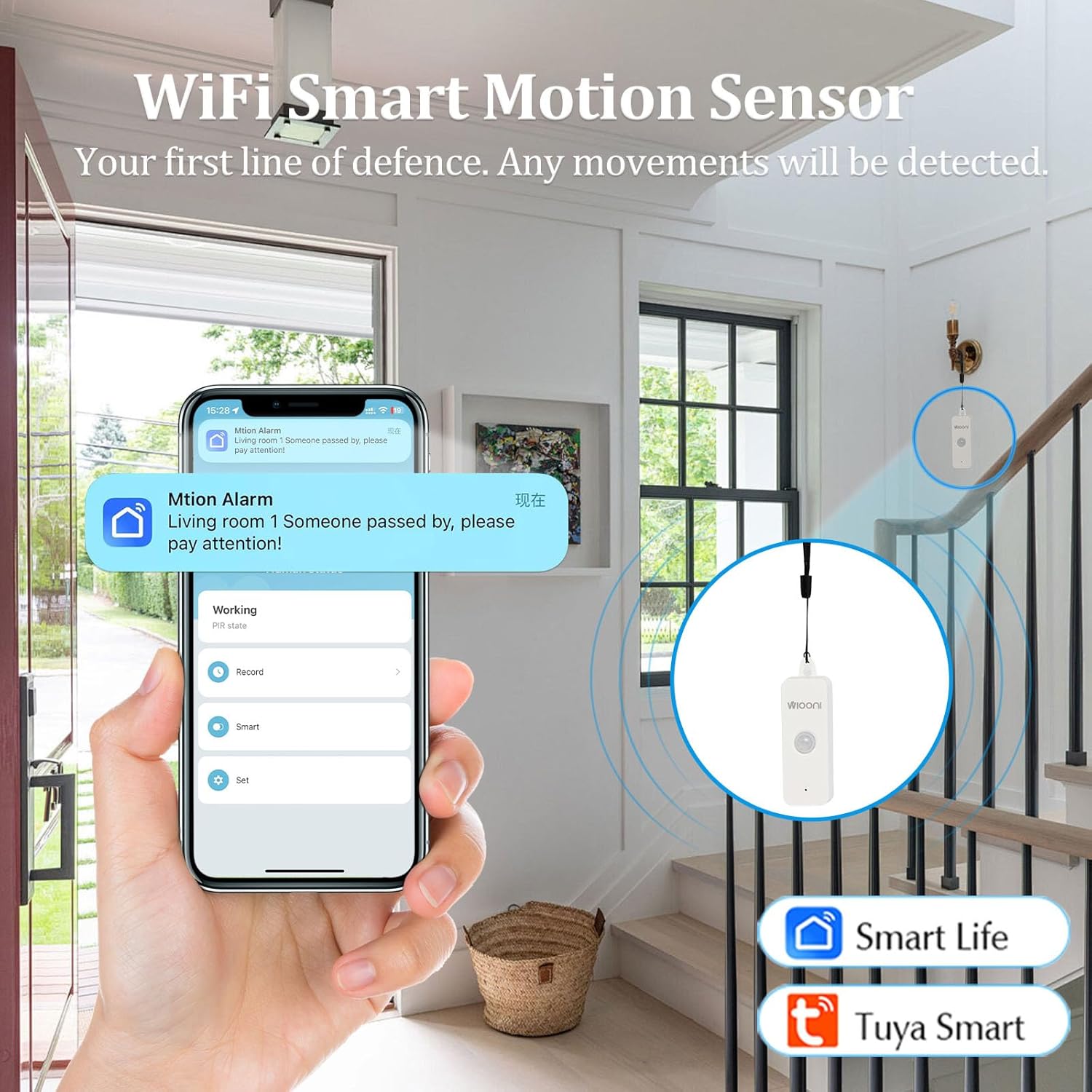
Image 4.1: The WIOONI motion sensor discreetly installed in a home environment, demonstrating its role as a security device.
5. Installation
5.1. Installation de la batterie
- Gently open the back cover of the motion detector.
- Insérez les deux piles AAA en veillant à respecter la polarité (+/-).
- Remove the battery insulation strip (if present) to activate the device.
- Fermez bien le capot arrière.

Image 5.1: Step-by-step guide for initial setup, including battery activation and app pairing.
5.2. Téléchargement et installation de l'application
The WIOONI motion detector is compatible with the Smart Life and Tuya Smart applications. Choose one to manage your device.
- Scan the QR code provided in Image 5.1 or search for "Smart Life" or "Tuya Smart" in your mobile app store (App Store for iOS, Google Play Store for Android).
- Téléchargez et installez l'application.
- Créez un nouveau compte ou connectez-vous si vous en avez déjà un.
You can also download the Smart Life app directly from: https://smartapp.tuya.com/smartlife
5.3. Appairage/Connexion de l'appareil
- Assurez-vous que votre smartphone est connecté à un réseau Wi-Fi 2.4 GHz. (Les réseaux 5 GHz ne sont pas pris en charge).
- Ouvrez l'application Smart Life ou Tuya Smart.
- Activez le Bluetooth et le Wi-Fi sur votre téléphone.
- In the app, tap "Add Device" or the "+" icon in the top right corner.
- The app may automatically discover the device. If not, select "Security & Sensor" > "Motion Sensor (Wi-Fi)" or similar.
- Follow the on-screen instructions to connect the device. This usually involves pressing the pairing button on the sensor until the LED indicator flashes, then confirming in the app.
- Une fois l'appareil ajouté avec succès, vous pouvez le renommer et l'affecter à une pièce spécifique.
6. Fonctionnement
6.1. Basic Motion Detection
The WIOONI motion detector uses Passive Infrared (PIR) technology to detect changes in infrared radiation caused by moving objects, such as people. When motion is detected within its range, the device will trigger an alert.

Image 6.1: Illustration of PIR motion detection and instant notification to your smartphone.
6.2. Fonctionnalités de l'application
- Surveillance en temps réel: View the current status of the motion detector (e.g., "No motion detected," "Motion detected") directly from the app, no matter where you are.
- Notifications instantanées : Receive push notifications on your smartphone immediately when motion is detected, keeping you informed of any activity.
- Journal d'activité : Review a history of detected movements with timestamps.
- Automatisation intelligente : Create intelligent scenarios (routines) to link the motion detector with other Smart Life/Tuya Smart devices. For example, you can set up a rule to turn on lights automatically when motion is detected in a room.
6.3. Sharing Functions
You can share control of the motion detector with family members or trusted individuals through the Smart Life/Tuya Smart app. This allows multiple users to receive notifications and manage the device.

Image 6.2: Sharing device control with family members for collaborative home security management.
7. Installation/Montage
The WIOONI motion detector offers flexible mounting options:
- Pendaison: The top of the detector has a hanging hole. You can use the provided rope to hang it in a suitable location.
- Montage adhésif : Use the included double-sided adhesive tapes to securely attach the sensor to any flat surface, such as a wall or furniture.
- Placement: Simply place the sensor on a shelf, table, or any elevated surface within the desired detection area.
Consider the detection angle and distance when choosing a mounting location to ensure optimal coverage.

Image 7.1 : Examples of suitable installation locations for the motion sensor.
8. Dépannage
| Problème | Cause possible | Solution |
|---|---|---|
| L'appareil ne se connecte pas au Wi-Fi | Incorrect Wi-Fi band (5GHz not supported); Weak Wi-Fi signal; Incorrect password; Device not in pairing mode. | Ensure your router is set to 2.4GHz. Move the device closer to the router. Re-enter Wi-Fi password carefully. Press the pairing button on the sensor to enter pairing mode (LED flashing). |
| No motion detected / False alarms | Incorrect placement; Obstructions; Environmental factors (e.g., drafts, direct sunlight, pets). | Ensure the sensor has a clear line of sight to the detection area. Avoid placing near vents, windows, or areas with rapid temperature changes. Adjust placement to avoid pets. |
| Notifications non reçues | App notification settings disabled; Phone's notification settings disabled; App not running in background. | Check notification settings within the Smart Life/Tuya Smart app. Verify your phone's system notification settings for the app. Ensure the app is allowed to run in the background. |
| Durée de vie de la batterie courte | Frequent detections; Low-quality batteries. | Reduce the number of unnecessary detections by optimizing placement. Use high-quality alkaline AAA batteries. |
9. Spécifications
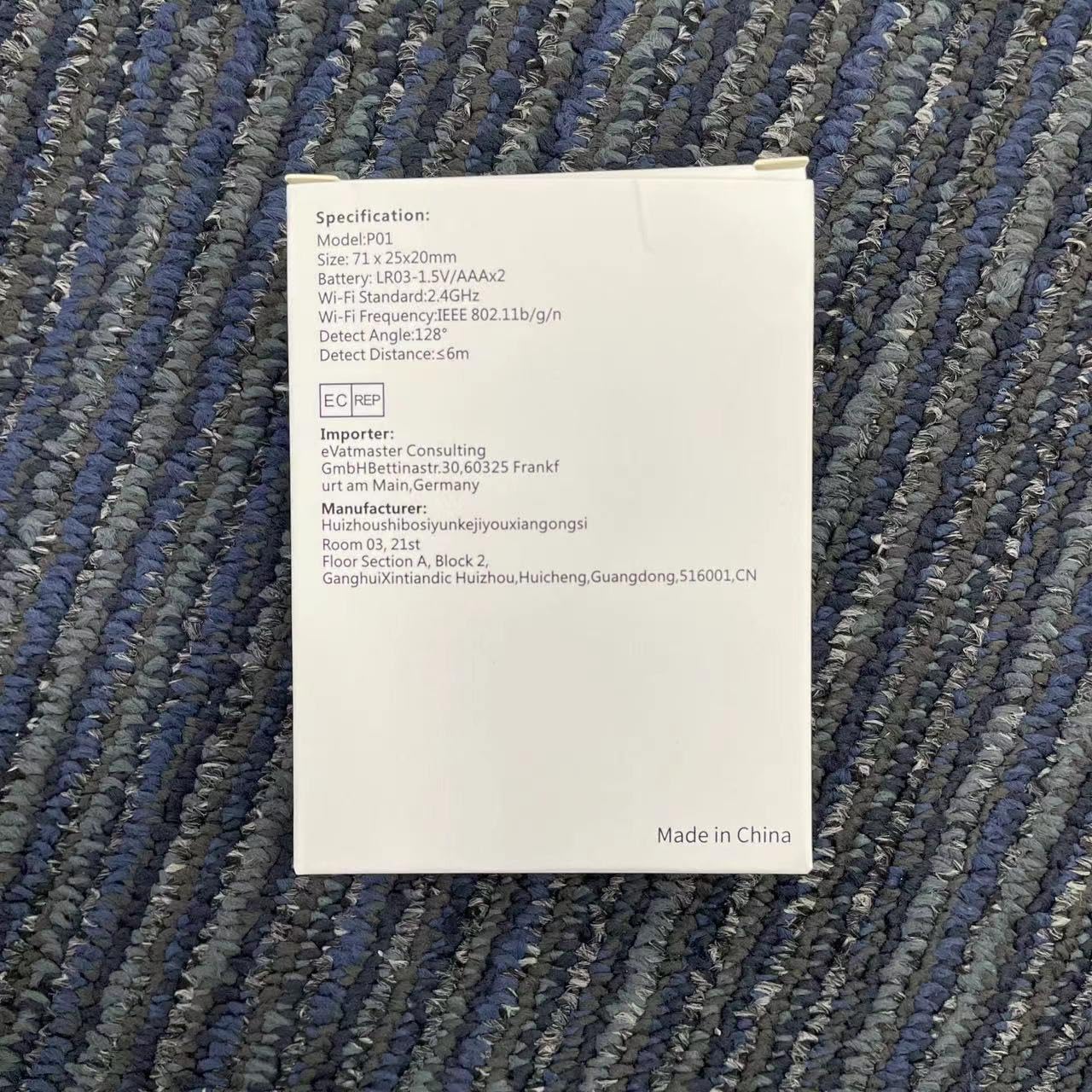
Image 9.1: Detailed specifications as listed on the product packaging.
| Fonctionnalité | Détail |
|---|---|
| Numéro de modèle | HWTCQ0627 |
| Dimensions | 8.99 x 6.68 x 2.59 cm |
| Poids | 68 grammes |
| Source d'énergie | 4 piles AAA (incluses) |
| Technologie de détection | PIR infrarouge |
| Angle de détection | 130° |
| Distance de détection | 2~12 meters (Note: Detection angle and distance values may vary by location.) |
| Connectivité sans fil | Wi-Fi 802.11b/g/n (2.4GHz only) |
| Compatibilité | Smart Life App, Tuya Smart App |
| Type de montage | Wall Mount / Hanging / Placement |
10. Garantie et assistance
WIOONI products are designed for reliability and performance. For any technical support, troubleshooting, or warranty inquiries, please contact your retailer or the WIOONI customer service team.
Veuillez conserver votre preuve d'achat à des fins de garantie.
Manufacturer: WIOONI
Address: Huizhouhbosiyunkeijiyouxiangongsi, Room 03, 21st Floor, Section A, Block 2, GanghuiXintiandic Huizhou, Huicheng, Guangdong, 516001, CN