1. Introduction
The vretti BQ1 Bluetooth Label Printer is a compact, portable thermal label printer designed for various labeling needs in home, office, school, and small business environments. It connects wirelessly to your smartphone via Bluetooth, allowing for quick and easy label creation and printing through the dedicated "xeasy label" application.
This printer utilizes thermal printing technology, eliminating the need for ink or toner, which saves on replacement costs and maintenance. It supports label sizes from 25mm to 58mm, offering flexibility for printing address labels, price tags, food labels, clothing tags, barcodes, QR codes, and more.

Image 1.1: The vretti BQ1 Bluetooth Label Printer, highlighting its Bluetooth connectivity and compatibility with iOS and Android devices.
2. Installation
2.1 Contenu du paquet
Avant de commencer, veuillez vérifier que tous les articles sont inclus dans votre colis :
- 1 x vretti BQ1 Label Printer
- 1 x Manuel d'utilisation (ce document)
- 1 x 50x30mm Label Paper Roll (pre-installed inside the machine)
- 1 x câble de chargement USB de type C
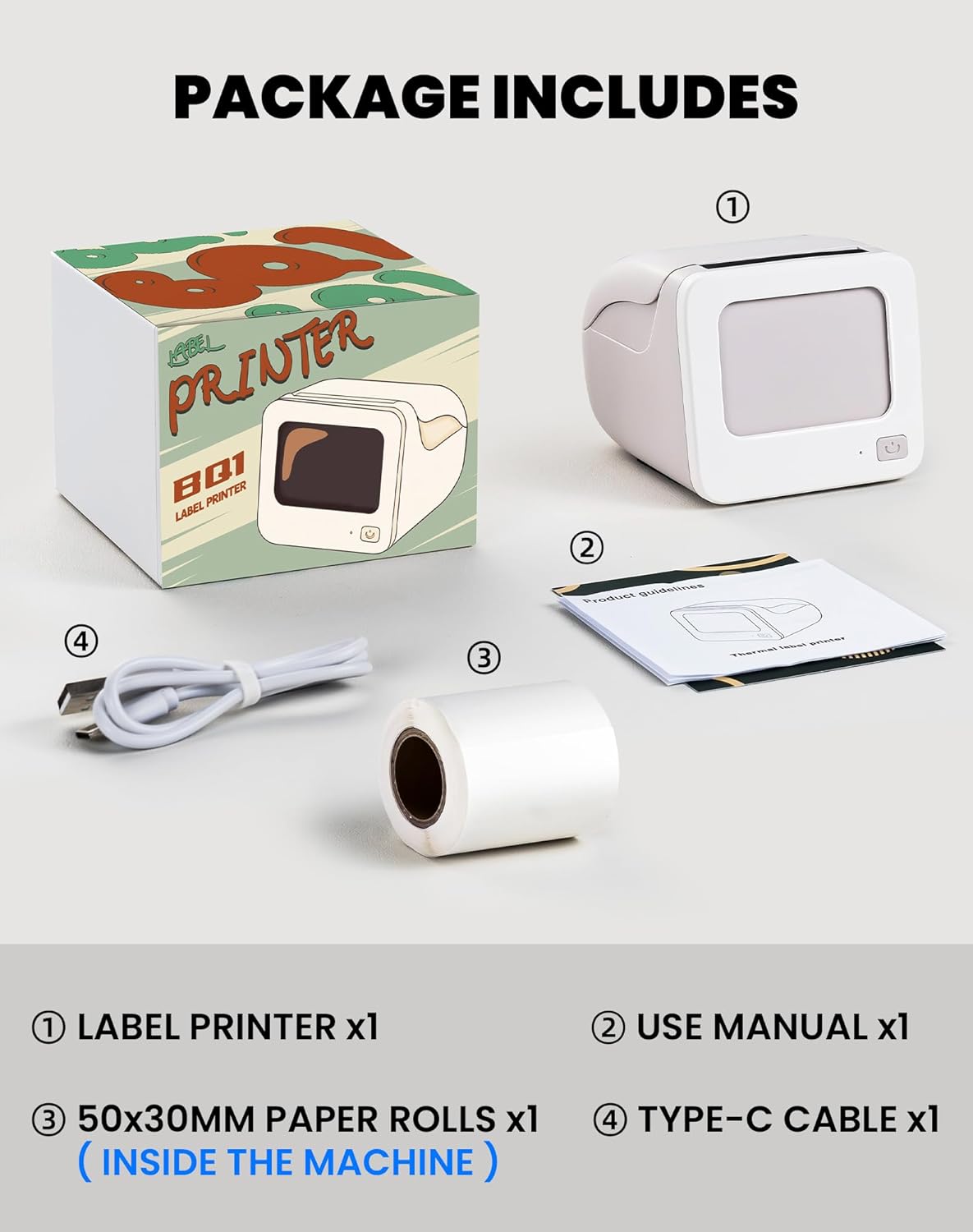
Image 2.1: Visual representation of the items included in the vretti BQ1 label printer package.
2.2 Chargement du papier d'étiquettes
The printer comes with a label roll pre-installed. If you need to replace or load a new roll:
- Ouvrez délicatement le capot de l'imprimante.
- Insert the new label roll into the compartment, ensuring the labels feed out smoothly. The printable side of the label should face upwards.
- Fermez correctement le capot de l'imprimante.

Image 2.2: Proper insertion of a label roll into the vretti BQ1 printer, demonstrating the supported label width range.
2.3 Installation de l'application et connexion Bluetooth
To use your vretti BQ1 printer, you need to download and connect it via the "xeasy label" application.
- Téléchargez l'application : Rechercher "xeasy label" in your smartphone's app store (Google Play Store for Android or Apple App Store for iOS) and install it.
- Activer le Bluetooth : Assurez-vous que Bluetooth est activé sur votre smartphone.
- Ouvrez l'application et connectez-vous : Open the "xeasy label" app. The app will guide you to connect to your printer. Select "BQ1" from the list of available devices.
- Mise sous tension : Maintenez le bouton d'alimentation de l'imprimante enfoncé jusqu'à ce que le voyant s'allume.

Image 2.3: Step-by-step guide for downloading the "xeasy label" app, connecting to the printer via Bluetooth, and preparing to edit a label.
3. Mode d'emploi
3.1 Création et impression d'étiquettes
Once connected, the "xeasy label" app provides a user-friendly interface for designing and printing labels.
- Select a Template or Create New: The app offers a variety of pre-designed templates, fonts, icons, and frames. You can choose an existing template or start a new design.
- Personnalisez votre étiquette : Edit text, add images, barcodes, QR codes, and adjust the layout to fit your needs. The app supports various customization options.
- Préview et Imprimer : Avant l'impression, préview your label to ensure it looks as desired. Then, tap the print button in the app to send the design to your vretti BQ1 printer.
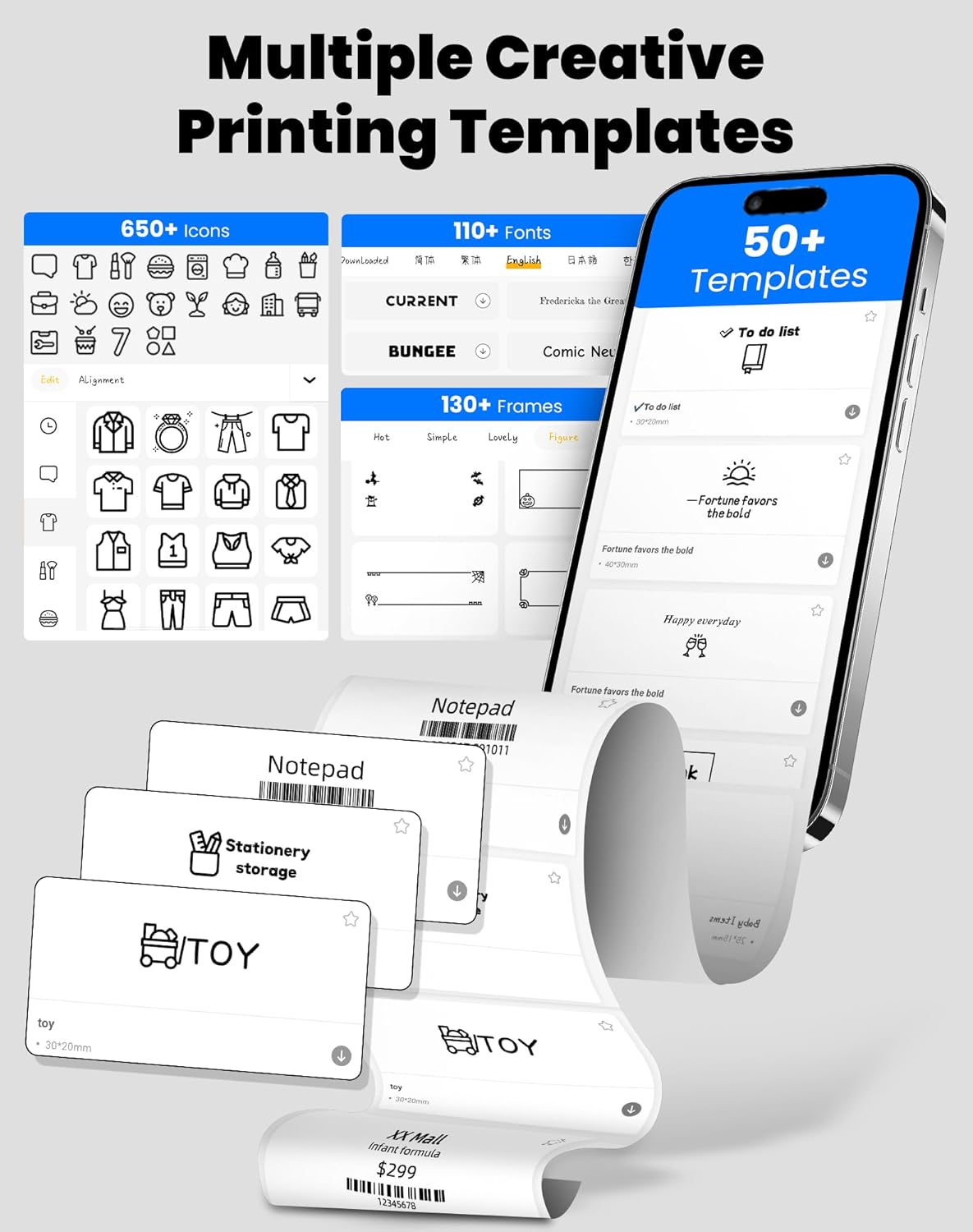
Image 3.1: The "xeasy label" app interface, showcasing a wide range of creative printing templates, icons, and fonts available for label design.

Image 3.2 : Terminéview of the multi-functional applications within the "xeasy label" app, including support for barcodes, QR codes, images, various borders, font shapes, and hundreds of icons.
3.2 Common Label Applications
The vretti BQ1 printer is versatile and suitable for a wide range of applications:
- Organisation du domicile : Label storage bins, pantry items, spice jars, and more.
- Bureau et école : Organiser files, label stationery, create name tags, or mark assets.
- Commerce de détail et petites entreprises : Prix d'impression tags, product labels, address labels for shipping, and inventory management labels.
- Utilisation personnelle : Create decorative labels for gifts, DIY projects, or personal items.

Image 3.3 : Examples of the vretti BQ1 printer's versatility, showing labels used for toy classification, light switches, to-do lists, clothing, and gifts.

Image 3.4: Demonstrations of common label types that can be printed, including address labels, price labels, food labels, and customizable DIY labels.
4. Entretien
4.1 Nettoyage de l'imprimante
To ensure optimal performance and print quality, regular cleaning is recommended:
- Extérieur: Essuyez l'extérieur de l'imprimante avec un chiffon doux et sec. Évitez d'utiliser des nettoyants abrasifs ou des solvants.
- Tête d'impression: If print quality degrades, gently clean the thermal print head with an alcohol swab. Ensure the printer is turned off and cooled down before cleaning.
4.2 Stockage des rouleaux d'étiquettes
Conservez les rouleaux d'étiquettes dans un endroit frais et sec, à l'abri de la lumière directe du soleil et des températures excessives, afin de préserver leurs propriétés adhésives et la qualité de leur impression.
5. Dépannage
If you encounter issues with your vretti BQ1 printer, try the following steps:
- L'imprimante ne s'allume pas : Ensure the printer is charged. Connect it to a power source using the provided Type-C cable.
- Impossible de se connecter via Bluetooth :
- Assurez-vous que Bluetooth est activé sur votre smartphone.
- Assurez-vous que l'imprimante est allumée et à portée.
- Redémarrez l'imprimante et votre smartphone.
- Try reconnecting through the "xeasy label" app.
- Mauvaise qualité d'impression :
- Check if the label roll is inserted correctly and is not damaged.
- Nettoyez la tête d'impression thermique comme décrit dans la section Maintenance.
- Ensure the label type is compatible with thermal printing.
- Étiquettes ne s'alimentant pas correctement :
- Verify the label roll is properly seated and not jammed.
- Assurez-vous que le capot de l'imprimante est bien fermé.
Vidéo 5.1 : Présentation générale du produitview video for the vretti BQ1 label printer, demonstrating its features and operation. If the video does not load, please ensure your browser supports HLS streaming.
6. Spécifications
| Marque | vretti |
| Nom du modèle | BQ1 |
| Technologie de connectivité | Bluetooth |
| Technologie d'impression | Thermique |
| Taille maximale du support | 58 mm (supports 25-58mm width) |
| Résolution d'impression | 203 dpi (Monochrome) |
| Appareils compatibles | Smartphone (Android, iOS) |
| Composants inclus | 1 Label Printer, 1 Label Roll (starter), 1 Type-C Cable |
| Dimensions du produit | 10.3D x 10.4W x 8H centimètres |
| Dossier spécial | Elegant TV-like design |
7. Garantie et assistance
7.1 Informations sur la garantie
The vretti BQ1 Label Printer typically comes with a Garantie d'un an À compter de la date d'achat, veuillez conserver votre preuve d'achat pour toute réclamation au titre de la garantie. La garantie couvre les défauts de fabrication, mais ne couvre pas les dommages causés par une mauvaise utilisation, un accident ou des modifications non autorisées.
7.2 Assistance clientèle
For further assistance, technical support, or warranty inquiries, please refer to the official vretti website or contact their customer service through the contact information provided on their official channels. Ensure you have your product model number (BQ1) and purchase details ready when contacting support.


