1. Introduction
Merci pour votre achatasing the Bobtot K701S 5.1/2.1 Channel Surround Sound System. This system is designed to provide a powerful and immersive audio experience for your home entertainment. With 800W peak power and a 6.5-inch subwoofer, it delivers clear, dynamic sound. This manual will guide you through the setup, operation, and maintenance of your new sound system.

Image 1.1: Bobtot K701S 5.1/2.1 Channel Surround Sound System with subwoofer, satellite speakers, and remote control.
2. Consignes de sécurité importantes
Please read and follow these safety instructions carefully before operating the system to prevent electric shock, fire, or damage to the unit.
- N'exposez pas cet appareil à la pluie ou à l'humidité.
- Ne pas obstruer les ouvertures de ventilation. Procéder à l'installation conformément aux instructions du fabricant.
- Ne pas installer à proximité de sources de chaleur telles que radiateurs, bouches de chauffage, poêles ou autres appareils (y compris amp(échangeurs thermiques) qui produisent de la chaleur.
- Protégez le cordon d’alimentation pour éviter qu’il ne soit piétiné ou pincé, en particulier au niveau des fiches, des prises de courant et du point de sortie de l’appareil.
- Utilisez uniquement les accessoires spécifiés par le fabricant.
- Débranchez cet appareil en cas d’orage ou lorsqu’il n’est pas utilisé pendant de longues périodes.
- Confiez tous les travaux d'entretien à du personnel de service qualifié. Un entretien est nécessaire lorsque l'appareil a été endommagé de quelque manière que ce soit.
3. Contenu du colis
Déballez soigneusement le colis et vérifiez que tous les articles sont présents et en bon état. Si un article est manquant ou endommagé, veuillez contacter le service client.
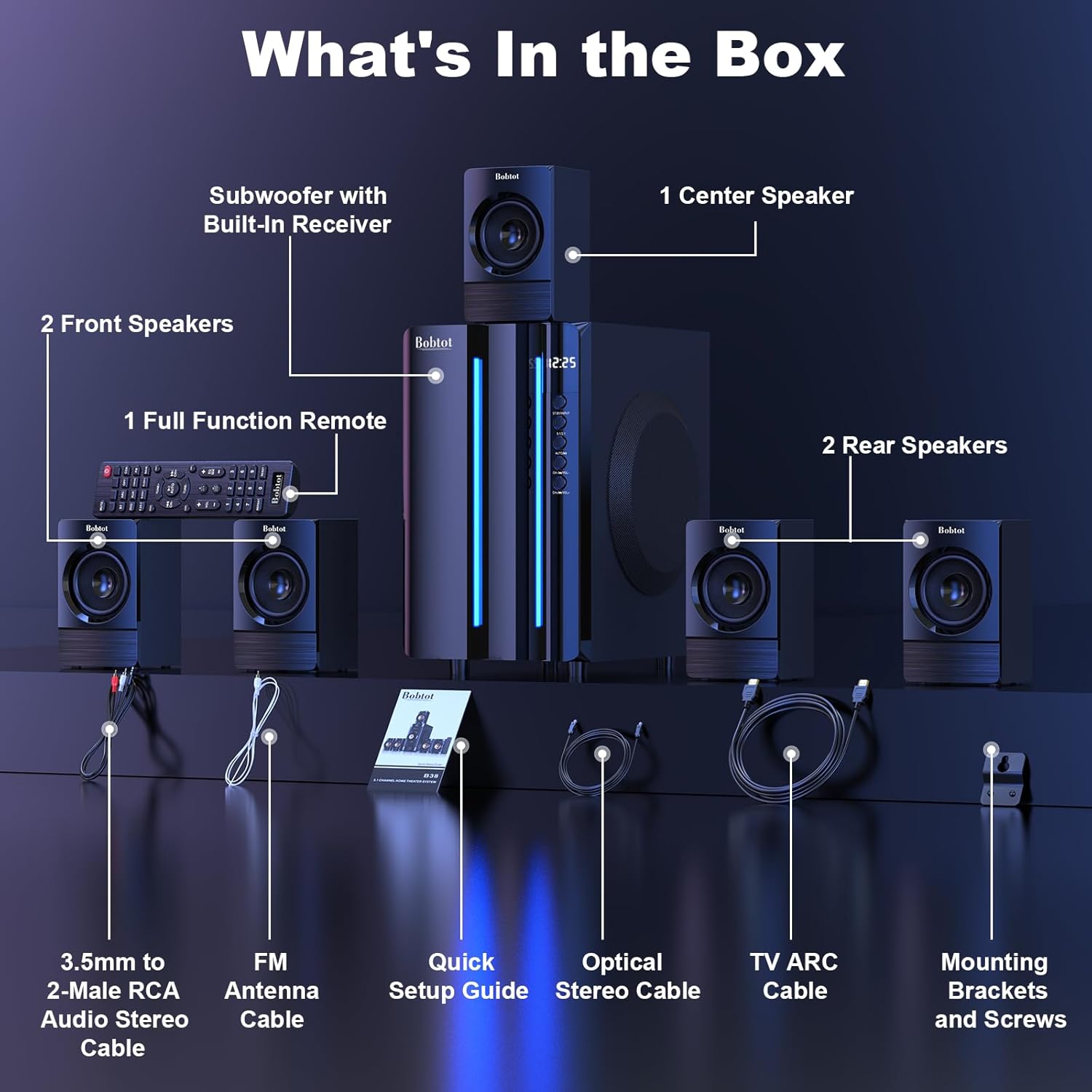
Image 3.1: Visual representation of all items included in the Bobtot K701S package.
- 1 x Subwoofer with Built-in Receiver
- 1 x Center Speaker
- 2 x Front Speakers
- 2 x Rear Speakers
- 1 x Télécommande multifonction
- 1 x 3.5mm to 2-Male RCA Audio Stereo Cable
- 1 x FM Antenna Cable
- 1 x Guide d'installation rapide
- 1 x Optical Stereo Cable
- 1 x TV ARC Cable (HDMI)
- 1 x câble coaxial
- 1 x câble AUX
- Câble 1 x RCA
- Supports de montage et vis
- Manuel de l'utilisateur (ce document)
4. Composants terminésview
4.1 Caisson de basses (Unité principale)
The subwoofer houses the main receiver and amplifier for the entire system. It features a 6.5-inch driver for deep bass and includes all input/output ports.

Image 4.1 : Détail view of the 6.5-inch subwoofer, highlighting its internal components.
4.2 enceintes satellites
The system includes five satellite speakers: one center, two front (left/right), and two rear (left/right). These speakers are wired and connect directly to the subwoofer unit.
Télécommande 4.3
The full-function remote control allows you to manage power, input modes, volume, channel selection, and other settings from a distance.
5. Configuration du système
Follow these steps to set up your Bobtot K701S surround sound system.
5.1 Connexion des enceintes
The five satellite speakers come with integrated cables. Connect each speaker to the corresponding "Audio Output" slot on the rear of the subwoofer unit. The cables are color-coded or labeled for easy identification (e.g., FL for Front Left, FR for Front Right, CEN for Center, SL for Surround Left, SR for Surround Right).
- Front Center and L/R speakers: Cables are approximately 13 feet long.
- Rear L/R speakers: Cables are approximately 31 feet long.
Place all speakers in the same room for optimal surround sound performance.

Image 5.1: Recommended speaker placement for a 5.1 channel surround sound experience.
5.2 Power On and Initial Test
- Connect the subwoofer to a power outlet using the provided power cable.
- Allumez le subwoofer à l'aide de l'interrupteur d'alimentation.
- Appuyez sur le bouton marche/arrêt de la télécommande ou du panneau avant.
- Tester les fonctionnalités de la télécommande.
- Switch to "BT" (Bluetooth) mode and connect your mobile device to "B701D" via Bluetooth to ensure audio playback.
5.3 Connexion de périphériques externes
Choose the appropriate input mode and connect your external device (e.g., TV, projector, DVD player, game console) to the subwoofer using the corresponding audio cables provided.
- Ensure the cable is securely plugged into the correct input slot on the subwoofer.
- Select the matching input mode on the system (e.g., HDMI ARC, OPT, COA, AUX, USB, DVD).

Image 5.2 : Terminéview of the rear panel connections and supported multimedia inputs.
6. Mode d'emploi
6.1 Fonctions de la télécommande
The remote control provides full command over your sound system. Always press the power button before selecting an input mode when turning on the unit.

Image 6.1: Detailed diagram of the remote control buttons and their functions.
- Marche/Arrêt : Active ou désactive le système.
- Input Mode Select: Buttons for BT, ARC, OPT, COA, DVD, AUX, USB/SD, FM to switch between audio sources.
- 5.1/2.1 Channel Select: Toggles between 5.1 surround sound and 2.1 stereo mode (in 2.1 mode, only the two front speakers play).
- Contrôle du volume (VOL +/-) : Règle le volume général du système.
- Mic Volume Adjustment (MIC +/-): Adjusts the volume for connected microphones (supports wireless/wired microphones).
- Echo Control (ECHO +/-): Ajuste l'effet d'écho pour les microphones.
- RÉGLER +/- : For FM radio tuning.
- CH +/- : For FM radio channel selection.
- MUET: Coupe ou réactive la sortie audio.
6.2 Modes d'entrée
The Bobtot K701S supports various input methods:
- Bluetooth (BT) : Pour une connexion sans fil aux smartphones, tablettes et autres appareils compatibles Bluetooth.
- HDMI ARC : Connects to your TV's HDMI ARC port for high-quality audio transmission and TV remote control integration.
- Optique (OPT) : Digital audio input for TVs, game consoles, and other devices with an optical output.
- Coaxial (COA): Digital audio input, similar to optical, for compatible devices.
- AUX: Analog audio input using a 3.5mm or RCA cable for a wide range of devices.
- USB/SD : Lire l'audio filedirectement depuis des clés USB ou des cartes SD.
- Radio FM: Tuner FM intégré pour écouter les stations de radio.
- DVD: Dedicated input for DVD players.
6.3 Channel Configuration (5.1 / 2.1)
The system offers two channel modes: 5.1 and 2.1. You can switch between these modes using the remote control or the front panel. In 5.1 mode, all five satellite speakers and the subwoofer are active, providing a full surround sound experience. In 2.1 mode, only the two front speakers and the subwoofer are active, suitable for stereo audio.
7. Connectivity Guide
This section details how to connect various devices to your sound system.
7.1 Connexion Bluetooth
- Press the "BT" button on the remote control or front panel to select Bluetooth mode. The display will show "BT".
- Sur votre appareil mobile, activez Bluetooth et recherchez les appareils disponibles.
- Select "B701D" from the list to pair. Once connected, you will hear a confirmation sound.
7.2 Connexion HDMI ARC
- Connect one end of the HDMI ARC cable to the "HDMI ARC" port on the subwoofer.
- Connect the other end to the "HDMI ARC" port on your TV.
- Select "ARC" input mode on the sound system.
- Assurez-vous que la sortie audio de votre téléviseur est réglée sur HDMI ARC ou sur des haut-parleurs externes.
7.3 Optical/Coaxial Connection
- Connect an optical or coaxial cable from your device's digital audio output to the corresponding "OPT" or "COA" input on the subwoofer.
- Select "OPT" or "COA" input mode on the sound system.
- Ensure your device's audio output is set to PCM (Pulse-code modulation) for optical/coaxial connections, as some devices may default to other formats not supported by the system.
7.4 Connexion AUX
- Use the provided 3.5mm to 2-Male RCA cable or a standard RCA cable.
- Connect the cable from your device's audio output (e.g., headphone jack, RCA L/R output) to the "AUX" input on the subwoofer.
- Select "AUX" input mode on the sound system.
7.5 Lecture USB/SD
- Insérez une clé USB ou une carte SD contenant de l'audio files into the respective port on the subwoofer.
- Select "USB/SD" input mode. The system will automatically begin playing compatible audio files.
7.6 Radio FM
- Connect the FM antenna cable to the "FM ANTENNA" port on the subwoofer. Extend the antenna for better reception.
- Sélectionnez le mode d'entrée « FM ».
- Use the "TUNE +/-" or "CH +/-" buttons on the remote to scan for and select radio stations.
8. Spécifications
| Fonctionnalité | Spécification |
|---|---|
| Numéro de modèle | K701S |
| Type de haut-parleur | Satellite |
| Configuration des canaux de son surround | 5.1 |
| Puissance de sortie de crête | 800 watts |
| Diamètre du caisson de basses | 6.5 pouces |
| Réponse en fréquence | 20 kHz |
| Technologie de communication sans fil | Bluetooth 5.0 |
| Technologie de connectivité | Bluetooth, HDMI ARC, Optical, Coaxial, AUX, USB, DVD, FM |
| Méthode de contrôle | Télécommande |
| Source d'énergie | Électrique avec fil |
| Vol d'entréetage | 120 volts |
| Dimensions du produit (L x l x H) | 31.8 x 19.8 x 33 cm |
| Poids de l'article | 6.56 kilogrammes |
| Matériel | Wood (MDF), Acrylonitrile Butadiene Styrene (ABS) |
| Dossier spécial | Basse Amplification |
9. Dépannage
If you encounter issues with your Bobtot K701S system, refer to the following common problems and solutions:
9.1 Pas de son
- Vérifiez l'alimentation : Ensure the system is powered on and the power cable is securely connected.
- Niveau de volume : Increase the master volume on the system and your connected device.
- Mode de saisie : Verify that the correct input mode is selected on the system (e.g., BT, ARC, OPT).
- Connexions de câble : Ensure all audio cables are securely connected to both the system and the source device.
- Sortie du périphérique source : Check the audio output settings on your source device (e.g., TV, DVD player) to ensure it's sending audio to the correct output port and format (e.g., PCM for optical/coaxial).
9.2 Mauvaise qualité sonore / Distorsion
- Niveau de volume : Reduce the volume if it's too high, causing distortion.
- Intégrité du câble : Vérifiez que les câbles audio ne sont pas endommagés ou que les connexions ne sont pas desserrées.
- Placement des conférenciers : Ensure speakers are placed correctly and not obstructed.
- Qualité des sources : Testez avec une source audio différente ou file to rule out issues with the original content.
9.3 Télécommande non fonctionnelle
- Piles : Remplacez les piles de la télécommande.
- Ligne de mire: Ensure there is a clear line of sight between the remote and the system's IR receiver.
- Distance: Utilisez la télécommande dans sa zone de portée.
9.4 Problèmes de connexion Bluetooth
- Mode d'appariement: Assurez-vous que le système est en mode de couplage Bluetooth.
- Proximité de l'appareil : Keep your Bluetooth device within a few meters of the system.
- Ingérence: Éloignez-vous des autres appareils sans fil susceptibles de provoquer des interférences.
- Oubliez l'appareil: On your mobile device, "forget" or "unpair" the "B701D" and attempt to reconnect.
10. Entretien et maintenance
- Nettoyage: Use a soft, dry cloth to clean the surfaces of the system. Do not use liquid cleaners or aerosols.
- Ventilation: Assurez-vous que le caisson de basses bénéficie d'une ventilation adéquate et qu'il n'est pas placé dans un espace clos susceptible de restreindre la circulation de l'air.
- Placement: Avoid placing the system in direct sunlight, near heat sources, or in areas with high humidity.
- Éteindre: Turn off and unplug the system when not in use for extended periods.
11. Garantie et support client
Bobtot is committed to providing a positive customer experience. If you encounter any issues with your B701D Home Surround Sound System, please refer to this user manual for initial troubleshooting.
For further assistance, please contact Bobtot customer support through the Amazon buyer-seller messaging service. Our support team is available to help you with any questions or concerns you may have.


