1. Produit terminéview
The KEMIMOTO Electronic Device Holder is designed to securely mount your smartphone or tablet on the dashboard of compatible Pioneer 1000 models. It features an adjustable clamp, shock-absorbing sponge strips for device protection, and an integrated storage compartment.
- Support de tablette réglable : Compatible with most 5.1-8 inch devices. Designed for easy installation near a power source for convenient charging.
- Shock-resistant Sponge Strip: Constructed from durable HDPE material, this mount includes shock-absorbing sponge pads to reduce vibrations and protect your device during off-roading.
- Expandable Storage Box: Provides additional dashboard storage for small essentials such as smartphones, keys, and sunglasses, enhancing cabin organization.
2. Contenu du colis
Le forfait comprend les éléments suivants :
- 1 x Electronic Device Holder unit
- 1 x Interchangeable Smartphone Holder
- Sponge strips for cushioning
- Push pins for installation
3. Compatibilité
This device holder is compatible with the following models:
- Pioneer 1000 (2022, 2023, 2024, 2025 models)
- Pioneer 1000-5 (2022, 2023, 2024, 2025 models)
- Pioneer 1000-6 (2022, 2023, 2024, 2025 models)
NOTE: NOT compatible with 2016-2021 versions of Pioneer models.

Image: Visual representation of compatible Pioneer 1000 models (3P, 5P, 6P) from 2022-2025.
4. Configuration et installation
Follow these steps for quick and secure installation of your KEMIMOTO Electronic Device Holder:
- Préparer le tableau de bord : Ensure the installation area on your Pioneer 1000 dashboard is clean and free of dust or debris.
- Retirer la couverture d'origine : Carefully remove the existing dashboard cover by pulling out any retaining pins or screws.
- Positionnez le support : Place the KEMIMOTO device holder in the desired position on the dashboard. It is designed to fit into existing slots.
- Trous de forage : Using a power drill, create 3/8-inch holes at the designated mounting points on your plastic panels.
- Secure with Push Pins: Insert the four provided push pins into the drilled holes to firmly secure the device holder to the dashboard.
- Apply Sponge Strips: Stick the provided shock-absorbing sponge strips to the feet, top, and back interior surfaces of the holder. This provides cushioning and prevents vibration noise.

Image: Illustration of drilling holes and securing the device holder with push pins.

Image: Close-up of the shock-resistant sponge strip and easy access to charging solutions for devices.
Vidéos d'installation :
Installation of Electronic Tablet Holder for Pioneer 520
Video: A detailed guide demonstrating the installation process of the electronic tablet holder on a Pioneer 520 dashboard, including securing screws and applying sponge strips.
3 Easy Steps to Install Your KEMIMOTO UTV Device Mount
Video: A quick, 30-second overview of the installation process for the KEMIMOTO UTV device mount, highlighting key steps for fast setup.
5. Mode d'emploi
The KEMIMOTO device holder is designed for ease of use and secure device retention.
- Réglage du Clamp: The holder features an adjustable clamp. To insert a device, gently pull the top clamp upwards. The clamp will automatically adjust to the width of your device (5.1-8 inches).
- Insertion de votre appareil : Place your smartphone or tablet into the holder, ensuring it sits securely against the sponge strips. The clamp will hold it firmly.
- Sécurisation de l'appareil : For added security, rotate the internal knob to tighten the clamp around your device. This dual-secure mechanism (auto-clamp + knob lock) prevents movement during rides.
- Accès au stockage : The top section of the holder features a push-button release to access the expandable storage compartment. Press the 'PUSH' button to open and close the compartment.
- Appareils de charge: The design allows for easy access to charging ports, enabling you to charge your device while it is mounted.
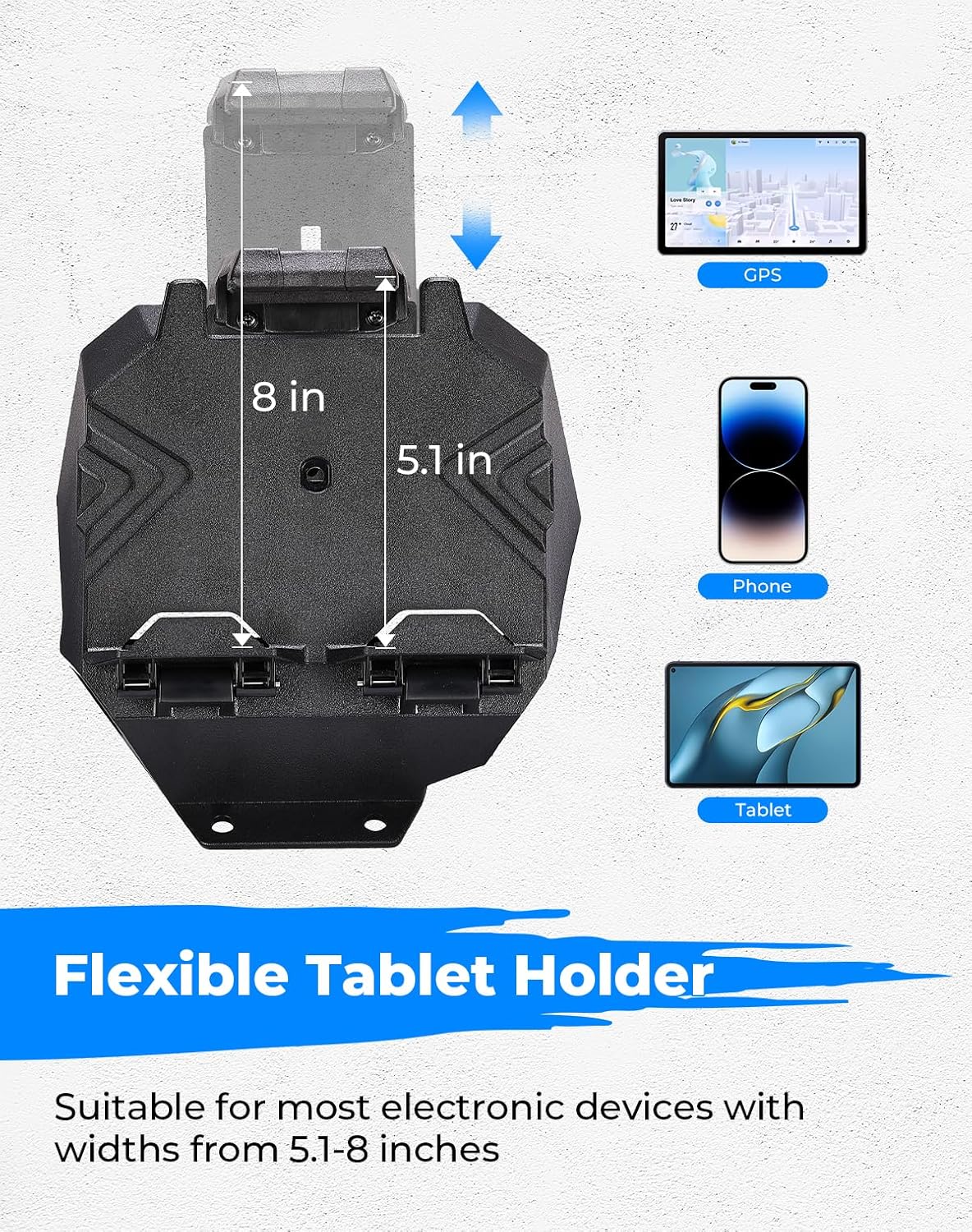
Image: Demonstrates the adjustable clamp accommodating devices from 5.1 to 8 inches in width.

Image: Shows the interchangeable phone and tablet holder options, allowing users to switch based on device size.

Image: The KEMIMOTO Electronic Device Tablet Holder mounted on a dashboard, displaying a tablet with GPS navigation.
Vidéos d'opération :
KEMIMOTO Electronic Device Tablet Holder Overview
Vidéo : Un bref aperçuview of the KEMIMOTO Electronic Device Tablet Holder, showcasing its features and how devices are secured.
Display of Electronic Device Tablet Holder for Pioneer 520
Video: Demonstrates the electronic device holder in action on a Pioneer 520, showing how a device is placed and used for navigation.
6. Entretien
To ensure the longevity and optimal performance of your KEMIMOTO Electronic Device Holder, follow these simple maintenance guidelines:
- Nettoyage: Regularly wipe the holder with a soft, damp chiffon pour enlever la poussière et la saleté. Évitez d'utiliser des produits chimiques agressifs ou des nettoyants abrasifs.
- Vérifiez les fixations : Periodically inspect the push pins and any other fasteners to ensure they remain tight and secure. Tighten if necessary.
- Sponge Strip Integrity: Check the sponge strips for wear and tear. If they become damaged or lose their cushioning ability, replace them to maintain device protection.
7. Dépannage
If you encounter any issues with your KEMIMOTO Electronic Device Holder, refer to the following common solutions:
- Appareil incompatible : Ensure your device's width is within the 5.1-8 inch range. Adjust the clamp mechanism fully before inserting.
- Le support semble lâche : Verify that all push pins are fully inserted and secure. If the dashboard panel itself is loose, consult your vehicle's manual.
- Bruit de vibration : Confirm that the sponge strips are correctly installed and provide adequate cushioning for your device. Ensure the internal knob is tightened to secure the device.
8. Spécifications
| Fonctionnalité | Détail |
|---|---|
| Dimensions du colis | 9.5 x 9 x 9 pouces |
| Poids de l'article | 2.1 livres |
| Numéro de modèle de l'article | KMB0111-14701BK |
| Caractéristiques spéciales | Adjustable, Shock Resistant, Storage |
| Couleur | NOIR |
| Fabricant | KEMIMOTO |
| Appareils compatibles | Smartphones, tablettes (5.1-8 pouces) |
| Type de montage | Tableau de bord |
9. Garantie et assistance
KEMIMOTO stands behind the quality of its products. For warranty information, product support, or any inquiries, please refer to the contact details provided with your purchase or visit the official KEMIMOTO website.
Veuillez conserver votre preuve d'achat pour toute réclamation au titre de la garantie.


