1. Introduction et plusview
The Ditec RM-L 1370 is a universal replacement remote control designed for a wide range of Sony Bravia televisions. This remote offers direct compatibility with various Sony LCD, LED, UHD, OLED, and QLED 4K Ultra HD Smart Android TV models, eliminating the need for complex programming or pairing. It features dedicated hotkeys for popular streaming services like YouTube and Netflix for convenient access.

Image: The Ditec RM-L 1370 remote control, highlighting its compatibility as a single remote solution for Sony TVs.
2. Installation et utilisation initiale
This remote control is designed for immediate use without any setup or programming. Simply insert the required batteries, and it will be ready to operate your compatible Sony TV.
2.1 Installation de la batterie
- Localisez le compartiment à piles à l'arrière de la télécommande.
- Faites glisser le couvercle du compartiment à piles pour l'ouvrir.
- Insert two (2) AAA batteries (not included), ensuring correct polarity (+ and - terminals).
- Fermez soigneusement le couvercle du compartiment à piles.

Image : Arrière view de la télécommande, illustrant l'emplacement du compartiment à piles.
2.2 Première utilisation
Once batteries are installed, point the remote control towards your Sony TV and press the Power button. The remote should operate your TV without any further configuration.
3. Mode d'emploi
The Ditec RM-L 1370 remote control provides all standard functions for your Sony Bravia TV, along with convenient shortcut buttons.
3.1 Fonctions de base
- Bouton d'alimentation : Allume ou éteint le téléviseur.
- Touches numériques (0-9): Pour la sélection directe des chaînes.
- Volume haut/bas : Règle le volume du téléviseur.
- Canal haut/bas : Change de chaîne de télévision.
- Pavé de navigation (Haut/Bas/Gauche/Droite/Entrée) : Pour la navigation et la sélection dans les menus.
- Bouton d'accueil: Accesses the TV's Smart Home screen or main menu.
- Bouton Retour/Retour : Revient à l'écran ou au menu précédent.
- Bouton Options : Affiche les options contextuelles.
3.2 Caractéristiques spéciales
- YouTube Hotkey: Lance directement l'application YouTube.
- Netflix Hotkey: Lance directement l'application Netflix.
The remote features an enhanced infrared sensor for a farther transmitting distance, allowing effective control up to 50 feet.

Image: The remote control demonstrating its farther distance sensor, capable of operating up to 50 feet.
4. Compatibilité
The Ditec RM-L 1370 universal remote is compatible with a wide range of Sony Bravia LCD, LED, UHD, OLED, and QLED 4K Ultra HD Smart Android TVs. It is designed to replace many original Sony remote models, including but not limited to:
- RMT-TX100U, RMT-TX102U
- RMF-TX200U, RMF-TX201U, RMF-TX220U
- RMT-TX300U, RMF-TX310U
- RMT-TX500U, RMF-TX520U, RMF-TX600U
- And many other Sony TV remote models.
For a comprehensive list of compatible Sony TV remote models, please refer to the image below:
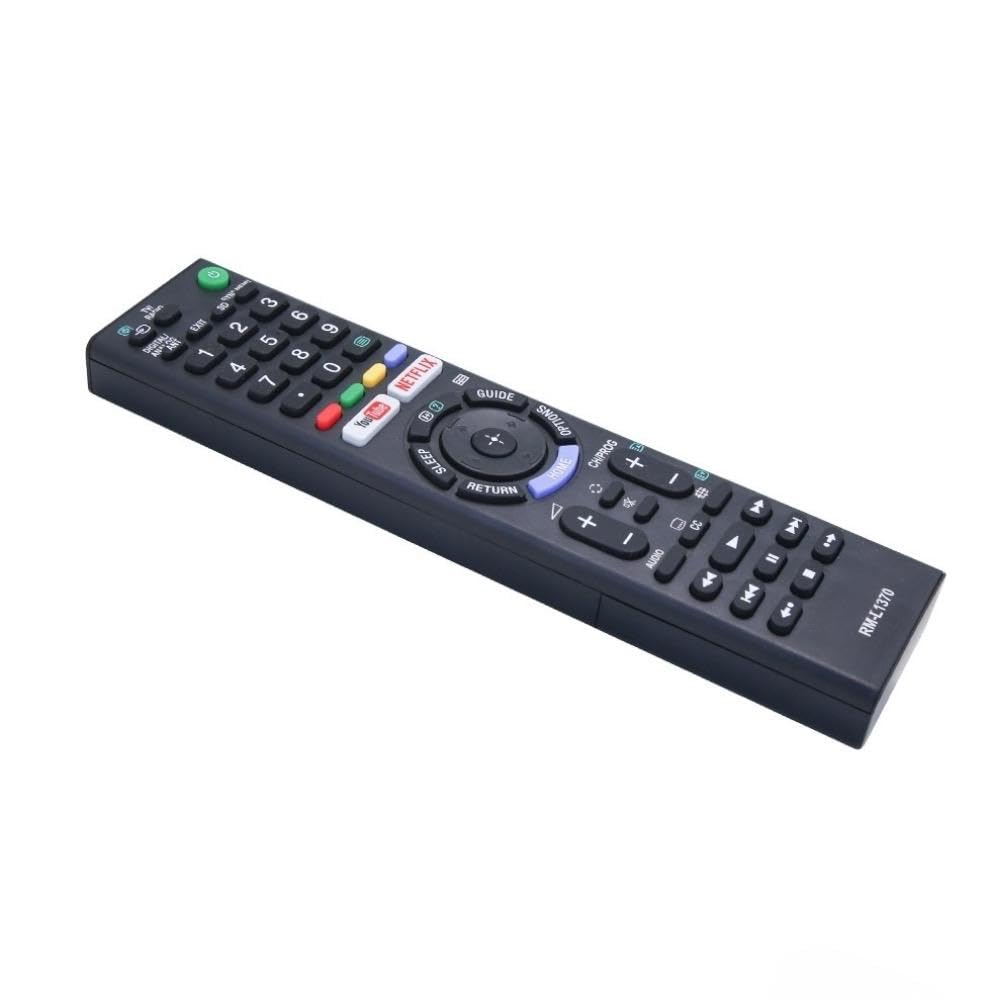
Image: A detailed list of Sony TV remote models that are compatible with the Ditec RM-L 1370.
It is recommended to compare the appearance of this remote with your original remote for visual confirmation of compatibility.
5. Entretien
5.1 Remplacement de la batterie
When the remote control's performance degrades or it stops responding, replace the batteries with two new AAA alkaline batteries. Always replace both batteries at the same time. Do not mix old and new batteries or different types of batteries.
5.2 Nettoyage
Pour nettoyer la télécommande, utilisez un chiffon doux et sec. N'utilisez pas de nettoyants liquides, de sprays ni de produits abrasifs, car ils pourraient endommager la surface ou les composants internes de la télécommande.
6. Dépannage
- La télécommande ne répond pas :
- Vérifiez que les piles sont correctement insérées et que la polarité est correcte.
- Remplacez les anciennes piles par des neuves.
- Assurez-vous qu'aucun obstacle ne se trouve entre la télécommande et le récepteur infrarouge du téléviseur.
- Assurez-vous d'être dans la zone de fonctionnement efficace (jusqu'à 50 pieds).
- Certains boutons ne fonctionnent pas :
- Some advanced functions or TV-specific features might not be supported by a universal replacement remote.
- Ensure the TV is powered on and functioning correctly.
7. Spécifications
| Fonctionnalité | Détail |
|---|---|
| Marque | Ditec |
| Modèle | RM-L 1370 |
| Appareils compatibles | Sony Bravia LCD, LED, UHD, OLED, QLED 4K Ultra HD Smart Android TVs |
| Type de connecteur | Infrarouge (IR) |
| Piles requises | 2 x AAA (non inclus) |
| Caractéristiques spéciales | Ergonomic design, YouTube & Netflix Hotkeys |
| Dimensions du produit | 3 x 3 x 12 cm |
| Poids de l'article | 80 g |
| Pays d'origine | Chine |
8. Assistance
For assistance with compatibility or any questions regarding your Ditec RM-L 1370 remote control, you may contact support by sending a picture of your old remote or your device's brand name and model number to +91 9924350801. This will help in verifying compatibility or addressing specific queries.

Image: Information on how to contact support for compatibility checks or questions.


