1. Introduction
The MASTECH MS8236 is a versatile 2-in-1 digital multimeter and network cable track tester designed for electrical and network diagnostics. This device combines the functions of a digital multimeter for measuring electrical parameters with a network cable tester for verifying cable integrity and a tone generator for tracing wires. It is suitable for professional and DIY use in various applications.
2. Consignes de sécurité
Always adhere to basic safety precautions when using this device to prevent personal injury or damage to the meter or equipment under test. Read all instructions carefully before use.
- Ne dépassez pas les valeurs d'entrée maximales spécifiées pour chaque fonction.
- Faites preuve d'une extrême prudence lorsque vous travaillez sur des circuits sous tension.
- Avant d'effectuer des mesures, assurez-vous que le commutateur de fonction est dans la bonne position.
- N’utilisez pas l’appareil de mesure s’il semble endommagé ou si les cordons de test sont endommagés.
- Remplacez immédiatement les piles dès que le voyant de batterie faible s'allume afin de garantir des mesures précises.
- Avoid using the device in environments with high humidity, extreme temperatures, or explosive gases.
- Always disconnect power to the circuit before testing continuity or resistance.
3. Produit terminéview
The MASTECH MS8236 integrates a digital multimeter with a detachable cable tracker/tone generator. The main unit features a clear digital display, function selector dial, and input jacks. The cable tracker assists in identifying and tracing network and telephone lines.
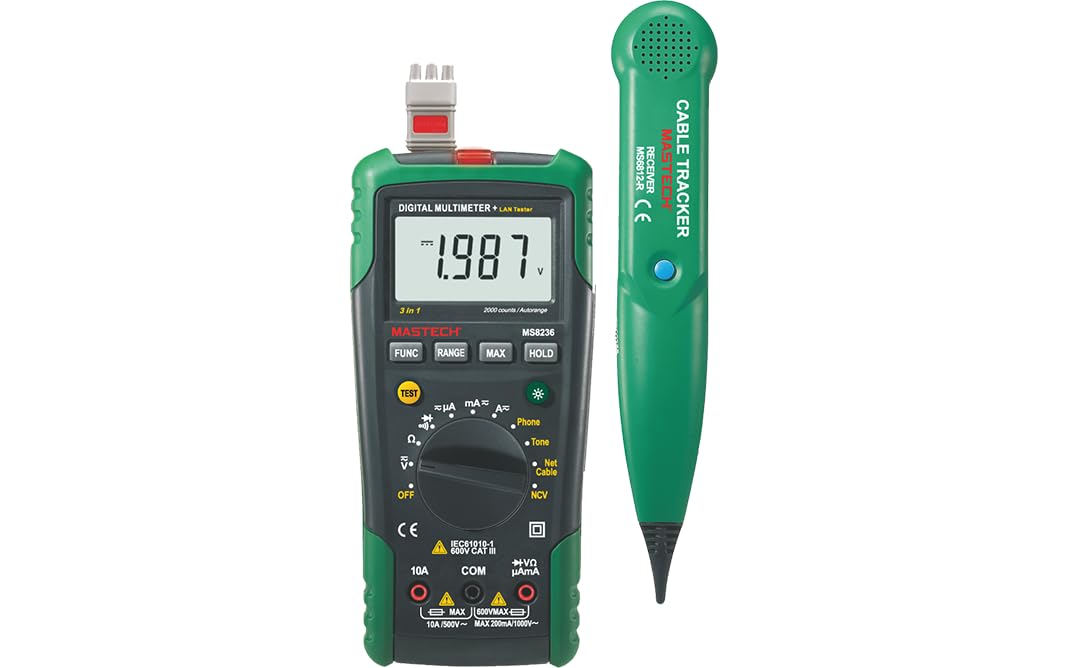
Figure 3.1: MASTECH MS8236 Digital Multimeter and Cable Tracker. The image shows the main multimeter unit on the left and the separate cable tracker unit on the right. Both are green and black.
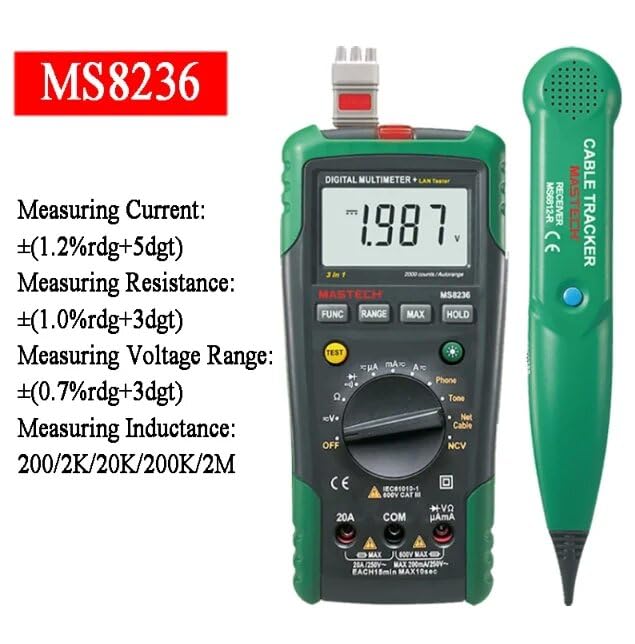
Figure 3.2: Close-up of the MASTECH MS8236 Multimeter Display and Controls. The display shows '1.987 V' and the function dial indicates various measurement modes including V, A, Ohm, Diode, Continuity, Phone, Net Cable, and NCV.
Caractéristiques principales :
- Affichage: 2000 compte
- Ranging: Auto & Manual
- Vol sans contacttage (NCV) Détecteur
- Diode ouverte Voltage : 1.7 V
- Continuity Buzzer: Activates below 70Ω
- Fonction de maintien des données
- Affichage de la batterie faible
- Rétroéclairage de l'écran
- Arrêt automatique
- Network Cable Check: Tests for open circuits, shorts, miss-wires, reversals, split pairs, and shield detection. Supports T568A, T568B, 10Base-T.
- Telephone Line Check: Identifies line states (Busy, Ringing, Clear) and continuity.
- Tone Function: For tracking cables and diagnosing break points.
4. Installation
4.1. Déballage et inspection
Carefully unpack the MS8236 and all accessories. Inspect the device for any signs of damage. If any damage is found, contact your supplier immediately.
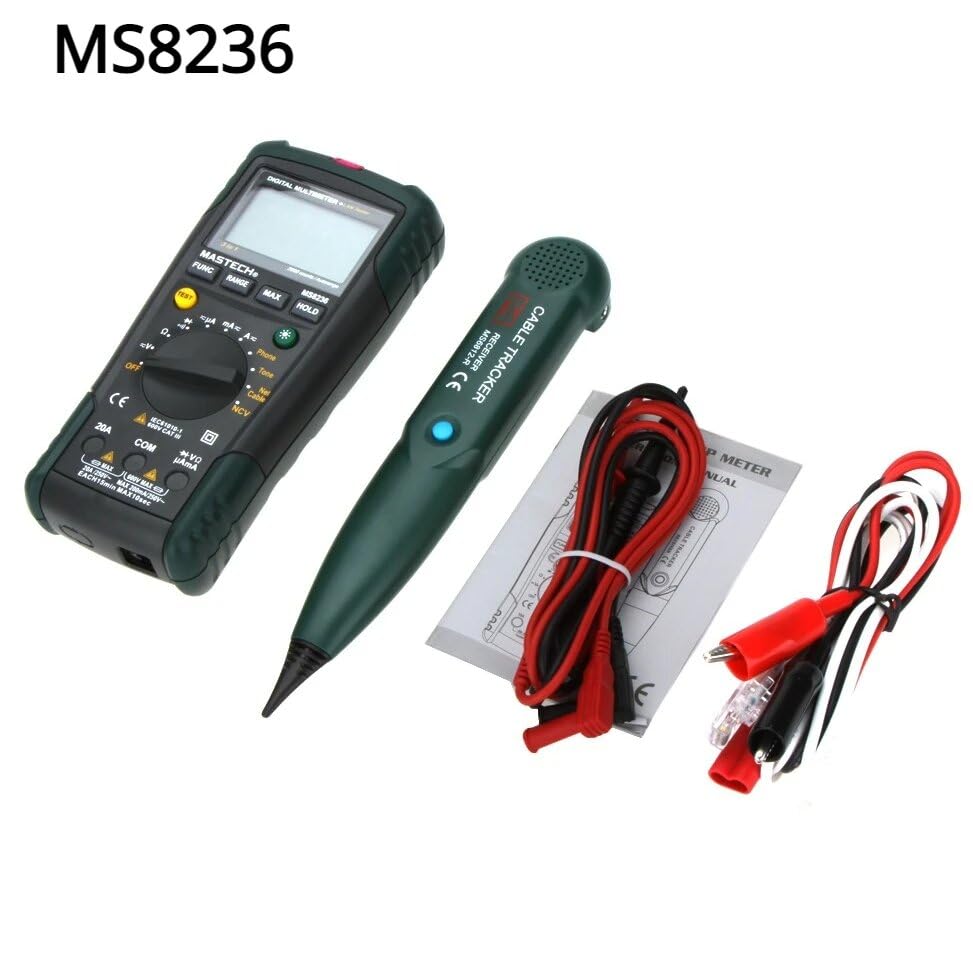
Figure 4.1: MASTECH MS8236 Kit Contents. The image displays the multimeter, cable tracker, red and black test leads, a network cable adapter, and a small instruction manual.
4.2. Installation de la batterie
The MS8236 requires 2 LR44 batteries, which are included. To install or replace batteries:
- Locate the battery compartment cover on the back of the multimeter unit.
- Utilisez un tournevis pour ouvrir le compartiment à piles.
- Insert the 2 LR44 batteries, observing the correct polarity (+/-).
- Fermez fermement le couvercle du compartiment des piles.
5. Mode d'emploi
5.1. Basic Multimeter Functions
Connect the test leads to the appropriate input jacks (COM for black lead, VΩmA for red lead for most measurements, or 20A for high current). Select the desired function using the rotary switch.
- Voltage Measurement (DCV/ACV): Turn the rotary switch to the 'V' position. Select DC or AC voltage if applicable. Connect test leads in parallel to the circuit.
- Current Measurement (DCA/ACA): Turn the rotary switch to the 'A' position. Select DC or AC current. Connect test leads in series with the circuit. Ensure the correct input jack (mA or 20A) is used.
- Mesure de la résistance (Ω) : Turn the rotary switch to the 'Ω' position. Ensure the circuit is de-energized. Connect test leads across the component.
- Test de diodes (→|): Turn the rotary switch to the diode symbol. Connect the red lead to the anode and the black lead to the cathode of the diode.
- Test de continuité ()))): Turn the rotary switch to the continuity symbol. The buzzer will sound if the resistance is below approximately 70Ω.
5.2. Network Cable Check
This function tests the integrity of network cables (RJ45). It can detect open circuits, shorts, miss-wires, reversals, split pairs, and shield detection for T568A, T568B, and 10Base-T standards.
- Turn the rotary switch to the 'Net Cable' position.
- Connect one end of the network cable to the RJ45 port on the main multimeter unit.
- Connect the other end of the network cable to the RJ45 port on the remote cable tracker unit.
- Observe the display for test results, which will indicate the cable status. The device also features a debug mode for detailed fault identification.
5.3. Telephone Line Check
This function allows for checking the state of a working telephone line and its continuity.
- Turn the rotary switch to the 'Phone' position.
- Connect the telephone line to the appropriate port on the main unit.
- The device will identify the state of the line as Busy, Ringing, or Clear. It can also judge the continuity of the telephone cables or wires.
5.4. Tone Function
The tone function is used with the cable tracker to trace cables and wires and diagnose break points.
- Turn the rotary switch to the 'Tone' position.
- Connect the test leads or RJ11/RJ45 plug to the cable you wish to trace.
- Use the remote cable tracker unit to follow the cable. The tracker will emit an audible tone when it detects the signal from the main unit, helping to locate the cable and identify breaks.
5.5. Vol sans contacttage (NCV) Détection
La fonction NCV permet de détecter le volume alternatiftage sans contact direct avec le conducteur.
- Tournez le commutateur rotatif sur la position « NCV ».
- Approchez la partie supérieure du multimètre d'une tension alternative sous tension.tagla source.
- L'appareil indiquera la présence de courant alternatif.tage par le biais d'une alarme sonore et/ou d'un indicateur visuel.
5.6. Fonctions supplémentaires
- Maintien de données: Appuyez sur le bouton « HOLD » pour figer la lecture actuelle affichée. Appuyez de nouveau pour relâcher.
- Rétroéclairage : Press the backlight button (often labeled with a light bulb symbol) to illuminate the display for better visibility in low-light conditions.
- Arrêt automatique : L'appareil s'éteindra automatiquement après une période d'inactivité afin de préserver la batterie.
6. Entretien
6.1. Nettoyage
Essuyez le boîtier avec la publicitéamp Nettoyer avec un chiffon et un détergent doux. Ne pas utiliser de produits abrasifs ni de solvants. S'assurer que l'appareil est parfaitement sec avant utilisation.
6.2. Remplacement de la batterie
When the low battery indicator appears on the display, replace the batteries as described in Section 4.2. Remove batteries if the device will not be used for an extended period.
7. Dépannage
- Aucun affichage ou affichage très faible : Vérifiez l'installation et le niveau de charge des batteries. Remplacez-les si nécessaire.
- Lectures incorrectes : Ensure test leads are properly connected and the correct function is selected. Verify the circuit is de-energized for resistance/continuity tests.
- Network cable test failure: Ensure both ends of the cable are securely connected to the main unit and remote. Check for physical damage to the cable or connectors.
- No tone from cable tracker: Verify the main unit is in 'Tone' mode and properly connected to the cable. Check the cable tracker's battery.
8. Spécifications
The following table outlines the general and electrical specifications for the MASTECH MS8236.

Figure 8.1: MASTECH MS8236 Features and Specifications Table. This image provides detailed electrical specifications for DC Voltage, Vol ACtage, DC Current, AC Current, and Resistance, including ranges, resolutions, and accuracies.
| Paramètre | Gamme | Résolution | Précision |
|---|---|---|---|
| Vol CCtage | 200mV/2V/20V/200V/600V | 0.1mV/1mV/10mV/100mV/1V | ±(0.5%+5) |
| Vol ACtage | 200mV/2V/20V/200V/600V | 0.1mV/1mV/10mV/100mV/1V | ±(0.8%+5) |
| Courant continu | 200µA/2000µA/20mA/200mA/2A/10A | 0.1µA/1µA/10µA/0.1mA/1mA/10mA | ±(1.2%+5) ±(2.0%+10) for 10A |
| Courant alternatif | 200µA/2000µA/20mA/200mA/2A/10A | 0.1µA/1µA/10µA/0.1mA/1mA/10mA | ±(1.5%+5) ±(3.0%+10) for 10A |
| Résistance | 200Ω/2kΩ/20kΩ/200kΩ/2MΩ/20MΩ | 0.1Ω/1Ω/10Ω/100Ω/1kΩ/10kΩ | ±(1.0%+5) ±(1.5%+5) for 20MΩ |
| Diode ouverte Voltage | 1.7V | ||
| Buzzer de continuité | <70Ω | ||
| Afficher | 2000 comptes | ||
| Portée | Automatique et manuel | ||
| Vol sans contacttage Détecteur | Oui | ||
| Arrêt automatique | Oui | ||
| Conservation des données | Oui | ||
| Affichage de la batterie faible | Oui | ||
| Rétroéclairage de l'écran | Oui | ||
| Source d'énergie | 2 piles LR44 (fournies) | ||
| Dimensions du produit | 16 x 9 x 5 cm | ||
| Poids de l'article | 500 g | ||
| Matériel | Acrylonitrile butadiène styrène (ABS) | ||
| Certifications | CE, RoHS | ||
9. Garantie et assistance
For warranty information and technical support, please refer to the documentation provided with your purchase or contact the seller or manufacturer directly. Specific warranty terms may vary by region and retailer.


