1. Introduction
This manual provides essential information for the safe and efficient operation of your BITMAIN Antminer S19 86TH/S Bitcoin ASIC Miner. Please read this document thoroughly before setting up and operating the device. Proper installation and maintenance are crucial for optimal performance and longevity.
The Antminer S19 is designed for high-performance cryptocurrency mining using the SHA256 algorithm, supporting currencies such as Bitcoin (BTC), Bitcoin Cash (BCH), and Bitcoin SV (BSV). It features an air-cooling system and is optimized for energy efficiency.
2. Installation
2.1. Déballage et inspection
Carefully remove the Antminer S19 from its packaging. Inspect the device for any visible damage that may have occurred during transit. Ensure all components are present.

Figure 1 : Face avant view of the Antminer S19.
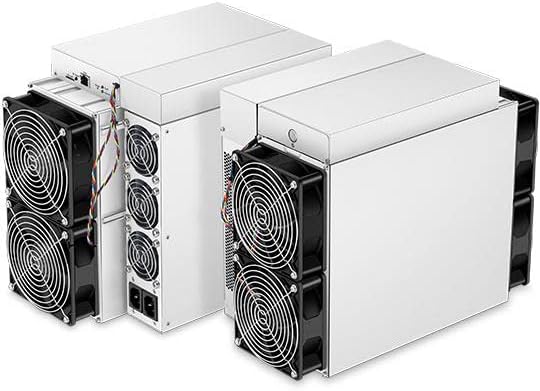
Figure 2: Multiple Antminer S19 units, illustrating their compact design.
2.2. Connexion électrique
The Antminer S19 requires a 200-240V AC input voltage. A power cord is NON INCLUS with the unit. Use an appropriate power cord and ensure the voltage supply is within the specified range. Incorrect voltage can cause severe damage to the miner.

Figure 3: Rear panel of the Antminer S19, highlighting power input ports and the RJ45 Ethernet port.
2.3. Connexion réseau
Connect the miner to your network using an Câble Ethernet RJ45. The device supports 10/100M Ethernet connections. Ensure a stable internet connection for continuous mining operations.
2.4. Configuration initiale
Once powered on and connected to the network, the miner will typically acquire an IP address via DHCP. Access the miner's web interface using its IP address to configure mining pool settings, worker names, and other parameters. Refer to the BITMAIN official website for detailed software configuration guides.
3. Operating the Antminer S19
3.1. Performance surview
The Antminer S19 delivers a hashrate of 86 TH/S ± 3%, with a power efficiency of 34.5 J/TH ± 5%. It operates on approximately 2967 W ± 5 % at 77°F (25°C) ambient temperature. These figures are crucial for calculating potential profitability and ensuring your electrical infrastructure can support the load.
3.2. Exigences environnementales
To ensure stable and long-term operation, adhere to the following environmental conditions:
- Température de fonctionnement : 32°F à 113°F (0°C à 45°C)
- Température de stockage : -4°F à 158°F (-20°C à 70°C)
- Humidité de fonctionnement (sans condensation) : 10% à 90% HR
- Altitude d'opération : ≤ 2000 mètres
Operating outside these ranges may lead to reduced performance, instability, or permanent damage to the unit.
4. Entretien
4.1. Air Filter and Fan Cleaning
The Antminer S19 utilizes an air-cooling system. Regular cleaning of the air intake and exhaust fans is essential to prevent dust buildup, which can impede airflow and lead to overheating. Use compressed air to gently clear dust from the fan blades and heatsinks. Ensure the device is powered off and disconnected from the power source before performing any cleaning.

Figure 4 : Face avant view of the Antminer S19, highlighting the air-cooling fans.
4.2. Surveillance de l'environnement
Continuously monitor the operating temperature and humidity of the mining environment. Maintaining optimal conditions will extend the lifespan of your miner and ensure consistent performance.
5. Dépannage
5.1. Problèmes courants
- Pas d'alimentation : Verify the power cord is securely connected and the power supply is receiving adequate voltage (200-240V).
- Aucune connexion réseau : Check the Ethernet cable connection and ensure your network is operational. Confirm the miner has obtained an IP address.
- Faible taux de hachage : This can be caused by poor network connectivity, incorrect mining pool settings, or environmental factors such as high temperatures.
- Surchauffe: Ensure proper ventilation and clean the fans. Check ambient room temperature.
5.2. Important Note on Voltage
Using an incorrect input voltage (e.g., 110V instead of 220-240V) will likely cause irreversible damage to the miner. Always confirm your power source meets the specified requirements before connecting the device.
6. Spécifications
| Fonctionnalité | Spécification |
|---|---|
| Modèle | S19 |
| Algorithm | Cryptocurrency | SHA256 | BTC/BCH/BSV |
| Taux de hachage | 86 TH/S ± 3% |
| Power on wall @77°F(25°C) | 2967 W ± 5 % |
| Power efficiency on wall @77°F(25°C) | 34.5 J/TH ± 5% |
| Alimentation AC Entrée voltage | 200~240 V |
| Power supply AC Input Frequency Range | 47 à 63 Hz |
| Alimentation CA Courant d'entrée | 20 Amp |
| Mode de connexion réseau | Ethernet RJ45 10/100M |
| Miner Size (Length*Width*Height, w/o package) | 15.75 x 7.68 x 11.42 pouces |
| Miner Size (Length*Width*Height, with package) | 22.45 x 12.45 x 16.93 pouces |
| Poids net | 33.96 livres |
| Poids brut | 37.92 livres |
| Température de fonctionnement | 32~113°F (0~45°C) |
| Température de stockage | -4~158°F (-20~70°C) |
| Operation humidity (non-condensing) | 10 à 90 % d'humidité relative |
| Altitude de fonctionnement | ≤2000m |
7. Garantie et assistance
7.1. Couverture de la garantie
Brand new BITMAIN Antminer units are covered by a warranty provided directly by BITMAIN. The seller is not responsible for warranty claims. Customers are required to contact BITMAIN's official website for warranty service and support. Dedicated personnel at BITMAIN will assist you with any warranty-related inquiries.
7.2. Politique de retour
For brand new BITMAIN Antminer units, if a return is not due to product malfunction, a 40% restocking fee will be applied. Please consider your purchase carefully before proceeding.
7.3. Assistance technique
For technical assistance, troubleshooting beyond this manual, or any operational questions, please refer to the official BITMAIN support channels. Their website typically provides comprehensive FAQs, forums, and direct contact options for technical support.