Introduction
This manual provides detailed instructions for the safe and effective operation of your WOUXUN KG-R56 VHF Professional Radio. Please read this manual thoroughly before using the device to ensure proper function and to prevent damage.
Produit terminéview
The WOUXUN KG-R56 is a compact and robust professional VHF transceiver designed for authorized users, operating within the 66-88 MHz frequency range. It features 256 memory channels, advanced menu functions, and integrated USB Type-C charging. The device is compliant with current R&TTE RED CE standards.
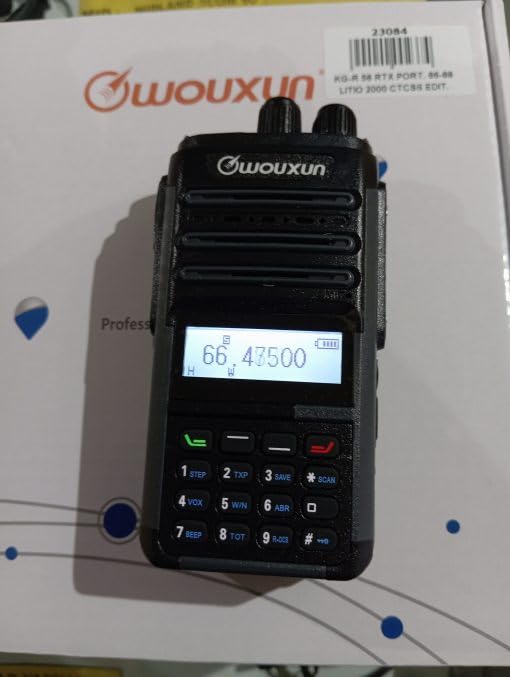
Image: WOUXUN KG-R56 VHF Professional Radio. This image shows the front view de la radio, en mettant en évidence son écran, son clavier et sa connexion d'antenne.
Contenu du colis
Vérifiez que tous les éléments énumérés ci-dessous sont présents dans votre colis :
- KG-R56 Transceiver
- 7.4V - 2000 mAh Lithium-Ion Battery Pack
- Chargeur
- Alimentation 220V
- Flexible Rubber Antenna
- Clip de ceinture
- User Manual (in original language)
- Certifications
Installation
1. Installation de la batterie
- Alignez la batterie avec les rainures à l’arrière de la radio.
- Faites glisser le bloc-batterie vers le haut jusqu'à ce qu'il s'enclenche correctement.
- Pour retirer la batterie, appuyez sur le loquet de déverrouillage (le cas échéant) et faites glisser la batterie vers le bas.
2. Chargement de la batterie
The KG-R56 features an integrated USB Type-C port for convenient charging.
- Connect a USB Type-C cable to the radio's USB-C port.
- Connect the other end of the cable to the provided charger or a compatible USB power source.
- The charging indicator light on the radio will show the charging status.
- Une charge complète prend généralement plusieurs heures. Évitez de surcharger la batterie.
3. Fixation de l'antenne
- Screw the flexible rubber antenna clockwise onto the antenna connector on top of the radio until it is finger-tight.
- Ne serrez pas trop l'antenne.
4. Fixation du clip de ceinture
- Utilisez les vis fournies pour fixer le clip de ceinture à l'emplacement prévu à cet effet à l'arrière de la radio.
Mode d'emploi
1. Marche/Arrêt
Rotate the Power/Volume knob clockwise to turn the radio on. Rotate it counter-clockwise until a click is heard to turn it off.
2. Réglage du volume
After powering on, continue rotating the Power/Volume knob to adjust the audio output level to your preference.
3. selection de CHAINE
Use the Up/Down arrow keys or the rotary encoder (if present) to select the desired channel or frequency. The display will show the selected channel number, frequency, or channel name.
4. Transmission et réception
- Pour transmettre, maintenez enfoncé le bouton Push-To-Talk (PTT) situé sur le côté de la radio. Parlez clairement dans le microphone.
- Relâchez le bouton PTT pour recevoir.
- Always ensure the channel is clear before transmitting to avoid interference.
5. Navigation dans les menus
The KG-R56 features an advanced menu system for managing various radio functions.
- Appuyez sur le MENU bouton pour entrer dans le menu principal.
- Use the Up/Down arrow keys to scroll through the available menu options.
- Presse MENU encore ou OK (if available) to select an option.
- Use the Up/Down keys to change settings within a selected option.
- Presse EXIT or DOS pour revenir au menu précédent ou quitter le système de menus.
Caractéristiques principales
- Encodage/décodage DTMF : Supports DTMF tones for advanced signaling capabilities.
- CTCSS / DCS: Includes 50 CTCSS groups and 105 DCS groups for selective calling. These can be customized via PC programming software.
- CTCSS/DCS Scanner: Automatically detects CTCSS/DCS tones on a received signal.
- Guide vocal : Provides audible prompts for menu navigation and function selection, enhancing user experience.
- Channel Name Display: Allows for editing and displaying custom channel names for easier identification.
- Battery Capacity Inquiry: Check the current battery level directly from the radio.
- Programmable par PC : Customize radio settings, frequencies, and channels using dedicated PC software.
- Bande passante sélectionnable : Choose between various channel spacing options (5K/6.25K/10K/12.5K/25K).
- Reverse Frequency Function: Quickly switch between transmit and receive frequencies for specific operations.
- Multiple Scan Modes (TO/CO/SE): Offers various scanning options for monitoring channels efficiently.
- Modes d'affichage: Switch between displaying Frequency, Channel Number, or Channel Name.
- TOT (Minuteur de temporisation) : Prevents excessively long transmissions by limiting transmission duration.
- Verrouillage du canal occupé (BCLO) : Prevents transmission on an occupied channel, avoiding interference.
- Keypad Lock (Automatic/Manual): Prevents accidental key presses and setting changes.
- Wired Clone Function: Copy settings and configurations from one radio to another using a cable.
- Chargement USB Type-C : Conveniently charge the radio via a standard USB-C port.
Entretien
Nettoyage
Essuyez la surface de la radio avec un chiffon doux et sec.amp cloth. Do not use harsh chemicals, abrasive cleaners, or solvents, as these can damage the casing. Ensure the USB-C port cover is closed when not charging to protect against dust and moisture.
Entretien de la batterie
- Chargez complètement la batterie avant la première utilisation.
- Ne pas exposer la batterie à des températures extrêmes (chaudes ou froides).
- Si vous n'utilisez pas la radio pendant une période prolongée, retirez la batterie et rangez-la dans un endroit frais et sec.
- Use only WOUXUN approved battery packs and chargers to ensure safety and optimal performance.
Dépannage
| Problème | Cause possible | Solution |
|---|---|---|
| La radio ne s'allume pas. | La batterie est faible ou n'est pas installée correctement. | Rechargez la batterie ou réinstallez-la correctement. |
| Impossible de transmettre. | Busy Channel Lockout (BCLO) active; incorrect frequency/channel; low battery. | Wait for the channel to clear; verify frequency/channel settings; charge battery. |
| Aucune réception ou signal faible. | Antenna not attached correctly; squelch level too high; out of range. | Check antenna connection; adjust squelch level; move closer to transmitting station. |
| Le clavier ne répond pas. | Le verrouillage du clavier est activé. | Désactiver le verrouillage du clavier (reportez-vous au mode d'emploi pour connaître la combinaison de touches spécifique). |
| La charge USB-C ne fonctionne pas. | Cable or charger faulty; port dirty. | Try a different USB-C cable/charger; carefully clean the port if visibly dirty. |
| Audio output is distorted. | Volume too high; weak signal; speaker damage. | Adjust volume; check signal strength; contact support if speaker is damaged. |
Spécifications techniques
- Modèle: KG-R56
- Gamme de fréquences : 66-88 MHz
- Nombre de canaux : 256
- Espacement des canaux : 5K/6.25K/10K/12.5K/25K
- Modulation: FM F3E
- Vol d'exploitationtage: 7.4 V CC
- Puissance de sortie RF : 5W/1W (selectable)
- Sensibilité du récepteur : 0.25 µV (12 dB SINAD)
- Sensibilité du silencieux : <0.16 µV
- Puissance de sortie audio : 500 mW at 8 ohms
- Type de batterie : 7.4V - 2000 mAh Lithium-Ion Pack
- Courant de veille : 50 mA
- Température de fonctionnement : -30°C à +60°C
- Dimensions (H x L x P) : 105 x 63 x 39 mm (without antenna and battery)
- Poids: 250 g (with battery and antenna)
- Classement de protection internationale : IP54 (Protected from limited dust ingress and water spray from any direction)
- Niveau de résistance à l'eau : Not designed for immersion in water.
- Caractéristiques spéciales : Weather-resistant, USB rechargeable
Remarque: les spécifications peuvent être modifiées sans préavis.
Consignes de sécurité
- Do not operate the radio in explosive atmospheres (e.g., near flammable gases, dust particles, or metallic powders).
- Ne modifiez pas la radio. Toute modification non autorisée peut annuler votre garantie et constituer une infraction à la réglementation.
- Keep the radio away from medical devices (e.g., pacemakers) to avoid potential interference.
- Use only WOUXUN approved accessories, including batteries and chargers.
- Do not expose the radio to direct sunlight for extended periods or to extreme heat sources.
- Dispose of batteries properly according to local environmental regulations.
- While rated IP54 for weather resistance, this device is not designed for immersion in water. Avoid exposing it to heavy rain or submersion.
Garantie et assistance
For warranty information or technical support, please contact your authorized WOUXUN dealer or the point of purchase. Keep your purchase receipt as proof of purchase.
For further assistance, you may visit the official WOUXUN website or consult the contact information provided in your original product packaging.


