1. Introduction
This manual provides detailed instructions for the safe and effective use of your iJoy Disney Winnie The Pooh Wireless Bluetooth Speaker. Please read this manual thoroughly before operating the device and retain it for future reference.
2. Contenu de la boîte
Carefully unpack your speaker and ensure all items are present:
- iJoy Disney Winnie The Pooh Wireless Bluetooth Speaker
- Câble de chargement USB
- Câble AUX de secours
- Manuel du propriétaire (ce document)

Image: The speaker shown next to its retail packaging, illustrating the product and its box.
3. Produit terminéview
3.1 boutons de commande
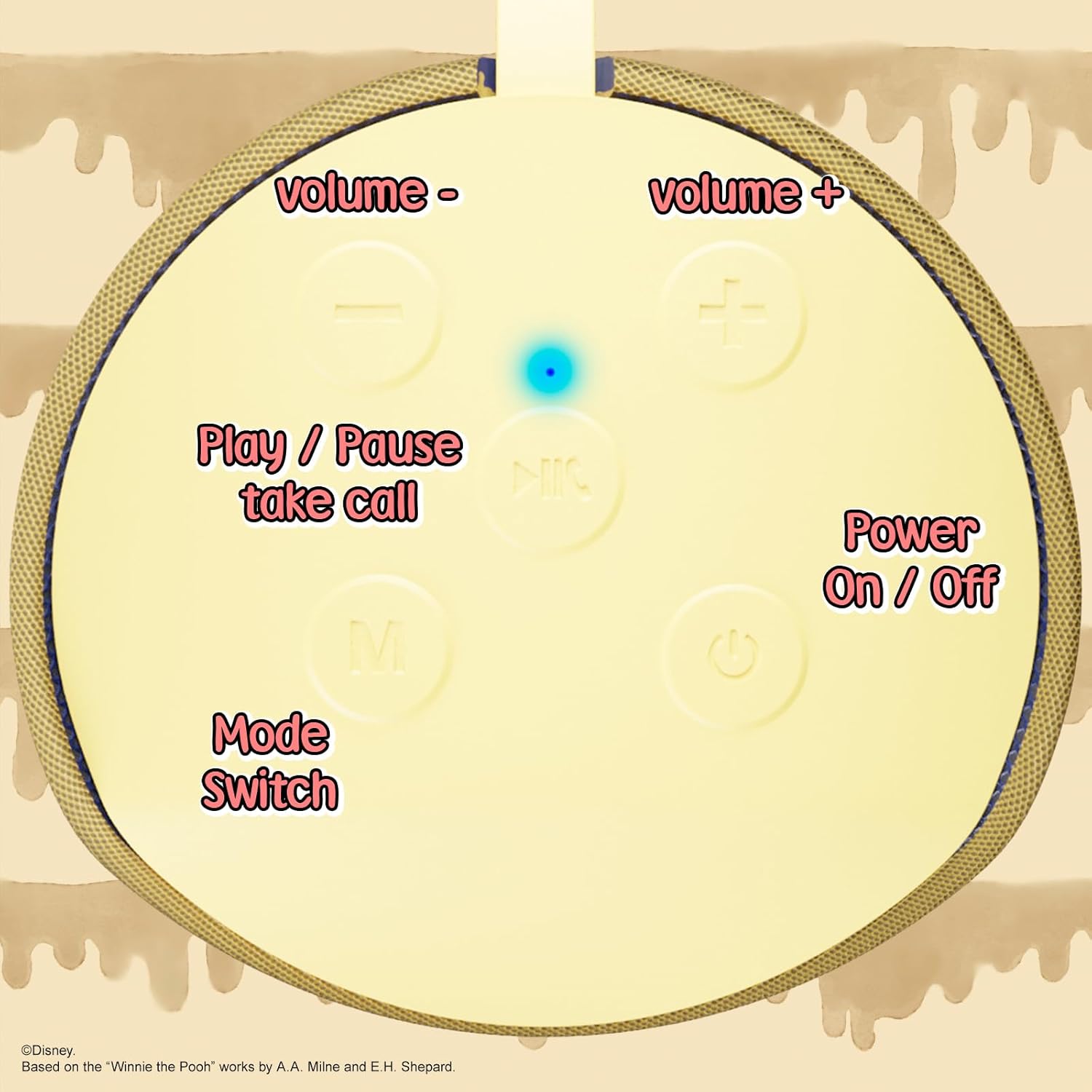
Image: A close-up of the speaker's top panel, displaying the control buttons.
- Bouton marche / arrêt: Appuyez longuement pour allumer ou éteindre l'enceinte.
- Bouton Lecture/Pause : Press to play or pause audio. Also used to answer or end phone calls.
- Bouton d'augmentation du volume (+) : Appuyez pour augmenter le volume. Appuyez longuement pour passer à la piste suivante.
- Bouton de réduction du volume (-) : Appuyez pour baisser le volume. Appuyez longuement pour revenir à la piste précédente.
- Mode Switch (M) Button: Press to switch between Bluetooth, FM Radio, SD Card, and USB modes.
3.2 Ports et voyants

Image : Une image détaillée view of the speaker's rear panel, highlighting the AUX port, SD card slot, USB port, and Micro USB charging port.
- Port AUX: For connecting external audio devices via the provided 3.5mm AUX cable.
- Emplacement pour carte SD : Insérez une carte microSD pour la lecture audio directe.
- Port USB : Insérez une clé USB pour la lecture audio directe.
- Port de chargement micro-USB : Branchez ici le câble de chargement USB pour charger l'enceinte.
- Voyant lumineux LED: Indicates charging status and Bluetooth pairing status.
4. Installation
4.1 Chargement de l'enceinte
- Connectez l'extrémité Micro USB du câble de chargement au port de chargement Micro USB de l'enceinte.
- Connectez l'extrémité USB standard du câble à un adaptateur secteur USB (non inclus) ou au port USB d'un ordinateur.
- The LED indicator light will illuminate during charging and turn off once fully charged.
- Une charge complète prend généralement environ 2 heures.
4.2 Couplage Bluetooth
- Assurez-vous que le haut-parleur est complètement chargé.
- Press and hold the Power On/Off button to turn on the speaker. You will hear an audible prompt, and the LED indicator will flash, indicating it's in pairing mode.
- Sur votre appareil mobile (smartphone, tablette, etc.), activez le Bluetooth.
- Rechercher available Bluetooth devices. The speaker will appear as "iJoy Winnie The Pooh Speaker" or similar.
- Select the speaker from the list to pair. Once successfully paired, you will hear a confirmation sound, and the LED indicator will stop flashing and remain solid.
- L'enceinte se reconnectera automatiquement au dernier appareil apparié lors de sa mise sous tension, si le Bluetooth de l'appareil est actif et à portée.
5. Mode d'emploi
5.1 Mode Bluetooth
After successful pairing, you can stream audio wirelessly from your device to the speaker. Use your device's controls or the speaker's Play/Pause, Volume Up/Down buttons to manage playback.
5.2 Mode radio FM
- Appuyez sur le bouton Mode (M) pour passer en mode radio FM.
- Appuyez sur le bouton Lecture/Pause pour rechercher et enregistrer automatiquement les stations FM disponibles.
- Utilisez les boutons Volume + et Volume - (appui court) pour naviguer entre les stations enregistrées.
5.3 SD Card / USB Playback
- Insert a microSD card into the SD card slot or a USB flash drive into the USB port.
- L'enceinte basculera automatiquement sur le mode correspondant et commencera à diffuser du son. files. If not, press the Mode (M) button to select the correct mode.
- Use the speaker's Play/Pause, Volume Up/Down buttons to control playback.
5.4 Mode AUX
- Connect one end of the provided 3.5mm AUX cable to the speaker's AUX port.
- Connectez l'autre extrémité à la prise casque de votre appareil audio.
- The speaker will automatically switch to AUX mode. If not, press the Mode (M) button.
- Control playback and volume primarily from your connected audio device.
5.5 Appels mains libres
Lorsqu'il est connecté à un smartphone via Bluetooth :
- Répondre à l'appel : Appuyez une fois sur le bouton Lecture/Pause.
- Fin d'appel : Appuyez une fois sur le bouton Lecture/Pause pendant un appel.
- Rejeter l'appel : Appuyez et maintenez enfoncé le bouton Lecture/Pause.
6. Entretien
- Nettoyez le haut-parleur avec un chiffon doux et sec. N'utilisez pas de produits nettoyants abrasifs ni de solvants.
- The speaker is IPX4 splashproof, meaning it can withstand splashes of water. Do not submerge it in water.
- Rangez l'enceinte dans un endroit frais et sec lorsqu'elle n'est pas utilisée.
- Évitez d'exposer le haut-parleur à des températures extrêmes, à la lumière directe du soleil ou à une forte humidité.
7. Dépannage
| Problème | Cause possible | Solution |
|---|---|---|
| Le haut-parleur ne s'allume pas | Batterie faible | Chargez complètement l'enceinte. |
| Impossible de coupler via Bluetooth | Speaker not in pairing mode / Device Bluetooth off / Too far from device | Ensure speaker is in pairing mode (flashing LED). Turn on Bluetooth on your device. Move speaker closer to device (within 30 feet). |
| Pas de son | Volume too low / Incorrect mode / Device not playing audio | Increase speaker and device volume. Press 'M' button to select correct mode. Ensure audio is playing on your connected device. |
| La réception radio FM est mauvaise. | Signal faible / Interférences | Move the speaker to a different location. The AUX cable can act as an antenna; try connecting it. |
8. Spécifications

Image: The speaker with visual indicators showing its height of 6.3 inches and width of 2.9 inches.
| Fonctionnalité | Détail |
|---|---|
| Numéro de modèle | SS-KH7C-FS4O |
| Technologie de connectivité | Bluetooth |
| Portée de communication sans fil | Jusqu'à 30 pieds (10 mètres) |
| Type de haut-parleur | Tour |
| Puissance de sortie maximale du haut-parleur | 20 watts |
| Mode de sortie audio | Mono |
| Capacité de la batterie | 800 millièmeamp Heures |
| Temps de charge | Environ 2 heures |
| Récréation | Up to 3 Hours (depending on volume and usage) |
| Niveau de résistance à l'eau | IPX4 (résistant aux éclaboussures) |
| Dimensions du produit | 3 po P x 3 po L x 6 po H (7.62 cm P x 7.62 cm L x 15.24 cm H) |
| Poids de l'article | 8 onces (226.8 grammes) |
| Composants inclus | Enceinte Bluetooth, câble de chargement USB, câble AUX de secours, manuel d'utilisation |
| Caractéristiques spéciales | Built-in Microphone, LED Indicator Lights, Portable, SD Card Slot, USB Port, FM Radio |
9. Garantie et assistance
9.1 Informations sur la garantie
This iJoy Disney Winnie The Pooh Wireless Bluetooth Speaker comes with a 90-day manufacturer's warranty from the date of purchase. This warranty covers manufacturing defects and workmanship under normal use. It does not cover damage caused by misuse, accidents, unauthorized modifications, or normal wear and tear.
9.2 Assistance clientèle
For technical assistance, warranty claims, or further inquiries, please contact iJoy customer support through their official website or the retailer where the product was purchased. Please have your model number (SS-KH7C-FS4O) and proof of purchase ready.


