Produit terminéview
The Svetaecho A100 Dual Controller Charger Station is designed to provide efficient and convenient charging for your Xbox controllers. Featuring a unique robot helmet-inspired design with LED indicators, it ensures your controllers are always ready for extended gaming sessions. This kit includes two high-capacity 5520mWh rechargeable battery packs, eliminating the need for disposable batteries.

Image: The Svetaecho A100 Dual Controller Charger Station, showcasing its design with two Xbox controllers docked and two rechargeable battery packs.
Qu'y a-t-il dans la boîte
- 2 x 5520mWh Xbox One Rechargeable Batteries
- 1 x Charger Dock for Xbox Series X Rechargeable Battery Pack
- Câble de charge 1 x USB-C
- 4 x Battery Covers (for various Xbox controller models)
- 1 x Manuel d'utilisation

Image : Une complète view of all items included in the package: the charging dock, two rechargeable batteries, a USB-C cable, and four different battery covers.
Instructions d'installation
- Installer les blocs-batteries :
Open the battery compartment on your Xbox controller. Insert one of the provided 5520mWh rechargeable battery packs, ensuring proper alignment with the contacts. Close the compartment with the appropriate battery cover for your controller model.

Image: Visual instructions demonstrating how to remove the old battery cover, insert the new rechargeable battery pack, and attach the compatible battery cover.
- Station de recharge Connect :
Connect the included USB-C charging cable to the port on the back of the charger dock. Plug the other end of the USB-C cable into a compatible USB power source (e.g., Xbox console, USB wall adapter).
- Place Controllers on Dock:
Carefully place your Xbox controllers onto the charging slots of the dock. Ensure the controllers are seated correctly and the charging contacts align. The robot helmet's LED indicators will illuminate to show the charging status.
Mode d'emploi
Indicateurs LED
The charger station features clear LED indicators on the robot helmet design to show the charging status of each controller:
- Red Breathing Light: Indique que le contrôleur est actuellement en charge.
- Feu vert fixe : Indicates that the controller is fully charged or in standby mode.
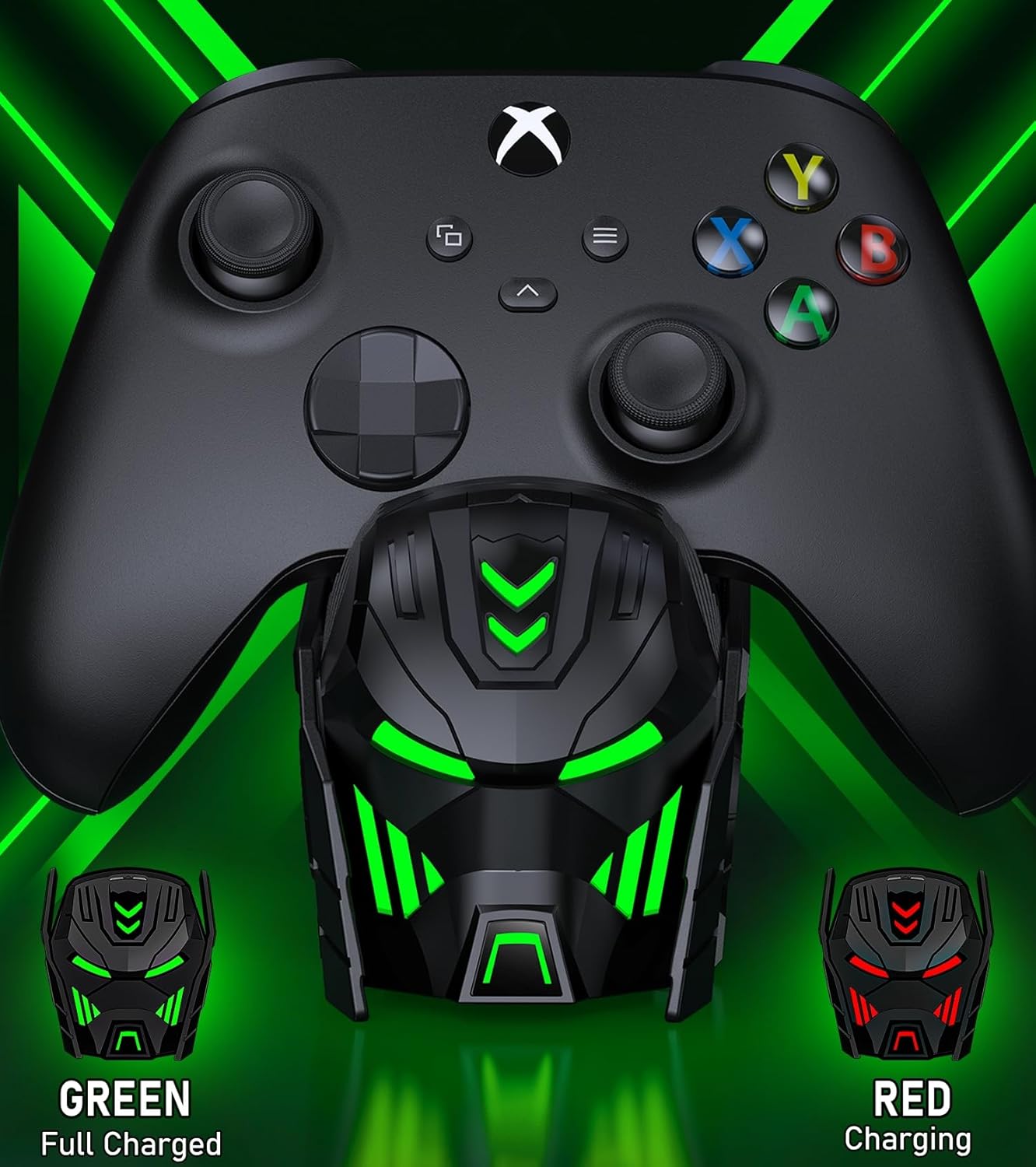
Image: Close-up of the charger station's robot helmet face, illustrating the red light for charging and the green light for a fully charged or standby state.
Bouton de contrôle de la lumière
A touch button is integrated into the design, allowing you to control the LED ambient light. You can switch between charging indicators (red/green) or turn the LED lights off completely.
Caractéristiques et avantages du produit
- Durée de lecture prolongée : Each 5520mWh battery pack provides 18-25 hours of continuous playtime, ensuring uninterrupted gaming sessions.
- Charge rapide : It takes approximately 4-5 hours to fully charge both battery packs simultaneously.
- Longue durée de vie de la batterie : The rechargeable batteries can be recharged up to 2000 times, offering a cost-effective and environmentally friendly alternative to disposable AA batteries.
- Protection intelligente : Built with an intelligent charging board, the dock provides overheating, short-circuit, over-voltage, and over-current protection to safeguard your batteries and controllers.
- Design élégant : The robot helmet-inspired aesthetic with cool LED ambient light adds a unique and appealing look to your gaming setup.

Image: Key performance metrics of the charger, highlighting its fast charging, high battery capacity, and long playing time.
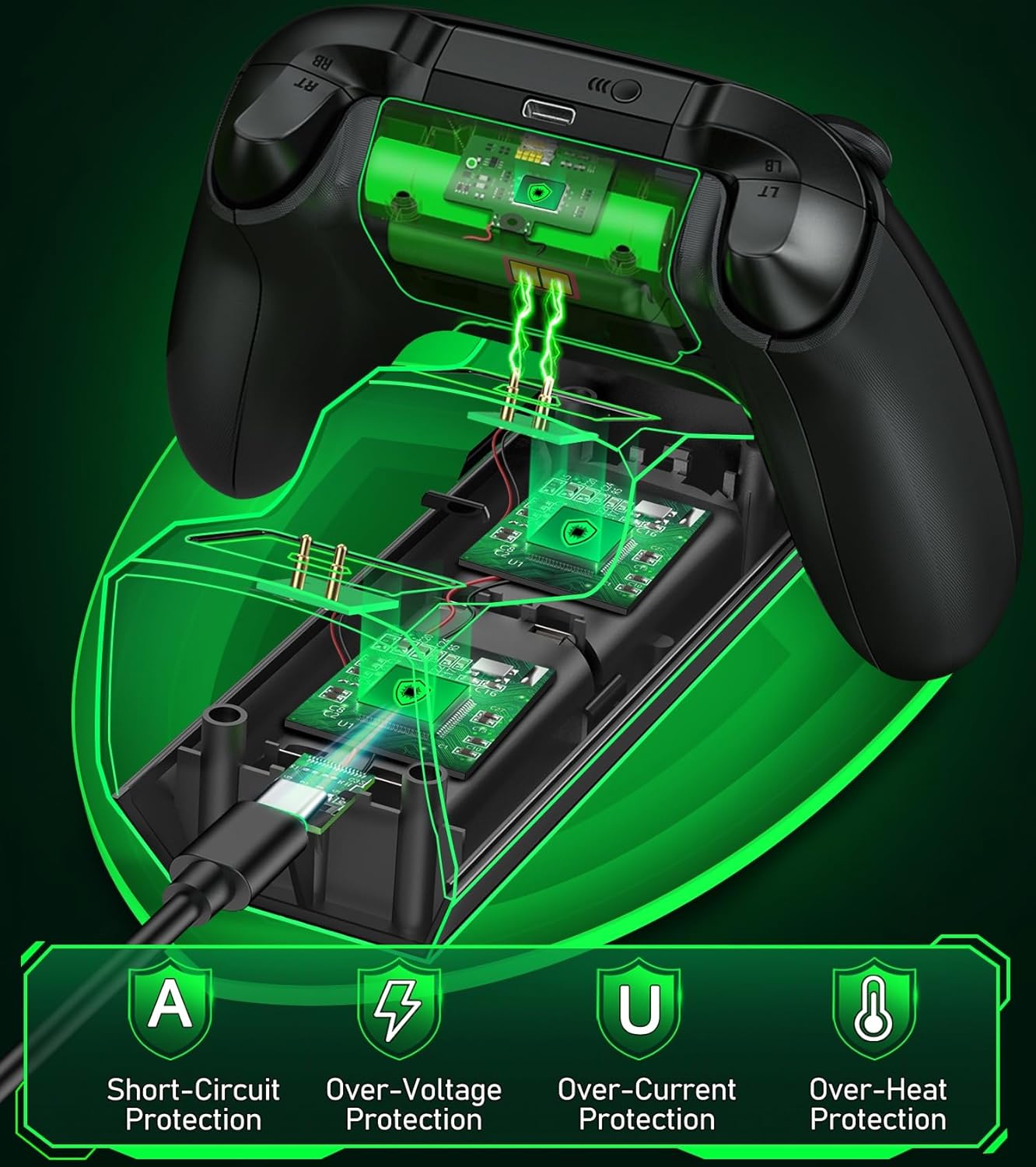
Image: A visual representation of the multiple safety protections integrated into the charging station, including short-circuit, over-voltage, over-current, and over-heat protection.
Compatibilité
The Svetaecho A100 Dual Controller Charger Station is compatible with a wide range of Xbox controllers, including:
- Xbox Series X/S Controllers
- Xbox One Controllers
- Xbox One X Controllers
- Xbox One S Controllers
- Xbox Elite Controllers

Image: A compatibility chart illustrating different Xbox controller models and the corresponding battery covers provided for each, ensuring broad compatibility.
Entretien
- Keep the charging station and batteries dry and clean.
- Wipe surfaces with a soft, dry cloth. Avoid using abrasive cleaners or solvents.
- Conserver dans un endroit frais et sec, à l'abri de la lumière directe du soleil et des températures extrêmes.
- Do not disassemble the product or attempt repairs yourself. Contact customer support if issues arise.
Dépannage
- Controllers not charging:
- Ensure the USB-C cable is securely connected to both the charging station and the power source.
- Vérifiez que la source d'alimentation est active et fournit une puissance suffisante.
- Check if the battery packs are correctly inserted into the controllers and the controllers are properly seated on the charging dock.
- Ensure the charging contacts on both the controller and the dock are clean and free of debris.
- Les voyants LED ne fonctionnent pas :
- Press the light control button to ensure the LEDs are not turned off.
- Confirm the charging station is receiving power.
- Short battery life after charging:
- Ensure the batteries are fully charged (solid green LED).
- Les performances de la batterie peuvent se dégrader avec le temps en cas d'utilisation intensive.
Caractéristiques
| Fonctionnalité | Détail |
|---|---|
| Numéro de modèle | A100 |
| Capacité de la batterie | 2 x 5520mWh |
| Temps de charge | Environ 4 à 5 heures |
| Temps de lecture par charge | 18-25 heures |
| Cycles de recharge | Jusqu'à 2000 fois |
| Saisir | USB-C |
| Dimensions du produit | 7.99 x 3.5 x 2.83 pouces |
| Poids de l'article | 15.2 onces |
| Fabricant | Svetaecho |
Vidéo officielle du produit
Video: An official product video from Svetaecho demonstrating the features and functionality of the Xbox Controller Charger Station with Robot Helmet design, including LED indicators, battery storage, and fast charging capabilities.
Garantie et assistance
For warranty information and customer support, please refer to the warranty card included in your package or visit the official Svetaecho store on Amazon:
Des plans de protection sont également disponibles pour une couverture étendue :
- Plan de protection de 2 ans : disponible à l’achat.
- Plan de protection de 3 ans : disponible à l’achat.
- Protection complète : forfait mensuel couvrant les achats admissibles, passés et futurs.


