1. Produit terminéview
The VIMIN VM-S250501M is a 2.5G Web Managed Ethernet Switch designed for high-performance network environments. It features five 2.5 Gigabit RJ45 ports and one 10 Gigabit SFP+ port, providing flexible connectivity options for various devices. This switch supports multiple speeds (100Mbps, 1Gbps, 2.5Gbps) with intelligent auto-negotiation, making it suitable for 2.5G NAS, gaming PCs, WiFi 6 routers, and 4K video streaming. It incorporates essential Layer 2 management features such as Link Aggregation, IGMP Snooping, Quality of Service (QoS), and VLAN support, all accessible through a user-friendly web-based graphical interface.
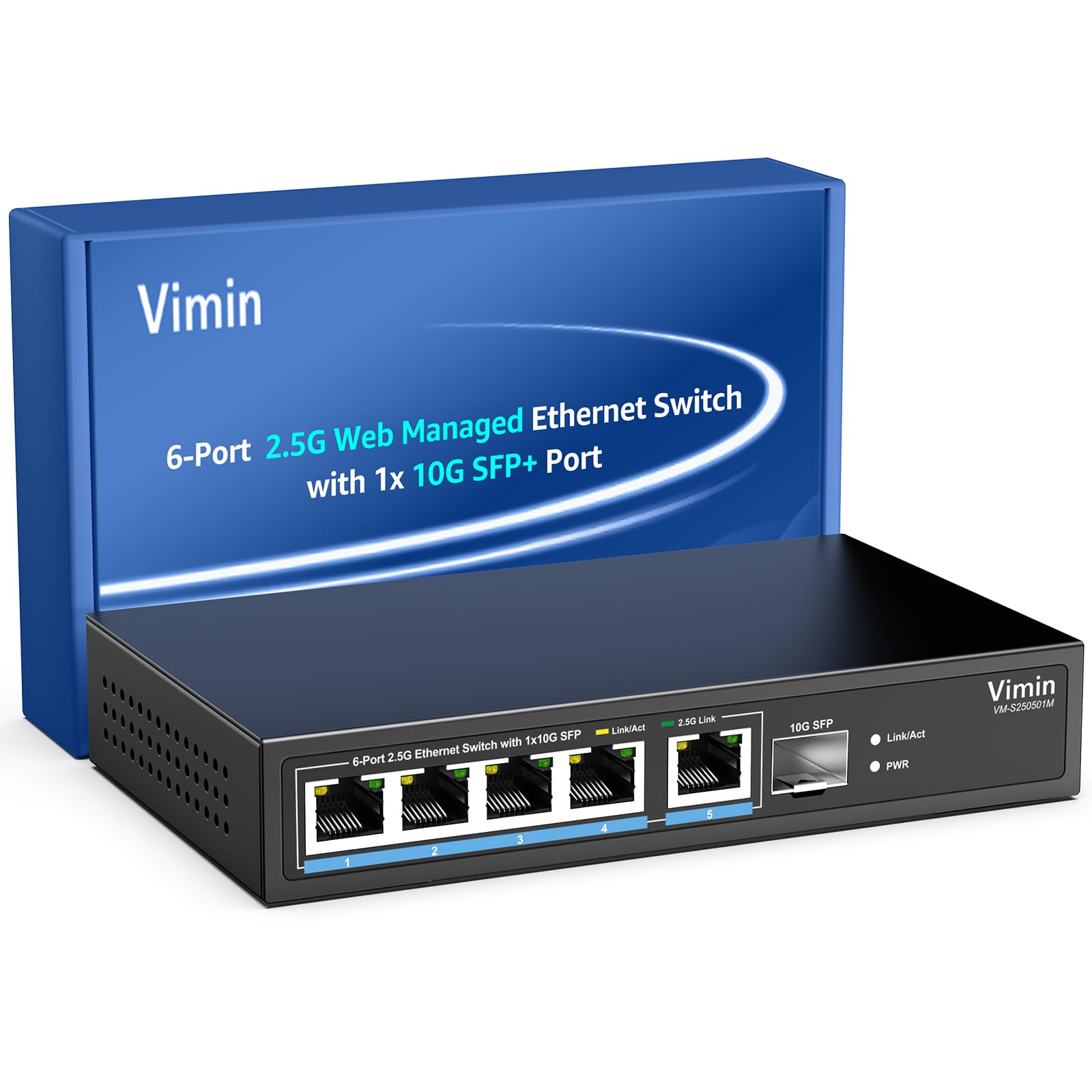
Figure 1 : Face avant view of the VIMIN VM-S250501M switch, showing the 2.5G RJ45 ports, 10G SFP+ port, and LED indicators.

Figure 2: Illustration highlighting the durability, high compatibility, and versatility of the switch.
2. Instructions de configuration
2.1 Contenu du paquet
Veuillez vérifier que les éléments suivants sont inclus dans votre colis :
- 1 x VIMIN VM-S250501M 2.5G Web Commutateur Ethernet géré
- 1 x adaptateur secteur
- 1 x Manuel d'utilisation

Figure 3: The switch, power cable, and user manual are included in the package.
2.2 Installation physique
The switch can be placed on a desktop or mounted on a wall. Ensure proper ventilation around the device.
- Emplacement sur le bureau : Placez l'interrupteur sur une surface plane et stable.
- Montage mural : The switch features two mounting holes at the base for wall installation. Use appropriate screws (not included) to secure the device to a wall.
2.3 Connexion de l'alimentation
- Connect the power adapter to the DC 12V/1A power port on the rear panel of the switch.
- Branchez l'autre extrémité de l'adaptateur secteur dans une prise électrique standard.
- The Power LED indicator on the front panel will illuminate when the switch is powered on.
2.4 Connexion des périphériques réseau
Connect your network devices (e.g., computers, NAS, routers, access points) to the switch using appropriate Ethernet cables.
- Ports RJ45 (1-5) : Use Category 5e (Cat5e) or Category 6 (Cat6) UTP cables for optimal performance with 1G/2.5G connections. For 100Mbps, Cat5 cables are sufficient.
- Port SFP+ (6) : Insert a compatible 1G/2.5G/10G SFP+ optical fiber module (not included) into the SFP+ slot, then connect a fiber optic cable.

Figure 4: Illustrates connecting devices to the switch and recommended cable types for different speeds.
3. Utilisation de l'interrupteur
3.1 Indicateurs LED
Les LED du panneau avant fournissent des informations d'état en temps réel :
- 5*2.5G Ports (RJ45):
- Yellow: Indicates a 10/100/1000Mbps link or activity.
- Green: Indicates a 2.5Gbps link.
- 1*10G SFP (SFP+ Port):
- Green: Indicates a 1G/2.5G/10G link.
- Flashing: Indicates data transmission.
- PWR (Puissance):
- Allumé : L'appareil est sous tension.
- Éteint : L'appareil est éteint.

Figure 5: Detailed explanation of the LED indicators on the switch.
3.2 Accéder au Web Interface de gestion
The switch can be configured and managed via a web-interface utilisateur graphique (GUI).
- Assurez-vous que votre ordinateur est connecté à l'un des ports RJ45 du commutateur.
- Ouvrir un web navigateur (par exemple, Chrome, Firefox, Edge).
- In the address bar, enter the default IP address: 192.168.1.199.
- Press Enter. A login page will appear.
- Saisissez le nom d'utilisateur et le mot de passe par défaut :
- Nom d'utilisateur: administrateur
- Mot de passe: administrateur
- Click "Log In" to access the management interface.
Il est recommandé de modifier le mot de passe par défaut après la première connexion pour des raisons de sécurité.

Figure 6 : Capture d'écran de web management interface login page.
3.3 Basic Management Features
Le web interface provides access to various Layer 2 management functions:
- Agrégation de liens : Combine multiple physical links into a single logical link for increased bandwidth and redundancy. Supports static link aggregation.
- Cadre géant : Support for larger Ethernet frames (up to 12KB) to improve network efficiency for large data transfers.
- VLAN (réseau local virtuel) : Segment your network into smaller, isolated broadcast domains. Supports up to 32 VLANs (on 4K VLAN IDs), MTU/Port/802.1Q VLAN.
- Qualité de service (QoS) : Prioritize network traffic to ensure critical applications receive sufficient bandwidth. Supports port-based, 802.1p, and DSCP priority, with 4 priority queues, rate limiting, and storm control.
- Surveillance IGMP : Optimiser la distribution du trafic multicast, en évitant l'inondation inutile de tous les ports par des paquets multicast.
- Mise en miroir des ports : Copier le trafic d'un ou plusieurs ports sources vers un port de destination pour la surveillance et l'analyse du réseau.
- Test de câble: A diagnostic tool to check the status and length of connected Ethernet cables.

Figure 7 : Plusview of the basic management features available through the web interface.
4. Entretien
4.1 Entretien général
- Keep the switch in a cool, dry environment, away from direct sunlight, heat sources, and moisture.
- Assurez une circulation d'air adéquate autour de l'appareil pour éviter toute surchauffe.
- Clean the exterior of the switch with a soft, dry cloth. Do not use liquid cleaners or aerosols.
4.2 mises à jour du micrologiciel
Periodically check the VIMIN official webSite dédié aux mises à jour du micrologiciel. Ces mises à jour peuvent apporter de nouvelles fonctionnalités, des améliorations de performances et des renforcements de sécurité. Suivez attentivement les instructions fournies avec le package de mise à jour.
4.3 Réinitialisation de l'appareil
If the switch is not functioning correctly or you forget the login credentials, you can reset it to factory default settings. Locate the "Reset" button on the rear panel of the switch. With the switch powered on, use a paperclip or a similar pointed object to press and hold the Reset button for approximately 5-10 seconds until the LEDs flash, then release. The switch will restart with factory default settings.
5. Dépannage
5.1 Pas d'alimentation
- Assurez-vous que l'adaptateur secteur est correctement branché à la fois à l'interrupteur et à une prise électrique fonctionnelle.
- Vérifiez le bon fonctionnement de la prise de courant en y branchant un autre appareil.
- Vérifiez que l'adaptateur secteur ne présente aucun dommage visible.
5.2 No Link/Connectivity
- Vérifiez les câbles Ethernet connectés au commutateur et à vos appareils. Assurez-vous qu'ils sont bien branchés et en bon état.
- Verify the Link/Act LEDs on the switch for the connected ports. If they are off, there might be a cable issue or the connected device is not powered on/configured correctly.
- Try using a different Ethernet cable or port.
- Vérifiez que la carte réseau de l'appareil connecté est activée et correctement configurée.
5.3 Débit réseau lent
- Ensure you are using Cat5e or Cat6 cables for 1G/2.5G connections. Lower category cables may limit speed.
- Check the Link/Act LED color for the connected port. A yellow LED on a 2.5G port indicates a 1G or lower connection.
- Verify that your connected devices (e.g., network card, NAS) support 2.5G or 10G speeds.
- Check for network congestion or high traffic on your network.
- Consider updating the switch firmware.
5.4 Impossible d'accéder Web Interface
- Ensure your computer is on the same network segment as the switch. The default IP is 192.168.1.199, so your computer's IP should be in the 192.168.1.x range (e.g., 192.168.1.100) with a subnet mask of 255.255.255.0.
- Verify that the Ethernet cable is properly connected and the Link/Act LED is on.
- Videz le cache de votre navigateur ou essayez un autre navigateur.
- If you have changed the switch's IP address and forgotten it, or forgotten the login password, perform a factory reset (refer to Section 4.3).
6. Spécifications
| Modèle | VM-S250501M |
| Normes | IEEE 802.3/802.3u/802.3ab/802.3bz/802.3x/802.3cb |
| Ports | 5 x 10/100/1000/2500 Mbps RJ45, 1 x 10G SFP+ slot |
| Capacité de commutation | 45 Gbit/s |
| Tableau d'adresses MAC | 4K |
| Taux de transfert de paquets | 33.48 Mpps |
| Cadre Jumbo | 12 Ko |
| Tampon de paquets | 8 Mbit |
| Alimentation électrique | 12 V/1 A CC |
| Network Cable (Max 100m) |
|
| Méthode de montage | Desktop and Wall Mount |
| Température de fonctionnement | 0 ℃ ~ 45 ℃ (32 ℉ ~ 113 ℉) |
| Température de stockage | -40 ℃ ~ 70 ℃ (-40 ℉ ~ 158 ℉) |
| Humidité de fonctionnement | 10% ~ 90% sans condensation |
| Humidité de stockage | 5% ~ 95% sans condensation |
| Poids | 380 g |
| Dimensions (L x l x H) | 160 x 95 x 30 mm (6.3 x 3.7 x 1.2 pouces) |
| Matériau du boîtier | Métal |
| Couleur | Noir |
7. Garantie et assistance
7.1 Garantie du produit
The VIMIN VM-S250501M 2.5G Web Managed Ethernet Switch comes with a Garantie d'un an À compter de la date d'achat, cette garantie couvre les défauts de fabrication et assure que le produit répond à ses spécifications de performance dans des conditions normales d'utilisation. Veuillez conserver votre preuve d'achat pour toute réclamation au titre de la garantie.
7.2 Assistance technique
VIMIN provides support technique à vie for this product. If you encounter any issues or have questions regarding the setup, operation, or troubleshooting of your switch, please contact our support team.
Coordonnées:
- E-mail: support@vimintech.com
Figure 8: VIMIN support information, including email contact.


