1. Introduction
Thank you for choosing the TIMESS Atomic Analog Wall Clock. This clock is designed for precise timekeeping, automatically synchronizing with the WWVB radio signal from the U.S. National Institute of Standards and Technology (NIST). It features a clear analog display, an integrated LCD for date and temperature, and silent operation. This manual provides detailed instructions for setup, operation, and maintenance to ensure optimal performance of your clock.
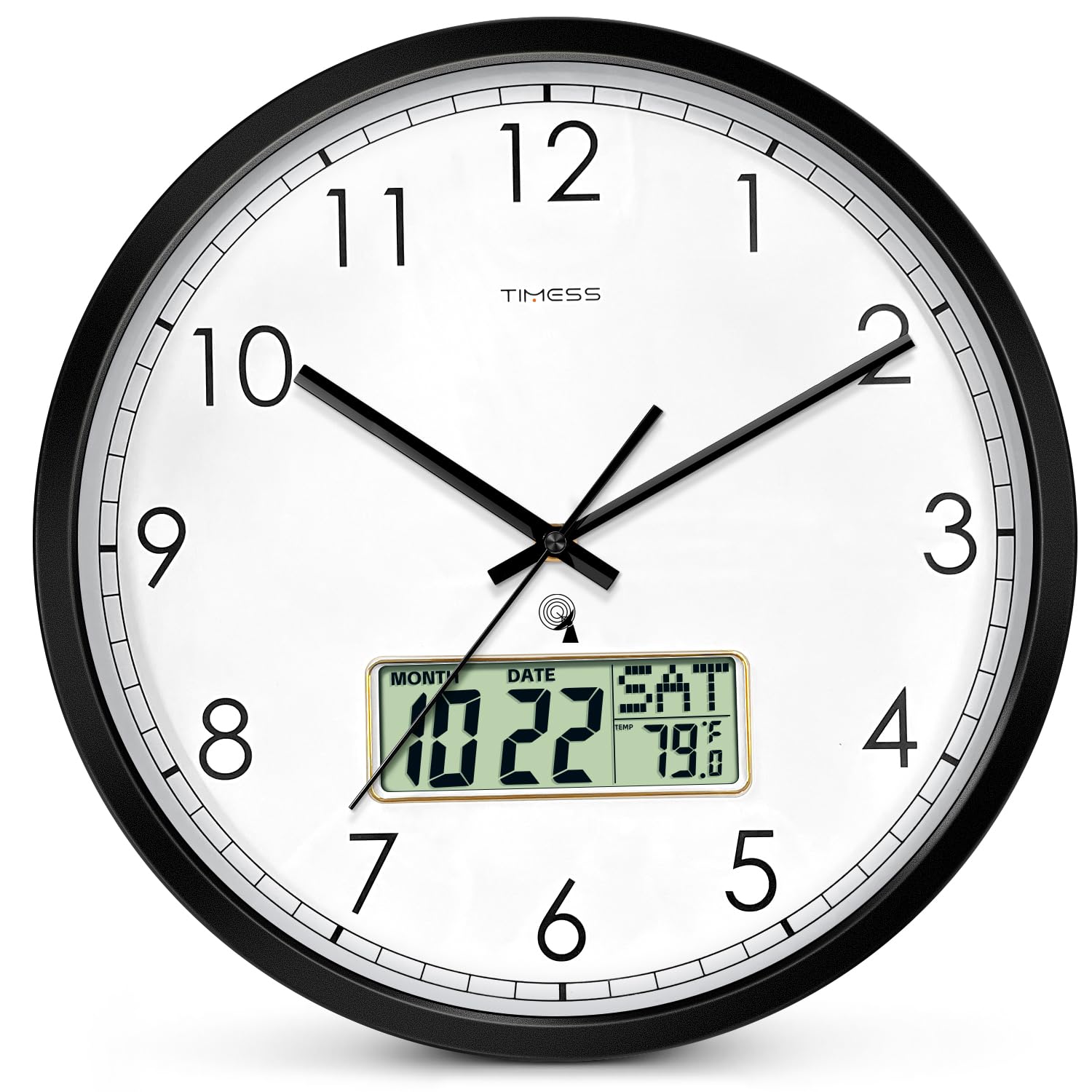
Figure 1 : Face avant view of the TIMESS Atomic Analog Wall Clock. This clock features a large, easy-to-read dial with an integrated LCD display at the bottom for additional information.
2. Consignes de sécurité
- Use only 1.5V AA alkaline batteries. Do not mix old and new batteries, or different types of batteries.
- Retirez les piles si l'horloge n'est pas utilisée pendant une période prolongée afin d'éviter les fuites.
- N’exposez pas l’horloge à des températures extrêmes, à la lumière directe du soleil ou à une forte humidité.
- Keep the clock away from strong magnetic fields, which may interfere with its operation.
- N’essayez pas de démonter ou de réparer l’horloge vous-même. Contactez le service client pour obtenir de l’aide.
3. Contenu du colis
- 1 x TIMESS Atomic Analog Wall Clock (Model: TIMESS-M22)
- 1 x Manuel d'utilisation
4. Instructions de configuration
4.1 Installation de la batterie
- Localisez le compartiment à piles à l'arrière de l'horloge.
- Insert one new AA alkaline battery (1.5V) into the designated slot, ensuring correct polarity (+/-).
- Fermez soigneusement le couvercle du compartiment à piles.
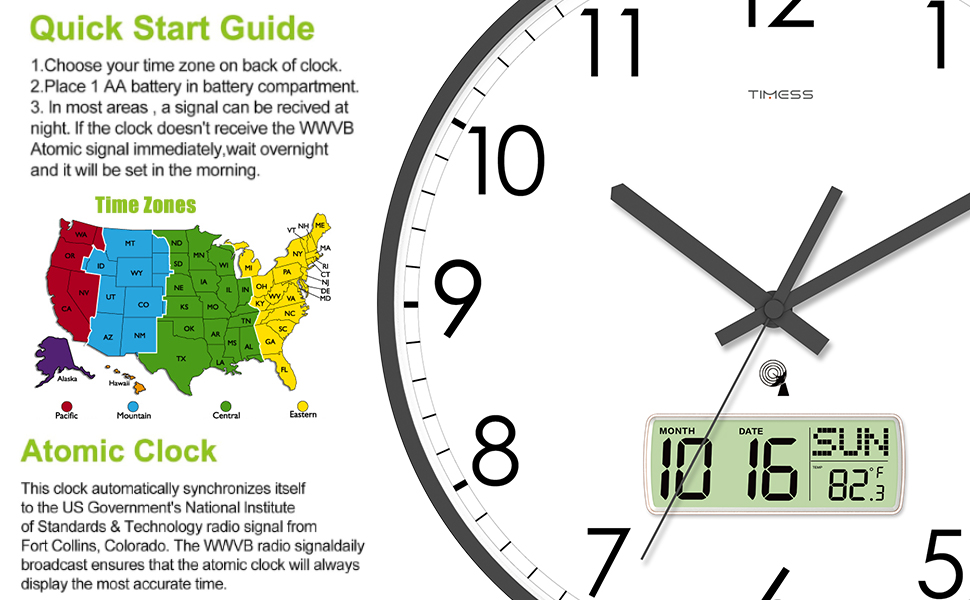
Figure 2 : Arrière view of the clock, illustrating the battery compartment and setting switches.
4.2 Time Zone and DST Selection
Before the atomic clock can work correctly, you must select your time zone and Daylight Saving Time (DST) setting.
- Commutateur DST : Slide the DST switch to the "ON" position if your area observes Daylight Saving Time. If your area does not observe DST (e.g., Arizona and Indiana), slide the switch to "OFF".
- Time Zone Switch (P/M/C/E): Select the correct time zone for your area by sliding the corresponding switch:
- P: Heure du Pacifique
- M: Heure des montagnes
- C: Heure du Centre
- E: Heure de l'Est

Figure 3: Close-up of the clock mechanism, showing the DST and Time Zone selection switches.
4.3 Synchronisation automatique de l'heure
After battery installation and time zone selection, the clock will begin searching for the WWVB radio signal.
- The second hand will make one full revolution and stop at the 12 o'clock position.
- The minute and hour hands will then move to the 12 o'clock position.
- The clock will search for the WWVB radio signal.
- Signal fort : If a strong signal is received, the clock will set itself within 3 to 10 minutes.
- Weak or No Signal: If the signal is weak or not received immediately, the clock will search for the signal on the odd hours (e.g., 1 AM, 3 AM, 5 AM, 9 PM, 11 PM). It may take overnight for the clock to synchronize in some areas.
- Once synchronized, the clock will display the correct time, date, and temperature.

Figure 4: Quick Start Guide illustrating the steps for initial setup and atomic clock synchronization.
Video 1: This video demonstrates the initial setup process, including battery installation, time zone selection, and the automatic synchronization sequence of the TIMESS Atomic Analog Wall Clock.
5. Mode d'emploi
5.1 Reading the Analog Display
The large analog dial with bold numbers and clear hands provides easy readability of the current time. The clock features a silent, non-ticking sweep movement for a quiet environment.
5.2 Comprendre l'écran LCD
The integrated LCD display provides additional information:
- Month and Date: Affiche le mois et le jour actuels.
- Jour de la semaine : Shows the current day (e.g., MON, TUE).
- Température: Affiche la température ambiante.

Figure 5 : Détaillé view of the LCD display, showing the month, date, day of the week, and temperature reading.
5.3 Changement d'unité de température (°C/°F)
To switch between Celsius (°C) and Fahrenheit (°F) temperature display, locate the small button or switch labeled "°C/°F" on the back of the clock, usually near the LCD display unit. Press or slide it to toggle between the two units.
6. Entretien
- Nettoyage: Wipe the clock with a soft, dry cloth. Do not use abrasive cleaners or chemicals, as they may damage the finish or display.
- Remplacement de la batterie : Replace the AA alkaline battery annually or when the clock's performance degrades (e.g., second hand getting stuck, LCD display fading). Ensure correct polarity when replacing.
- Stockage: Si vous rangez la pendule pendant une période prolongée, retirez la pile pour éviter les fuites et les dommages potentiels.
7. Dépannage
| Problème | Cause possible | Solution |
|---|---|---|
| Clock does not set automatically or displays incorrect time. |
|
|
| Second hand gets stuck or moves erratically. | Batterie faible. | Replace with a new AA alkaline battery. A weak battery may not provide enough power for consistent hand movement. |
| L'écran LCD est éteint ou faiblement lumineux. | Weak or depleted battery. | Remplacez-la par une pile alcaline AA neuve. |
| Digital time on LCD does not match analog time. | This model's analog and digital displays are not synchronized. The analog display is the primary time source, synchronized by WWVB. The digital display is for date and temperature. | This is normal operation. The analog clock is the atomic time-synchronized display. |
8. Spécifications
| Fonctionnalité | Détail |
|---|---|
| Marque | TEMPS |
| Numéro de modèle | TIMESS-M22 |
| Type d'affichage | Analog with LCD Digital Display |
| Source d'énergie | 1 piles AA (non incluses) |
| Caractéristiques spéciales | Atomic (WWVB Self-Setting), Calendar Display, Temperature Display (°F/°C Switchable), Silent Sweep Movement |
| Dimensions du produit | 14 po L x 14 po H (35.56 cm x 35.56 cm) |
| Matériel | Acrylonitrile Butadiene Styrene (ABS) Frame, HD Glass Panel |
| Type de montage | Support mural |
| Poids de l'article | 3.59 livres (1.63 kg) |
| Utilisation intérieure/extérieure | Indoor, Outdoor (protected from elements) |

Figure 6: Dimensional diagram of the TIMESS Atomic Analog Wall Clock.
9. Garantie et assistance
TIMESS products are manufactured to high-quality standards. For specific warranty information, please refer to the warranty card included with your purchase or visit the official TIMESS website. If you encounter any issues or have questions regarding your clock, please contact our customer support team for assistance.
Assistance clientèle : Please refer to your purchase documentation for contact details or visit the TIMESS brand store on Amazon: TIMESS Store


