1. Introduction
This manual provides detailed instructions for the operation and maintenance of your SWOFY M4 MP3 Player. Please read this manual thoroughly before using the device to ensure proper functionality and to maximize your user experience.
2. Produit terminéview
The SWOFY M4 is a versatile digital audio player featuring Bluetooth 5.3 connectivity, a 2.4-inch touch screen, and a range of functions including FM radio, e-book reader, video playback, and voice recording. It comes with 64GB of built-in storage, expandable up to 128GB with a Micro SD card.
2.1 Contenu du paquet
- 1x SWOFY 64GB Bluetooth MP3 Player
- 1x Wired Earbuds
- 1x câble USB Type-C
- 1 étui de protection en silicone
- 1x Manuel d'utilisation
2.2 Disposition de l'appareil
Familiarize yourself with the physical components of your SWOFY M4 MP3 Player.
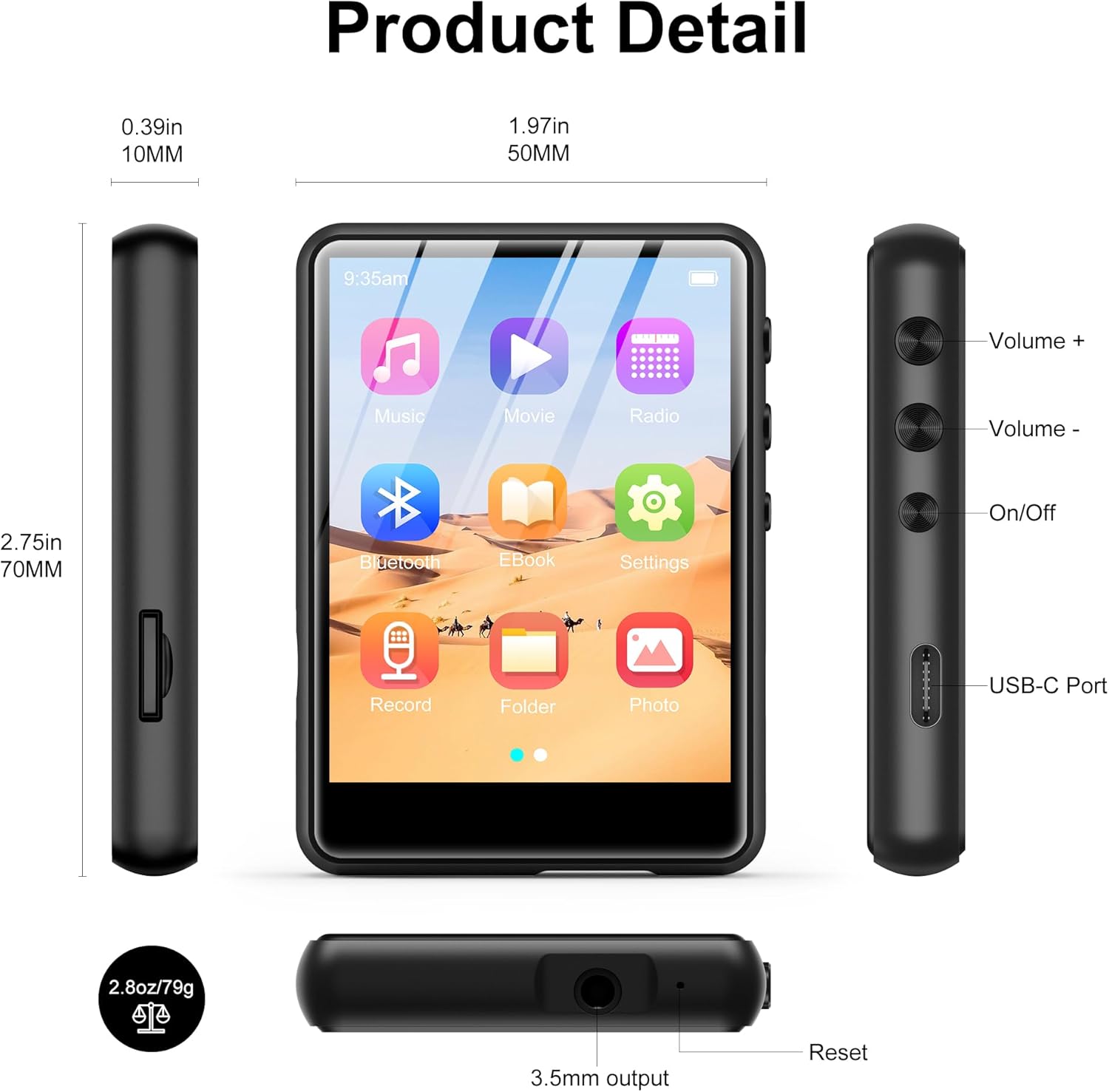
Image 2.2.1: Vue de face, de côté et de dessus views of the SWOFY M4 MP3 Player, highlighting the 2.4-inch screen, Volume +/-, On/Off buttons, USB-C Port, 3.5mm output, Reset button, and Micro SD card slot.
- Écran tactile IPS de 2.4 pouces : For navigation and display.
- Boutons de volume +/- : Régler le niveau de sortie audio.
- Bouton marche/arrêt : Allumez ou éteignez l’appareil.
- Port USB-C : Pour le chargement et le transfert de données.
- Prise stéréo 3.5 mm : Branchez des écouteurs filaires ou des haut-parleurs externes.
- Emplacement pour carte micro SD : For storage expansion up to 128GB.
- Bouton de réinitialisation : Redémarrez l'appareil s'il ne répond plus.
- Haut-parleur HD : Haut-parleur intégré pour la lecture audio.
3. Installation
3.1 Chargement de l'appareil
Before first use, fully charge the MP3 player. Connect the provided USB Type-C cable to the device's USB-C port and the other end to a USB power adapter (not included) or a computer's USB port. The battery indicator on the screen will show charging status.

Image 3.1.1: The SWOFY M4 MP3 Player connected via USB Type-C cable, illustrating its 300mAh battery capacity for long playback.
3.2 Mise sous/hors tension
- Pour allumer : Press and hold the On/Off button located on the side of the device until the screen illuminates.
- Pour éteindre : Press and hold the On/Off button until a power-off prompt appears on the screen. Select "Power Off" or continue holding until the screen turns off.
3.3 Loading Music and Files
Transférer files à votre lecteur MP3 :
- Connectez le lecteur MP3 à votre ordinateur à l'aide du câble USB Type-C fourni.
- Le périphérique apparaîtra comme un disque amovible sur votre ordinateur.
- Drag and drop your music, video, image, or e-book files dans les dossiers appropriés du lecteur MP3.
- Éjectez le périphérique de votre ordinateur en toute sécurité avant de débrancher le câble.

Image 3.3.1: Transfert de musique files (MP3, WMA, APE, FLAC, WAV, OGG, DRM, ACELP) from a computer to the SWOFY M4 MP3 Player via USB-C.
The device supports various audio formats including MP3, WMA, APE, FLAC, WAV, OGG, DRM, and ACELP. For video and image files, ensure they are in compatible formats to avoid "unsupported format" errors.
3.4 Extension du stockage
The SWOFY M4 has 64GB of internal storage. You can expand this by inserting a Micro SD card (up to 128GB) into the dedicated slot on the side of the device.
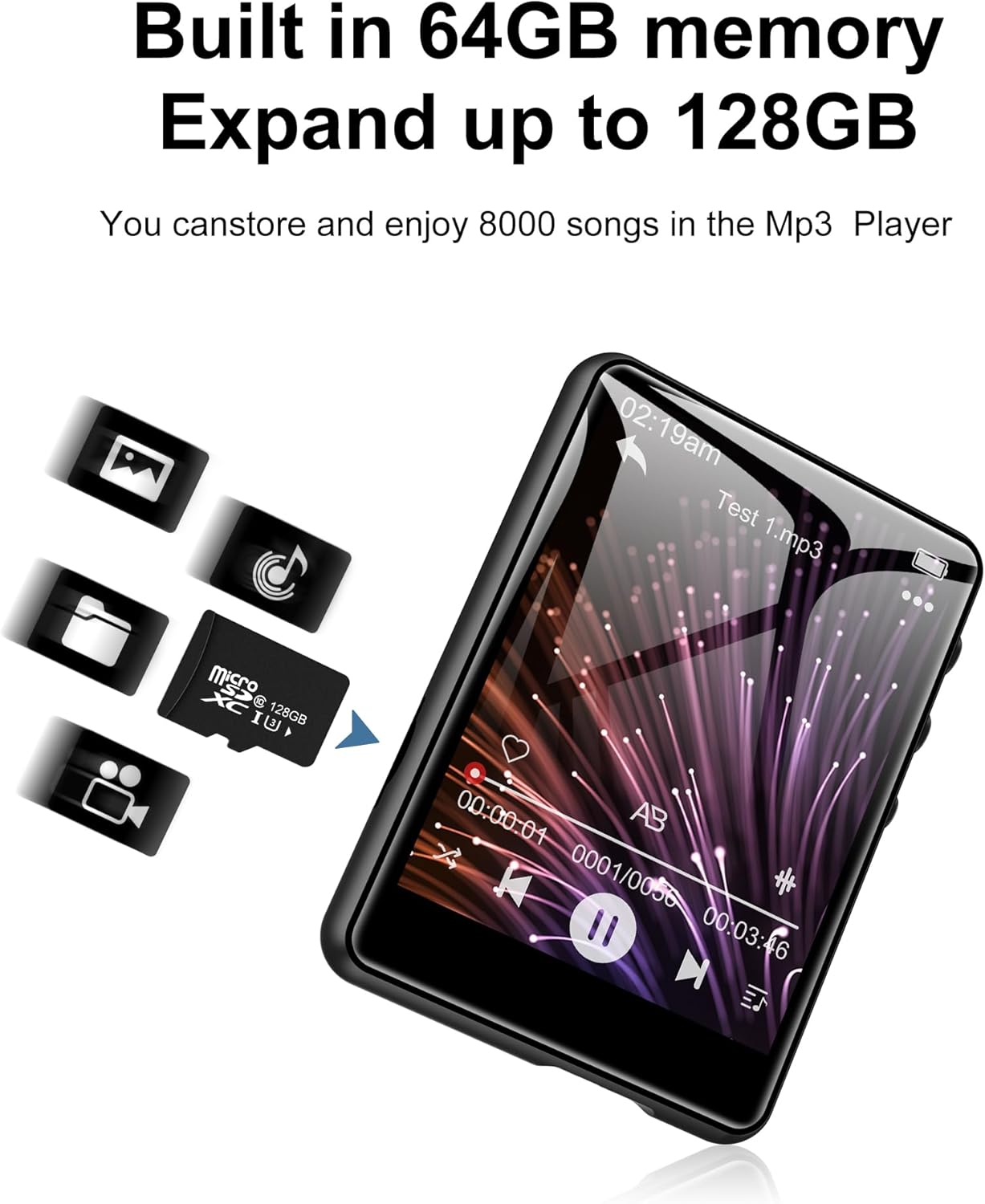
Image 3.4.1: The SWOFY M4 MP3 Player with a Micro SD card, illustrating the expandable storage capability up to 128GB.
4. Mode d'emploi
4.1 Navigation sur l'écran tactile
The 2.4-inch touch screen allows for intuitive navigation. Tap icons to open applications, swipe to scroll, and use the back arrow icon to return to the previous screen.

Image 4.1.1: A finger interacting with the 2.4-inch IPS touch screen of the SWOFY M4 MP3 Player, demonstrating its convenient operation.
4.2 Lecture de musique
- Dans le menu principal, appuyez sur l'icône « Musique ».
- Parcourez votre bibliothèque musicale par artiste, album, genre ou dossier.
- Touchez un morceau pour lancer la lecture.
- Use the on-screen controls (play/pause, skip, volume) or physical volume buttons to manage playback.
- Access equalizer settings and playback modes (repeat, shuffle) from the music playback screen.

Image 4.2.1: The music playback interface of the SWOFY M4, showing options for AB Repeat, 8-speed playback, two playback modes, and equalizer settings.
4.3 Connectivité Bluetooth
The SWOFY M4 features Bluetooth 5.3 for wireless audio streaming.
- From the main menu, tap the "Bluetooth" icon or go to "Settings" and select "Bluetooth".
- Activez le Bluetooth. L'appareil recherchera les appareils Bluetooth disponibles.
- Assurez-vous que vos écouteurs ou votre enceinte Bluetooth sont en mode de couplage.
- Select your device from the list to pair. Once paired, audio will stream wirelessly.

Image 4.3.1: The SWOFY M4 MP3 Player demonstrating Bluetooth 5.3 connectivity with both Bluetooth earbuds and a Bluetooth speaker for wireless audio.
4.4 Radio FM
Pour utiliser la fonction radio FM :
- Branchez des écouteurs filaires à la prise jack 3.5 mm ; ils serviront d'antenne.
- Dans le menu principal, appuyez sur l'icône « Radio ».
- Perform an auto-scan to find available stations or manually tune to a frequency.

Image 4.4.1: The SWOFY M4 MP3 Player showing the FM radio interface with wired headphones connected, which are necessary for antenna reception.
Lecteur de livres électroniques 4.5
Pour lire des livres électroniques :
- Livre électronique compatible avec le transfert files to the device (e.g., TXT format).
- Tap the "E-Book" icon from the main menu.
- Select an e-book to open it. Use the touch screen to turn pages.

Image 4.5.1: The SWOFY M4 MP3 Player displaying an e-book, with a hand demonstrating page-turning via the touch screen.
4.6 Lecture vidéo
L'appareil prend en charge la lecture vidéo. Assurez-vous que la vidéo files are in a compatible format for optimal performance.
- Vidéo compatible avec le transfert files à l'appareil.
- Tap the "Movie" icon from the main menu.
- Sélectionnez une vidéo à lire.

Image 4.6.1: The SWOFY M4 MP3 Player displaying a video in full-screen mode, demonstrating its video playback capability.
4.7 Enregistreur vocal
Pour enregistrer l'audio :
- Appuyez sur l'icône « Enregistrer » dans le menu principal.
- Appuyez sur le bouton d'enregistrement pour démarrer l'enregistrement.
- Appuyez de nouveau pour mettre en pause/reprendre, et appuyez sur le bouton d'arrêt pour terminer et sauvegarder l'enregistrement.

Image 4.7.1: The SWOFY M4 MP3 Player showing the voice recorder interface, indicating active recording with sound wave visualization.
4.8 Photo Viewer
À view photos:
- Image compatible avec le transfert files (e.g., JPEG) to the device.
- Tap the "Photo" icon from the main menu.
- Sélectionnez une image à view. Swipe left or right to navigate through photos.

Image 4.8.1: The SWOFY M4 MP3 Player displaying images, with a hand demonstrating swiping gestures to browse through photos.
5. Entretien
- Nettoyage: Utilisez un chiffon doux et sec pour nettoyer l'appareil. Évitez les nettoyants liquides ou abrasifs.
- Stockage: Rangez le lecteur MP3 dans un endroit frais et sec, à l'abri de la lumière directe du soleil et des températures extrêmes.
- Entretien de la batterie: Pour prolonger la durée de vie de la batterie, évitez de la décharger complètement trop souvent. Chargez l'appareil régulièrement, même en cas de non-utilisation prolongée.
- Protection: Use the provided silicone protective case to guard against scratches and minor impacts.
6. Dépannage
- L'appareil ne s'allume pas :
- Ensure the device is fully charged. If the issue persists, try pressing the reset button with a thin object (like a paperclip) and then attempt to power on again.
- "Unsupported format" error for files:
- Vérifiez que votre files (music, video, image) are in compatible formats. For music, MP3, WMA, APE, FLAC, WAV, OGG, DRM, ACELP are supported. For videos and images, specific formats may be required; refer to the product specifications or try converting files to common formats like JPEG for images or MP4 for videos.
- Impossible de se connecter à l'ordinateur :
- Ensure the USB Type-C cable is securely connected to both the device and the computer. Try a different USB port or cable. Restart both the MP3 player and the computer. Ensure the device is powered on when connecting.
- L'appareil Bluetooth ne se connecte pas :
- Ensure Bluetooth is enabled on both the MP3 player and the target device (headphones/speaker). Make sure the target device is in pairing mode and within range. Try turning Bluetooth off and on again on both devices.
- Mauvaise qualité sonore :
- Vérifiez le son file quality. Ensure headphones or speakers are properly connected and functioning. Adjust equalizer settings on the device. For wired connections, ensure the 3.5mm jack is fully inserted.
7. Spécifications
| Fonctionnalité | Détail |
|---|---|
| Numéro de modèle | M4 |
| Dimensions | 2.75 x 1.97 x 0.4 pouces |
| Poids de l'article | 7.4 onces |
| Taille de l'écran | 2.4 pouces |
| Stockage interne | 64 Go |
| Stockage extensible | Jusqu'à 128 Go (carte microSD) |
| Version Bluetooth | 5.3 |
| Connectivité | Bluetooth, USB Type-C |
| Batterie | Batterie lithium-polymère 300 mAh (incluse) |
| Playback Time (wired earbuds) | Jusqu'à 50 XNUMX heures |
| FM Radio Recording Time | Environ 7.5 heures |
| Formats audio pris en charge | MP3, WMA, FLAC, APE, OGG, DRM, ACELP, WAV |
| Caractéristiques spéciales | Égaliseur, radio FM, écran tactile, lecture vidéo, enregistreur vocal |
8. Vidéo officielle du produit
Vidéo 8.1.1: An official product video from SWOFY Direct showcasing the features and design of the SWOFY M4 MP3 Player. This video demonstrates the device's multi-colored options, package contents, 2.4-inch touch screen, various ports, Bluetooth 5.3, and overall functionality.
9. Garantie et assistance
Pour obtenir des informations sur la garantie et une assistance technique, veuillez consulter les coordonnées figurant sur l'emballage du produit ou visiter le site officiel de SWOFY. website. Conservez votre reçu d’achat pour les réclamations au titre de la garantie.


