Introduction
Le Kiloview N6 is a versatile bi-directional NDI converter designed to support both HDMI input (for encoding) and loop output (for decoding). It is compatible with both NDI high bandwidth and NDI HX2/3 protocols, allowing it to process NDI sources from various cameras, software, or devices. This manual provides essential information for setting up, operating, maintaining, and troubleshooting your N6 converter, ensuring you can leverage its full capabilities for low-latency, high-quality video transmission.
Qu'y a-t-il dans la boîte
Veuillez vérifier le contenu de votre colis pour vous assurer que tous les articles sont présents :
- 1 x Kiloview N6 HD HDMI/NDI Bi-Directional Converter
- 1 x bloc d'alimentation
- 1 x support de griffe froide
- 1 x Guide de démarrage rapide
Produit terminéview
Le Kiloview N6 features a compact design with powerful functionalities. Below are key aspects of the device's physical layout and core features.

Figure 1 : Devant view du Kiloview N6, showing the integrated 1.14-inch LCD screen which displays real-time status information such as CPU usage, memory, temperature, firmware version, and tally status. Navigation buttons are located on either side of the screen.

Figure 2 : Arrière view du Kiloview N6, illustrating the various connectivity ports. From left to right, these include the NDI/PoE Ethernet port, HDMI IN, HDMI OUT, 3.5mm audio LINE IN/OUT, DC 12V power input, and Tally light indicator.
Caractéristiques principales :
- Bi-Directional NDI Conversion: Supports both NDI High Bandwidth and NDI HX 2/3 for encoding HDMI signals into NDI streams and decoding NDI streams to HDMI output.
- Écran LCD intégré : A 1.14-inch LCD screen with touch buttons provides real-time monitoring of connectivity, IP address, CPU, memory, resolution, temperature, and tally status.
- Options d'alimentation flexibles : Supports Power over Ethernet (PoE) for single-cable power and data, as well as wide DC input (5V to 18V) for power via USB or camera battery.
- Audio and Intercom Support: Features 3.5mm analog audio line in/out and embedded audio. Supports up to 4-channel audio encoding and voice intercom with Kiloview Serveur d'interphonie.
- Contrôle PTZ: Enables control of PTZ cameras over the network.
- Conception compacte et robuste : Durable construction suitable for various production environments.
Installation
Follow these steps to set up your Kiloview N6 converter:
- Connecter l'alimentation :
- If using PoE, connect an Ethernet cable from a PoE-enabled switch or injector to the NDI/PoE port on the N6.
- Alternatively, connect the provided power supply to the DC 12V input port. The N6 supports a wide DC input range from 5V to 18V.
- Connect Video Source (for Encoding):
- Connect an HDMI cable from your video source (e.g., camera, computer) to the HDMI IN port on the N6.
- Connect Video Display (for Decoding/Loop Output):
- Connectez un câble HDMI à partir du SORTIE HDMI port on the N6 to your display monitor or recording device.
- Se connecter au réseau :
- Connect an Ethernet cable from the NDI/PoE port on the N6 to your network switch or router. This is essential for NDI transmission and control.
- Connecter l'audio (facultatif) :
- If using external audio, connect a 3.5mm audio cable to the ENTRÉE/SORTIE LIGNE port selon les besoins.
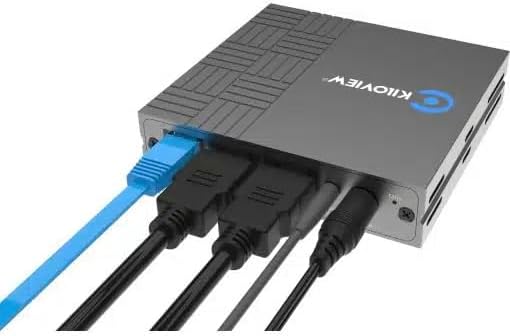
Figure 3 : Example of the Kiloview N6 with power, HDMI input, HDMI output, and Ethernet cables connected, demonstrating a typical setup configuration.
Mode d'emploi
Le Kiloview N6 can operate in two primary modes: Encoding and Decoding. The working mode can be switched via the device's web UI.
1. Accéder au Web Interface utilisateur :
- Ensure the N6 is connected to the same network as your computer.
- Use the LCD screen to find the device's IP address.
- Ouvrir un web browser on your computer and enter the IP address of the N6.
- Connectez-vous en utilisant les identifiants par défaut (reportez-vous au Guide de démarrage rapide pour plus de détails).
2. Encoding Mode:
In encoding mode, the N6 converts an HDMI video signal into an NDI stream.
- De la web UI, select "Encoder" as the working mode.
- Ensure your HDMI video source is connected to the HDMI IN port.
- Configure NDI stream settings such as resolution, frame rate, and bitrate as required.
- The NDI stream will now be discoverable by NDI-compatible software and hardware on your network.
3. Decoding Mode:
In decoding mode, the N6 receives an NDI stream from the network and outputs it via HDMI.
- De la web UI, select "Decoder" as the working mode.
- The N6 will automatically detect available NDI sources on the network. Select the desired NDI source from the list.
- The decoded video will be output through the SORTIE HDMI port to your connected display.
4. LCD Screen and Touch Buttons:
The front LCD screen provides quick access to device status and basic settings. Use the touch buttons (left and right arrows) to navigate through menus and the 'O' button to confirm selections.
- Affichage d'état: View CPU, memory, temperature, IP address, and firmware version.
- Tally Status: The LCD screen also acts as a large tally light, indicating program (red) or preview (green) status in an NDI workflow.
5. Audio and Intercom:
- The N6 supports embedded audio from the HDMI source/output.
- For external audio, connect devices to the 3.5mm LINE IN/OUT port.
- For intercom functionality, connect to a Kiloview Intercom server and configure settings via the web UI.
6. PTZ Control:
The N6 supports PTZ control over the network. Refer to the detailed online manual or web UI for specific PTZ camera integration and control protocols.
Entretien
Proper maintenance ensures the longevity and optimal performance of your Kiloview N6 converter.
- Nettoyage: Utilisez un chiffon doux et sec pour nettoyer l'extérieur de l'appareil. N'utilisez pas de nettoyants liquides ni d'aérosols.
- Ventilation: Veillez à placer l'appareil dans un endroit bien ventilé afin d'éviter toute surchauffe. Ne bloquez pas les ouvertures de ventilation.
- Mises à jour du micrologiciel : Vérifiez régulièrement le kiloview officiel webSite de mise à jour du micrologiciel. La mise à jour du micrologiciel permet d'améliorer les performances, d'ajouter de nouvelles fonctionnalités et de corriger les bogues.
- Stockage: En cas de non-utilisation prolongée de l'appareil, rangez-le dans un endroit frais et sec, à l'abri de la lumière directe du soleil et des températures extrêmes.
- Gestion des câbles: Assurez-vous que tous les câbles sont bien connectés et ne sont pas soumis à des tensions afin d'éviter d'endommager les ports ou les câbles.
Dépannage
If you encounter issues with your Kiloview N6, refer to the table below for common problems and their solutions.
| Problème | Cause possible | Solution |
|---|---|---|
| No power indication on LCD. | Pas d'alimentation ou connexion défectueuse. | Check power adapter connection or PoE connection. Ensure power source is active. |
| No NDI stream detected (Encoding mode). | Incorrect network configuration; HDMI input issue; NDI settings. | Verify network cable connection. Check if HDMI source is active and connected to HDMI IN. Confirm NDI settings in web UI. Ensure firewall is not blocking NDI traffic. |
| No video output (Decoding mode). | No NDI source selected; HDMI output issue; display problem. | Ensure an NDI source is selected in the web UI. Check HDMI cable connection to display. Verify display input. |
| Surchauffe de l'appareil. | Poor ventilation; high ambient temperature. | Ensure adequate airflow around the device. Move to a cooler environment if necessary. |
| Impossible d'accéder web UI. | Adresse IP incorrecte ; problème de connectivité réseau ; pare-feu. | Verify IP address from LCD. Check network cable. Ensure computer is on the same subnet. Temporarily disable firewall. |
Caractéristiques
Technical specifications for the Kiloview N6 HD HDMI/NDI Bi-Directional Converter:
| Fonctionnalité | Détail |
|---|---|
| Numéro de modèle | N6 |
| Marque | Kiloview |
| Entrée vidéo | 1x HDMI |
| Sortie vidéo | 1x HDMI (Loop Out / Decoding Output) |
| Interfaces réseau | 1x RJ45 Ethernet (NDI/PoE) |
| Interface audio | 3.5mm Line In/Out |
| Supported NDI Protocols | NDI High Bandwidth, NDI HX2/3 |
| Puissance d'entrée | DC 5V-18V, PoE (Power over Ethernet) |
| Afficher | 1.14-inch LCD screen with touch buttons |
| Dimensions | 7.44 x 6.18 x 3.27 pouces (dimensions de l'emballage) |
| Poids | 1.41 livres |
| Appareils compatibles | Monitors, Projectors, Cameras |
| Utilisations spécifiques | Video conferences, PTZ control, IP-based post production |
Garantie et assistance
Kiloview products are designed for reliability and performance. For specific warranty terms and conditions, please refer to the warranty card included with your product or visit the official Kiloview website. For technical support, firmware updates, or additional resources, please visit the Kiloview support portal or contact their customer service team.
Fabricant: Kiloview
Date de mise en ligne sur Amazon : 12 novembre 2024


