Produit terminéview
The DYNAVIN D9-DMI Ultra Flex is an advanced Android car radio navigator designed to upgrade your in-car entertainment and navigation experience. It features a 6.5-inch high-resolution anti-glare touchscreen, integrated GPS navigation, wireless CarPlay, and Android Auto compatibility. This unit seamlessly integrates with your vehicle's existing systems, including steering wheel controls, climate control, and parking sensors, for a cohesive user experience.
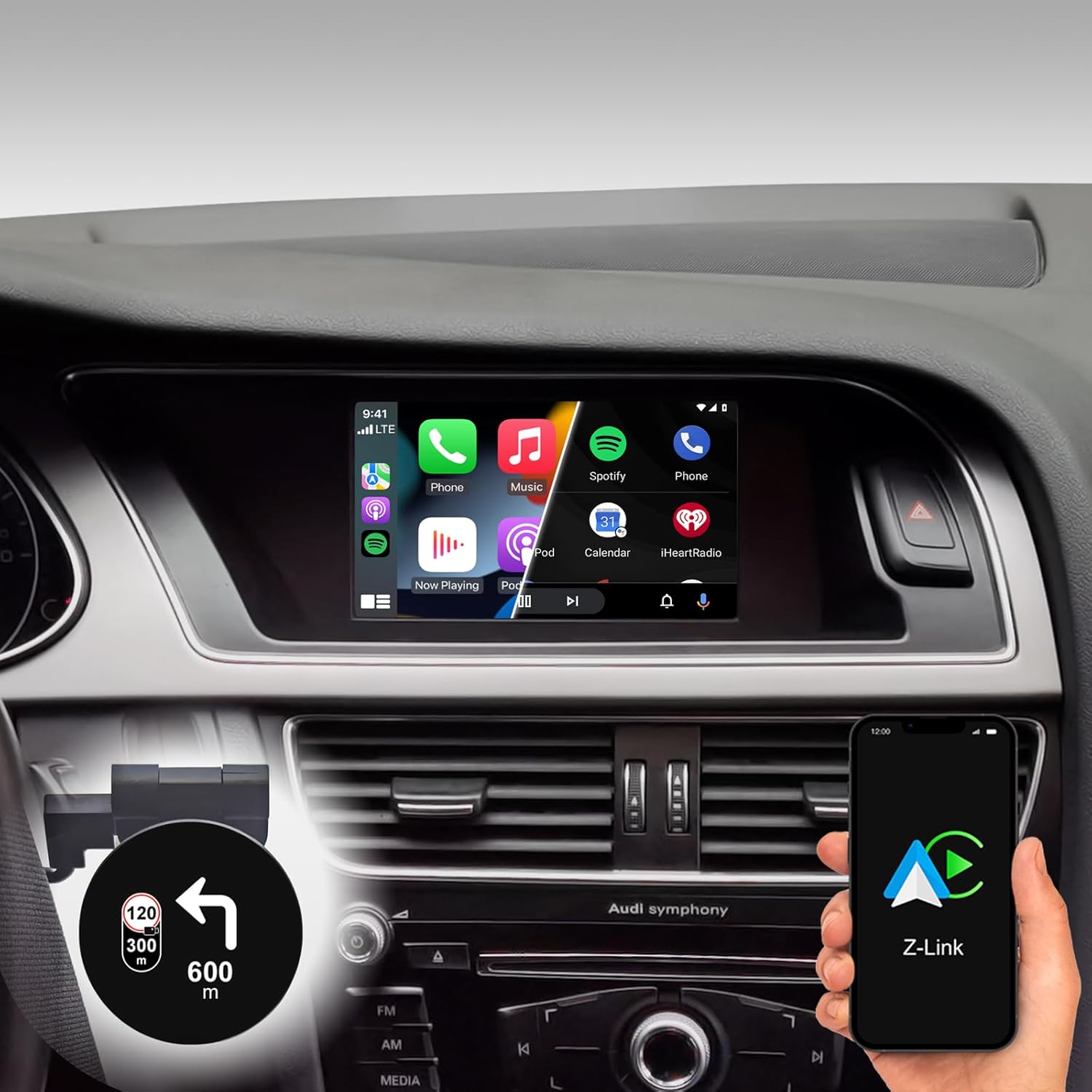
Figure 1: DYNAVIN D9-DMI Ultra Flex Car Radio Navigator installed in an Audi dashboard, showcasing its CarPlay interface and integration with navigation features.
Compatibilité
This Android Navi Radio is specifically designed for Audi vehicles equipped with a Concert or Symphony radio. Please verify your vehicle's radio type before installation to ensure compatibility.
- Audi A4: 2007 – 2015
- Audi A5: 2007 – 2016
- Audi Q5: 2008 – 2017
- Audi S4: 2009 – 2016
- Audi S5: 2009 – 2016
The unit is compatible with the original AUDI sound system and can receive the AUDI vehicle menu.

Figure 2: Compatible Audi Concert and Symphony radio units.

Figure 3: How to check your car's system version for compatibility.
Caractéristiques principales
- Afficher: 6.5-inch high-resolution (1024 x 600 pixels) anti-glare touchscreen.
- Système opérateur: Android 11 OS with quad-core CPU and 4 GB RAM.
- Connectivité : Wireless CarPlay, Android Auto, and Smartphone Mirroring.
- Navigation: Integrated GPS navigation with Dynaway app (31-day trial, activation code required), including speed camera information.
- Audio: Highly sensitive FM-RDS tuner with 15 presets for clear, noise-free playback. Supports audio streaming via smartphone/USB.
- Microphone: Compact digital dual microphone with noise reduction for excellent call quality.
- Intégration: Integrated CANBUS solution for seamless control via steering wheel, air conditioning display, and parking sensor information.
- Affichage tête haute (HUD) : Included HUD shows navigation directions, vehicle speed, and speed camera alerts.
- Dynapp Pack: Access to Google Playstore, third-party app installation, and display of speed limits (31-day trial, activation code required).

Figure 4: DYNAVIN's commitment to quality and experience.

Figure 5: The innovative Dynavin Digital Dual-Microphone.

Figure 6: Upgrade your Audi system with the DYNAVIN DMI Ultra Flex.
Configuration et installation
Installation of the DYNAVIN D9-DMI Ultra Flex requires careful attention to detail. It is recommended to have the installation performed by a qualified professional. The unit integrates with your vehicle's existing wiring and CAN-BUS system.
Composants inclus :
Avant de commencer l'installation, assurez-vous que tous les composants énumérés ci-dessous sont présents dans votre colis.

Figure 7 : Liste complète des accessoires inclus dans l'emballage.
- Dynavin Radio Unit
- Câble de connexion
- Antenne DAB
- DAB / CAN Interface
- Câble de caméra arrière
- Antenne GPS
- Câble de rallonge USB
- Adaptateur d'antenne
- Microphone
- Climate Control Cable
- HUD 150 (Head-up Display)
- Antenne BT/Wi-Fi
- Outils de démontage
- Guide rapide
Étapes d'installation (généralités) :
Refer to the included Quick Guide for detailed, step-by-step installation instructions specific to your Audi model. Professional installation is highly recommended.
- Préparation: Disconnect the vehicle's battery. Use the provided disassembly tools to carefully remove the original radio unit and trim.
- Câblage : Connect the Dynavin radio unit using the supplied connection cables, ensuring all connections are secure. Integrate the DAB/CAN interface and connect the GPS antenna, DAB antenna, and BT/Wi-Fi antenna.
- Installation du microphone : Install the compact digital dual microphone in a suitable location, typically near the rearview mirror or steering column, for optimal call quality.
- Head-up Display Installation: Mount the HUD 150 unit on your dashboard or windshield as per the instructions, ensuring it does not obstruct your view.
- Intégration CAN-BUS : Ensure the CAN-BUS connections are correctly made to enable steering wheel control, climate display, and parking sensor integration.
- Essai: Reconnect the vehicle's battery. Power on the unit and perform initial function tests for radio, navigation, CarPlay/Android Auto, and vehicle system integration.
- Remontage: Réassemblez soigneusement les composants du tableau de bord.
Mode d'emploi
Fonctionnement de base :
- Marche/Arrêt : L'appareil s'allume et s'éteint généralement avec le contact du véhicule.
- Contrôle de l'écran tactile : Navigate menus and select functions using the responsive 6.5-inch touchscreen.
- Commandes au volant : Utilize your vehicle's existing steering wheel controls for volume, track skipping, and call management, thanks to CAN-BUS integration.
Système de navigation:
The integrated GPS navigation system uses the Dynaway app. A 31-day trial is included, after which an activation code must be purchased.
- Entrée de destination : Enter destinations via the touchscreen.
- Guidage vocal : Follow clear voice instructions for turn-by-turn navigation.
- Indications d'itinéraire : Select preferred route options (e.g., fastest, shortest).
- Alertes radars : The navigation software includes alerts for speed cameras.
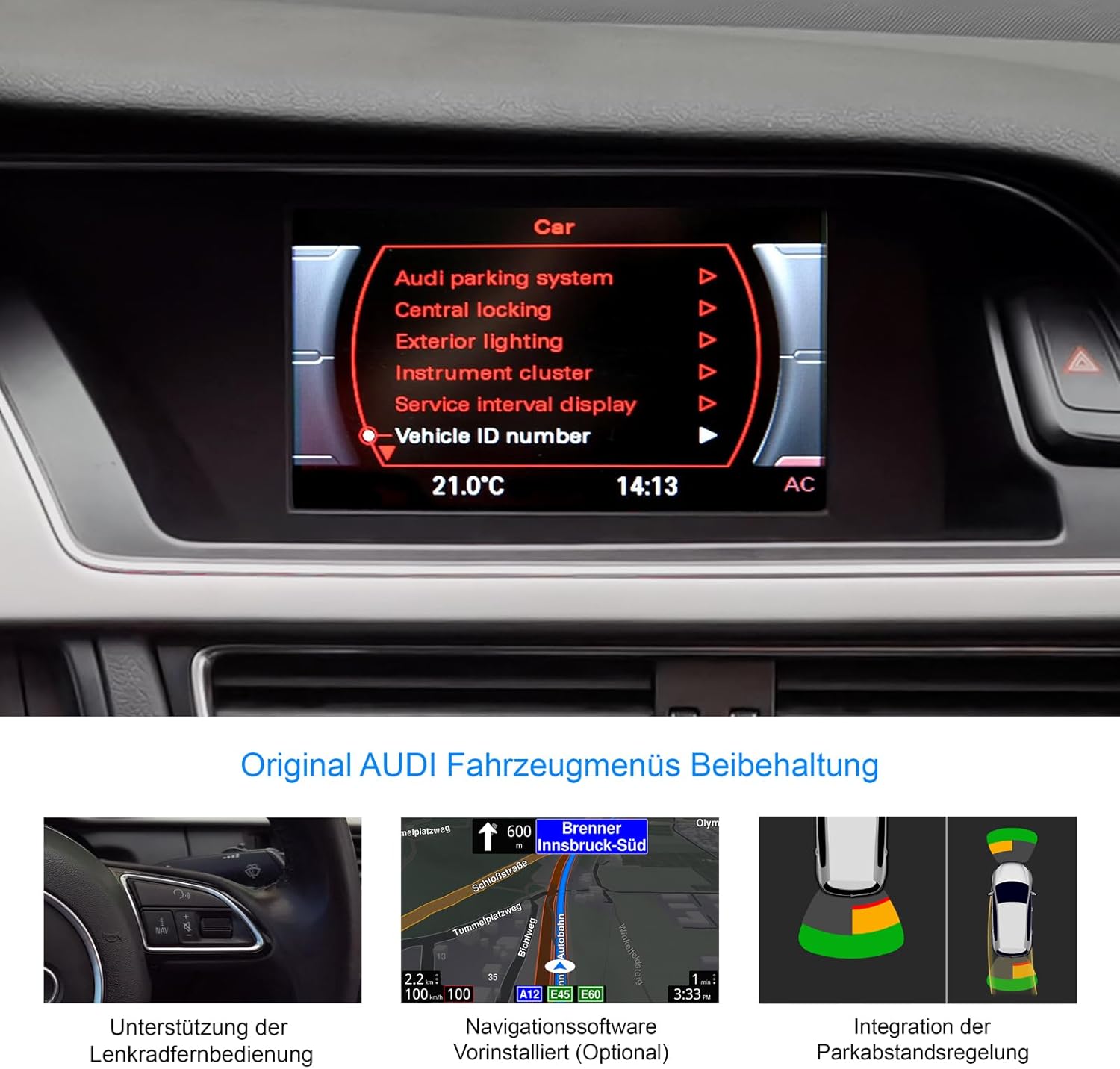
Figure 8: Retention of original Audi vehicle menus and integrated features.
CarPlay et Android Auto :
Connect your smartphone wirelessly to access CarPlay (for iOS devices) or Android Auto (for Android devices). A 31-day trial is included, after which an activation code must be purchased.
- Connexion sans fil : Pair your phone via Bluetooth and follow the on-screen prompts to establish a wireless CarPlay or Android Auto connection.
- Accès à l'application : Use compatible apps for navigation (Apple Maps, Google Maps), music streaming (Spotify, Apple Music), messaging, and calls directly from the unit's display.
Affichage tête haute (HUD) :
The included HUD 150 projects key information onto your windshield, allowing you to keep your eyes on the road.
- Informations affichées : Navigation directions (from Dynaway, Apple Maps, Google Maps), vehicle speed, and Blitzer.de speed camera information.
- Placement: Position the HUD unit to ensure clear visibility without obstructing your driving view.

Figure 9: Head-up Display in action, showing navigation and time.
Entretien
To ensure the longevity and optimal performance of your DYNAVIN D9-DMI Ultra Flex, follow these maintenance guidelines:
- Nettoyage de l'écran : Utilisez un chiffon doux non pelucheux spécialement conçu pour les écrans électroniques. N’utilisez pas de nettoyants abrasifs ni de solvants. Essuyez délicatement l’écran pour enlever la poussière et les traces de doigts.
- Mises à jour logicielles : Periodically check for software updates from DYNAVIN to ensure the system runs efficiently and has the latest features and bug fixes. Updates can typically be performed via Wi-Fi or USB.
- Soins généraux: Évitez d'exposer l'appareil à des températures extrêmes, à la lumière directe du soleil pendant des périodes prolongées ou à une humidité excessive.
- Connexions de câble : Ensure all cables remain securely connected. Avoid pulling on cables forcefully.
Dépannage
This section addresses common issues you might encounter with your DYNAVIN D9-DMI Ultra Flex. For more complex problems, contact customer support.
| Problème | Cause possible | Solution |
|---|---|---|
| L'unité ne s'allume pas. | Mauvaise connexion électrique, fusible grillé, problème de batterie du véhicule. | Vérifiez tous les câbles d'alimentation et leurs connexions. Inspectez les fusibles du véhicule. Assurez-vous que la batterie du véhicule est chargée. |
| Pas de sortie audio. | Volume too low, mute activated, incorrect audio source selected, wiring issue. | Augmentez le volume. Vérifiez si la fonction muet est activée. Sélectionnez la source audio appropriée. Vérifiez les connexions des haut-parleurs. |
| CarPlay/Android Auto ne se connecte pas. | Bluetooth not paired, Wi-Fi disabled, trial period expired, activation code not entered. | Ensure Bluetooth and Wi-Fi are enabled on both devices. Re-pair the phone. Check trial status and enter activation code if necessary. |
| Signal GPS perdu ou imprécis. | Antenne GPS obstruée ou déconnectée, mauvaise réception satellite. | Assurez-vous que l'antenne GPS est correctement installée et qu'elle est dégagée. view du ciel. Vérifiez la connexion de l'antenne. Déplacez-vous dans un endroit dégagé. |
| Les commandes au volant ne fonctionnent pas. | CAN-BUS connection issue, incorrect vehicle configuration. | Verify CAN-BUS wiring. Check unit settings for correct vehicle model configuration. |
Caractéristiques
| Fonctionnalité | Détail |
|---|---|
| Marque | DYNAVIN |
| Modèle | D9-DMI Ultra Flex |
| Véhicules compatibles | Audi A4 (2007-2015), A5 (2007-2016), Q5 (2008-2017), S4 (2009-2016), S5 (2009-2016) with Concert/Symphony radio |
| Taille de l'écran | 6.5 pouces |
| Type d'affichage | LCD, Anti-glare |
| Résolution | 1024 x 600 pixels |
| Système opérateur | Android 11 |
| Processeur | Quad-cœur |
| BÉLIER | 4 Go |
| Connectivité | CarPlay sans fil, Android Auto, Bluetooth, USB |
| Mode de sortie audio | Stéréo (2.0 canaux) |
| Tuner radio | FM-RDS with 15 presets |
| Caractéristiques spéciales | Integrated GPS Navigation, Head-up Display (HUD), CAN-BUS Integration (steering wheel, climate, parking sensors), Digital Dual Microphone |
| Dimensions du colis | 28 x 23 x 10 cm |
| Poids de l'article | 2 kg |
| ASIN | B0CS67GQKN |
Garantie et assistance
For warranty information, please refer to the documentation provided with your purchase or contact DYNAVIN customer service directly. DYNAVIN offers customer support for product inquiries, technical assistance, and troubleshooting.
For the Dynapp package, CarPlay, and Android Auto features, a 31-day trial phase is included. An activation code must be purchased online to continue using these features after the trial period.
Please visit the official DYNAVIN website or contact your retailer for the most up-to-date support information and contact details.


