1. Introduction et plusview
This manual provides essential instructions for the safe and efficient use of your Maxcom MM135L Basic Mobile Phone. The MM135L is designed for straightforward communication, featuring a user-friendly interface, large keys, and a 1.77-inch screen. It supports 2G networks and includes dual SIM capability, an SOS button for emergencies, and convenient USB-C charging. Please read this manual thoroughly before operating the device.
2. Contenu du colis
Vérifiez que tous les éléments sont présents dans le colis :
- Maxcom MM135L Mobile Phone
- Battery (Lithium-Ion, 600 mAh)
- Câble USB
- Éjecteur de plateau SIM
- Manuel de l'utilisateur (ce document)
3. Disposition de l'appareil
Familiarize yourself with the physical components of your Maxcom MM135L phone.
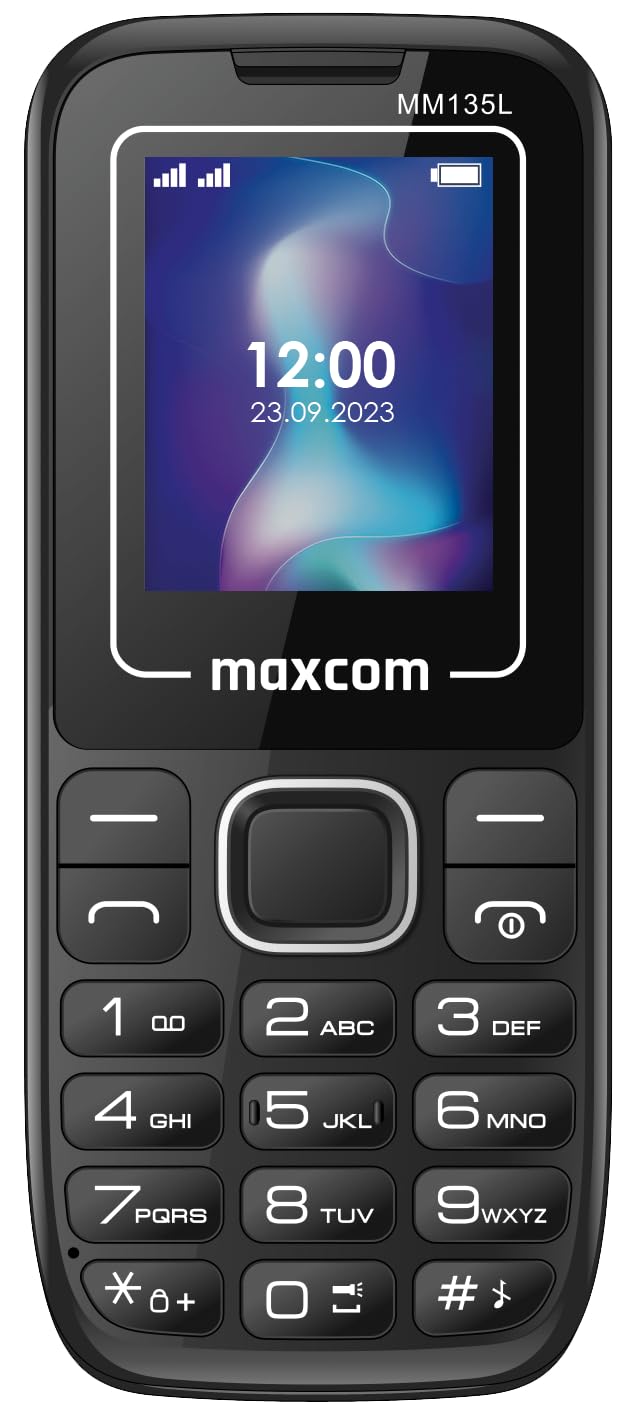
Figure 3.1 : Arrière view of the Maxcom MM135L phone, showing the blue textured back cover, Maxcom logo, and speaker grille at the top.

Figure 3.2 : Face avant view of the Maxcom MM135L phone, displaying the screen, large numeric keypad, and call/end buttons.

Figure 3.3: Bottom edge of the phone, featuring the USB-C charging port and a 3.5mm headphone jack.

Figure 3.4: Top edge of the phone, highlighting the integrated flashlight.
Composants clés :
- Écran d'affichage : 1.77-inch LCD for clear text and call information.
- Clavier numérique: Large, tactile buttons for easy dialing and texting.
- Boutons d'appel/de fin : Dedicated buttons for managing calls.
- Touches de navigation : Pour la navigation dans les menus.
- Bouton SOS : Located on the rear for emergency calls (refer to Figure 3.1).
- Lampe de poche: Integrated at the top of the device (refer to Figure 3.4).
- Port USB-C : For charging the device (refer to Figure 3.3).
- Prise casque: 3.5mm port for audio accessories (refer to Figure 3.3).
4. Installation
4.1 Installation de la batterie
- Retirez délicatement le cache arrière du téléphone.
- Alignez les contacts de la batterie avec les bornes situées à l'intérieur du compartiment de la batterie.
- Enfoncez délicatement la batterie en place.
- Remettez le couvercle arrière en place en vous assurant qu'il s'enclenche correctement.
4.2 Installation de la carte SIM
The Maxcom MM135L supports dual SIM cards.
- With the phone powered off and the back cover removed, locate the SIM card slots.
- Insérez votre ou vos cartes SIM dans le ou les emplacements prévus à cet effet, les contacts dorés vers le bas, en suivant l'orientation indiquée sur le téléphone.
- Assurez-vous que la ou les cartes SIM sont bien insérées.
- Replace the back cover and battery.
4.3 Charger le téléphone
The phone uses a USB-C port for charging.
- Connect the USB-C cable to the charging port at the bottom of the phone (refer to Figure 3.3).
- Connectez l'autre extrémité du câble USB à un adaptateur secteur USB compatible ou à un port USB d'un ordinateur.
- L'indicateur de batterie à l'écran affichera l'état de charge.
- Débranchez le chargeur une fois la batterie complètement chargée.
Note: For optimal battery life, fully charge the phone before first use.
5. Mode d'emploi
5.1 Mise sous/hors tension
- Pour allumer : Appuyez et maintenez enfoncé le Call/Power jusqu'à ce que l'écran s'allume.
- Pour éteindre : Appuyez et maintenez enfoncé le Fin/Alimentation Appuyez sur le bouton jusqu'à ce que les options d'arrêt apparaissent, puis confirmez.
5.2 Passer et recevoir des appels
- Faire un appel: Saisissez le numéro de téléphone à l'aide du clavier et appuyez sur la touche Appel bouton.
- Pour répondre à un appel : Appuyez sur le Appel bouton lorsque le téléphone sonne.
- Pour terminer un appel : Appuyez sur le Fin bouton.
5.3 Envoi et réception de messages
- Accédez au menu « Messages » à l'aide des touches de navigation.
- Select "Create New Message" to compose an SMS.
- Saisissez le numéro du destinataire et votre message, puis envoyez.
- Les messages reçus apparaîtront dans la « Boîte de réception ».
5.4 Utilisation du bouton SOS
The SOS button is located on the rear of the phone. It is designed for emergency situations.
- Activer: Press and hold the SOS button for several seconds.
- The phone will automatically sound an alarm and send emergency SMS messages to pre-set contacts.
- Il appellera ensuite automatiquement et en boucle les contacts d'urgence enregistrés jusqu'à ce que quelqu'un réponde.
- Assurez-vous que les contacts d'urgence sont correctement configurés dans les paramètres du téléphone.
Fonction lampe torche 5.5
The built-in flashlight can be activated for convenience.
- Refer to the phone's specific settings or a dedicated side button for flashlight activation. Typically, a long press on a designated key or a side switch controls it.
6. Entretien
- Nettoyage: Utilisez un chiffon doux et sec pour nettoyer la surface du téléphone. Évitez les nettoyants liquides.
- Entretien de la batterie: N’exposez pas la batterie à des températures extrêmes. Évitez de la décharger complètement et fréquemment.
- Stockage: Rangez le téléphone dans un endroit frais et sec lorsqu'il n'est pas utilisé pendant une période prolongée.
- Résistance à l'eau : Ce téléphone n'est pas étanche. Évitez tout contact avec des liquides.
7. Dépannage
| Problème | Solution possible |
|---|---|
| Le téléphone ne s'allume pas. | Vérifiez que la batterie est correctement installée et chargée. Branchez le chargeur et réessayez. |
| Impossible de passer ou de recevoir des appels. | Vérifiez que la carte SIM est correctement insérée et activée. Vérifiez la puissance du signal réseau. Contactez votre opérateur si le problème persiste. |
| La batterie ne charge pas. | Ensure the USB-C cable and charger are securely connected and functional. Try a different charging cable or adapter. |
| Le bouton SOS ne fonctionne pas. | Verify that emergency contacts are saved in the phone's settings. Ensure the phone has network coverage. |
| Mauvaise qualité d'appel. | Move to an area with better network reception. Check the speaker and microphone for obstructions. |
8. Spécifications
| Fonctionnalité | Détail |
|---|---|
| Nom du modèle | MM135L |
| Taille de l'écran | 1.77 pouces |
| Type d'affichage | Écran LCD |
| Résolution | 128 x 160 |
| Technologie cellulaire | 2G |
| Prise en charge SIM | Double SIM |
| Type de batterie | Lithium-ion |
| Capacité de la batterie | 600 mAh |
| Port de chargement | USB-C |
| Dimensions (L x l x H) | 7 x 14 x 3.5 cm |
| Poids | 60 g |
| Caractéristiques spéciales | SOS Button, Flashlight, Expandable Memory, Fast Charging Support |
9. Garantie et assistance
For warranty information, technical support, or service inquiries, please refer to the warranty card included with your product or contact Maxcom customer service directly. Keep your proof of purchase for warranty claims.


