1. Introduction
This manual provides instructions for the assembly, operation, maintenance, and troubleshooting of your LITFAD LT1206939S Modern Brown Wood Office Desk. Please read these instructions carefully before assembly and use to ensure proper function and safety.

Image 1.1 : Terminéview of the LITFAD Modern Brown Wood Office Desk.
2. Consignes de sécurité
Always assemble this desk on a stable, level surface. Ensure all parts are securely fastened before use. This desk is heavy and may tip over if not properly anchored to the wall. Do not exceed the maximum weight recommendation of 150 pounds on the working surface. Always follow the included instructions for safe assembly and use.
- Assurez-vous que toutes les vis et fixations sont bien serrées.
- Ne vous tenez pas debout et ne vous asseyez pas sur le bureau.
- Gardez les petites pièces hors de portée des enfants pendant l'assemblage.
- Évitez de poser des objets chauds directement sur la surface du bureau sans protection.
3. Composants du produit
Before beginning assembly, verify that all components listed in the packaging are present and undamaged. The desk includes the following main parts:
- Panneau de bureau
- Drawer Unit (with 3 drawers, one locking)
- Unité d'armoire
- Sled Base Supports
- Quincaillerie d'assemblage (vis, chevilles, verrous à came, etc.)
- Assembly Tools (basic tools for assembly are included)
4. Configuration et assemblage
Assembly of the LITFAD LT1206939S desk typically requires one person and includes all necessary tools. Follow the step-by-step instructions provided in the separate assembly guide included with your product packaging. A general overview Le processus d'assemblage se déroule comme suit :
- Déballer et identifier les pièces : Carefully remove all components from the packaging and lay them out on a clean, soft surface to prevent scratches. Compare them with the parts list in your assembly guide.
- Assembler les structures de base : Begin by assembling the drawer unit and the cabinet unit according to the detailed diagrams.
- Attach Sled Base: Secure the sled base supports to the assembled drawer and cabinet units.
- Monter le bureau : Carefully place the desktop panel onto the assembled base structures, aligning all pre-drilled holes. Secure the desktop using the provided hardware.
- Installer les tiroirs : Insert the assembled drawers into their respective slides within the drawer unit.
- Vérifications finales : Ensure all connections are tight and the desk is stable before placing any items on it.
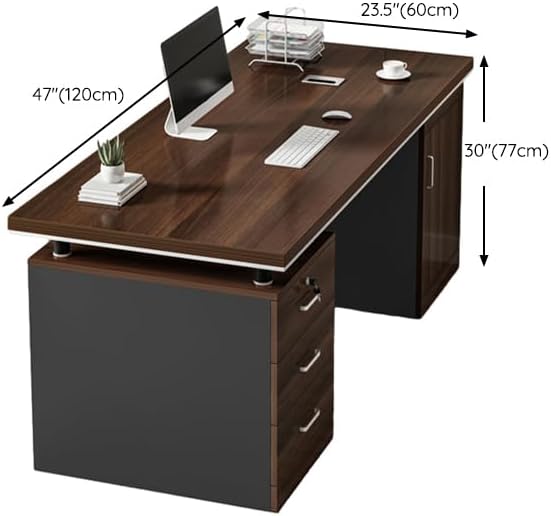
Image 4.1: Desk dimensions for planning placement and assembly.
5. Mode d'emploi
Your LITFAD office desk is designed for functionality and convenience in a home or professional office environment.
5.1. Utilisation du tiroir
The desk features three drawers for storage. The top drawer includes a locking mechanism for securing important documents or personal items. Use the provided key to lock and unlock this drawer.

Image 5.1: Detail of the three drawers, highlighting the locking top drawer.
5.2. Cabinet Usage
The integrated cabinet provides additional storage space, suitable for larger items or a computer tower. The cabinet door opens to reveal an open storage area.
5.3. Gestion des câbles
A wire hole is integrated into the desk design to help manage cables from your computer, monitor, and other electronic devices, keeping your workspace tidy and organized.

Image 5.2: Detail of the wire hole for cable organization.
6. Entretien
Un entretien approprié prolongera la durée de vie et préservera l'apparence de votre bureau.
- Nettoyage: Essuyez les surfaces avec un chiffon doux, damp Utilisez un chiffon. Évitez les produits chimiques agressifs ou les nettoyants abrasifs, qui peuvent endommager la finition du bois.
- Déversements : Nettoyez immédiatement les liquides renversés pour éviter les taches ou les dégâts d'eau.
- Protection: Utilisez des sous-verres pour les boissons et des dessous de plat pour écrire ou pour votre matériel informatique afin de protéger la surface des rayures et de la chaleur.
- Fixations : Vérifiez et resserrez régulièrement toutes les vis et fixations pour garantir la stabilité du bureau.
7. Dépannage
Si vous rencontrez des problèmes avec votre bureau, consultez les problèmes et solutions courants suivants :
- Le bureau vacille : Assurez-vous que toutes les vis de montage sont bien serrées. Vérifiez que le bureau repose sur une surface plane. Ajustez les pieds réglables, le cas échéant.
- Les tiroirs collent : Vérifiez que les glissières du tiroir sont bien alignées et dégagées. Assurez-vous que le tiroir n'est pas surchargé.
- Lock Not Working: Verify the key is fully inserted and turned correctly. Ensure no items are obstructing the locking mechanism inside the drawer.
- Parties manquantes: If any parts were missing upon unboxing, contact customer support immediately with your product model number and a description of the missing part.
8. Spécifications
| Fonctionnalité | Détail |
|---|---|
| Marque | LITFAD |
| Numéro de modèle | LT1206939S |
| Dimensions du produit (P x L x H) | 23.6" x 47.2" x 30.3" |
| Couleur | Brun |
| Matériel | Bois |
| Conception de bureau | Bureau d'ordinateur |
| Nombre de tiroirs | 3 |
| Tiroir verrouillable | Oui (1) |
| Nombre d'armoires | 1 |
| Caractéristiques spéciales | Scratch Resistant, Wire Hole |
| Poids maximum recommandé | 150 livres |
| Assemblage requis | Oui |
| Outils d'assemblage inclus | Oui |
9. Informations sur la garantie
This LITFAD office desk comes with a Limited Warranty. The specific terms and duration of the warranty may vary. Please refer to the warranty card included in your product packaging or contact customer support for detailed information regarding parts, labor, and comprehensive coverage.
10. Assistance clientèle
If you have any questions, require assistance with assembly, or encounter any issues not covered in this manual, our customer service team is available to help. Please have your model number (LT1206939S) ready when contacting support.
For support, please refer to the contact information provided in your product packaging or visit the official LITFAD website. Our 24/7 customer services will guide you along if it doesn't work.