1. Introduction
The syitren R300 is a portable desktop retro CD player designed for home use. It features Bluetooth connectivity and fiber optic output, allowing users to connect to various external audio systems. This manual provides detailed instructions for setting up, operating, maintaining, and troubleshooting your R300 CD player.

Figure 1: syitren R300 CD Player - Front View
2. Contenu de la boîte
Veuillez vérifier le contenu du colis pour vous assurer que tous les éléments sont présents :
- syitren R300 CD Player
- Câble d'alimentation de type C
- 1 pile AAA (incluse)
3. Installation
3.1 Mise sous tension et charge
The R300 CD player is powered via a Type-C cable. It includes a built-in 2000mAh battery, providing over 6 hours of playback on a full charge. Connect the provided Type-C power cable to the DC IN 5V port on the back of the unit and plug the other end into a compatible USB power adapter (not included).

Figure 2: Rear Ports (DC IN 5V and SPDIF)
3.2 Connexion aux périphériques audio
The R300 CD player does not have a built-in speaker. It requires connection to external audio devices for sound output. This design helps reduce the impact of audio vibration on the CD player, allowing users to choose their preferred speakers and power ampéquipement de lification.
3.2.1 Connexion Bluetooth
The R300 CD player can connect wirelessly to Bluetooth headphones or speakers.
- Ensure your external Bluetooth audio device is in discovery mode.
- On the R300, activate Bluetooth pairing mode by holding the designated Bluetooth button (refer to controls section for button identification).
- Once connected, a solid Bluetooth icon will appear on the R300's display.
Video 1: Demonstrates how to connect the R300 CD Player to an external stereo system using Bluetooth. The video shows activating Bluetooth on the R300 and pairing it with a separate speaker, confirming connection via the display icon.
3.2.2 Fiber Optic (SPDIF) Output
For high-quality digital audio output, connect the R300 to an audio receiver or amplifier using a fiber optic cable (not included) via the SPDIF port on the back of the unit.
3.2.3 Sortie AUX
The R300 also features an AUX output for analog audio connection to compatible devices using a 3.5mm audio cable (not included).
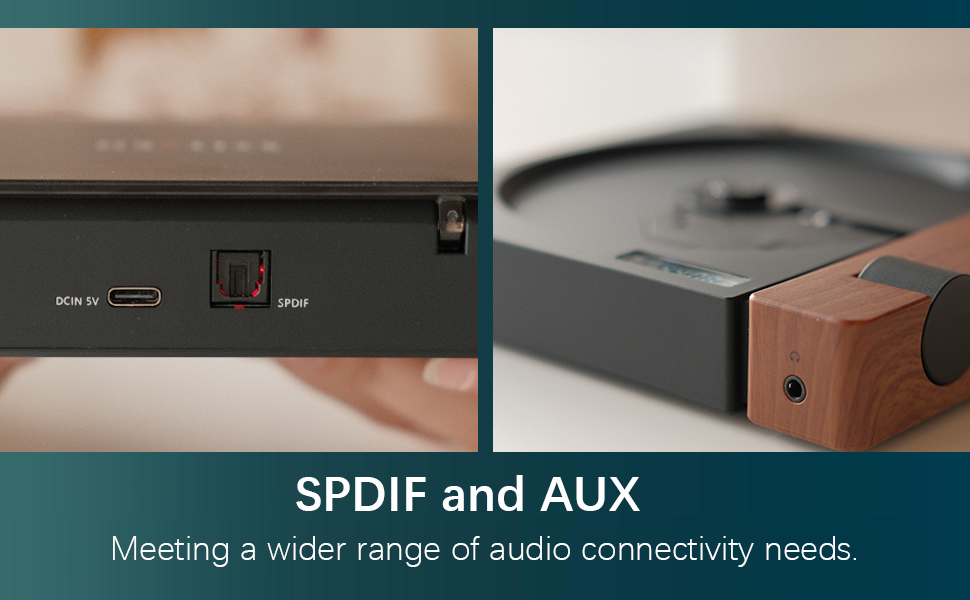
Figure 3: SPDIF and AUX Connectivity Options
4. Mode d'emploi
4.1 Lecture de CD
- Ouvrez délicatement le couvercle du disque.
- Placez un CD sur l'axe en vous assurant qu'il est correctement positionné.
- Fermez le couvercle du disque.
- Press the Play/Pause button (orange button) to begin playback.
- Use the Skip Forward and Skip Backward buttons to navigate between tracks.
- Réglez le volume à l'aide du bouton de volume.

Figure 4: Opening the Disc Cover

Figure 5 : Panneau de commande et écran
4.2 contrôles surview
The R300 features a minimalist control panel on the right side of the unit:
- Interrupteur: Located on the back/side of the unit (refer to Figure 2).
- Bouton de volume : Rotates to adjust audio output level.
- Bouton Lecture/Pause : Orange button to start or pause CD playback.
- Boutons Passer : Black buttons for skipping tracks forward or backward.
- Bluetooth Activation Button: (Likely one of the black buttons, or the top one, as shown in video) Used to initiate Bluetooth pairing.
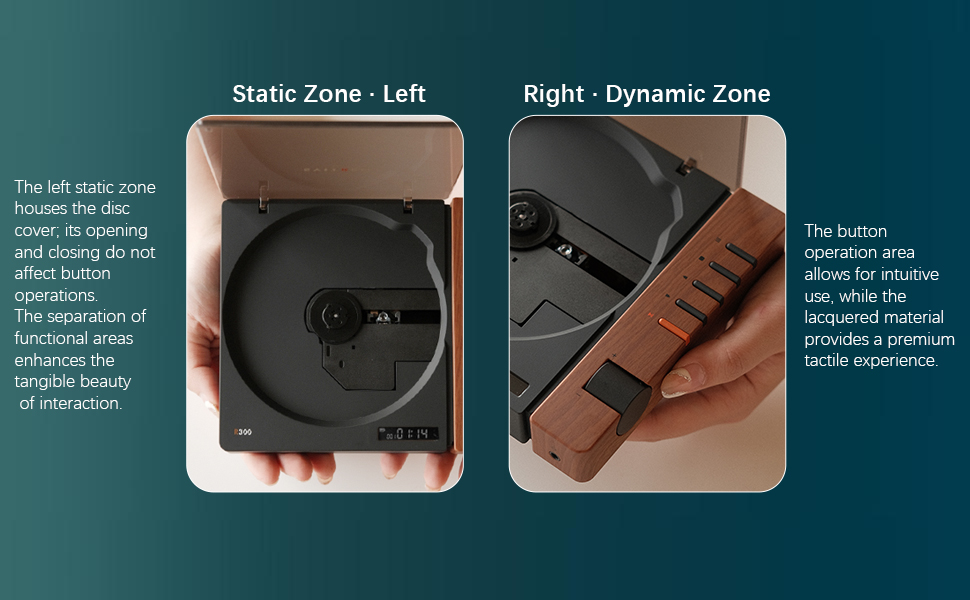
Figure 6: Functional Zones of the R300
5. Entretien
- Nettoyez l'appareil avec un chiffon doux et sec. Évitez les nettoyants abrasifs et les solvants.
- Ensure the disc tray is free of dust and debris to prevent playback issues.
- Lorsqu'il n'est pas utilisé, rangez le lecteur CD dans un endroit frais et sec, à l'abri de la lumière directe du soleil et des températures extrêmes.
- Manipulez les CD par les bords pour éviter les traces de doigts et les rayures.
6. Dépannage
| Problème | Cause possible | Solution |
|---|---|---|
| Le lecteur ne s'allume pas. | La batterie est déchargée ou le câble d'alimentation n'est pas connecté. | Charge the unit using the Type-C power cable. Ensure the power cable is securely connected. |
| "NO CD" message displayed. | No CD inserted, CD is dirty/scratched, or CD is not properly seated. | Insert a CD. Clean the CD with a soft cloth. Ensure the CD is placed correctly on the spindle. |
| Aucune sortie audio. | No external speaker connected, volume too low, or incorrect output mode selected. | Connect an external speaker via Bluetooth, SPDIF, or AUX. Increase the volume. Ensure the external device is properly configured for input. |
| Problèmes de connexion Bluetooth. | L'appareil n'est pas en mode d'appairage, hors de portée ou en cas d'interférence. | Ensure both devices are in pairing mode. Move devices closer. Reduce interference from other wireless devices. |
| Player randomly shuts off. | Batterie faible ou dysfonctionnement interne. | Assurez-vous que la batterie est complètement chargée. Si le problème persiste, contactez le support client. |
7. Spécifications
- Nom du modèle : R300
- Marque: Syitren
- Dimensions du produit : 6.38 x 5.79 x 1.28 pouces
- Poids de l'article : 14.1 onces
- Piles : 1 piles AAA requises (incluses)
- Technologie de connectivité: Bluetooth, SPDIF, AUX
- Dossier spécial : Portable
- Fabricant: syitren/Guangdong Kaiping Electronics Co., Ltd
- Capacité de la batterie : Built-in 2000mAh (more than 6 hours playback)
8. Garantie et assistance
For warranty information and customer support, please refer to the product's official Amazon listing page or visit the syitren official webConsultez le site. Conservez votre reçu d'achat pour toute réclamation au titre de la garantie.
Fabricant: syitren/Guangdong Kaiping Electronics Co., Ltd
Boutique de la marque : Visit the syitren Store on Amazon


