1. Introduction
This manual provides comprehensive instructions for the safe and efficient use of your new artfone C1+ 4G mobile phone. Please read this manual thoroughly before operating the device to ensure proper functionality and to familiarize yourself with all features. Keep this manual for future reference.

Image 1.1: The artfone C1+ 4G mobile phone with its dedicated charging dock.
2. Produit terminéview
2.1 Principales caractéristiques
- Conception conviviale : Features a large 1.77-inch color display with clear menu icons and larger fonts for easy readability.
- Audio amélioré : Amazingly high volume and clear speakers, ideal for individuals with hearing difficulties.
- Caractéristiques de sécurité : Integrated SOS button for up to 5 emergency contacts and a conveniently located flashlight button.
- Longue durée de vie de la batterie : Equipped with a robust 1800mAh battery, offering 5-6 hours of continuous talk time and 240-300 hours (10-12 days) of standby time.
- Construction durable : Non-slip back panel and sturdy PC materials provide protection against impacts and drops.
- Compatibilité réseau polyvalente : Unlocked and compatible with major Canadian 4G networks, supporting 2G, 3G, and 4G bands for voice calls and text messaging.
- Fonctions essentielles : Includes audio, video, Bluetooth, FM radio, calculator, alarm, and calendar.
2.2 Contenu du paquet
À l'ouverture du colis, vérifiez que tous les éléments sont présents :
- Téléphone portable Artfone C1+ 4G
- Batterie rechargeable
- Câble de chargement USB-C
- Adaptateur de chargeur mural
- Station de chargement
- Manuel d'utilisation

Image 2.1: The complete package contents, including the phone, battery, charger, dock, and manual.
3. Installation
3.1 Installation de la carte SIM et de la batterie
- Retirer le couvercle arrière : Gently slide the back cover of the phone downwards or pry it open from the designated notch.
- Insérer la carte sim: Locate the SIM card slot(s). Insert your 4G compatible SIM card(s) into the slot(s) with the gold contacts facing down and the cut corner aligned as indicated.
- Insérer la batterie : Placez la batterie dans son compartiment en veillant à ce que les contacts dorés de la batterie soient alignés avec ceux du téléphone.
- Remplacer le couvercle arrière : Remettez fermement en place le couvercle arrière jusqu'à ce qu'il s'enclenche.
3.2 Charger le téléphone
Avant la première utilisation, chargez complètement la batterie du téléphone.
- Utilisation de la station de charge : Connect the USB-C charging cable to the wall charger adapter, then plug the adapter into a power outlet. Connect the other end of the USB-C cable to the charging dock. Place the phone into the charging dock, ensuring it sits securely and the charging indicator appears on the screen.
- Chargement direct : Alternatively, connect the USB-C charging cable directly to the USB-C port on the phone and then to the wall charger adapter plugged into a power outlet.
A full charge typically takes approximately 2-3 hours. The battery icon on the screen will indicate charging status.
4. Fonctionnement de base
4.1 Mise sous/hors tension
- Mise sous tension : Appuyez et maintenez enfoncé le Red Call/Power Off button (usually marked with a phone icon) until the screen lights up.
- Éteindre: Appuyez et maintenez enfoncé le Red Call/Power Off button until a power off option appears on the screen. Select 'Power Off' and confirm.
4.2 Passer et recevoir des appels
- Passer un appel : On the standby screen, dial the desired phone number using the keypad. Press the Appel vert bouton pour lancer l'appel.
- Répondre à un appel: Lorsque le téléphone sonne, appuyez sur la touche Appel vert bouton pour répondre.
- Terminer un appel : Appuyez sur le Red Call/Power Off button to end an active call.
4.3 Contacts
- Access Contacts: From the main menu, navigate to 'Contacts' or press the dedicated 'Contacts' button if available.
- Ajouter un nouveau contact : Select 'Options' or 'Add New' within the Contacts menu. Enter the contact's name and phone number, then save.
- Call from Contacts: Select a contact from the list and press the Appel vert bouton.
4.4 Messagerie (SMS)
- Access Messages: Depuis le menu principal, accédez à « Messages ».
- Create New Message: Select 'New Message' or 'Write Message'. Enter the recipient's phone number and type your message using the keypad.
- Envoyer le message: Select 'Send' to transmit the message.

Image 4.1: The phone's user-friendly interface with large icons for easy navigation.
5. Caractéristiques spéciales
5.1 Bouton d'urgence SOS
The SOS button is located on the back of the phone. It allows you to quickly contact pre-set emergency numbers in critical situations.
- Configuration des contacts SOS : Navigate to the 'SOS Settings' menu. You can add up to 5 emergency contact numbers.
- Activation de SOS : In an emergency, press and hold the SOS button on the back of the phone for a few seconds. The phone will emit an alarm sound and automatically send an emergency SMS to the pre-set contacts, then sequentially call them until one answers.

Image 5.1: Location of the SOS button and other functional side buttons.
5.2 Lampe de poche
Le téléphone comprend une lampe torche intégrée pour plus de commodité.
- Activer/désactiver : Locate the dedicated flashlight button on the side of the phone. Slide or press this button to turn the flashlight on or off.

Image 5.2: The phone's strong flashlight feature in use.
5.3 Radio FM
Enjoy listening to FM radio stations on your device.
- Accès à la radio FM : Accédez à l'application « Radio FM » depuis le menu principal.
- Scannez les canaux : Use the options within the FM Radio app to automatically scan for available stations.
- Régler le volume : Use the side volume buttons to adjust the radio volume.
5.4 Parler des chiffres
The talking numbers feature provides audio feedback when dialing, enhancing usability for visually impaired users.
- Activer/Désactiver : This feature can usually be toggled on or off in the phone's 'Settings' menu under 'Sound' or 'Accessibility' options.
6. Entretien
Proper maintenance ensures the longevity and optimal performance of your artfone C1+ 4G.
- Nettoyage: Utilisez un chiffon doux et sec pour nettoyer l'écran et le boîtier du téléphone. Évitez d'utiliser des nettoyants liquides ou des produits abrasifs.
- Entretien de la batterie: Évitez les températures extrêmes. N’exposez pas la batterie à la lumière directe du soleil ni au froid intense. Rechargez régulièrement votre téléphone, mais évitez les surcharges prolongées.
- Stockage: Si vous stockez le téléphone pendant une longue période, assurez-vous que la batterie est partiellement chargée (environ 50 %) et rangez-le dans un endroit frais et sec.
- Protection: The phone features a non-slip design and sturdy PC materials for protection. However, avoid dropping the phone or exposing it to excessive force.
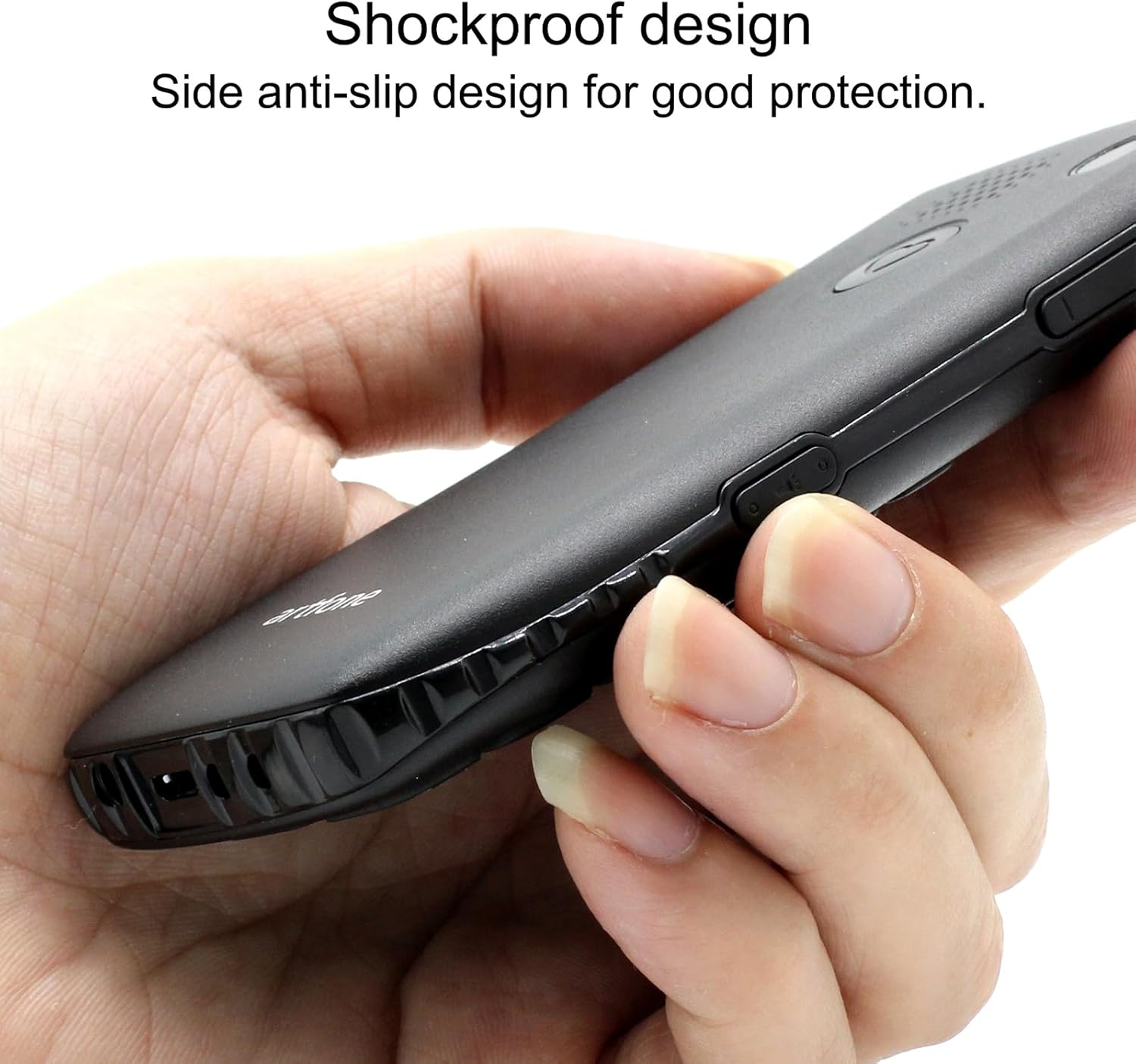
Image 6.1: The phone's shockproof design with side anti-slip features.
7. Dépannage
Si vous rencontrez des problèmes avec votre téléphone, consultez les problèmes et solutions courants suivants :
| Problème | Cause possible | Solution |
|---|---|---|
| Le téléphone ne s'allume pas | Batterie faible ; batterie mal installée | Charge the phone for at least 30 minutes; Reinstall the battery, ensuring contacts align. |
| Impossible de passer/recevoir des appels | Carte SIM inexistante ; carte SIM désactivée ; hors réseau | Ensure SIM card is inserted and active; Move to an area with better network signal. |
| Poor call quality/low volume | Signal faible ; obstruction du haut-parleur/microphone | Move to an area with better signal; Ensure speaker/microphone are not covered. Adjust call volume using side buttons. |
| La batterie se décharge rapidement | Frequent use; Background features active | Reduce usage; Turn off unnecessary features like flashlight when not in use. |
| Le bouton SOS ne fonctionne pas. | No emergency contacts set; Feature disabled | Verify emergency contacts are correctly configured in SOS settings; Ensure SOS feature is enabled. |
Si le problème persiste après avoir essayé ces solutions, veuillez contacter le support client.
8. Spécifications
| Fonctionnalité | Spécification |
|---|---|
| Modèle | C1+ 4G |
| Système opérateur | Artfone OS |
| Processeur | Muflier |
| BÉLIER | 48 Mo |
| Mémoire flash | 128 Mo |
| Capacité de stockage numérique | 32 GB (for media/contacts) |
| Taille de l'écran | Écran LCD de 1.8 pouces |
| Résolution | 240 x 320 |
| Taux de rafraîchissement | 60 Hz |
| Résolution de la caméra | 2 MP |
| Résolution de capture vidéo | 1280 x 720 |
| Type de batterie | Lithium-ion |
| Capacité de la batterie | 1400 mAh |
| Average Battery Life (Talk) | 5.5 heures |
| Technologie cellulaire | 4G, 3G, 2G |
| Type de connecteur | USB-C |
| Entrée de l'interface humaine | Boutons |
| Facteur de forme | Bar |
| Dimensions | 13.1 x 11.8 x 6.1 cm |
| Poids | 240 g |
9. Vidéos officielles du produit
Vidéo 9.1 : Un aperçu détailléview of the artfone C1+ 4G phone's features and design. This video demonstrates the phone's physical attributes and user interface.
Video 9.2: A demonstration of the phone's ease of use and key functionalities, highlighting its suitability for seniors.
10. Garantie et assistance
Your artfone C1+ 4G mobile phone comes with a standard manufacturer's warranty. Please refer to the warranty card included in your package for specific terms and conditions, including the warranty period and coverage details.
For technical support, troubleshooting assistance beyond this manual, or warranty claims, please contact artfone customer service through their official website ou les coordonnées fournies dans l'emballage de votre produit.


