1. Introduction
Thank you for choosing the Takstar MS-189 Table Conference Microphone. This manual provides detailed instructions for the proper setup, operation, and maintenance of your microphone. The MS-189 is a unidirectional condenser microphone designed for clear vocal pickup in conference settings, computer use, and other desktop applications. Please read this manual thoroughly before use to ensure optimal performance and longevity of the product.
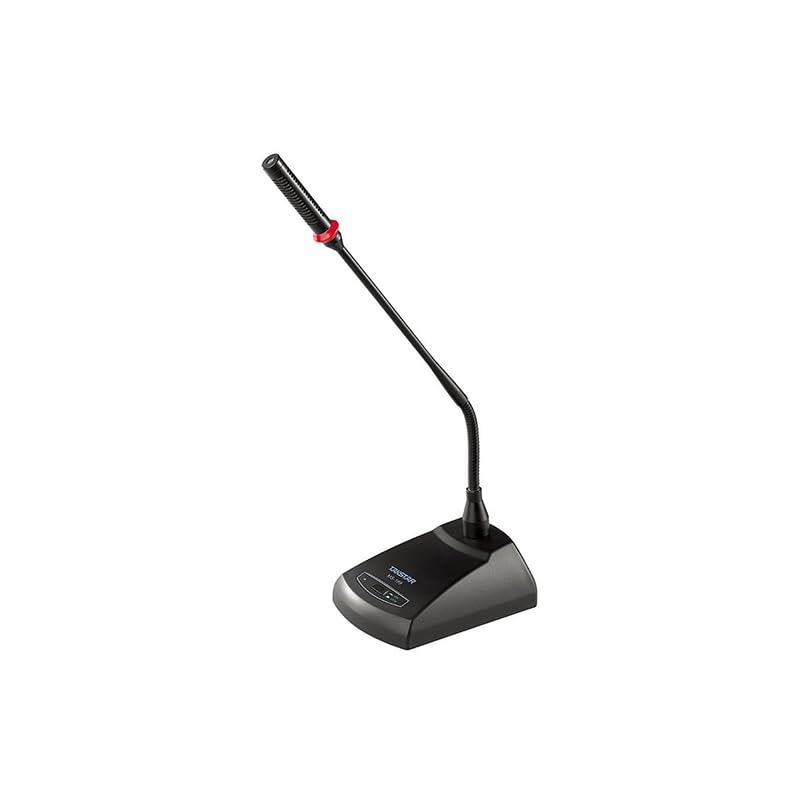
Image 1.1: The Takstar MS-189 Table Conference Microphone. This image displays the microphone with its gooseneck design and base unit, ready for desktop placement.
2. caractéristiques du produit
- Back Electret Condenser Transducer: Ensures high-quality audio capture.
- High Sensitivity and Low Noise: Delivers clear and crisp sound reproduction.
- Clear and Bright Vocal Pick-up: Optimized for speech and vocal applications.
- On/Off Button with LED Indicator: Located on both the base and gooseneck for easy control and status indication.
- Options d'alimentation flexibles : Can be powered by 9-52V phantom power or two 1.5V AA batteries.
- Diagramme polaire unidirectionnel : Se concentre sur le son provenant de l'avant, réduisant ainsi le bruit de fond.
- Durable Gooseneck Design: Allows for flexible positioning and adjustment.
3. Contenu du colis
Veuillez vérifier le contenu du colis lors du déballage pour vous assurer que tous les éléments sont présents :
- Takstar MS-189 Table Conference Microphone (Gooseneck and Base Unit)
- Manuel de l'utilisateur (ce document)
Note: XLR cable and AA batteries are typically sold separately and may not be included.
4. Instructions de configuration
4.1 Alimentation du microphone
The MS-189 microphone offers two power options:
- Phantom Power (9-52V): If your audio mixer, interface, or computer sound card provides phantom power, connect the microphone using an XLR cable. The microphone will draw power directly from the connected device. Ensure phantom power is enabled on your device.
- AA Batteries (2 x 1.5V): If phantom power is not available, insert two 1.5V AA batteries into the battery compartment located on the underside of the microphone base. Ensure correct polarity (+/-) when inserting batteries.
Note: Do not use both phantom power and batteries simultaneously. The microphone will prioritize phantom power if both are connected.
4.2 Connexion à un appareil
The MS-189 connects via an XLR connector.
- Locate the XLR output port on the microphone base.
- Connect one end of a standard XLR cable (not included) to the microphone's XLR output.
- Connect the other end of the XLR cable to an available XLR input on your audio mixer, audio interface, or computer sound card. Ensure the input is compatible with a condenser microphone.
4.3 Placement du microphone
Place the microphone on a stable, flat surface. Position the gooseneck so the microphone head is approximately 15-30 cm (6-12 inches) from the speaker's mouth, pointing directly towards them for optimal sound capture.
5. Mode d'emploi
5.1 Mise sous/hors tension
Press the ON/OFF button located on the microphone base. The LED indicator will illuminate when the microphone is active. Press the button again to turn off the microphone.
5.2 Adjusting the Gooseneck
Gently bend the flexible gooseneck to adjust the microphone's position and angle. Avoid excessive force to prevent damage.
5.3 Utilisation optimale
- For best results, speak directly into the microphone from a consistent distance.
- Minimize background noise in the environment to enhance clarity.
- Monitor audio levels on your connected device to prevent clipping or distortion.
6. Entretien
- Nettoyage: Utilisez un chiffon doux et sec pour nettoyer l'extérieur du microphone. N'utilisez pas de nettoyants liquides ni de solvants.
- Stockage: When not in use, store the microphone in a dry, dust-free environment. Avoid extreme temperatures and humidity.
- Remplacement de la batterie : If using battery power, replace AA batteries when the LED indicator dims or audio quality degrades. Remove batteries if the microphone will not be used for an extended period to prevent leakage.
7. Dépannage
| Problème | Cause possible | Solution |
|---|---|---|
| Pas de sortie audio |
|
|
| Poor sound quality (low volume, distortion) |
|
|
| Le voyant LED ne s'allume pas |
|
|
8. Spécifications
| Modèle | MS-189 |
| Principe du transducteur | Condenseur à électret arrière |
| Directivity Characteristic (Polar Pattern) | Unidirectionnel |
| Réponse en fréquence | 100 Hz-16 kHz |
| Sensibilité | -33dB±3dB (0dB=1V/Pa à 1kHz) |
| Impédance de sortie | 340Ω±30% (à 1kHz) |
| Exigences en matière d'alimentation | 9-52V phantom power or 2 x 1.5V AA battery |
| Technologie de connectivité | XLR |
| Type de connecteur | XLR |
| Appareils compatibles | Ordinateur portable, ordinateur personnel |
| Facteur de forme du microphone | Gooseneck, Table Array |
| Dimensions de l'article (L x l x H) | 15 x 15 x 15 cm |
| Poids net | 500g |
| Couleur | Noir |
9. Garantie et assistance
For warranty information and technical support, please refer to the warranty card included with your product or visit the official Takstar webVous pouvez également contacter votre distributeur ou détaillant local pour obtenir de l'aide.
Visit the Takstar Store on Amazon pour plus d'informations sur les produits et les ressources d'assistance.


