1. Produit terminéview
The charmast 20000mAh Portable Charger (Model C2065) is a high-capacity power bank designed to charge multiple devices on the go. It features built-in USB-C, Lightning, and Micro-USB cables, along with additional USB-A and USB-C ports, providing versatile charging options for a wide range of electronic devices. A digital display indicates the remaining battery percentage.

Image 1.1: The charmast 20000mAh Portable Charger (Model C2065) in Navy.
2. Contenu de la boîte
À l'ouverture du colis, vérifiez que tous les articles sont présents :
- 1 x charmast 20000mAh Portable Charger (Model C2065)
- 1 x Manuel d'utilisation
- 1 x Pochette de voyage
3. Spécifications
| Fonctionnalité | Détail |
|---|---|
| Numéro de modèle | C2065 |
| Capacité de la batterie | 20000 millièmeamp Heures (mAh) |
| Dimensions du produit | 6.3 x 2.85 x 0.75 pouces |
| Poids de l'article | 12 onces |
| Ports de sortie | Built-in USB-C, Lightning, Micro-USB cables; 2x USB-A ports; 1x USB-C port (Input/Output) |
| Chargement rapide | Charge rapide PD 22.5 W |
| Caractéristiques spéciales | Built-in cables, Digital Display, Fast Charging, High Capacity, Slim design |
4. Installation
4.1 Charge initiale de la batterie externe
Before first use, fully charge the power bank. The digital display will show the charging progress from 0% to 100%.
- Utilisation du câble USB-C intégré : Connect the built-in USB-C cable to a compatible USB wall adapter (not included). Charging time is approximately 6 hours.
- Utilisation du câble USB-A intégré : Connect the built-in USB-A cable to a compatible USB wall adapter (not included). Charging time is approximately 12 hours.
- Using an External Cable (USB-C Input): Connect a USB-C cable (not included) to the power bank's USB-C input port and a compatible 18W PD/QC wall adapter. Charging time is approximately 6 hours.
- Using an External Cable (Micro-USB Input): Connect a Micro-USB cable (not included) to the power bank's Micro-USB input port and a compatible 18W PD/QC wall adapter. Charging time is approximately 6 hours.

Image 4.1: Methods for recharging the power bank.
5. Mode d'emploi
5.1 Appareils de charge
La batterie externe offre plusieurs façons de recharger vos appareils :
- Utilisation des câbles intégrés : The power bank includes built-in Lightning, USB-C, and Micro-USB cables. Simply pull out the appropriate cable and connect it directly to your device.
- Utilisation des ports USB-A : Connect your device's USB-A charging cable to one of the two USB-A output ports on the power bank.
- Utilisation du port USB-C : Connect your device's USB-C charging cable to the USB-C output port on the power bank. This port also supports input for recharging the power bank.

Image 5.1: Built-in cables for various devices.
5.2 Charge simultanée
The power bank can charge up to six devices simultaneously using a combination of its built-in cables and external USB ports.

Image 5.2: Charging multiple devices.
5.3 Chargement rapide
The power bank supports 22.5W PD fast charging. When connected to a compatible device, it can charge up to 50% in approximately 30 minutes. Ensure your device and cable support fast charging for optimal performance.
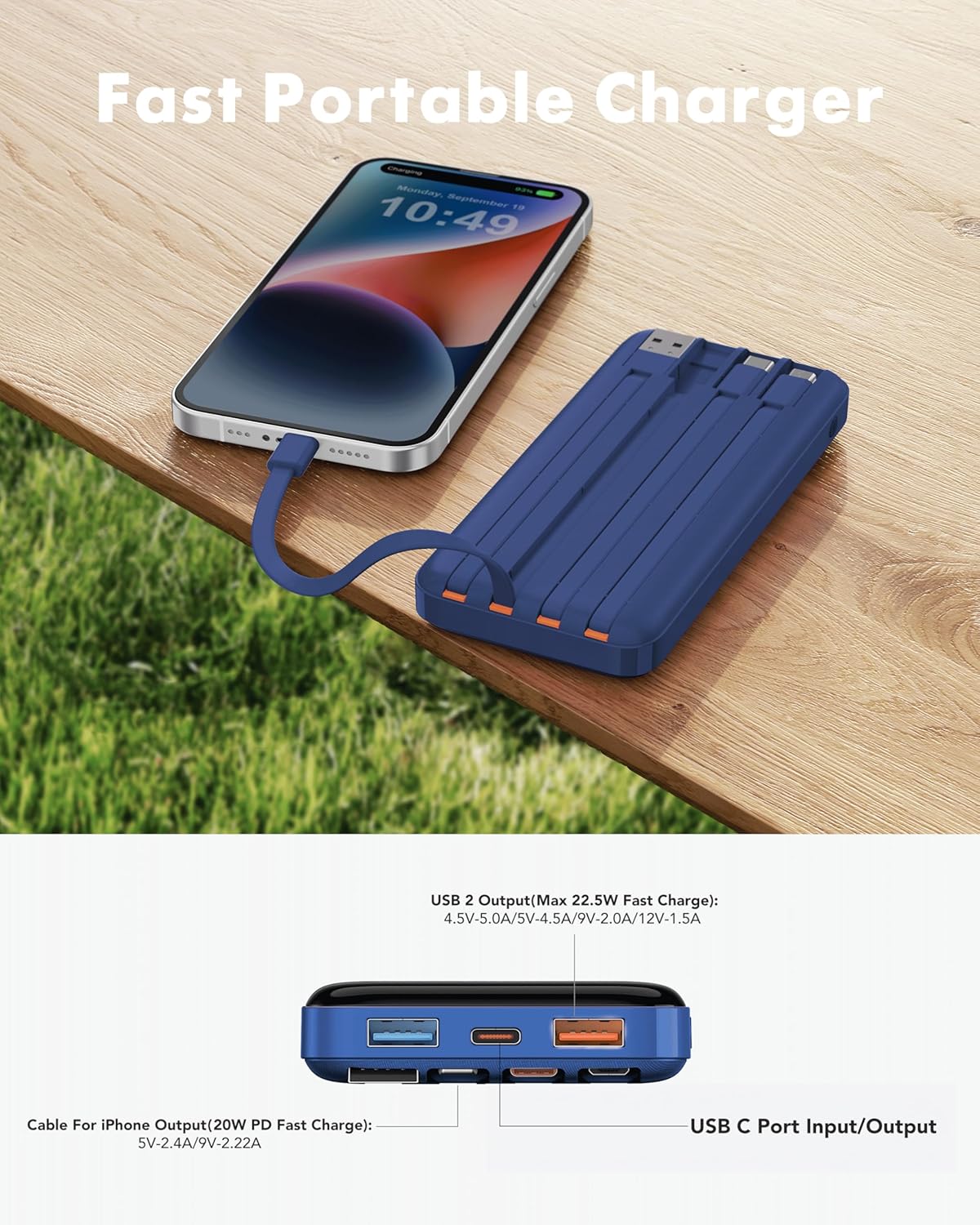
Image 5.3: Fast charging in action.
5.4 Affichage numérique
The integrated digital display shows the precise remaining battery percentage (0-100%) of the power bank. This allows for accurate monitoring of the power bank's charge level.

Image 5.4: Digital display showing battery percentage.
5.5 Mode faible courant
For charging low-power devices such as Bluetooth earphones, smartwatches, or fitness trackers, activate the low-current mode. Press and hold the power button for 5 seconds to engage this mode, ensuring safe and efficient charging for smaller electronics.
6. Consignes de sécurité
- N’exposez pas la batterie externe à des températures extrêmes (chaudes ou froides), à la lumière directe du soleil ou au feu.
- Évitez de faire tomber, de démonter ou de modifier l'appareil.
- Tenir à l'écart de l'eau et d'une forte humidité.
- Conserver dans un endroit frais et sec lorsqu'il n'est pas utilisé.
- Tenir hors de portée des enfants.
- Flight Travel: This power bank meets airline safety standards for carry-on luggage. Always pack it in your carry-on bag; never place it in checked luggage.

Image 6.1: The power bank is flight-friendly.
7. Entretien
- Nettoyez la batterie externe avec un chiffon doux et sec. N'utilisez pas de produits chimiques agressifs ni de matériaux abrasifs.
- Si la batterie externe n'est pas utilisée pendant une période prolongée, chargez-la à environ 50-75 % tous les trois mois pour préserver sa durée de vie.
- Avoid storing the power bank in extreme temperatures or direct sunlight.
8. Dépannage
8.1 La batterie externe ne charge pas
- Ensure the charging cable is securely connected to both the power bank's input port/built-in cable and the wall adapter.
- Vérifiez que l'adaptateur mural fonctionne correctement et qu'il est branché sur une prise de courant fonctionnelle.
- Essayez un autre câble de chargement ou un autre adaptateur secteur.
8.2 L'appareil ne se charge pas à partir de la batterie externe
- Vérifiez si la batterie externe est suffisamment chargée (reportez-vous à l'affichage numérique).
- Ensure the cable connecting the device to the power bank is securely plugged in at both ends.
- Try a different output port or built-in cable on the power bank.
- Vérifiez que le port de chargement de votre appareil est propre et exempt de débris.
- If charging a low-power device, ensure Low-Current Mode is activated (press and hold power button for 5 seconds).
8.3 Charge lente
- Assurez-vous que la batterie externe et votre appareil prennent en charge les protocoles de charge rapide.
- Utilisez un câble compatible avec la charge rapide et de haute qualité.
- Avoid charging multiple devices simultaneously if you require maximum speed for a single device.
9. Garantie et assistance
The charmast 20000mAh Portable Charger comes with 24 months of support and lifetime technical support. For assistance, please refer to the contact information provided in your product packaging or visit the official charmast website.