1. Introduction
Thank you for choosing the Cherry KW 7100 Mini Multi-Device Compact Keyboard. This manual provides essential information for setting up, operating, and maintaining your new keyboard. Designed for versatility and portability, this keyboard offers seamless connectivity across multiple devices.
2. Contenu de la boîte
- Cherry KW 7100 Mini Multi-Device Compact Keyboard
- USB-C to USB-A Charging/Connection Cable
- 2 piles AAA
- 2.4 GHz Wireless Nano Receiver (stored magnetically in the keyboard)
- Mallette de transport
- Manuel d'instructions

Figure 1 : Vue de dessus view of the Cherry KW 7100 Mini Keyboard.
3. Installation
3.1. Installation de la batterie
- Repérez le compartiment des piles sous le clavier.
- Faites glisser le couvercle du compartiment à piles pour l'ouvrir.
- Insérez les deux piles AAA en veillant à respecter la polarité (+/-).
- Fermez soigneusement le couvercle du compartiment à piles.
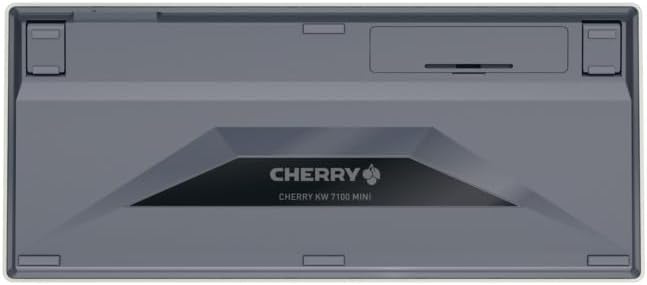
Figure 2: Underside of the keyboard with the battery compartment.
3.2. Connexion du clavier
The Cherry KW 7100 Mini supports three connection methods: Bluetooth, 2.4 GHz Wireless, and Wired USB-C.
3.2.1. Connexion Bluetooth (jusqu'à 3 appareils)
- Allumez le clavier à l'aide de l'interrupteur d'alimentation situé sur le côté.
- Press and hold one of the Bluetooth channel keys (F1, F2, or F3) for 3-5 seconds until the corresponding LED indicator blinks rapidly. This indicates pairing mode.
- On your device (laptop, smartphone, tablet), navigate to Bluetooth settings and search for available devices.
- Select "Cherry KW 7100" from the list to pair. The LED will stop blinking and remain solid for a few seconds upon successful connection.
- Repeat for up to two additional devices using the other Bluetooth channel keys (F1, F2, or F3).
3.2.2. Connexion sans fil 2.4 GHz
- Locate the 2.4 GHz wireless nano receiver, typically stored magnetically in a slot on the underside of the keyboard.
- Insert the nano receiver into an available USB-A port on your computer.
- Allumez le clavier à l'aide de l'interrupteur d'alimentation. Le clavier devrait se connecter automatiquement au récepteur.
3.2.3. Connexion USB-C filaire
- Connectez une extrémité du câble USB-C fourni au port USB-C du clavier.
- Connect the other end of the USB-C cable to an available USB-A port on your computer.
- The keyboard will function as a wired keyboard.
Video 1: Demonstrating the setup and typing experience of the Cherry KW 7100 Mini Keyboard.
4. Utilisation du clavier
4.1. Basculement entre les appareils connectés
To switch between paired Bluetooth devices, simply press the corresponding Bluetooth channel key (F1, F2, or F3) that your device is paired to. The keyboard will automatically connect to the selected device.
4.2. Function Keys (FN)
The keyboard features a dedicated FN key, typically located near the right Shift key. This key, in combination with other keys, activates secondary functions such as media controls, screen brightness, and other system commands. Refer to the keycap legends for specific FN key combinations.
4.3. Indicateurs LED
LED indicators on the keyboard provide information about its status:
- Bluetooth Channel LEDs (F1, F2, F3): Indicate the currently active Bluetooth connection or pairing mode.
- Voyant de verrouillage des majuscules : S'illumine lorsque la touche Verr. Maj. est activée.
- Voyant d'état de la batterie : Indique un niveau de batterie faible.
4.4. Pieds réglables
The keyboard is equipped with stable, fold-out feet on the underside. These allow you to adjust the typing angle for improved ergonomics and comfort.
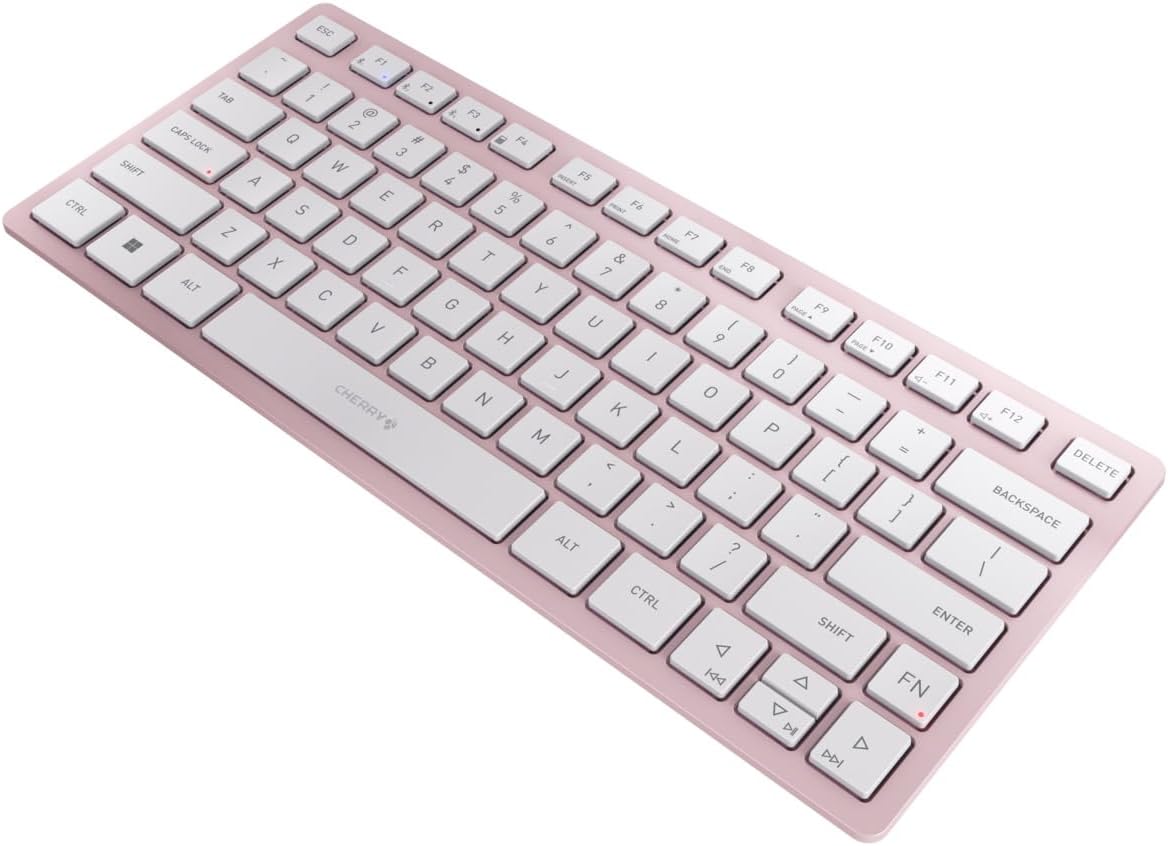
Figure 3 : Angulaire view of the keyboard, highlighting its slim profile.

Figure 4 : Côté view showing the adjustable feet extended for an ergonomic typing angle.
5. Entretien
5.1. Nettoyage
To clean your keyboard, gently wipe the keycaps and surface with a soft, lint-free cloth. For stubborn dirt, slightly dampen the cloth with water or a mild, non-abrasive cleaning solution. Avoid excessive moisture and do not spray cleaners directly onto the keyboard.
5.2. Stockage
When not in use, especially during travel, store the keyboard in its included carrying case to protect it from dust, scratches, and minor impacts.

Figure 5: The keyboard stored in its protective carrying case.
6. Dépannage
6.1. Clavier non connecté
- Assurez-vous que le clavier est sous tension.
- Vérifiez les piles et remplacez-les si nécessaire.
- For Bluetooth, ensure the correct channel (F1, F2, or F3) is selected and the keyboard is in pairing mode (blinking LED).
- For 2.4 GHz wireless, ensure the nano receiver is securely plugged into a USB-A port.
- Essayez de vous connecter via le câble USB-C pour exclure tout problème de connexion sans fil.
- Redémarrez votre appareil et réessayez le couplage.
6.2. Les touches ne répondent pas
- Check the connection as described above.
- Assurez-vous qu'aucun débris ne soit coincé sous les clés.
- Si vous utilisez une connexion filaire, essayez un autre port USB ou un autre câble.
6.3. Autonomie de la batterie réduite
- Assurez-vous d'utiliser des piles AAA neuves et de haute qualité.
- Turn off the keyboard when not in use to conserve battery power.
7. Spécifications
| Fonctionnalité | Spécification |
|---|---|
| Nom du modèle | KW 7100 |
| Numéro de modèle de l'article | JK-7100US-19 |
| Marque | Cerise |
| Technologie de connectivité | Bluetooth 5.1 (3 channels), 2.4 GHz Wireless, USB-C Wired |
| Appareils compatibles | Ordinateur portable, smartphone, tablette |
| Description du clavier | Compact, Multi-Device |
| Mécanisme clé | CHERRY SX Scissor Mechanism |
| Source d'énergie | 2 piles AAA |
| Cryptage | AES-128 |
| Dimensions du produit | 11.6 x 5.1 x 0.6 pouces |
| Poids de l'article | 1.4 livres |
| Matériel | Métal, plastique |
| Couleur | Fleur de cerisier |
8. Garantie et assistance
This product is covered by Cherry's standard manufacturer warranty. For detailed warranty information, technical support, or service inquiries, please visit the official Cherry webconsultez le site ou contactez directement leur service client.
Fabricant: Cerise
Website: www.cherry.de