1. Introduction
The Dayton Audio Matrix88 is an advanced 8-source, 8-zone matrix audio switcher designed to provide flexible audio distribution and control throughout your home or commercial space. This device allows you to assign any audio input to any output zone, adjust volume, bass, and treble, and manage power, all through an intuitive mobile application. It integrates seamlessly with existing audio amplification systems and offers various connectivity options including analog, digital, 12V triggers, and RS232 for comprehensive control.
2. Consignes de sécurité importantes
Please read and follow all safety instructions before operating the Dayton Audio Matrix88. Retain this manual for future reference.
- Source d'alimentation : Connect the unit only to the specified power supply as indicated in this manual and on the product label.
- Ventilation: Assurez une ventilation adéquate. Ne bloquez aucune ouverture de ventilation. Installez l'appareil conformément aux instructions du fabricant.
- Eau et humidité : Do not expose this apparatus to rain or moisture. Do not use near water or in wet locations.
- Chaleur: Ne pas installer à proximité de sources de chaleur telles que radiateurs, bouches de chauffage, poêles ou autres appareils (y compris amp(échangeurs thermiques) qui produisent de la chaleur.
- Nettoyage: Nettoyer uniquement avec un chiffon sec.
- Entretien: N'essayez pas de réparer vous-même ce produit. Confiez tous les travaux d'entretien à du personnel de service qualifié.
- câbles: Protégez les cordons d'alimentation contre tout piétinement ou pincement, en particulier au niveau des prises, des prises de courant et à l'endroit où ils sortent de l'appareil.
3. Produit terminéview
3.1 Panneau avant
The front panel of the Matrix88 provides essential indicators and controls for quick status checks and basic power management.

Figure 1 : Devant View of Dayton Audio Matrix88
- Zone Signal LED Indicators: These LEDs illuminate to indicate active audio signals in each of the 8 zones.
- Indicateur LED d'alimentation : Affiche l'état d'alimentation de l'appareil.
- Interrupteur Marche/Arrêt : Controls the main power to the Matrix88.
3.2 Panneau arrière
The rear panel houses all input and output connections, along with control ports for integration into various audio systems.
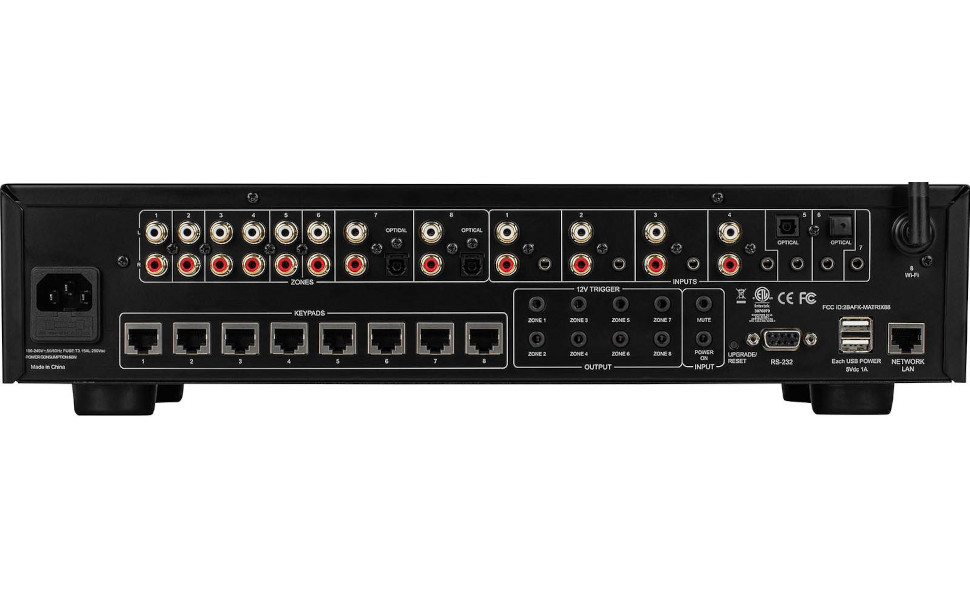
Figure 2 : Arrière View of Dayton Audio Matrix88
- Entrée CA : Raccordement électrique pour l'appareil.
- Zone Préamp Sorties 1-8 : Sorties RCA pour la connexion à des périphériques externes amplifiers for each zone.
- Entrées RCA stéréo : Analog audio inputs for various sources.
- Stereo 3.5mm Inputs: Auxiliary analog audio inputs.
- Optical Toslink Inputs: Digital audio inputs.
- Antenne Wi-Fi : Pour la connectivité réseau sans fil.
- Keypad Connections: Ports for optional in-wall keypads.
- 12VDC Trigger Inputs: For external control via 12V trigger signals.
- Sorties de déclenchement 12 V CC : To trigger other devices based on Matrix88 status.
- Port série RS232: For integration with third-party control systems.
- USB Power Outputs: For powering small external devices.
- Network LAN Port: Pour connexion réseau filaire.
4. Guide de configuration
4.1 Déballage et placement
Carefully remove the Matrix88 from its packaging. Place the unit on a stable, flat surface or mount it in an equipment rack. Ensure there is sufficient space around the unit for proper ventilation.
4.2 Connexion des sources audio
The Matrix88 supports a variety of audio input types:
- Analog RCA: Connect your audio sources (e.g., CD player, streamer, TV audio out) to the Stereo RCA Inputs on the rear panel using appropriate RCA cables.
- Analog 3.5mm: Use the Stereo 3.5mm Inputs for devices with a 3.5mm audio output.
- Digital Optical (Toslink): Connect digital audio sources (e.g., TV, game console) to the Optical Toslink Inputs.
4.3 Connexion Amplificateurs et haut-parleurs
The Matrix88 provides pre-amplified outputs for each zone. These outputs must be connected to external power amplifiers, which then drive your speakers.
- Connectez le Zone Préamp Sorties 1-8 (RCA) to the corresponding input of your external power amplifiers for each zone.
- Assurez votre amplifiers are correctly connected to your speakers in each zone.
Connexion réseau 4.4
Network connectivity is essential for app control.
- Connexion filaire : Connectez un câble Ethernet de votre routeur ou commutateur réseau au Port réseau local sur le panneau arrière.
- Connexion sans fil : Attach the provided Wi-Fi antenna to the Antenne Wi-Fi connector on the rear panel. The unit will automatically attempt to connect to an available Wi-Fi network. Configuration may be required via the Matrio app.
4.5 12V Trigger Connections (Optional)
The 12V trigger ports allow for automated control of other devices or to be controlled by external systems.
- 12VDC Trigger Inputs: Connect a 12V trigger source to these inputs to control specific functions of the Matrix88.
- Sorties de déclenchement 12 V CC : Connect these outputs to devices that can be triggered by a 12V signal (e.g., power amplifiers) to turn them on/off in sync with the Matrix88 zones.
4.6 RS232 Control (Optional)
For advanced integration with home automation systems, use the RS232 serial port.
- Connect an RS232 cable from your control system to the Port série RS232. Refer to the detailed RS232 protocol documentation for specific commands.
4.7 Mise sous tension
Once all connections are made, connect the AC power cord to the Entrée CA and then to a wall outlet. Flip the Interrupteur marche/arrêt on the front panel to the 'On' position. The Power LED Indicator will illuminate.
5. Mode d'emploi
5.1 Matrio App Installation and Pairing
The primary control interface for the Matrix88 is the Matrio mobile application.
- Download the Matrio app from your device's app store (iOS or Android).
- Ensure your mobile device is connected to the same network as the Matrix88.
- Open the Matrio app. It will automatically search for and discover the Matrix88 on your network.
- Follow the on-screen prompts to pair your device with the Matrix88. You may need to name your zones and inputs during the initial setup.

Figure 3 : Matrio App Interface for Zone and Source Control
Contrôle de zone 5.2
The Matrio app provides comprehensive control over each audio zone.
- Assigning Inputs: Select any available audio input source to play in any desired zone.
- Réglage du volume : Independently control the volume level for each zone.
- Contrôle de tonalité: Adjust bass and treble settings for individual zones to optimize sound quality.
- Marche/Arrêt : Turn zones on or off as needed.
- Muet: Temporarily mute audio in a specific zone.
5.3 Contrôle de groupe
The app allows for grouping multiple zones to play the same source at synchronized volumes.
- Select the 'Group Control' option within the app.
- Choose the zones you wish to group together.
- Select a common input source and adjust the master volume for the group.
Vidéo 1: Demonstrating App Control for Dayton Audio Matrix88
6. Entretien
6.1 Nettoyage
To maintain the appearance and functionality of your Matrix88, periodically wipe the exterior with a soft, dry cloth. Do not use harsh chemicals or abrasive cleaners.
6.2 mises à jour du micrologiciel
Dayton Audio may release firmware updates to improve performance or add new features. Check the Matrio app or the Dayton Audio website contenant des informations sur les mises à jour disponibles et des instructions sur la manière de les appliquer.
7. Dépannage
If you encounter issues with your Matrix88, refer to the following common problems and solutions:
| Problème | Cause possible | Solution |
|---|---|---|
| Pas d'alimentation électrique à l'unité. | Power cord disconnected; Power switch off; Faulty outlet. | Vérifiez le branchement du cordon d'alimentation ; assurez-vous que l'interrupteur d'alimentation est sur ON ; testez la prise avec un autre appareil. |
| No sound in a zone. | Incorrect input selected; Zone volume too low; Amplifier off/disconnected; Speaker wiring issue. | Verify input selection in app; Increase zone volume; Check amplifier power and connections; Inspect speaker wiring. |
| App cannot find the Matrix88. | Network connection issue; Device not powered on; App/firmware outdated. | Ensure Matrix88 is powered on and connected to the network (wired or Wi-Fi); Restart app and Matrix88; Check for app/firmware updates. |
| Audio déformé. | Input signal too high; Volume too high; Faulty cables. | Reduce input source volume; Lower zone volume; Replace audio cables. |
If the problem persists after trying these solutions, please contact Dayton Audio customer support.
8. Spécifications
- Dimensions du produit : 21.5 x 13.75 x 8.75 pouces
- Poids de l'article : 14 livres
- Numéro de modèle : Matrice88
- Marque: Dayton Audio
- Couleur: Noir
- Types de connecteurs : 3.5mm Jack, RCA, Optical Toslink, RS232, LAN
- Appareils compatibles : DVD Player, Projector, Monitor, Television, Gaming Console, Blu-ray Player, Satellite Receiver, DVR, various audio sources and amplificateurs.
- Types de câbles : RCA, 3.5mm Jack, Optical, Ethernet, RS232
- Première disponibilité : 5 septembre 2023
9. Garantie et assistance
For warranty information, technical support, or service inquiries, please refer to the official Dayton Audio webConsultez leur site web ou contactez leur service client. Conservez votre reçu d'achat comme preuve d'achat pour toute réclamation au titre de la garantie.
Dayton Audio Website: www.daytonaudio.com


