1. Introduction et présentation du systèmeview
This manual provides essential information for the installation, operation, and maintenance of your ExpertPower 10KWH 3240W 48V-120V Solar Power System Kit. This comprehensive off-grid solar solution is designed to provide energy independence for residential homes, cabins, or as a backup power source.
The system integrates solar panels for power generation, LiFePO4 batteries for energy storage, and a hybrid solar inverter to convert stored energy into usable AC power. It ensures a reliable and seamless transition between solar, grid, or generator power sources as needed.

Vidéo 1.1 : Un survol animéview demonstrating the functionality and components of the ExpertPower 10KWH 3240W 48V Solar Power System Kit, including charging and load priorities.
2. Composants du produit
The ExpertPower 10KWH 3240W Solar Power System Kit includes the following main components:
- Two (2) 48V 100Ah LiFePO4 batteries
- Six (6) 540W Monocrystalline Solar Panels
- One (1) 6500W Hybrid Solar Inverter with 120A MPPT Solar Charge Controller
Note: Wiring cables, fuses, breakers, connectors, and panel mounting brackets are not included and must be sourced separately.
3. Configuration et installation
Installation of ExpertPower’s solar kit requires a comprehensive understanding of electrical principles and strict adherence to applicable National Electrical Code (NEC) standards and regulations, along with appropriate installation techniques. It is highly recommended to employ a certified professional for proper and secure installation.
3.1 Précautions de sécurité
- Débranchez toujours toutes les sources d'alimentation avant d'effectuer toute installation ou opération de maintenance.
- Assurez-vous d'une mise à la terre correcte pour tous les composants.
- Portez un équipement de protection individuelle (EPI) approprié lors de l'installation.
- Consult local building codes and electrical regulations before beginning installation.
3.2 Placement des composants
Place the inverter and batteries in a well-ventilated, dry area, away from direct sunlight and flammable materials. Solar panels should be mounted in a location that receives maximum sun exposure throughout the day, free from shading.
4. Mode d'emploi
4.1 Inverter Charging Priority Settings
The inverter allows you to control how the battery bank is charged from different power sources. Select the mode that best suits your energy needs:
- Le solaire d'abord : The inverter prioritizes solar power for charging. AC input will only charge the battery bank when solar power is no longer available.
- Solar and AC Input: Solar energy and utility power will charge your battery bank simultaneously.
- Solaire uniquement : Solar energy will be the only charging source, regardless of AC input availability.

4.2 Inverter Load Priority Settings
Control how your appliances are powered to ensure continuous operation. Choose from the following load priority modes:
- Le solaire d'abord : The inverter prioritizes inverting solar power to supply loads. If solar power is insufficient, AC input will compensate.
- AC Priority: The inverter will redirect AC input to power all appliances and only use solar and batteries when AC input is unavailable.
- DC Priority: Prioritize solar power first. If solar is not enough, the battery bank will supply power simultaneously. AC input will power on only when the voltage drops to a programmable value.

4.3 Inverter Wi-Fi Monitoring
The hybrid inverter features built-in Wi-Fi transmitters, allowing you to monitor its performance from anywhere via the dedicated WatchPower Wi-Fi app on your iOS or Android smartphone. Registration is required to use this feature.
- Monitor system performance and energy usage.
- Modifiez les paramètres à distance.
- Receive alerts and view données historiques.

5. Battery System Details
The system includes cutting-edge 16-cell LiFePO4 batteries, offering exceptional reliability and longevity.
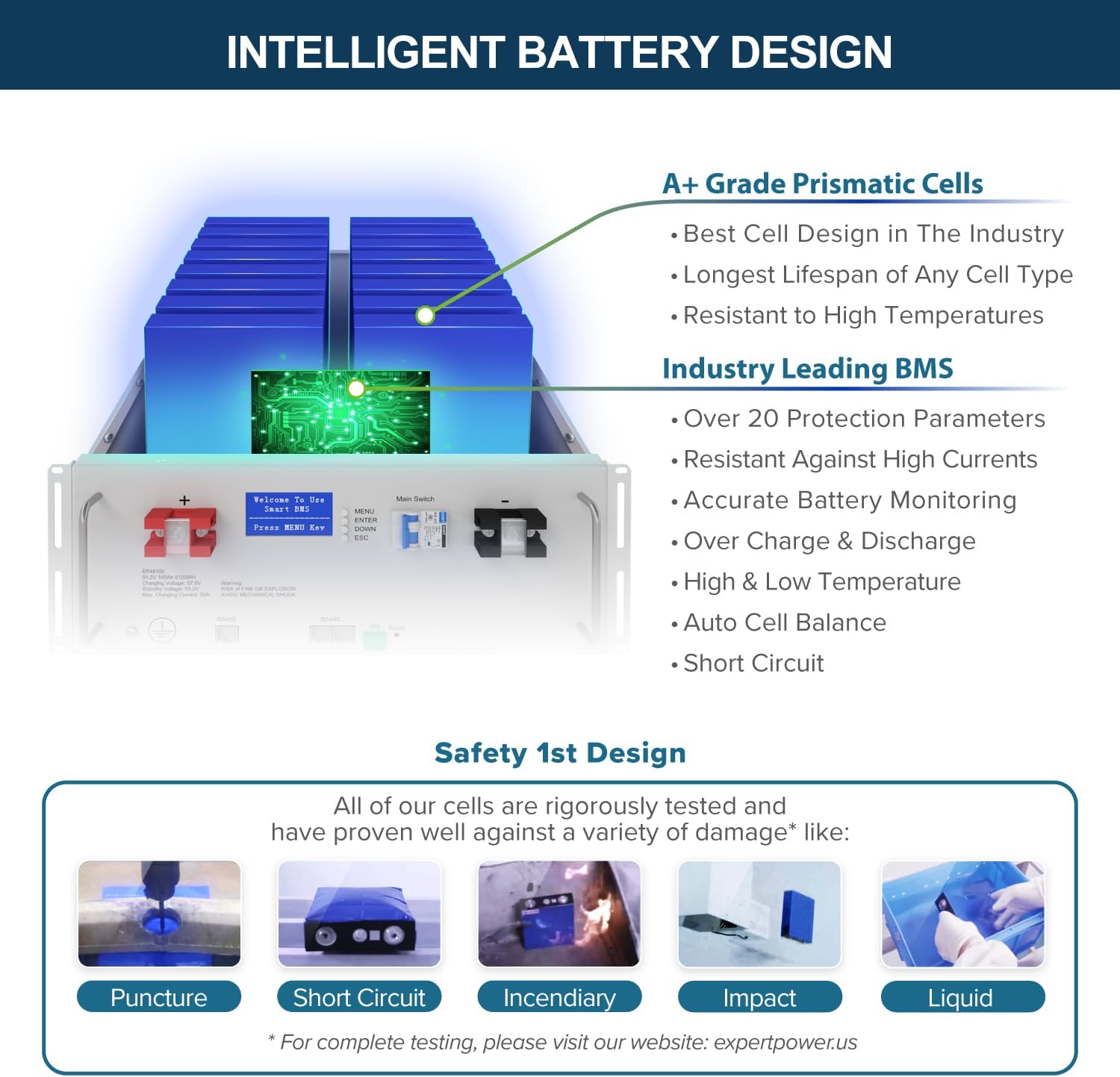
5.1 Intelligent Battery Design
- A+ Grade Prismatic Cells: Best cell design in the industry, longest lifespan, resistant to high temperatures.
- Industry Leading BMS: Advanced Battery Management System provides over 20 protection parameters against over-temperature, over-voltage, sous-voltage, over-current, and short-circuit. It also ensures accurate battery monitoring, over-charge/discharge protection, high/low temperature protection, and auto cell balance.
- Safety 1st Design: Rigorously tested against puncture, short circuit, incendiary, impact, and liquid damage.

Video 5.1: Detailed look at the ExpertPower 48V 100Ah LiFePO4 Lithium Battery, highlighting its internal components, BMS, and rack-mounted design.
5.2 Battery Parallel Connection
Our batteries allow for the connection of up to 10 units in parallel, providing ample storage capacity for your energy needs. This configuration can achieve a total of 51.2 kilowatt-hours of energy storage.

5.3 Battery Monitoring Display
Monitor your battery's parameters and history, including cell health, temperature, and current flow, using the convenient LCD display on the battery unit. The display provides real-time information on pack voltage, current, cell temperature, cell voltage, and BMS protection status.

6. Solar Panel Details
The system includes high-efficiency 540W bifacial solar panels, engineered to capture more sunlight and generate additional power compared to traditional single-face panels.
Advan 6.1tages of Bifacial Solar Panels
- Capture solar power from both sides, potentially providing up to 30% more energy.
- Increased energy yield from direct sunlight and reflected/diffused sunlight.
- Enhanced power production and adaptability for evolving energy needs.


7. Inverter System Details
The 6500W Hybrid Solar Inverter is a versatile and intelligent component of your solar power system.
7.1 Versatile Design and Parallel Connection
The inverter system offers unparalleled flexibility, with the capability to accommodate up to 6 inverters. Each inverter can handle up to 8,000W of solar power, and together they can achieve an output of 39KW. This allows for various configurations to match your power needs for either residential or commercial use.
- Monophasé: Up to 6 inverters for maximum 39KW power delivery in 120V residential systems.
- Split-Phase: Up to 6 inverters for 240V and 120V systems, recommended for large residential or small commercial applications. Configurations include one inverter per phase or two inverters per phase.
- 3-Phase: For commercial applications needing 240V or 208V systems. Various series-parallel connections are possible, including one or two inverters per phase, or combinations for larger 208V systems.


8. Spécifications
Detailed specifications for the 5KWh Battery, 6.5KW Inverter, and 540W Solar Panel are provided below:

| Composant | Spécification | Valeur |
|---|---|---|
| Batterie (LiFePO4) | Type de batterie | LiFePO4 / Lithium |
| Vol nominaltage | 51.2V | |
| Capacité nominale | 100 Ah | |
| Normal Energy | 5120 Wh | |
| Cycle Life (0.2C 50%DOD) | >7500 cycles | |
| Max. Cont'd Discharge Current | 100A | |
| Max. Cont'd Charge Current | 100A | |
| Inverter (Hybrid Solar) | Puissance nominale | 6500 W |
| Volume CA d'entréetage | 120VAC (90-140 VAC) | |
| Entrée DC Voltage | 48 V CC | |
| Volume de sortie CAtage | 120 VCA ± 5 % | |
| Output Surge Power | 13000 VA | |
| Efficacité | 90 % - 93 % | |
| Courant d'entrée PV max. | 18A x 2 | |
| Solar Panel (Monocrystalline) | Puissance maximale (Pmax) | 540 W |
| Vol à circuit ouverttage VOC) | 49.60V | |
| Vol de puissance maximaletage (Vmp) | 41.64V | |
| Courant de court-circuit (Icc) | 13.86A | |
| Courant de puissance maximal (Imp) | 12.97A | |
| Efficacité du module | 21.00% |
9. Dimensions et poids
Refer to the following for the dimensions and weights of the main system components:

10. Entretien
Regular maintenance is crucial for ensuring the longevity and optimal performance of your solar power system. While the LiFePO4 batteries are designed for minimal maintenance, periodic checks are recommended.
- Panneaux solaires: Periodically clean solar panels to remove dust, dirt, and debris that can reduce efficiency. Inspect for any physical damage or shading.
- Piles : Monitor battery health and parameters via the LCD display or the WatchPower app. Ensure proper ventilation around the battery units.
- Onduleur: Keep the inverter's ventilation openings clear of obstructions. Regularly check connections for tightness and signs of corrosion.
- Câblage et connexions : Annually inspect all wiring and connections for wear, damage, or loose contacts.
11. Dépannage
This section provides general troubleshooting tips for common issues. For complex problems, contact ExpertPower customer support or a qualified electrician.
| Problème | Cause possible | Solution |
|---|---|---|
| L'onduleur ne produit aucune énergie. | Onduleur éteint, volume de batterie faibletage, circuit breaker tripped, solar input issue. | Check inverter power switch, verify battery charge, reset breakers, inspect solar panel connections. |
| Les batteries ne se chargent pas | Solar panels shaded/dirty, inverter charging priority setting, faulty connections. | Clean panels, check for shading, verify charging priority in inverter settings, inspect wiring. |
| Reduced system performance | Dirty solar panels, excessive load, battery degradation. | Clean panels, reduce load, check battery health via monitoring system. |
| Inverter error code displayed | Défaut système spécifique. | Refer to the inverter's dedicated manual for error code definitions and solutions. |
12. Garantie et assistance
For warranty information, technical support, or any inquiries regarding your ExpertPower Solar Power System Kit, please contact ExpertPower Direct. Ensure you have your product model number (CLBX48VK1) and purchase details available when contacting support.
Working with electricity is dangerous. The installation should be performed by a qualified technician or electrician. Doing it yourself could cause serious injury or death and may void your solar kit's warranty and home insurance. This manual is a general guide meant to educate in the construction of a typical solar array and should not be taken as direct instruction. ExpertPower accepts no liability for any damages, injuries, or losses that may arise from the use of this information or the installation of the solar array. Responsibility for proper installation lies solely with the qualified technician or electrician.
Thank you for choosing ExpertPower.