Introduction
This manual provides detailed instructions for the installation, operation, and maintenance of your ANJIELO SMART 10-inch Video Doorbell System. This system features a 1080P camera, infrared night vision, 160° wide-angle lens, PIR motion detection, and a 10-inch touch screen monitor for enhanced home security and communication. Please read this manual thoroughly before use to ensure proper functionality and safety.
Contenu du colis
- 1 x 10-inch TFT-LCD Touch Screen Indoor Monitor
- 1 x Outdoor Doorbell Camera (2MP 1080P)
- 1 x Adaptateur secteur (CC 12 V, 2 A)
- Vis et ancrages de montage
- 4-wire Connection Cable
- 1 x 32GB Carte Micro SD
- Manuel de l'utilisateur (ce document)
Consignes de sécurité
- Assurez-vous que toute alimentation électrique est coupée avant l'installation ou la maintenance.
- N’exposez pas le moniteur d’intérieur à l’humidité ou à des températures extrêmes.
- Utilisez uniquement l’adaptateur secteur fourni.
- Tenir le produit hors de portée des enfants.
- Refer to a qualified electrician for complex wiring if unsure.
Configuration et installation
1. Outdoor Doorbell Camera Installation
The outdoor doorbell camera is designed for surface or flush mounting. Choose a location near your entrance that provides a clear view of visitors and is protected from direct heavy rain. The unit has an IP66 waterproof rating.
- Marquez les points de perçage sur le mur en utilisant le support de fixation comme gabarit.
- Percez des trous et insérez des ancrages muraux si nécessaire.
- Fixez le support de montage au mur à l'aide de vis.
- Connect the 4-wire cable from the doorbell to the designated wiring in your wall. Ensure correct polarity.
- Fixez la sonnette vidéo au support de montage.
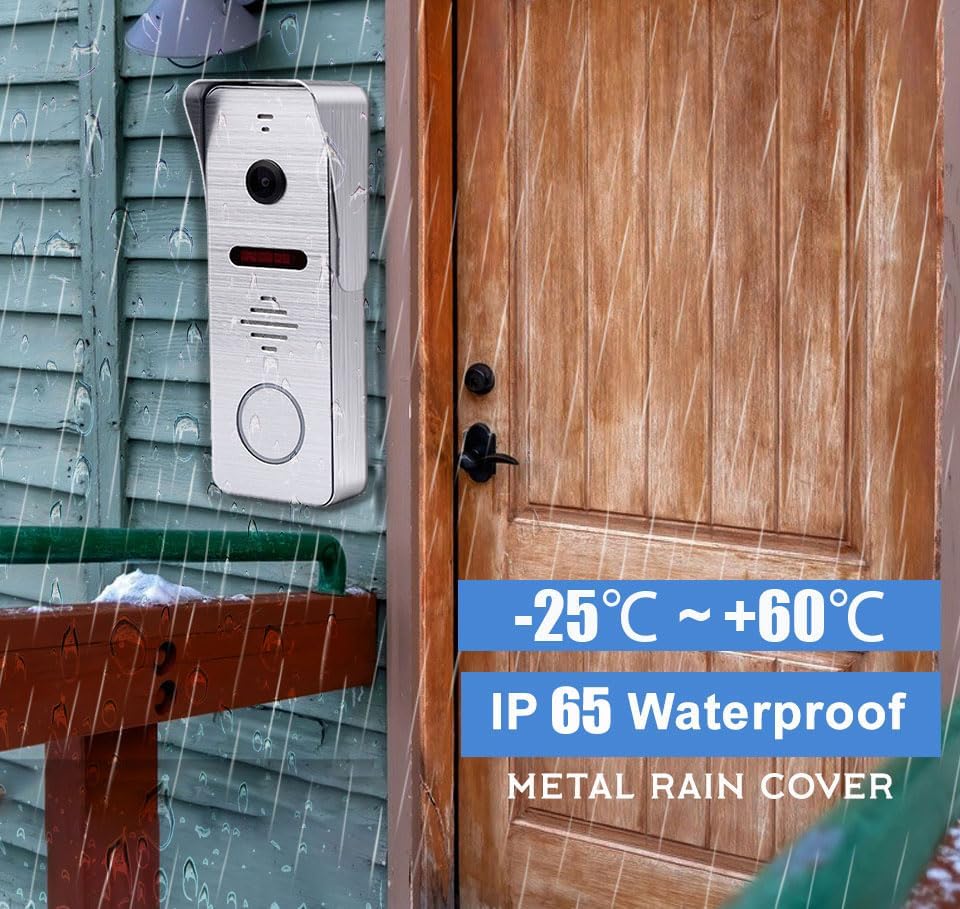
Figure 1 : The outdoor doorbell camera is designed for outdoor use with an IP65 waterproof rating, capable of withstanding temperatures from -25°C to +60°C. It is shown mounted on a wooden wall next to a door.
2. Installation du moniteur intérieur
The indoor monitor is designed for surface mounting. Select a central location within your home where the monitor is easily accessible and visible.
- Mark and drill holes for the monitor's mounting bracket.
- Fixez le support de montage au mur.
- Connect the 4-wire cable from the outdoor doorbell to the indoor monitor.
- Connect the DC 12V power adapter to the monitor and plug it into a power outlet.
- Fixez le moniteur intérieur sur son support.

Figure 2 : The indoor monitor displays the visitor, while the outdoor doorbell is ready for interaction. A smartphone app allows for remote control, including unlocking.
3. App Configuration (Tuya Solution)
The indoor monitor supports Wi-Fi connectivity and integrates with the Tuya Smart app for remote monitoring and control.
- Téléchargez l'application « Tuya Smart » depuis la boutique d'applications de votre smartphone (iOS ou Android).
- Inscrivez-vous ou connectez-vous à votre compte Tuya Smart.
- On the indoor monitor, navigate to the Wi-Fi settings and connect to your home Wi-Fi network.
- Follow the in-app instructions to add your video doorbell system. This typically involves scanning a QR code displayed on the monitor or entering a device ID.
- Once connected, you can receive calls, view vivre footage, and control the system remotely via the app.
Mode d'emploi
1. Interaction avec les visiteurs
- Sonnette de porte : When a visitor presses the outdoor doorbell button, the indoor monitor will ring, and the Tuya Smart app on your smartphone will receive an immediate call notification.
- Communication bidirectionnelle : Answer the call from the indoor monitor or your smartphone app to see, hear, and speak to the visitor.
- Surveillance à distance : Utilisez l'application pour view live video from the doorbell camera at any time.

Figure 3 : The system enables seamless two-way communication, allowing you to see, speak to, and hear visitors directly from your indoor monitor or smartphone.
2. Détection et enregistrement des mouvements
- Détection de mouvement PIR: The doorbell features PIR motion detection combined with radar detection to accurately identify human movement near your entrance.
- Real-time Alarm: Upon detecting motion, the system will send an alert to your smartphone app and record the event. Recorded videos can be reviewed on the indoor monitor.
- Enregistrement automatique : All captured moments are saved to the included 32GB Micro SD card in the local monitor.

Figure 4 : Motion sensors provide notifications when movement is detected, with event logs accessible via the smartphone app.
3. Modes de fonctionnement
The indoor monitor offers three selectable operating modes:
- Residence Mode: Standard operation with full alerts and ringing.
- Non-residence Mode: When you are away, the doorbell camera will automatically record visitor calls and motion events, notifying you via the app without ringing the indoor monitor.
- Mode silencieux : The doorbell and monitor will not produce sound, providing a quiet environment. App notifications for calls and motion detection will still be active.
4. Grand angle View et vision nocturne
- 160° ultra large ViewAngle d'attaque : The camera provides a 160° horizontal field of view and a 100° vertical field of view, ensuring comprehensive coverage of your entrance area.
- Vision nocturne infrarouge: Equipped with 8 enhanced infrared lights, the doorbell camera provides clear 1080P HD images even in low-light conditions or complete darkness, without color deviation.

Figure 5 : The 160° wide-angle lens and infrared night vision ensure clear visibility day and night, capturing a broad area around your door.
5. Call Forwarding
If a visitor presses the call button and the primary indoor monitor is not answered, the call can be forwarded to another indoor monitor within the system, allowing other users to interact with the visitor.

Figure 6 : The call forwarding feature allows a visitor's call to be transferred to another indoor monitor if the initial one is not answered.
Entretien
- Nettoyage: Utilisez un chiffon doux et sec.amp cloth to clean the indoor monitor screen and the outdoor doorbell camera lens. Avoid abrasive cleaners or solvents.
- Protection contre les intempéries : While the outdoor unit is IP66 waterproof, regularly check for any debris or obstructions around the camera lens and microphone/speaker.
- Mises à jour du micrologiciel : Check the Tuya Smart app periodically for any available firmware updates for your system to ensure optimal performance and security.
- Gestion de la carte SD: Répéter périodiquementview and manage recordings on the 32GB Micro SD card. Format the card if necessary to free up space or resolve recording issues.
Dépannage
- Moniteur hors tension :
- Ensure the power adapter is securely plugged into both the monitor and a working electrical outlet.
- Vérifiez la prise de courant avec un autre appareil.
- Aucune vidéo/audio provenant de la sonnette :
- Verify that the 4-wire connection between the outdoor doorbell and indoor monitor is secure and correctly wired.
- Restart both the outdoor doorbell (by temporarily disconnecting power) and the indoor monitor.
- L'application ne reçoit pas de notifications :
- Ensure the indoor monitor is connected to Wi-Fi.
- Check your smartphone's notification settings for the Tuya Smart app.
- Verify that the app is running in the background or has necessary permissions.
- Ensure the monitor is not in "Silence Mode" if you expect audible alerts from the monitor.
- La détection de mouvement ne fonctionne pas :
- Check motion detection settings in the indoor monitor and Tuya Smart app.
- Ensure the sensor area is clear of obstructions.
- Adjust sensitivity settings if false alarms or missed detections occur.
- Mauvaise qualité de vision nocturne :
- Assurez-vous que l'objectif de l'appareil photo est propre et exempt de saletés ou de traces de doigts.
- Check for any reflective surfaces close to the doorbell that might interfere with the infrared lights.
Caractéristiques
| Fonctionnalité | Détail |
|---|---|
| Écran | 10 inch TFT-LCD Touch Screen |
| Résolution | 1024 x 680 |
| Anneaux | anneaux mélodiques à 7 accords |
| Connexion | 4-wires, WIFI (Tuya solution) |
| Matériau du panneau | Couvercle en acrylique/ABS |
| Installation | Montage en surface |
| Vol d'entréetage | CA 100-240 V 50/60 Hz |
| Vol de travailtage | DC 12V, 2A |
| Dimensions | 198 x 130 x 21 mm (7.8 x 5.1 x 0.8 pouces) |
| Fonctionnalité | Détail |
|---|---|
| Résolution horizontale | 2MP 1080P |
| Capteur d'images | CCD/Colorful CMOS sensor |
| Taille du capteur | 1/3 pouce |
| Angle de vue | 160 degrees (140° horizontal, 100° vertical) |
| Vision nocturne | IR Cut, B/W Night Vision (8 enhanced IR lights) |
| Matériau du panneau | Métal |
| Installation | Montage en surface/encastré |
| Dimensions | 135 x 47 x 33 mm (5.7 x 3.6 x 1.5 pouces) |
| Température de fonctionnement | -40°C à 50°C (-40°F à 122°F) |
| Indice de protection IP | Étanchéité IP66 |
Autres spécifications :
- Protocole de connectivité : Wi-Fi, Wired (4-wire connection)
- Appareils compatibles : Smartphone (iOS/Android), Tablet
- Stockage: 32GB Micro SD card (included)
- Méthode de contrôle : Touch (monitor), App
- Numéro de modèle : AHD7+94206
- ASIN: B0CF1VS7D1
Garantie et assistance
For warranty information and technical support, please refer to the documentation provided with your purchase or contact ANJIELO SMART customer service directly.
Fabricant: ANJIELO INTELLIGENT
Date de mise en ligne sur Amazon : 8er août 2023


