1. Introduction
The CALEX Smart Home Indoor Ambiance Aroma Diffuser 590100500 is designed to enhance your indoor environment by improving air quality, diffusing pleasant aromas, and providing ambient lighting. This smart device integrates seamlessly into your smart home ecosystem, offering control through the Calex app, voice commands, and programmable features.
Les principales caractéristiques comprennent :
- Aroma diffusion with essential oils.
- Realistic flame effect for ambiance.
- Adjustable ambient lighting with 16 million color options.
- Smart control via Calex app (timers, programmable scenarios).
- Voice control compatibility with Google Assistant, Siri, and Amazon Alexa.
- 300ml water tank capacity with automatic shut-off.
2. Consignes de sécurité
Veuillez lire attentivement toutes les consignes de sécurité avant d'utiliser l'appareil afin d'éviter toute blessure ou tout dommage.
- Always place the diffuser on a stable, flat surface away from direct sunlight, heat sources, and electronic devices.
- Do not exceed the maximum water fill line (300ml) to prevent overflow.
- Utilisez uniquement de l'eau du robinet propre ou de l'eau distillée. N'utilisez pas d'eau chaude.
- Only use 100% pure, water-soluble essential oils. Other oils or corrosive liquids may damage the device.
- Gardez l’appareil hors de portée des enfants et des animaux domestiques.
- Ne pas obstruer la sortie de brumisation pendant le fonctionnement.
- Débranchez l'appareil de la prise de courant avant de le nettoyer ou de le remplir.
- The device features an automatic shut-off function when the water tank is empty, and sends a notification to your phone.
- A built-in safety configuration will cause the diffuser to flash if the remaining water in the tank needs to cool down after a maximum of 72 hours of continuous operation.
- N’essayez pas de réparer ou de modifier l’appareil vous-même. Contactez le service client pour obtenir de l’aide.
3. Contenu du colis
Vérifiez que tous les éléments sont présents dans le colis :
- CALEX Smart Home Indoor Ambiance Aroma Diffuser (Model 5901000500)
- Adaptateur secteur
- Manuel d'utilisation
4. Produit terminéview
Familiarize yourself with the components of your aroma diffuser.
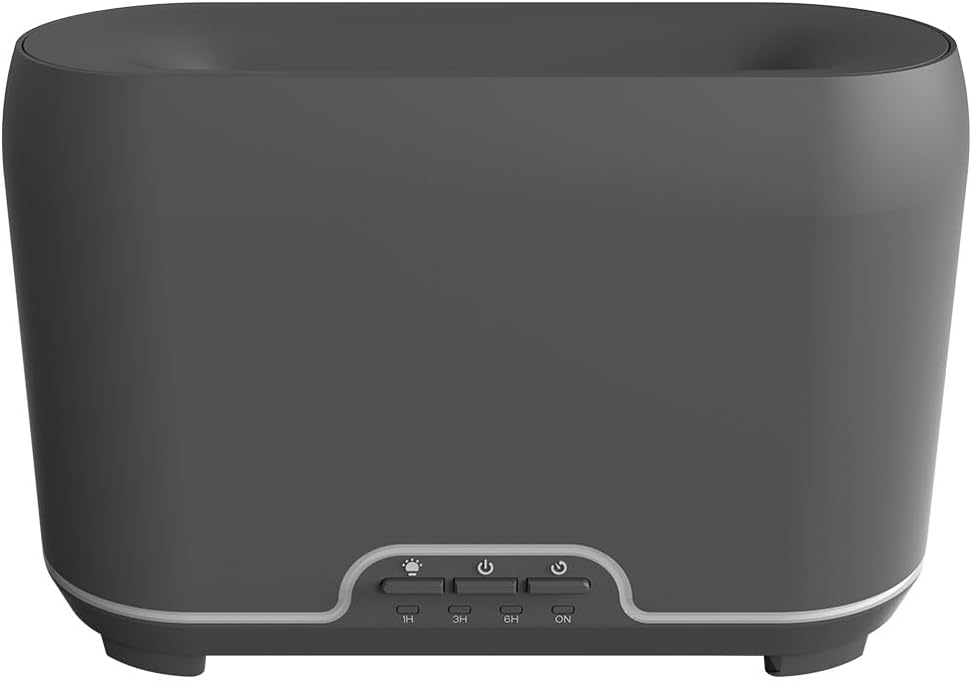
Image : Avant view of the CALEX Smart Home Aroma Diffuser, showing the control panel with buttons for light, power, and timer settings (1H, 3H, 6H, ON).

Image: The CALEX Smart Home Aroma Diffuser operating on a wooden table, displaying its ambient flame effect and mist output.
The diffuser typically consists of a water tank, an ultrasonic plate, a mist outlet, and a control panel with buttons for power, light, and timer functions. The power input port is usually located at the back or bottom of the device.
5. Installation
Suivez ces étapes pour la configuration initiale :
- Placement: Placez le diffuseur sur une surface plane et stable.
- Couvercle ouvert : Retirez délicatement le couvercle supérieur du diffuseur.
- Remplissez le réservoir d'eau : Fill the water tank with clean water up to the 300ml maximum fill line. Do not overfill.
- Ajouter de l'huile essentielle : Ajoutez quelques gouttes de votre huile essentielle préférée directement dans le réservoir d'eau.
- Fermer le couvercle : Remettez en place le capot supérieur en toute sécurité.
- Connecter l'alimentation : Plug the power adapter into the diffuser's power input port, then plug the adapter into a wall outlet.
- Téléchargez l'application Calex : Download the free Calex Smart app from your smartphone's app store (available for iOS and Android).
- Connectez-vous au Wi-Fi : Follow the in-app instructions to connect your diffuser to your home WiFi network. Ensure your WiFi is 2.4GHz.
6. Mode d'emploi
The CALEX Smart Home Aroma Diffuser can be operated via the Calex app or its integrated control buttons.
6.1 Using the Calex Smart App
The Calex app provides full control over your diffuser's functions:
- Marche/Arrêt : Turn the diffuser on or off remotely.
- Contrôle du brouillard : Adjust the mist output level.
- Contrôle de la lumière : Change the ambient light color from over 16 million options, adjust brightness, and select lighting modes.
- Effet Flamme : Activate or deactivate the flame effect.
- Minuteries : Set schedules for the diffuser to turn on or off automatically.
- Scénarios programmables : Create custom scenarios based on time, weather, or other smart home triggers.
- Notifications: Receive alerts when the water tank is empty.
6.2 Commande vocale
Integrate your diffuser with voice assistants for hands-free control:
- Assistant Google : Link your Calex account in the Google Home app. Use commands like "Hey Google, turn on the diffuser."
- Siri : Create custom shortcuts in the Apple Home app or through the Calex app for Siri commands.
- Amazon Alexa : Enable the Calex skill in the Alexa app. Use commands like "Alexa, set diffuser light to blue."
6.3 Boutons de commande manuelle
The control panel on the diffuser allows for basic operation:
- Bouton d'alimentation : Press once to turn on/off the mist and flame effect.
- Bouton lumineux : Press to cycle through light colors or turn the light on/off.
- Timer Buttons (1H, 3H, 6H, ON): Select a desired operating duration. The diffuser will automatically shut off after the selected time. 'ON' typically means continuous operation until water runs out or manually turned off.
7. Entretien
Un nettoyage régulier garantit des performances optimales et prolonge la durée de vie de votre diffuseur.
- Nettoyage quotidien : Après chaque utilisation, videz l'eau restante dans le réservoir. Essuyez l'intérieur du réservoir avec un chiffon propre et doux.
- Nettoyage hebdomadaire : For a more thorough clean, unplug the device. Add a small amount of white vinegar (about 10ml) to the water tank and let it sit for 10-15 minutes to dissolve mineral buildup. Gently wipe the ultrasonic plate with a cotton swab or soft brush. Rinse the tank thoroughly with clean water, avoiding the air outlet.
- Nettoyage externe : Essuyez l'extérieur du diffuseur avec un chiffon doux et sec.amp chiffon. N'utilisez pas de nettoyants abrasifs ou de solvants.
- Ensure the device is completely dry before refilling or storing.
8. Dépannage
En cas de problème, veuillez consulter la liste des problèmes courants et leurs solutions ci-dessous :
| Problème | Cause possible | Solution |
|---|---|---|
| Pas de brume ou brume faible | Niveau d'eau bas Plaque à ultrasons sale Sortie de brouillard bloquée | Remplir d'eau jusqu'au niveau approprié. Nettoyez la plaque à ultrasons conformément aux instructions d'entretien. Assurez-vous que la sortie de brumisation est dégagée. |
| L'appareil ne s'allume pas | Pas de courant Réservoir d'eau vide Dysfonctionnement de l'appareil | Vérifiez le branchement électrique et la prise murale. Remplissez le réservoir d'eau. Contactez le support client si le problème persiste. |
| Problèmes de connexion à l'application | Mot de passe Wi-Fi incorrect Routeur trop loin 2.4GHz vs 5GHz WiFi | Vérifiez le mot de passe du Wi-Fi. Move diffuser closer to the router. Ensure your router is broadcasting a 2.4GHz network and connect to it. |
| L'effet de flamme ne fonctionne pas | Feature deactivated in app Dysfonctionnement de l'appareil | Check app settings to ensure flame effect is enabled. Contactez le support client. |
9. Spécifications
| Fonctionnalité | Spécification |
|---|---|
| Numéro de modèle | 5901000500 |
| Marque | CALEX |
| Capacité | 300 millilitres |
| Matériel | Plastique |
| Arrêt automatique | Oui |
| Connectivité | Wi-Fi (2.4 GHz) |
| Méthodes de contrôle | Calex Smart App, Voice Control (Google Assistant, Siri, Amazon Alexa), Manual Buttons |
| Options d'éclairage | 16 millions de couleurs |
| Zone d'utilisation recommandée | Medium space |
| Code international d'article (EAN/UPC) | 08712879157090 |
10. Garantie et assistance
Pour toute information relative à la garantie ou pour obtenir une assistance technique, veuillez consulter la documentation fournie avec votre achat ou contacter directement le revendeur/fabricant. Conservez votre preuve d'achat pour toute réclamation au titre de la garantie.


