1. Introduction
The eppfun AK8675B Pro is a versatile Bluetooth 5.2 audio adapter designed to function as both a transmitter (TX) and a receiver (RX). It features advanced Qualcomm QCC3040 chip technology, supporting various aptX codecs including aptX-Adaptive, aptX HD, and aptX Low Latency, ensuring high-quality audio with minimal delay. This device allows you to wirelessly stream audio from non-Bluetooth devices (like TVs or PCs) to Bluetooth headphones/speakers, or from Bluetooth-enabled devices (like smartphones) to wired audio systems.
2. Contenu du colis
Vérifiez que tous les éléments énumérés ci-dessous sont inclus dans votre colis :
- eppfun AK8675B Pro Bluetooth Transmitter/Receiver
- Câble de chargement USB-C
- Câble audio auxiliaire 3.5 mm
- Optical Fiber Audio Cable
- Manuel de l'utilisateur (ce document)

Image: Contents of the eppfun AK8675B Pro package, including the device, various cables, and the user manual.
3. Produit terminéview et contrôles
Familiarisez-vous avec les composants et les commandes de l'appareil :

Image: Diagram of the eppfun AK8675B Pro device with key interfaces and buttons labeled.
- A: bouton d'alimentation - Press and hold to turn the device on or off.
- B: RX/TX Mode Switching - Slide switch to select Transmitter (TX) or Receiver (RX) mode.
- C: Pairing Button - Press to initiate Bluetooth pairing mode.
- D: AUX 3.5mm Interface - For connecting audio devices via a 3.5mm audio cable.
- E: Volume Adjusting - Buttons to increase or decrease audio volume.
- F: One Click Mute, Double Click Audio Decoding Switch - Single press for mute/unmute; double press to cycle through audio decoding options.
- G: USB Charging - USB-C port for charging the device.
- H: Optical Interface - For connecting audio devices via an optical fiber cable.
4. Setup and Operation Modes
The AK8675B Pro operates in two primary modes: Transmitter (TX) and Receiver (RX). Select the appropriate mode using the RX/TX mode switching slider (B).

Image: Comparison of Transmitter and Receiver modes, showing usage time, compatible codecs, and simultaneous linking capabilities.
4.1. Mode émetteur (TX)
In TX mode, the device transmits audio from a non-Bluetooth source (e.g., TV, PC) to Bluetooth-enabled headphones or speakers.
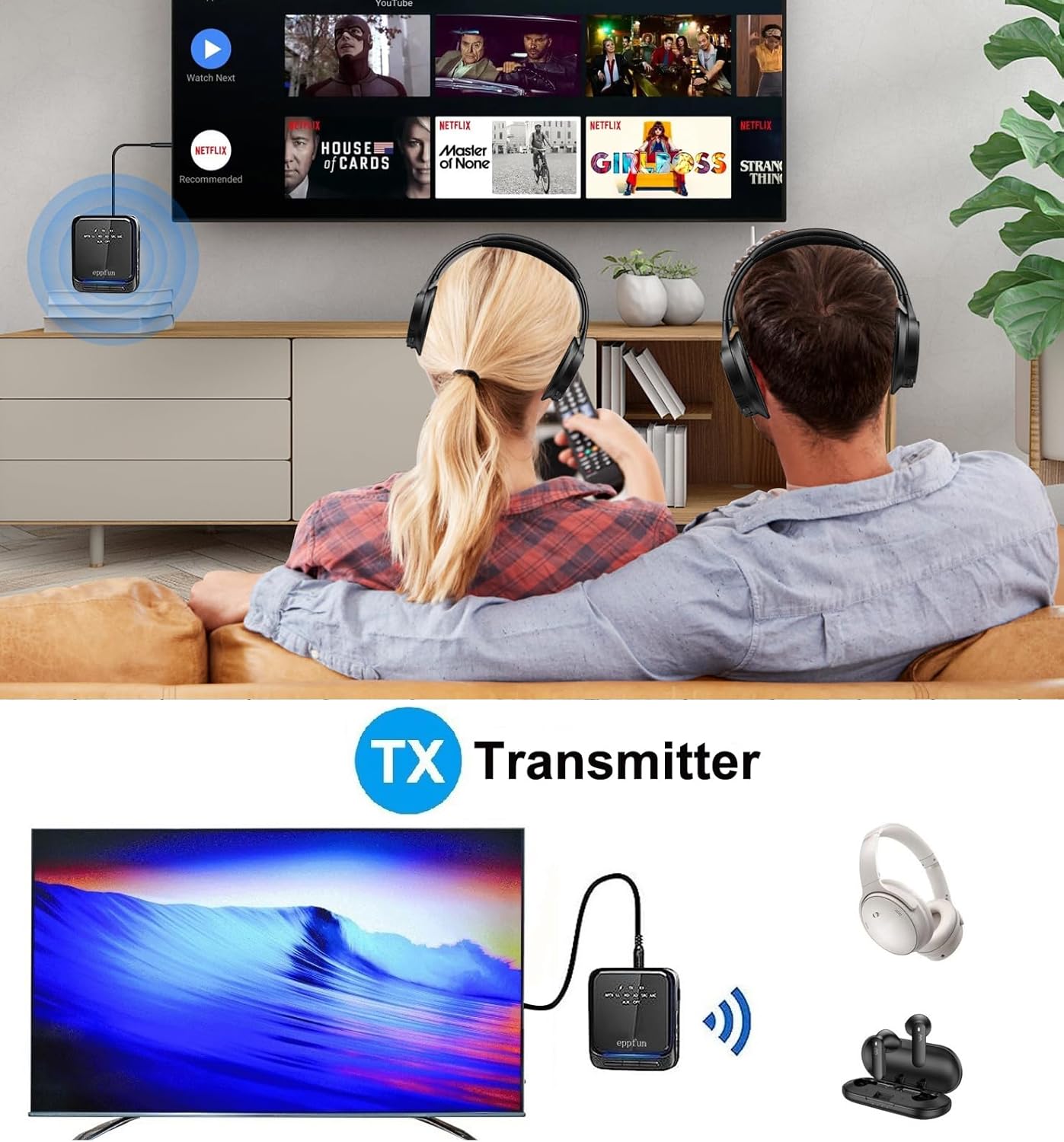
Image: An illustration of the eppfun AK8675B Pro connected to a TV, transmitting audio wirelessly to two pairs of Bluetooth headphones.
- Slide the mode switch (B) to TX.
- Connect the AK8675B Pro to your audio source (e.g., TV, PC) using either the 3.5mm AUX cable (D) or the Optical Fiber cable (H).
- Turn on the AK8675B Pro by pressing and holding the Power Button (A).
- Mettez vos écouteurs ou enceintes Bluetooth en mode appairage.
- Press the Pairing Button (C) on the AK8675B Pro to initiate pairing. The LED indicator will show pairing status.
- Once connected, audio from your source will stream wirelessly to your Bluetooth device(s).
TX Mode Features:
- Codecs compatibles : aptX, aptX-Adaptive, aptX LL (faible latence), aptX HD, SBC.
- Horaires d'ouverture: Environ 12 heures avec une charge complète.
- Double connexion : Supports connecting two Bluetooth headphones/earbuds simultaneously with aptX LL technology.
4.2. Mode récepteur (RX)
In RX mode, the device receives audio wirelessly from a Bluetooth-enabled source (e.g., smartphone, tablet) and outputs it to a wired audio system (e.g., wired headphones, speakers).

Image: An illustration of the eppfun AK8675B Pro connected to wired speakers, receiving audio wirelessly from a smartphone.
- Slide the mode switch (B) to RX.
- Connect the AK8675B Pro to your wired audio output device (e.g., speakers, wired headphones) using the 3.5mm AUX cable (D).
- Turn on the AK8675B Pro by pressing and holding the Power Button (A).
- Enable Bluetooth on your smartphone or other Bluetooth audio source and search for available devices.
- Select "eppfun AK8675B Pro" from the list of available Bluetooth devices to pair. The LED indicator will confirm connection.
- Once connected, audio from your Bluetooth source will play through your wired audio system.
RX Mode Features:
- Codecs compatibles : aptX, aptX-Adaptive, aptX HD, SBC, AAC.
- Horaires d'ouverture: Environ 20 heures avec une charge complète.
5. Chargement de l'appareil
To charge the eppfun AK8675B Pro:
- Connect the supplied USB-C cable to the USB Charging port (G) on the device.
- Connectez l'autre extrémité du câble USB-C à un adaptateur secteur USB standard (non inclus) ou au port USB d'un ordinateur.
- The LED indicator will show the charging status. A full charge typically takes about 2 hours.
Note: The device cannot be used while it is charging.
6. Entretien
To ensure the longevity and optimal performance of your eppfun AK8675B Pro:
- Gardez l'appareil au sec. Évitez toute exposition à l'humidité, à la pluie ou à d'autres liquides.
- Nettoyez l'appareil avec un chiffon doux et sec. N'utilisez pas de produits chimiques agressifs ni de nettoyants abrasifs.
- Rangez l'appareil dans un endroit frais et sec lorsqu'il n'est pas utilisé.
- Évitez les températures extrêmes.
- Ne tentez pas de démonter ou de modifier l'appareil, car cela annulera la garantie et pourrait l'endommager.
7. Dépannage
If you encounter issues with your AK8675B Pro, refer to the following common solutions:
- L'appareil ne s'allume pas :
- Assurez-vous que l'appareil est complètement chargé. Connectez-le à une source d'alimentation à l'aide du câble USB-C.
- Press and hold the Power Button (A) for a few seconds.
- Impossible de connecter un appareil Bluetooth :
- Ensure the AK8675B Pro is in the correct mode (TX for transmitting, RX for receiving).
- Make sure both devices are in pairing mode and within the 10-meter communication range.
- Clear previous pairing records on both the AK8675B Pro and your Bluetooth device, then attempt to pair again.
- Restart both the AK8675B Pro and your Bluetooth device.
- Aucune entrée/sortie audio :
- Check all cable connections (3.5mm AUX or Optical Fiber) to ensure they are secure and in the correct ports.
- Verify that the volume on both the AK8675B Pro (E) and the connected audio device is not muted or set too low.
- Ensure the correct audio input/output is selected on your source device (e.g., TV audio settings).
- Confirm that the AK8675B Pro is successfully paired and connected to the desired Bluetooth device.
- Audio delay or poor quality:
- Ensure both the AK8675B Pro and your connected Bluetooth device support aptX Low Latency (aptX LL) for minimal delay, especially in TX mode.
- Reduce the distance between the AK8675B Pro and the connected Bluetooth device, and remove any obstacles.
- Vérifiez la présence d'interférences potentielles provenant d'autres appareils sans fil.
8. Spécifications
| Fonctionnalité | Spécification |
|---|---|
| Nom du modèle | AK8675B Pro |
| Version Bluetooth | 5.2 |
| Chipset Bluetooth | Qualcomm QCC3040 |
| Supported Codecs (TX) | aptX, aptX-Adaptive, aptX LL, aptX HD, SBC |
| Supported Codecs (RX) | aptX, aptX-Adaptive, aptX HD, SBC, AAC |
| Bande de fréquence | 2.402 GHz - 2.480 GHz |
| Distance de communication | Jusqu'à 10 mètres (33 pieds) |
| Temps de travail en mode TX | Environ 12 heures |
| Temps de travail en mode RX | Environ 20 heures |
| Temps de charge | Environ 2 heures |
| Port de chargement | USB-C |
| Entrée/Sortie audio | 3.5mm AUX, Optical TOSLINK |
| Type de batterie | Lithium-Ion (inclus) |
| Dimensions du produit | 75 mm x 66 mm x 18 mm (environ) |
| Poids du produit | 60.5g (environ) |
9. Garantie et assistance
Les produits eppfun sont conçus pour offrir fiabilité et performance. Pour obtenir des informations sur la garantie et l'assistance technique, veuillez consulter le site officiel d'eppfun. webConsultez le site web ou contactez votre revendeur. Conservez votre reçu d'achat comme preuve d'achat pour toute réclamation au titre de la garantie.


