Introduction
This manual provides essential information for the safe and efficient operation of your TECNO Pova 5 Pro 5G smartphone. Please read it thoroughly before using your device to ensure optimal performance and longevity.

Image: The TECNO Pova 5 Pro 5G smartphone, showcasing its design and key feature of 68W Ultra Fast Charging.
Qu'y a-t-il dans la boîte
Vérifiez que tous les articles sont présents dans l'emballage :
- Smartphone
- Adaptateur secteur 68 W
- Câble Type-C
- Coque en TPU
- Outil d'éjection de SIM

Image: A flat lay of the TECNO Pova 5 Pro 5G packaging contents, showing the smartphone, 68W power adapter, USB-C cable, TPU protective cover, and the SIM ejector tool.
Installation
Configuration initiale
- Insérer la carte SIM/SD : Locate the SIM tray on the side of the device. Use the provided SIM ejector tool to open the tray. Insert your Nano-SIM card(s) and/or microSD card into the designated slots. Ensure the tray is fully reinserted.
- Mise sous tension : Press and hold the Power button (located on the right side) until the TECNO logo appears.
- Suivez les instructions à l'écran : The device will guide you through initial setup, including language selection, Wi-Fi connection, Google account setup, and security settings.
Charger l'appareil
The TECNO Pova 5 Pro 5G supports 68W Ultra Fast Charging.
- Connectez le câble Type-C au port de chargement situé en bas du téléphone.
- Connectez l'autre extrémité du câble à l'adaptateur secteur de 68 W.
- Branchez l’adaptateur secteur sur une prise murale.
- A full charge typically takes approximately 45 minutes, with 50% charge achievable in about 15 minutes.
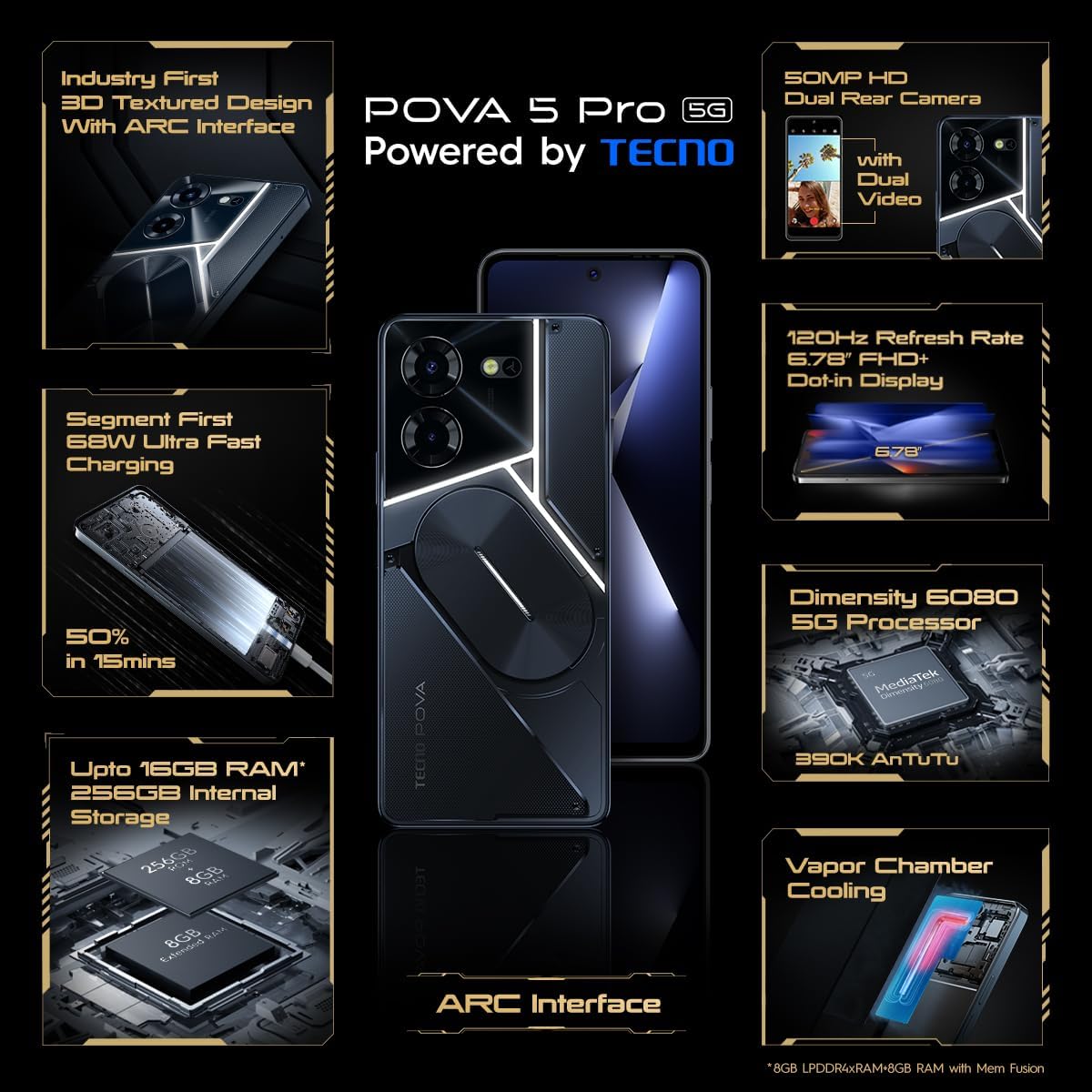
Image : Une face avant dégagée view of the TECNO Pova 5 Pro 5G smartphone, highlighting its display and front camera.
Utilisation de l'appareil
Navigation de base
- Écran tactile : Touchez pour sélectionner, faites glisser pour faire défiler, pincez pour zoomer.
- Bouton d'alimentation : Appuyez pour activer/désactiver l'écran. Appuyez longuement pour éteindre ou redémarrer l'appareil.
- Boutons de volume : Réglez le volume multimédia, le volume des appels ou le volume de la sonnerie.
Utilisation de la caméra
The device features a 50MP AI Dual Rear Camera and a 16MP Selfie Camera.
- Ouvrez l'application Appareil photo depuis l'écran d'accueil ou le tiroir d'applications.
- Sélectionnez le mode souhaité (Photo, Vidéo, Portrait, etc.).
- Appuyez sur le bouton de déclenchement pour prendre des photos ou démarrer/arrêter l'enregistrement vidéo.
- Tirez parti des améliorations apportées par l'IA pour une reconnaissance de scène et une qualité d'image optimisées.
ARC Interface and Notifications
The TECNO Pova 5 Pro 5G features a unique multi-color ARC interface with backlighting.
- The ARC interface provides customizable light effects for notifications, incoming calls, gaming, and music playback.
- Access settings to personalize the light patterns and colors for different alerts.

Image : L'arrière view of the TECNO Pova 5 Pro 5G, showcasing its distinctive 3D textured design and the illuminated ARC interface.

Image : Une image détaillée view of the TECNO Pova 5 Pro 5G's ARC interface, illustrating the multi-color backlighting feature.
Entretien
- Entretien de la batterie: To prolong battery life, avoid exposing the device to extreme temperatures. Do not fully discharge the battery regularly.
- Nettoyage: Utilisez un chiffon doux non pelucheux pour nettoyer l'écran et le boîtier. Évitez d'utiliser des produits chimiques agressifs ou des matériaux abrasifs.
- Mises à jour logicielles : Vérifiez et installez régulièrement les mises à jour système pour garantir des performances optimales, une sécurité renforcée et l'accès aux nouvelles fonctionnalités. Accédez à Paramètres > Système > Mise à jour système.
- Gestion du stockage: Nettoyez périodiquement les éléments inutiles fileet applications pour maintenir un espace de stockage suffisant et une vitesse d'appareil adéquate.
Dépannage
- L'appareil ne s'allume pas : Ensure the battery is charged. Connect the device to the charger for at least 15 minutes before attempting to power on again. If the issue persists, perform a forced restart by holding the Power button for 10-15 seconds.
- Problèmes de charge : Verify that the charging cable and adapter are securely connected and undamaged. Try using a different outlet.
- Plantage/blocage de l'application : Close the problematic app and reopen it. If the issue continues, clear the app's cache and data in Settings > Apps. As a last resort, uninstall and reinstall the app.
- Mauvaise connectivité réseau : Check if Airplane Mode is off. Restart the device. If using mobile data, ensure your SIM card is properly inserted and your data plan is active.
- Surchauffe: Avoid using the device in direct sunlight or during intensive tasks for extended periods. Close background applications.
Caractéristiques
| Fonctionnalité | Spécification |
|---|---|
| Nom du modèle | Pova 5 Pro 5G |
| Système opérateur | Android 13.0 |
| Processeur | Dimensity 6080 (2.4 GHz Octa-Core) |
| BÉLIER | 8 GB (expandable up to 16 GB with Memory Fusion) |
| Stockage interne | 256 GB (UMCP) |
| Afficher | 6.78-inch FHD+ Dot-in Display |
| Taux de rafraîchissement | 120 Hz |
| Caméra arrière | Double caméra IA de 50 MP |
| Caméra frontale | Caméra selfie 16 MP |
| Batterie | 5000 mAh Lithium-Polymère |
| Chargement | 68W Ultra Fast Charging |
| Dimensions | 16.9 x 7.7 x 16.9 cm |
| Poids | 214 grammes |
| Connectivité | 5G (10 bands supported), NFC, Bluetooth 5.1 |

Image: An internal diagram or view of the TECNO Pova 5 Pro 5G, illustrating its vapor chamber cooling system for efficient heat dissipation.
Garantie et assistance
Your TECNO Pova 5 Pro 5G comes with a manufacturer's warranty. Please refer to the warranty card included in your product packaging for specific terms and conditions.
For technical support, service, or warranty claims, please contact TECNO customer service. TECNO maintains a large service network with over 1200 service centers in India.
You can find more information and support resources by visiting the official Tecno store on Amazon: Tecno Store


